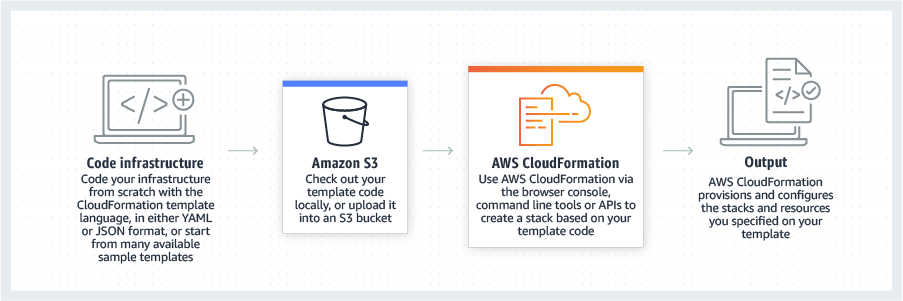
AWS CloudFormation gives developers and systems administrators a way to create and manage a collection of related AWS resources, provisioning and updating them in a predictable fashion. Use AWS CloudFormation’s sample templates or create templates to describe the AWS resources, and any associated dependencies or runtime parameters, required to run an application. Users don’t need to figure out the order for provisioning AWS services or the subtleties of making those dependencies work.…
$0
Azure DevOps
Score8.1 out of 10
N/A
Azure DevOps (formerly VSTS, Microsoft Visual Studio Team System) is an agile development product that is an extension of the Microsoft Visual Studio architecture. Azure DevOps includes software development, collaboration, and reporting capabilities.
$2
per GB (first 2GB free)
Azure DevOps Server
Score8.5 out of 10
N/A
Azure DevOps Server (formerly Team Foundation Server, or TFS) is the on-premise version of Azure DevOps. To license Azure DevOps Server an Azure DevOps license and a Windows operating system license (e.g. Windows Server) for each machine running Azure DevOps Server.
N/A
Pricing
AWS CloudFormation
Azure DevOps
Azure DevOps Server
Editions & Modules
Free Tier - 1,000 Handler Operations per Month per Account
$0.00
Handler Operation
$0.0009
per handler operation
Azure Artifacts
$2
per GB (first 2GB free)
Basic Plan
$6
per user per month (first 5 users free)
Azure Pipelines - Self-Hosted
$15
per extra parallel job (1 free parallel job with unlimited minutes)
Azure Pipelines - Microsoft Hosted
$40
per parallel job (1,800 minutes free with 1 free parallel job)
Basic + Test Plan
$52
per user per month
No answers on this topic
Offerings
Pricing Offerings
AWS CloudFormation
Azure DevOps
Azure DevOps Server
Free Trial
Yes
No
No
Free/Freemium Version
Yes
No
Yes
Premium Consulting/Integration Services
Yes
No
No
Entry-level Setup Fee
No setup fee
No setup fee
No setup fee
Additional Details
There is no additional charge for using AWS CloudFormation with resource providers in the following namespaces: AWS::*, Alexa::*, and Custom::*. In this case you pay for AWS resources (such as Amazon EC2 instances, Elastic Load Balancing load balancers, etc.) created using AWS CloudFormation as if you created them manually. You only pay for what you use, as you use it; there are no minimum fees and no required upfront commitments.
When you use resource providers with AWS CloudFormation outside the namespaces mentioned above, you incur charges per handler operation. Handler operations are create, update, delete, read, or list actions on a resource.
—
—
More Pricing Information
Community Pulse
AWS CloudFormation
Azure DevOps
Azure DevOps Server
Considered Multiple Products
Amazon AWS
Verified User
Chose AWS CloudFormation
Since the product I'm involved is primarily hosted on AWS we use CloudFormation but in some other products where we have hybrid cloud deployments we prefer Terraform which is opensource.
A de minimis incentive was given to thank the reviewer for their time. The incentive was not used to bias or drive a particular response, nor was the incentive contingent on a positive endorsement. More Info
Microsoft
Verified User
Chose Azure DevOps
Beside all cloud benefits, the main advantage Azure DevOps Services compared to Azure DevOps Server is the easier remote access for third party team members, and always up to date software. On the other hand, on prem deployment (Azure DevOps Server) makes complex access or …
A de minimis incentive was given to thank the reviewer for their time. The incentive was not used to bias or drive a particular response, nor was the incentive contingent on a positive endorsement. More Info
Verified User
Chose Azure DevOps
Compared to other tools we have used, Microsoft STS has been a much more complete tool. Communication, collaboration, tracking, management, automation, testing, speed to production—all these areas have been improved since we started using Microsoft STS. We have been looking for …
A de minimis incentive was given to thank the reviewer for their time. The incentive was not used to bias or drive a particular response, nor was the incentive contingent on a positive endorsement. More Info
Verified User
Chose Azure DevOps
Excellent tool when used in Microsoft technology environment.
A de minimis incentive was given to thank the reviewer for their time. The incentive was not used to bias or drive a particular response, nor was the incentive contingent on a positive endorsement. More Info
Software Developer III in Engineering at Opus Solutions (Events Services, 51-200 employees)
Chose Azure DevOps
Our TFS was dated and in some ways was quite crude. VSTS is thoroughly modern and I don't have to worry about updating it since MS is always updating VSTS. Also, VSTS has better integration with other products such as JIRA than our older TFS would. I am sure you could integrate …
A de minimis incentive was given to thank the reviewer for their time. The incentive was not used to bias or drive a particular response, nor was the incentive contingent on a positive endorsement. More Info
Analista Desenvolvedor Pleno in Information Technology at FACIL ASSIST (Insurance, 201-500 employees)
Chose Azure DevOps
Being its predecessor, VSS has a very limited team-sharing view, providing little to no multiple-user, multiple-project support. Considering the fact that Microsoft has purged its support in favor of TFS and VSTS, it's only reasonable to believe they have something extra. Git …
A de minimis incentive was given to thank the reviewer for their time. The incentive was not used to bias or drive a particular response, nor was the incentive contingent on a positive endorsement. More Info
Verified User
Chose Azure DevOps
Very simple to setup, easy connection to Visual Studio, nice web UI.
A de minimis incentive was given to thank the reviewer for their time. The incentive was not used to bias or drive a particular response, nor was the incentive contingent on a positive endorsement. More Info
Owner at The Great Void Marketing Lab (Media Production, 1-10 employees)
Chose Azure DevOps
Haven't used a lot of similar products that have the full feature set as Visual Studio. It's highly effective development platform especially when used with SVN and TFS makes large Agile project easy to manage and collaborate.
A de minimis incentive was given to thank the reviewer for their time. The incentive was not used to bias or drive a particular response, nor was the incentive contingent on a positive endorsement. More Info
Business Analyst at InnovaSystems International, LLC (Computer Software, 201-500 employees)
Chose Azure DevOps
I haven't used any other products, so I can't say how VSTS/TFS would stack against any competitors, but I know that for an SDLC management tool, VSTS/TFS has everything you need to help an organization meet the requirements needed to adhere to the specific/general practices …
A de minimis incentive was given to thank the reviewer for their time. The incentive was not used to bias or drive a particular response, nor was the incentive contingent on a positive endorsement. More Info
I still give it an 8 because it's one of those tools that just quietly does the heavy lifting for you but it can really test your patience when it breaks esp with deep nested stacks. It's perfect for projects where we need clean consistent environments every time. It's less ideal for quick experimental setups like new EC2 configs or Lambda permission tweaks.
A de minimis incentive was given to thank the reviewer for their time. The incentive was not used to bias or drive a particular response, nor was the incentive contingent on a positive endorsement. More Info
Azure DevOps works well when you’ve got larger delivery efforts with multiple teams and a lot of moving parts, and you need one place to plan work, track it properly, and see how everything links together. It’s especially useful when delivery and development are closely tied and you want backlog items, code and releases connected rather than spread across tools. Where it’s less of a fit is for small teams or simple pieces of work, as it can feel like more setup and process than you really need, and non-technical users often struggle with the interface. It also isn’t great if you want instant, easy programme-level views or a very visual planning experience without putting time into configuration.
A de minimis incentive was given to thank the reviewer for their time. The incentive was not used to bias or drive a particular response, nor was the incentive contingent on a positive endorsement. More Info
Azure DevOps is good to use if you are all-in on the Microsoft Azure stack. It's fully integrated across Azure so it is a point-and-click for most of what you will need to achieve. If you are new to Azure make sure you get some outside experience to help you otherwise it is very easy to overcomplicate things and go down the wrong track, or for you to manually create things that come out of the box.
A de minimis incentive was given to thank the reviewer for their time. The incentive was not used to bias or drive a particular response, nor was the incentive contingent on a positive endorsement. More Info
A de minimis incentive was given to thank the reviewer for their time. The incentive was not used to bias or drive a particular response, nor was the incentive contingent on a positive endorsement. More Info
A de minimis incentive was given to thank the reviewer for their time. The incentive was not used to bias or drive a particular response, nor was the incentive contingent on a positive endorsement. More Info
A de minimis incentive was given to thank the reviewer for their time. The incentive was not used to bias or drive a particular response, nor was the incentive contingent on a positive endorsement. More Info
A de minimis incentive was given to thank the reviewer for their time. The incentive was not used to bias or drive a particular response, nor was the incentive contingent on a positive endorsement. More Info
I did mention it has good visibility in terms of linking, but sometimes items do get lost, so if there was a better way to manage that, that would be great.
The wiki is not the prettiest thing to look at, so it could have refinements there.
A de minimis incentive was given to thank the reviewer for their time. The incentive was not used to bias or drive a particular response, nor was the incentive contingent on a positive endorsement. More Info
I don't think our organization will stray from using VSTS/TFS as we are now looking to upgrade to the 2012 version. Since our business is software development and we want to meet the requirements of CMMI to deliver consistent and high quality software, this SDLC management tool is here to stay. In addition, our company uses a lot of Microsoft products, such as Office 365, Asp.net, etc, and since VSTS/TFS has proved itself invaluable to our own processes and is within the Microsoft family of products, we will continue to use VSTS/TFS for a long, long time.
A de minimis incentive was given to thank the reviewer for their time. The incentive was not used to bias or drive a particular response, nor was the incentive contingent on a positive endorsement. More Info
Because we are a Microsoft Gold Partner we utilize most of their software and we have so much invested in Team Foundation Server now it would take a catastrophic amount of time and resources to switch to a different product.
A de minimis incentive was given to thank the reviewer for their time. The incentive was not used to bias or drive a particular response, nor was the incentive contingent on a positive endorsement. More Info
It's easy enough to get a shared template & apply it. You don't even have to download-then-upload or copy-and-paste, a publicly-accessible url works.
Diving deeper, it has enough powerful capabilities to make the life of a platform / DevOps engineer bearable.
However, you need equally deep knowledge to troubleshoot issues, when they inevitably pop up. This is the same for all IaC technologies, as they are additional abstraction layers on top of the native API provided by the cloud providers.
A de minimis incentive was given to thank the reviewer for their time. The incentive was not used to bias or drive a particular response, nor was the incentive contingent on a positive endorsement. More Info
It's a great help to get more information about new feature release and stay updated on what the dev team is working on. I like how easy it is to just login and read through the work items. Each work item has basic details: Title, Description, Assigned to, State, Area (what it belongs to), and iteration (when it’s worked on). See image above.They move through different states (New → Discovery → Ready for Prod → etc.).
A de minimis incentive was given to thank the reviewer for their time. The incentive was not used to bias or drive a particular response, nor was the incentive contingent on a positive endorsement. More Info
For standard users the interface is friendly. but if you are a manager some tools are a little confusing to use, like the query system that you always need to create from scratch. Templates should be more helpful for queries and for standard procedures that you need to duplicate PBIs over time. The search history of Work Items is a little painful to use.
A de minimis incentive was given to thank the reviewer for their time. The incentive was not used to bias or drive a particular response, nor was the incentive contingent on a positive endorsement. More Info
When we've had issues, both Microsoft support and the user community have been very responsive. DevOps has an active developer community and frankly, you can find most of your questions already asked and answered there. Microsoft also does a better job than most software vendors I've worked with creating detailed and frequently updated documentation.
A de minimis incentive was given to thank the reviewer for their time. The incentive was not used to bias or drive a particular response, nor was the incentive contingent on a positive endorsement. More Info
I have not had to use the support for Azure DevOps Server. There have never been any issues where I was not able to figure it out or quickly resolve. Our Scrum Master has used support before though, and the service has always been prompt and clear with a customer-focus
A de minimis incentive was given to thank the reviewer for their time. The incentive was not used to bias or drive a particular response, nor was the incentive contingent on a positive endorsement. More Info
A de minimis incentive was given to thank the reviewer for their time. The incentive was not used to bias or drive a particular response, nor was the incentive contingent on a positive endorsement. More Info
A de minimis incentive was given to thank the reviewer for their time. The incentive was not used to bias or drive a particular response, nor was the incentive contingent on a positive endorsement. More Info
Cloning a virtual machine creates a virtual machine that is cloning a virtual machine creates a virtual machine that is a copy of the original. The new virtual machine is configured with the same virtual hardware, installed software, and other properties that were configured for the original virtual machine. For information about persistent memory and PMem storage, see the vSphere Cloning a virtual machine creates a virtual machine that is a copy of the original. The new virtual machine is configured with the same virtual hardware, installed software, and other properties that were configured for the original virtual machine. For information. Management guide.For information copy of the original. The new virtual Cloning virtual machine creates a virtual machine that is a copy of the original. The new virtual machine is configured with the same virtual hardware, installed software, and other properties that were configured for the original virtual machine. For information about persistent memory and PMem storage, see the vSphere Resource Management Guide. For information is configured with the same virtual hardware, installed software, and other properties that were configured for the original virtual machine. For information about persistent memory and PMem storage, see the vSphere Resource Management Guide. For information
A de minimis incentive was given to thank the reviewer for their time. The incentive was not used to bias or drive a particular response, nor was the incentive contingent on a positive endorsement. TR verified that a representative sample of customers was invited. More Info
Microsoft Planner is used by project managers and IT service managers across our organization for task tracking and running their team meetings. Azure DevOps works better than Planner for software development teams but might possibly be too complex for non-software teams or more business-focused projects. We also use ServiceNow for IT service management and this tool provides better analysis and tracking of IT incidents, as Azure DevOps is more suited to development and project work for dev teams.
A de minimis incentive was given to thank the reviewer for their time. The incentive was not used to bias or drive a particular response, nor was the incentive contingent on a positive endorsement. More Info
In my opinion, DevOps covers the development process end to end way better than Jira or GitHub. Both competitors are nice in their specific fields but DevOps provides a more comprehensive package in my opinion. It is still crazy to see that the whole suite can be used for free. The productivity increase we realized with DevOps is worth real money!
A de minimis incentive was given to thank the reviewer for their time. The incentive was not used to bias or drive a particular response, nor was the incentive contingent on a positive endorsement. More Info
A de minimis incentive was given to thank the reviewer for their time. The incentive was not used to bias or drive a particular response, nor was the incentive contingent on a positive endorsement. More Info
We have saved a ton of time not calculating metrics by hand.
We no longer spend time writing out cards during planning, it goes straight to the board.
We no longer track separate documents to track overall department goals. We were able to create customized icons at the department level that lets us track each team's progress against our dept goals.
A de minimis incentive was given to thank the reviewer for their time. The incentive was not used to bias or drive a particular response, nor was the incentive contingent on a positive endorsement. More Info
It has streamlined the pipeline and project management for our agile effort.
It has helped our agile team get organized since that is a new methodology being leveraged within the Enterprise.
The calendar has improved visibility into different OOOs across the project team since we all come from different departments across the larger organization.
A de minimis incentive was given to thank the reviewer for their time. The incentive was not used to bias or drive a particular response, nor was the incentive contingent on a positive endorsement. More Info