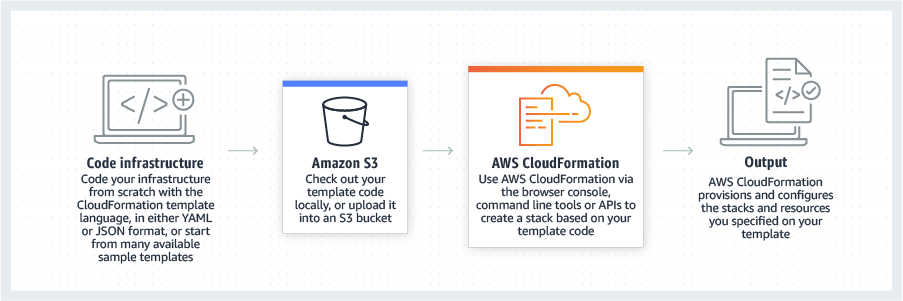
AWS CloudFormation gives developers and systems administrators a way to create and manage a collection of related AWS resources, provisioning and updating them in a predictable fashion. Use AWS CloudFormation’s sample templates or create templates to describe the AWS resources, and any associated dependencies or runtime parameters, required to run an application. Users don’t need to figure out the order for provisioning AWS services or the subtleties of making those dependencies work.…
$0
Rackspace Managed Hosting
Score 8.7 out of 10
N/A
Rackspace Managed Hosting is cloud computing company Rackspace's managed IT services and IaaS offering. Its infrastructure options include bare metal servers, virtual single-shared servers, and cloud multi-tenant environments.
$23
per month
Pricing
AWS CloudFormation
Rackspace Managed Hosting
Editions & Modules
Free Tier - 1,000 Handler Operations per Month per Account
$0.00
Handler Operation
$0.0009
per handler operation
Linux
$23.00
per month
Windows
$75.00
per month
Windows + SQL
$128.00
per month
Offerings
Pricing Offerings
AWS CloudFormation
Rackspace Managed Hosting
Free Trial
Yes
No
Free/Freemium Version
Yes
No
Premium Consulting/Integration Services
Yes
No
Entry-level Setup Fee
No setup fee
No setup fee
Additional Details
There is no additional charge for using AWS CloudFormation with resource providers in the following namespaces: AWS::*, Alexa::*, and Custom::*. In this case you pay for AWS resources (such as Amazon EC2 instances, Elastic Load Balancing load balancers, etc.) created using AWS CloudFormation as if you created them manually. You only pay for what you use, as you use it; there are no minimum fees and no required upfront commitments.
When you use resource providers with AWS CloudFormation outside the namespaces mentioned above, you incur charges per handler operation. Handler operations are create, update, delete, read, or list actions on a resource.
—
More Pricing Information
Community Pulse
AWS CloudFormation
Rackspace Managed Hosting
Features
AWS CloudFormation
Rackspace Managed Hosting
Configuration Management
Comparison of Configuration Management features of Product A and Product B
I still give it an 8 because it's one of those tools that just quietly does the heavy lifting for you but it can really test your patience when it breaks esp with deep nested stacks. It's perfect for projects where we need clean consistent environments every time. It's less ideal for quick experimental setups like new EC2 configs or Lambda permission tweaks.
Rackspace is very well suited as a IaaS (Infrastructure as a Service) provider, particularly when you're planning on leaving the infrastructure up for a period of time. They seem to focus a bit more on that aspect of infrastructure. That is to say, they seem to promote running servers for longer periods of time and not spinning up/shutting down servers frequently based on usage spikes. While, they do support that sort of availability -- they don't have features built into their offering, necessarily, that make it a lot easier to implement. Our experiences with Rackspace have been 100% around their cloud platform, but they have another entire part of their business that is centered around hosting/maintaining/supporting physical hardware (bare metal). They have had a great reputation over the last several years (10+) for being top-notch providers in this space, which is one reason we even considered them for our Cloud-based hosting needs. We don't have any direct experience with their "bare metal" offerings, but their reputation is certainly great, and worth noting.
Fanatical Support - I can't stress how great their team is. Not only are they knowledgeable, whenever I call in (during the day or in the middle of the night), I never have to wait more than a minute to speak to someone.
Webmail, Hosted Exchange, and Office365 Support - As an IT team of one, Rackspace's cloud solution and migration team has really helped me over the years to minimize issues for users, but also provide a reliable and flexible email platform.
Latest outage 12/2/22 and counting over 75 hours - in my opinion, support has been miserable. In my experience, there's little/no communication regarding the problem or cause. No support. In my opinion, erroneous advice. Virtually NOTHING for users. I feel we've been abandoned.
Outage appears to have been caused by unpatched servers & no backup servers
In my opinion, NO COMPANY should trust their data or services to a nonresponsive company like Rackspace.
In my experience, there are NO published policies/practices re: server maintenance (patching) to mitigate hacking, NO published policies/practices re: backup servers in the event of problems. I feel it's stupid of me as a user to have chosen to trust them with critical services
If I wake tomorrow completely incapable of managing a client cloud operation, our dedicated Rackspace Cloud Engineering Team is deployable as literal extension of our business, immediately addressing all needs and requirements without cause of business disruption for our consultancy, and more importantly for the mission-critical ones of our clients. For this reason alone, Rackspace is our choice of choices!
It's easy enough to get a shared template & apply it. You don't even have to download-then-upload or copy-and-paste, a publicly-accessible url works.
Diving deeper, it has enough powerful capabilities to make the life of a platform / DevOps engineer bearable.
However, you need equally deep knowledge to troubleshoot issues, when they inevitably pop up. This is the same for all IaC technologies, as they are additional abstraction layers on top of the native API provided by the cloud providers.
The company does not put as much focus on usability as other cloud competitors and it is kind of clear. It would be good to take a quarter and gather intense feedback, and then another quarter and focus purely on UI enhancements and backend interoperability
Cloning a virtual machine creates a virtual machine that is cloning a virtual machine creates a virtual machine that is a copy of the original. The new virtual machine is configured with the same virtual hardware, installed software, and other properties that were configured for the original virtual machine. For information about persistent memory and PMem storage, see the vSphere Cloning a virtual machine creates a virtual machine that is a copy of the original. The new virtual machine is configured with the same virtual hardware, installed software, and other properties that were configured for the original virtual machine. For information. Management guide.For information copy of the original. The new virtual Cloning virtual machine creates a virtual machine that is a copy of the original. The new virtual machine is configured with the same virtual hardware, installed software, and other properties that were configured for the original virtual machine. For information about persistent memory and PMem storage, see the vSphere Resource Management Guide. For information is configured with the same virtual hardware, installed software, and other properties that were configured for the original virtual machine. For information about persistent memory and PMem storage, see the vSphere Resource Management Guide. For information
LiquidWeb or Amazon both offer some products that could be considered similar. I will say though, after years of dealing with Rackspace, their service is what always has me coming back. Their support is typically so much better than other vendors that I hesitate to use other vendors. Pricing might be cheaper, but when you have an issue and need it resolved ASAP, then Rackspace has come through in the majority of cases for me.