Overview
ProductRatingMost Used ByProduct SummaryStarting Price
Azure DevOps Server
Score 8.4 out of 10
N/A
Azure DevOps Server (formerly Team Foundation Server, or TFS) is the on-premise version of Azure DevOps. To license Azure DevOps Server an Azure DevOps license and a Windows operating system license (e.g. Windows Server) for each machine running Azure DevOps Server.N/A
GitLab
Score 8.8 out of 10
N/A
GitLab is an intelligent orchestration platform for DevSecOps, where software teams enable AI at every stage of the software lifecycle to ship faster. The platform enables teams to automate repetitive tasks across planning, building, securing, testing, deploying, and maintaining software.
$0
per month per user
Octopus Deploy
Score 9.1 out of 10
Mid-Size Companies (51-1,000 employees)
Australian company Octopus Deploy offers their eponymous automated deployment and release management software that integrates with the user's preferred CI server and adds deployment & ops automation capabilities. Octopus Deploy enables developers, release managers, and operations folks to bring all automation into a single place. The vendor states that by reusing configuration variables, environment definition, API keys, connection strings, permissions, service principals, and automation logic,…
$0
per month
Pricing
Azure DevOps ServerGitLabOctopus Deploy
Editions & Modules
No answers on this topic
GitLab Free (self-managed)
$0
GitLab Free
$0
GitLab Premium
$29
per month per user
GitLab Premium (self-managed)
$29
per month per user
GitLab Ultimate
Contact Sales
GitLab Ultimate (self-managed)
Contact Sales
Octopus Server - Professional
$1920
per year starting with 20 projects
Octopus Cloud - Professional
$4170
per year starting with 20 projects
Octopus Server - Enterprise
$14400
per year starting with 100 projects
Octopus Cloud - Enterprise
$23400
per year starting with 100 projects
Cloud
Free
10 users/10 projects/10 tenants/10 machines
Server
Free
10 users/10 projects/10 tenants/10 machines
Offerings
Pricing Offerings
Azure DevOps ServerGitLabOctopus Deploy
Free Trial
NoYesYes
Free/Freemium Version
YesYesYes
Premium Consulting/Integration Services
NoYesYes
Entry-level Setup FeeNo setup feeOptionalOptional
Additional DetailsGitLab Credits enable flexible, consumption-based access to agentic AI capabilities in the GitLab platform, allowing you to scale AI adoption at your own pace while maintaining cost predictability. Powered by Duo Agent Platform, GitLab’s agentic AI capabilities help software teams to collaborate at AI speed, without compromising quality and enterprise security. If usage exceeds monthly allocations and overage terms are accepted, automated on-demand billing activates without service interruption, so your developers never lose access to AI capabilities they need. Real-time dashboards provide transparency into AI consumption patterns. Software teams can see usage across users, projects, and groups with granular attribution for cost allocation. Automated threshold alerts facilitate proactive planning. Advanced analytics deliver trending, forecasting, and FinOps integration.Octopus Deploy offers a Free tier (Cloud and Server) and a 30-day free trial of the Enterprise tier. No credit card needed. Octopus also offers a Professional tier with 8/5 support (9 am–5 pm on weekdays). The Enterprise tier provides advanced features for teams to scale, including high availability, DevOps Insights, ServiceNow & Jira Service Management integration, unlimited instances, 24/7 support & service credits, and a dedicated Customer Success Manager.
More Pricing Information
Community Pulse
Azure DevOps ServerGitLabOctopus Deploy
Considered Multiple Products
Azure DevOps Server
Chose Azure DevOps Server
Because of the microsoft ecosystem and the product is also build on ms services cloud which uses azure internal services so it is easy to integrate.
more reliant support available for the microsoft services because of the well established user community of the product and …
Chose Azure DevOps Server
Azure DevOps is a fully integrated solution that solves all of the problems that our separate tools did in a much easier-to-use way. Before we implemented DevOps we had three different solutions that we had to integrate with each other and required a lot of manual intervention …
Chose Azure DevOps Server
  • Better bug and user story tracking feature.
  • Easy integration with multiple version controls and code repo like- GitHub and Bitbucket.
  • Managing ticket lifecycle is quite good, able to easily move through different stages.
Chose Azure DevOps Server
The advantage of Team Foundation Server is the integration capability with Microsoft technologies and products, such as Visual Studio. Although this is an important consideration, Team Foundation Server is not a straightforward tool and needs to be improved to work seamlessly …
GitLab
Chose GitLab
We directly moved from the older Team Foundation Server system and had considered GitHub enterprise and Bitbucket as alternatives. In a corporate ecosystem, security is a top priority and that's why we chose Gitlab. It's really simple to use, offers most modern features while …
Chose GitLab
GitLab can be installed OnPrem, and in my company, we had to choose a solution that was not on the Cloud.
  • Open source.
  • Several security / fix updates per month.
Chose GitLab
Although GitLab lacks some indexing service but it is well suited for big enterprises users for version control and ci/ cd pipeline. The user interface of GitHub is much better than GitLab. The search functionality of GitLab is far better than GitHub along multiple projects. …
Chose GitLab
GitLab is full DevOps product compare with others as just VCS with other product integration. We will have control and security measures with us.
Chose GitLab
We have a small custom code development group. We only needed a basic entry-level code management repository. Gitlab meets our needs and is very price advantageous compared to others on the market. We also needed a system that is easy to administer and easy to grant access to …
Chose GitLab
Gitlab has a better UI, the larger community, and overall better feel than azure DevOps
Chose GitLab
1) Good support from the community.
2) Easy to implement and understand
3) Easy to manage GitLab runners.
Chose GitLab
Sometimes it gets very slow and provides a problem to connect or update the servers. Search is difficult on some pages. Some features are missing that are available on GitHub.
Chose GitLab
Cost aside, the current field of source code management systems is exceptional. GitLab, however, rises above them all. The community version has all of the basic features needed by virtually any company and the pricing for additional features is in line with the value obtained.
Octopus Deploy
Chose Octopus Deploy
Octopus showed better cost numbers than Azure DevOps and more flexibility against GitLab CI/CD. Octopus customization in step templates that can be reused and easily created gives big advantages against many of its competitors. Octopus was selected for these features and …
Best Alternatives
Azure DevOps ServerGitLabOctopus Deploy
Small Businesses
GitHub
GitHub
Score 9.1 out of 10
GitGuardian
GitGuardian
Score 9.0 out of 10
GitLab
GitLab
Score 8.8 out of 10
Medium-sized Companies
GitHub
GitHub
Score 9.1 out of 10
Veracode
Veracode
Score 8.8 out of 10
GitLab
GitLab
Score 8.8 out of 10
Enterprises
Perforce P4
Perforce P4
Score 7.2 out of 10
Veracode
Veracode
Score 8.8 out of 10
GitLab
GitLab
Score 8.8 out of 10
All AlternativesView all alternativesView all alternativesView all alternatives
User Ratings
Azure DevOps ServerGitLabOctopus Deploy
Likelihood to Recommend
9.0
(48 ratings)
8.3
(152 ratings)
8.6
(24 ratings)
Likelihood to Renew
10.0
(1 ratings)
9.0
(5 ratings)
8.0
(1 ratings)
Usability
6.0
(4 ratings)
10.0
(6 ratings)
8.4
(10 ratings)
Performance
-
(0 ratings)
9.0
(1 ratings)
8.5
(4 ratings)
Support Rating
8.4
(10 ratings)
10.0
(12 ratings)
8.2
(9 ratings)
Implementation Rating
8.0
(1 ratings)
-
(0 ratings)
-
(0 ratings)
Contract Terms and Pricing Model
-
(0 ratings)
-
(0 ratings)
8.5
(3 ratings)
Ease of integration
9.0
(2 ratings)
-
(0 ratings)
8.5
(4 ratings)
Product Scalability
-
(0 ratings)
10.0
(1 ratings)
-
(0 ratings)
Professional Services
-
(0 ratings)
-
(0 ratings)
9.1
(1 ratings)
User Testimonials
Azure DevOps ServerGitLabOctopus Deploy
Likelihood to Recommend
Microsoft
Azure DevOps is good to use if you are all-in on the Microsoft Azure stack. It's fully integrated across Azure so it is a point-and-click for most of what you will need to achieve. If you are new to Azure make sure you get some outside experience to help you otherwise it is very easy to overcomplicate things and go down the wrong track, or for you to manually create things that come out of the box.
Read full review
GitLab
GitLab is good if you work a lot with code and do complex repository actions. It gives you a very good overview of what were the states of your branches and the files in them at different stages in time. It's also way easier and more efficient to write pipelines for CI\CD. It's easier to read and it's easier to write them. It takes fewer clicks to achieve the same things with GitLab than it does for competitor products.
Read full review
Octopus Deploy
Octopus Deploy is well suited for our requirements of deploying across multiple environments with one consistent release. We are saving a lot of time by not having to package and move release files around. Our release process is more efficient and consistent with automation. There are some parts that we could probably perform with existing tools such as DevOps and there are one or two features we have to workaround to fit for our setup such as the step templates to install websites. These are minor in our opinion.
Read full review
Pros
Microsoft
  • Reporting Integration- Azure boards provides Kanban and other dashboard, their templates for easy management of project.
  • Project Pipeline- easy integration and development of CI/CD pipelines, helped in testing, releasing project artifacts.
  • Version Control- Integration with Git and code IDE made it easy to share, review our code, fix bugs and do testing.
Read full review
GitLab
  • GitLab excels in managing code versions, allowing easy tracking of changes, branch management, and merging contributions.
  • It helps maintain code stability and reliability, saving time and effort in the development or research workflow.
  • Powerful code review features, enabling collaboration and feedback among team members.
  • Robust project management features, including issue tracking, kanban boards, and milestones.
Read full review
Octopus Deploy
  • Octopus integrates nicely with TeamCity, our build server.
  • Octopus uses the same deployment packages across environments and makes it easy to track their progress across those environments.
  • Octopus makes it easy to handle configuration across environments which is usually a particularly difficult task.
Read full review
Cons
Microsoft
  • Can add more build templates for specific technology requirements
  • Can have more features in dashboards which can help dev teams stream line their tasks and priorities
  • Can have raise alarm feature in case of any sort of failure in devops pipeline execution
Read full review
GitLab
  • CI variables management is sometimes hard to use, for example, with File type variables. The scope of each variable is also hard to guess.
  • Access Token: there are too many types (Personal, Project, global..), and it is hard to identify the scope and where it comes from once created.
  • Runners: auto-scaled runners are for the moment hard to put in place, and monitoring is not easy.
Read full review
Octopus Deploy
  • In the past has been somewhat .net focused but that has been changing in recent times
  • Would be great if community licenses for NFP organizations were perpetual - but in saying that I appreciate that Octopus does provide my organization with a community [license]. Not all organisations do
  • I can’t think of any other
Read full review
Likelihood to Renew
Microsoft
Because we are a Microsoft Gold Partner we utilize most of their software and we have so much invested in Team Foundation Server now it would take a catastrophic amount of time and resources to switch to a different product.
Read full review
GitLab
I really feel the platform has matured quite faster than others, and it is always at the top of its game compared to the different vendors like GitHub, Azure pipelines, CircleCI, Travis, Jenkins. Since it provides, agents, CI/CD, repository hosting, Secrets management, user management, and Single Sign on; among other features
Read full review
Octopus Deploy
Would be a 10 except for the retirement of the free Community Edition.
Read full review
Usability
Microsoft
For standard users the interface is friendly. but if you are a manager some tools are a little confusing to use, like the query system that you always need to create from scratch. Templates should be more helpful for queries and for standard procedures that you need to duplicate PBIs over time. The search history of Work Items is a little painful to use.
Read full review
GitLab
I find it easy to use, I haven't had to do the integration work, so that's why it is a 9/10, cause I can't speak to how easy that part was or the initial set up, but day to day use is great!
Read full review
Octopus Deploy
Octopus Deploy has greatly helped us to improve our reliability and frequency of our deployments and given us the confidence to deploy much more often, with a direct benefit to customers. Cross-platform support and release to Cloud require more focus on the product side.
Read full review
Reliability and Availability
Microsoft
No answers on this topic
GitLab
I've never had experienced outages from GItlab itself, but regarding the code I have deployed to Gitlab, the history helps a lot to trace the cause of the issue or performing a rollback to go back to a working version
Read full review
Octopus Deploy
No answers on this topic
Performance
Microsoft
No answers on this topic
GitLab
GItlab reponsiveness is amazing, has never left me IDLE. I've never had issues even with complex projects. I have not experienced any issues when integrating it with agents for example or SSO
Read full review
Octopus Deploy
Octopus Deploy is a software that runs very effectively, is easy to use, does not require such a high learning curve, provides the necessary tools to carry out the functions it offers, making it a very flexible software, it also allows that can be configured according to the needs of the user and provides integrations with other very advantageous tools since they are carried out in a very favorable way.
Read full review
Support Rating
Microsoft
I have not had to use the support for Azure DevOps Server. There have never been any issues where I was not able to figure it out or quickly resolve. Our Scrum Master has used support before though, and the service has always been prompt and clear with a customer-focus
Read full review
GitLab
At this point, I do not have much experience with Gitlab support as I have never had to engage them. They have documentation that is helpful, not quite as extensive as other documentation, but helpful nonetheless. They also seem to be relatively responsive on social media platforms (twitter) and really thrived when GitHub was acquired by Microsoft
Read full review
Octopus Deploy
Octopus Deploy support has always been there for us, even when using the free tier, we get responsive hands-on help. We haven't needed to use that level of support since the documentation is clearly written, and help is readily available within the interface itself. Using Octopus Deploy is a truly joyful experience.
Read full review
Implementation Rating
Microsoft
Do research beforehand and, if possible, do a trial run before implementing into production environment.
Read full review
GitLab
No answers on this topic
Octopus Deploy
No answers on this topic
Alternatives Considered
Microsoft
In my opinion, DevOps covers the development process end to end way better than Jira or GitHub. Both competitors are nice in their specific fields but DevOps provides a more comprehensive package in my opinion. It is still crazy to see that the whole suite can be used for free. The productivity increase we realized with DevOps is worth real money!
Read full review
GitLab
Gitlab seems more cutting-edge than GitHub; however, its AI tools are not yet as mature as those of CoPilot. It feels like the next-generation product, so as we selected a tool for our startup, we decided to invest in the disruptor in the space. While there are fewer out-of-the-box templates for Gitlab, we have never discovered a lack of feature parity.
Read full review
Octopus Deploy
There aren't really any competitors in the land of ASP.NET. Deployment is too ad-hoc. Other tools exist that have massive downsides, like Web Deploy. Most aren't even supported anymore. You could argue that containers (Docker) are a competitor, but containers cannot be used for everything and solve a somewhat different problem. Octopus Deploy is even able to help with containers. To us, Octopus Deploy was really the only really polished solution.
Read full review
Scalability
Microsoft
No answers on this topic
GitLab
I think is very well designed, and like any VCS it works as intended
Read full review
Octopus Deploy
No answers on this topic
Professional Services
Microsoft
No answers on this topic
GitLab
No answers on this topic
Octopus Deploy
Great support from professional services.
Read full review
Return on Investment
Microsoft
  • It has streamlined the pipeline and project management for our agile effort.
  • It has helped our agile team get organized since that is a new methodology being leveraged within the Enterprise.
  • The calendar has improved visibility into different OOOs across the project team since we all come from different departments across the larger organization.
Read full review
GitLab
  • GitLab cut down our spent on container, package and infrastructure registry
  • Best thing is we can now have everything in single platform which cost effective too
  • Quality of support is really good and they do have emergency support team as well which is great
Read full review
Octopus Deploy
  • Allows us to deploy to our fleet quickly and without interruption to service
  • Can roll back to previous releases quickly, allowing us to back out of breaking changes in the worst-case scenarios.
  • Integration with several targets has allowed us to explore new platforms for our products, such as Docker in AWS ECS.
Read full review
ScreenShots

GitLab Screenshots

Screenshot of What is Intelligent Orchestration for DevSecOps?Screenshot of an overview of GitLab Duo Agent PlatformScreenshot of a new agent creation screen

Octopus Deploy Screenshots

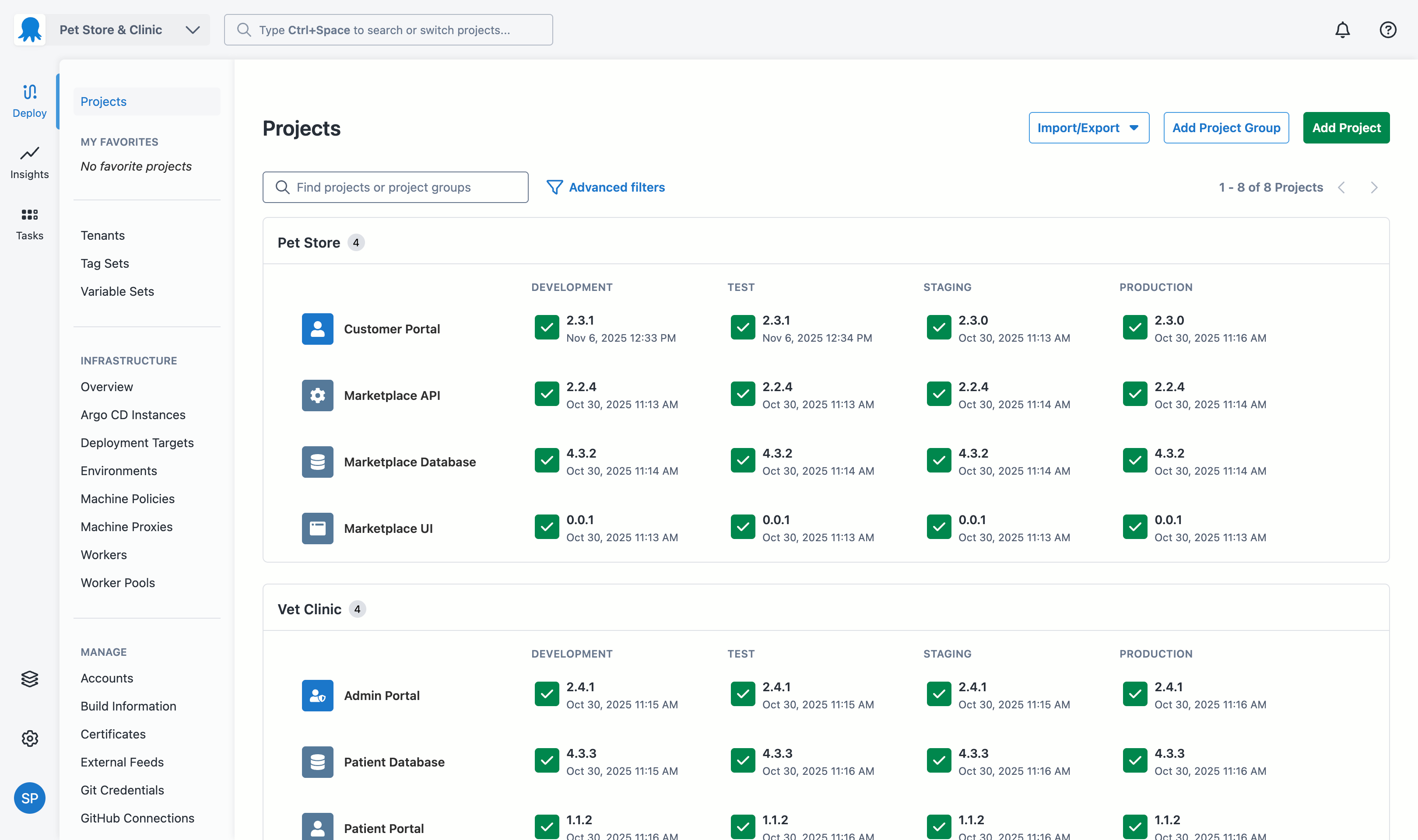
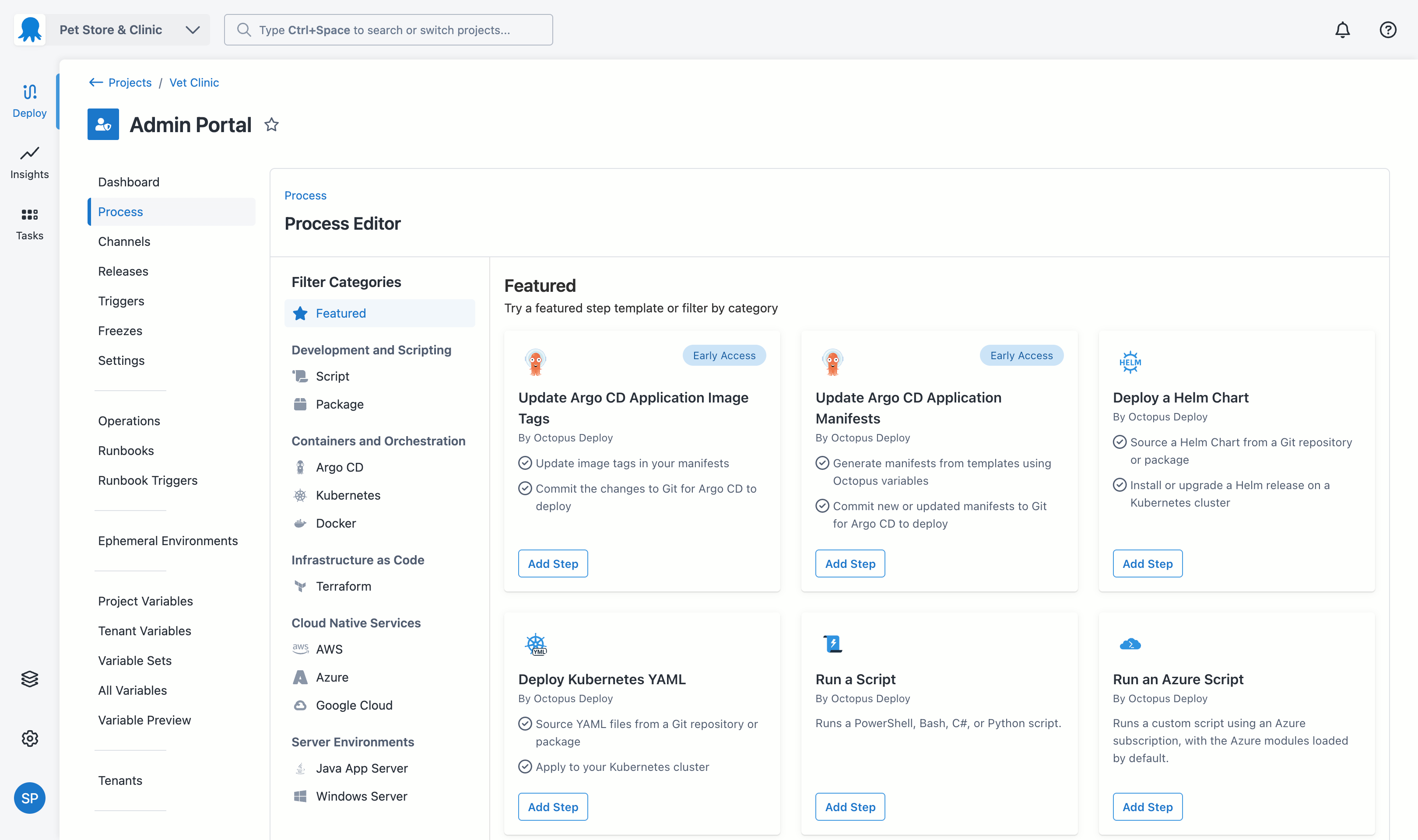
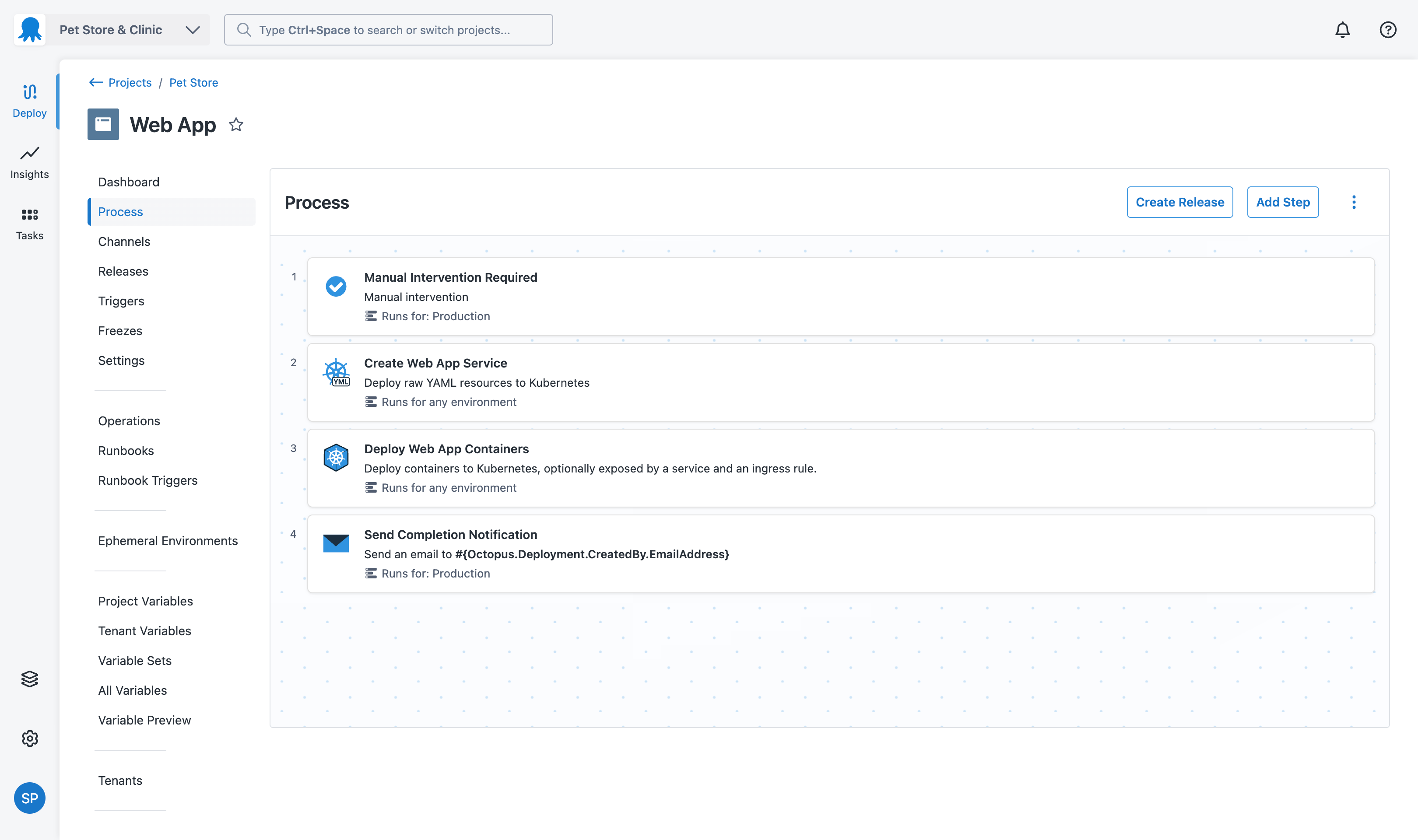
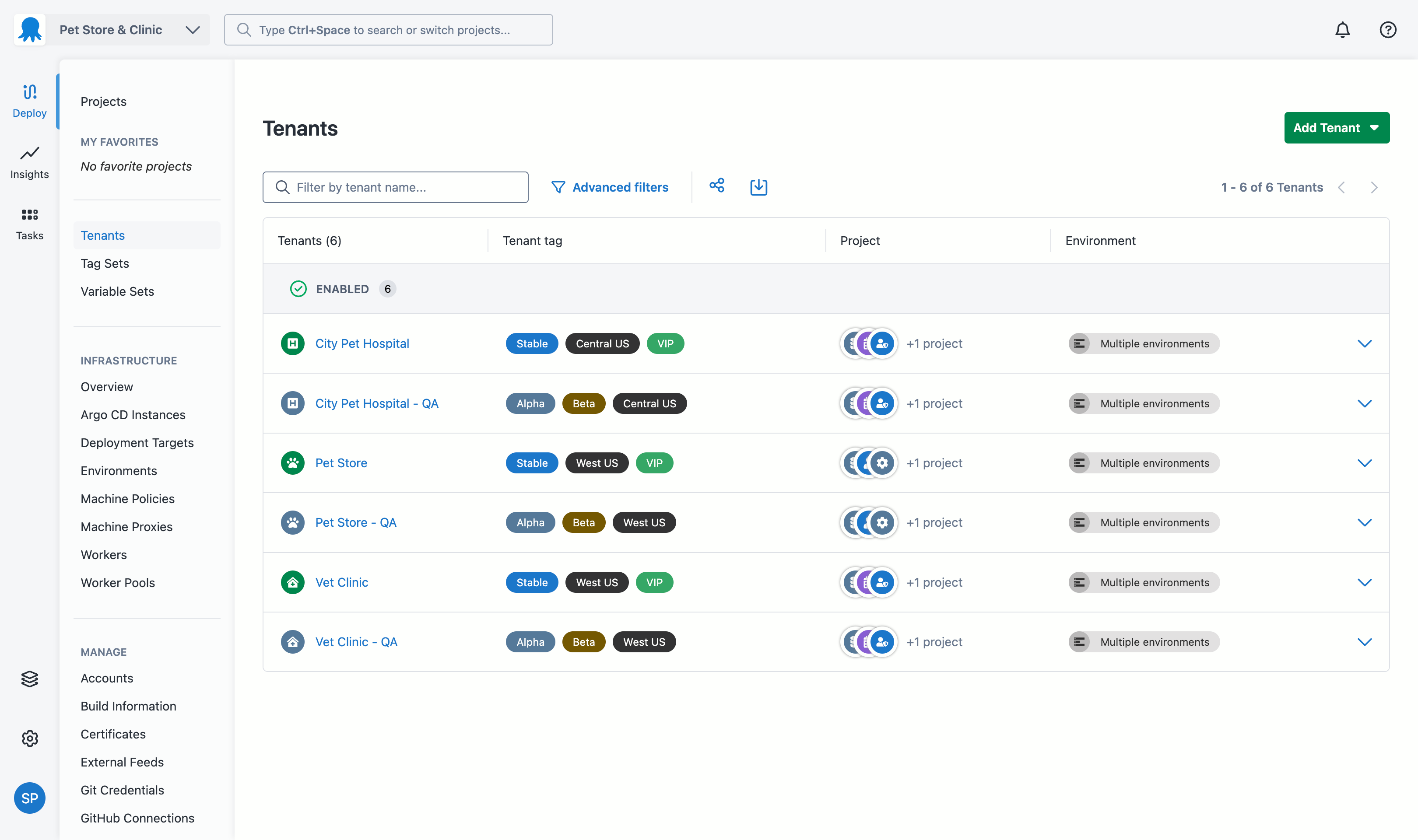
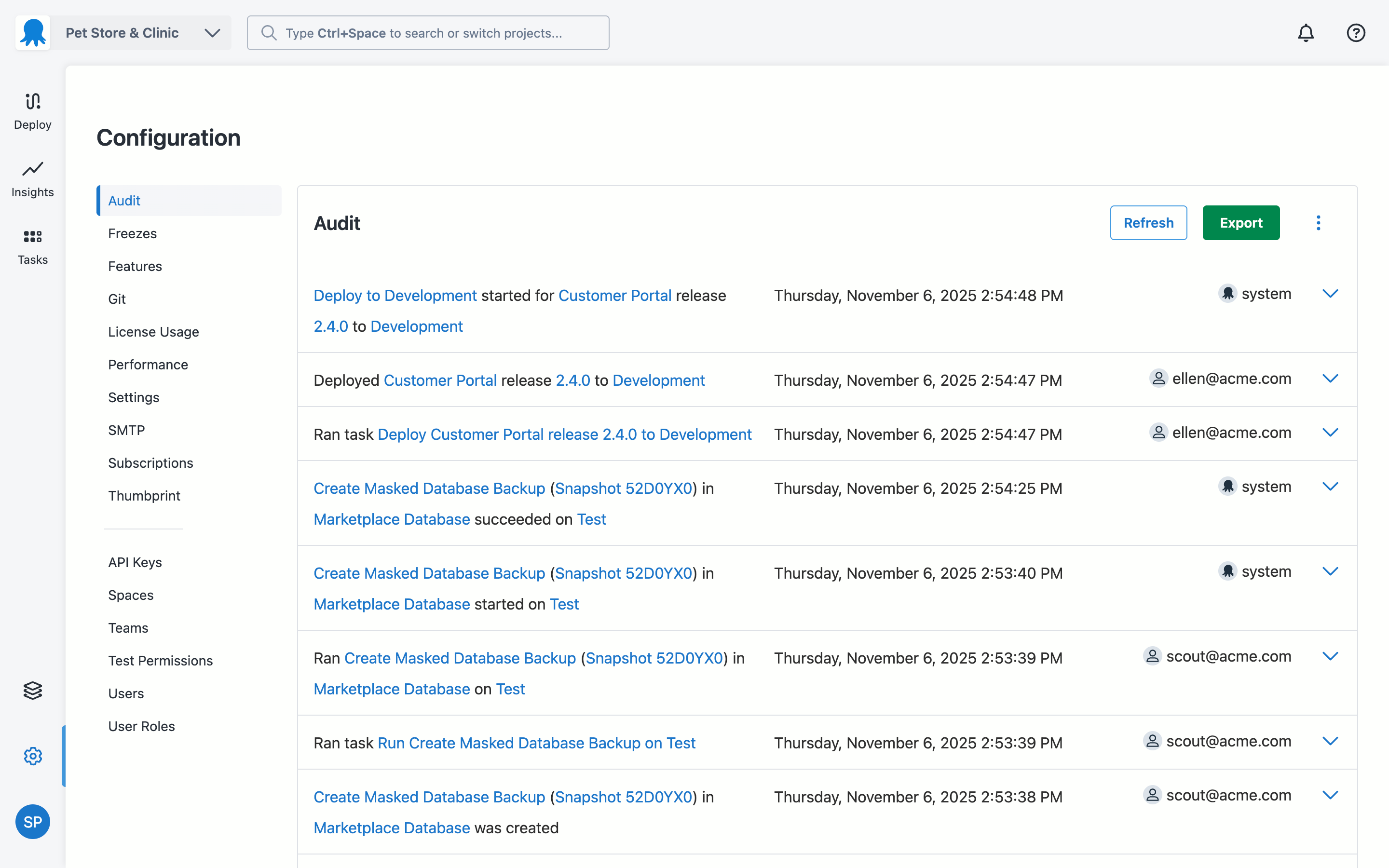
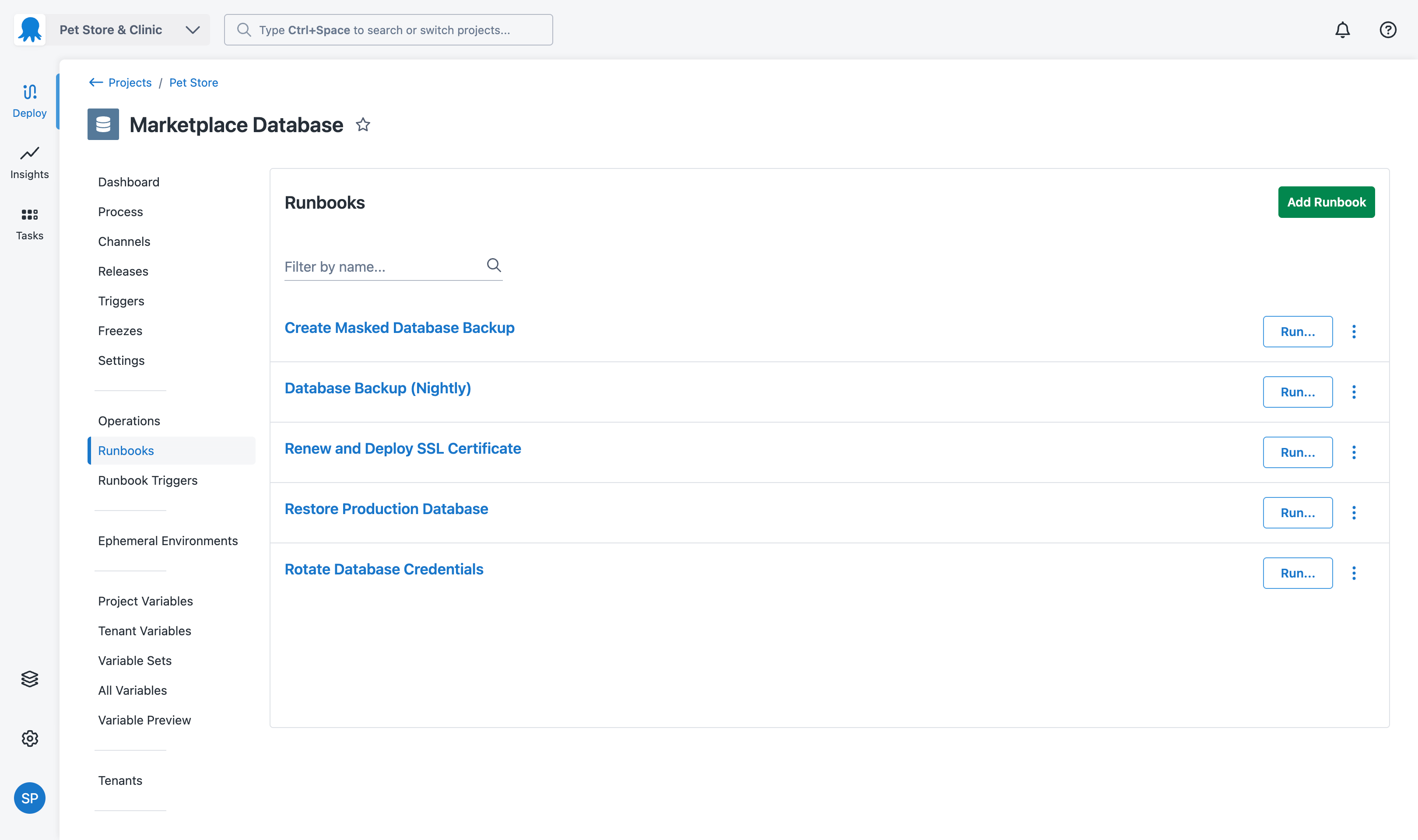
Screenshot of where Octopus provides real-time visibility into which application versions are deployed across all environmentsScreenshot of some of the 500+ pre-built step templates for Kubernetes, AWS, Azure, Terraform, and Docker, to define deployment processes.Screenshot of the interface to create a deployment process once and reuse it across all environments, ensuring consistent deployments from development through production.Screenshot of tenanted deployments, which allow users to deploy unique application versions to individual customers or business units while maintaining centralized control and visibility across all instancesScreenshot of the audit log, which captures every deployment action, change, and user activity with full attribution and timestamps, providing accountability for compliance and security.Screenshot of the Runbooks that enable teams to automate routine operational tasks like backups, certificate renewals, and infrastructure maintenance, reducing manual effort and ensuring consistent execution of critical procedures.