
Bacula Enterprise vs. UpSafe (discontinued)
Bacula Enterprise vs. UpSafe (discontinued)
| Product | Rating | Most Used By | Product Summary | Starting Price |
|---|---|---|---|---|
 Bacula Enterprise | N/A | Bacula Enterprise is a data center backup, restore, and recovery solution from Swiss, Dracula-themed software company Bacula Systems. | N/A | |
 UpSafe (discontinued) | N/A | UpSafe was a solution for storing and backing up data stored in Gmail, Google Drive, Google Contacts, and Google Calendar, or Outlook. It has been discontinued. | N/A |
| Bacula Enterprise | UpSafe (discontinued) | |||||||||||||||
|---|---|---|---|---|---|---|---|---|---|---|---|---|---|---|---|---|
| Editions & Modules | No answers on this topic | No answers on this topic | ||||||||||||||
| Offerings |
| |||||||||||||||
| Entry-level Setup Fee | No setup fee | No setup fee | ||||||||||||||
| Additional Details | — | — | ||||||||||||||
| More Pricing Information | ||||||||||||||||
| Bacula Enterprise | UpSafe (discontinued) |
|---|
| Bacula Enterprise | UpSafe (discontinued) | |||||||||||||||||||||||||||||||||||||||||||||
|---|---|---|---|---|---|---|---|---|---|---|---|---|---|---|---|---|---|---|---|---|---|---|---|---|---|---|---|---|---|---|---|---|---|---|---|---|---|---|---|---|---|---|---|---|---|---|
| Data Center Backup |
|
| Bacula Enterprise | UpSafe (discontinued) | |
|---|---|---|
| Small Businesses |  Cove Data Protection Score 9.2 out of 10 | Cove Data Protection Score 9.2 out of 10 |
| Medium-sized Companies | Cove Data Protection Score 9.2 out of 10 |  Druva Security Cloud Score 9.4 out of 10 |
| Enterprises |  IBM Cloud Backup Score 10.0 out of 10 | Druva Security Cloud Score 9.4 out of 10 |
| All Alternatives | View all alternatives | View all alternatives |
| Bacula Enterprise | UpSafe (discontinued) | |
|---|---|---|
| Likelihood to Recommend | 10.0 (52 ratings) | 8.5 (9 ratings) |
| Likelihood to Renew | 10.0 (5 ratings) | - (0 ratings) |
| Usability | 9.1 (7 ratings) | - (0 ratings) |
| Availability | 9.1 (1 ratings) | - (0 ratings) |
| Performance | 8.2 (1 ratings) | - (0 ratings) |
| Support Rating | 10.0 (17 ratings) | 8.3 (4 ratings) |
| In-Person Training | 9.1 (2 ratings) | - (0 ratings) |
| Implementation Rating | 9.8 (2 ratings) | - (0 ratings) |
| Configurability | 9.1 (1 ratings) | - (0 ratings) |
| Ease of integration | 10.0 (1 ratings) | - (0 ratings) |
| Product Scalability | 9.1 (1 ratings) | - (0 ratings) |
| Bacula Enterprise | UpSafe (discontinued) | |
|---|---|---|
| Likelihood to Recommend |  Bacula Systems
|  Discontinued Products
|
| Pros | Bacula Systems
 Carlos Costa Technical Support Manager | Discontinued Products
|
| Cons | Bacula Systems
| Discontinued Products
|
| Likelihood to Renew | Bacula Systems
| Discontinued Products No answers on this topic |
| Usability | Bacula Systems
 Daniel Drucker Director of IT, McLean Imaging Center | Discontinued Products No answers on this topic |
| Reliability and Availability | Bacula Systems
 Luis Silva Analista de Suporte SR | Discontinued Products No answers on this topic |
| Performance | Bacula Systems
Luis Silva Analista de Suporte SR | Discontinued Products No answers on this topic |
| Support Rating | Bacula Systems
| Discontinued Products
 Greg Roberts Broker/Associate Realtor |
| In-Person Training | Bacula Systems
| Discontinued Products No answers on this topic |
| Implementation Rating | Bacula Systems
| Discontinued Products No answers on this topic |
| Alternatives Considered | Bacula Systems
| Discontinued Products
 Sarah Bandy Executive Director |
| Contract Terms and Pricing Model | Bacula Systems
Luis Silva Analista de Suporte SR | Discontinued Products No answers on this topic |
| Scalability | Bacula Systems
Luis Silva Analista de Suporte SR | Discontinued Products No answers on this topic |
| Return on Investment | Bacula Systems
| Discontinued Products
 Kristin Page Senior Recruiter |
| ScreenShots | UpSafe (discontinued) Screenshots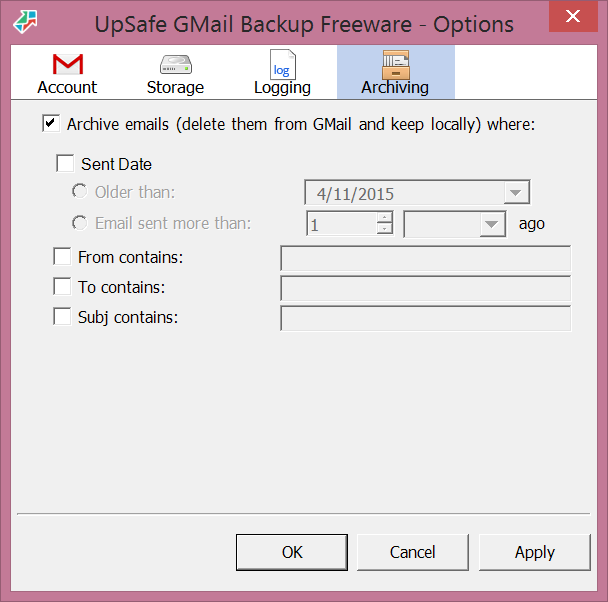  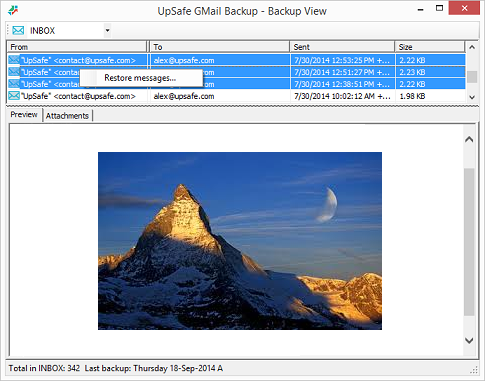  |