Overview
ProductRatingMost Used ByProduct SummaryStarting Price
BigTime Software
Score 6.3 out of 10
N/A
BigTime IQ is time and expense tracking software from Chicago-based BigTime Software.
$20
User per Month
OfficeTools by CARET
Score 4.0 out of 10
N/A
OfficeTools Cloud is cloud-based accounting practice management software designed to enable firms to track client work and collaborate with their team anytime, anywhere, from any browser. OfficeTools is an CARET brand.N/A
Projector PSA
Score 1.1 out of 10
N/A
Projector's cloud-based Professional Services Automation (PSA) software helps project-based services organizations track time and expenses, invoice clients, schedule resources, and manage projects. Its three modules span a more comprehensive set of uses than typical project management software. The Accounting module helps the user track time and expenses and manage invoices and billing. Also it syncs with the company's accounting systems as a sub-ledger. The Resource Scheduling module matches…
$15
per user
Pricing
BigTime SoftwareOfficeTools by CARETProjector PSA
Editions & Modules
Essentials
$20
User per Month
Advanced
$35
User per Month
Premier
$45
User per Month
Projector
$60
OfficeTools Cloud
$59 ($49)
per month (billed annually)
OfficeTools Workspace
Contact for Pricing
Team Edition
$15
per user
Professional Edition
$25
per user
Enterprise Edition
$30
per user
Offerings
Pricing Offerings
BigTime SoftwareOfficeTools by CARETProjector PSA
Free Trial
YesNoYes
Free/Freemium Version
NoNoNo
Premium Consulting/Integration Services
NoNoNo
Entry-level Setup FeeOptionalNo setup feeNo setup fee
Additional Details
More Pricing Information
Community Pulse
BigTime SoftwareOfficeTools by CARETProjector PSA
Considered Multiple Products
BigTime Software
Chose BigTime Software
I think BigTime Software has better invoice tracking and payment options but Monday offers better project tracking
Chose BigTime Software
After all the research and demos I watched, I had narrowed it down to BQE CORE & BigTime Software. We actually started w/ BQE CORE, which is an incredibly robust software with a lot of great abilities. It ended up being way more robust than we needed or wanted. We switched …
Chose BigTime Software
Many of those other softwares did not provide the detailed reporting capabilities that Big Time does. It was harder to get the data we needed out of those systems, and some just did not have it all together...
Chose BigTime Software
I didn't use the reporting features much on ClickTime, so I can't compare that. The previous company where I was that used ClickTime may have had just a basic subscription for timekeeping.
Chose BigTime Software
I liked the client management, but it didn't do time tracking, billing or syncing with quickbooks. It was too robust for my needs. I tried it for the client management and thought I might use it along with bigtime, but it was too cumbersome and would involve too much double …
Chose BigTime Software
BigTime Software blows Zoho out of the water because it's all in one place and the customer service is 1000x better than Zoho. It's easy to get answers and understand where the problem is and how to fix it. Zoho was confusing, didn't communicate well between modules, and the …
Chose BigTime Software
We selected BigTime [Software] because it had the most features that we needed in our company. It is lacking some features but overall it is a good fit for us.
Chose BigTime Software
I have used several custom products at various consulting forms that were clunky and difficult to work with.
Chose BigTime Software
The main reason why we have decided to change services [...] is because we have carried out an internal analysis to determine which tool [is the best], with the [most] appropriate functionalities to fulfill our labor proposal. [We] came to the conclusion that BigTime [Software] …
Chose BigTime Software
Customer Support; Ease of Platform Use; Product can and will do what it promises it will do!
Chose BigTime Software
While they have similar capabilities, our main reason for switching to BigTime Software was that Harvest could not reconcile expenses and labor hours into one budget line item, which threw off entire project budgets. In this regard, BigTime Software is more accurate and a much …
Chose BigTime Software
Ajera is not as user friendly and seems to be designed for larger corporations Does not have integrations with other software like QB
Chose BigTime Software
We looked at several different options, but most of them charge a percentage of the profits to use their service. BigTime is a flat rate for access/use and that works better with our business.
Chose BigTime Software
It’s a great alternative to other invoice software since it's easy for a quick Excel invoice or other timesheet for contracting work. It was easy to enter time and upload receipts as well. I uploaded a receipt for a software purchase when I had to add that to my billing as …
Chose BigTime Software
BigTime was recommended by enough people in our circle that we didn't even consider any other options. All other options were outside our price point as well.
Chose BigTime Software
We've been using BigTime exclusively since needing to incorporate a timesheet tracking for employees.
Chose BigTime Software
BigTime is much easier to use and available online and on mobile.
Chose BigTime Software
I have not used any other products like BigTime, but I know that our office was careful in selecting it and has been very pleased.
Chose BigTime Software
BigTime allows more detailed breakdowns by project than this software (though I used Kronos several years ago).
OfficeTools by CARET
Chose OfficeTools by CARET
OfficeTools is by far the easiest project management tool that I've ever used. It is very user friendly and easy to pickup. That cannot be said for other products that I've used in the past.
Projector PSA
Chose Projector PSA
One other software our organization was looking at was Mavenlink. Compared to that, Projector PSA is more powerful and has more flexibility.
Chose Projector PSA
Projector PSA is a great option for entering time. Our employees have no issue allocating their time to the correct tasks types. Projector PSA does not require a written description for time, and our employees have noticed that this makes for a cleaner, straightforward entry. …
Chose Projector PSA
Projector PSA provided a better value and much smaller initial commitment. The implementation process required minimal professional services. Projector PSA also had a strong data security model to limit visibility appropriately to personnel using the system.
Chose Projector PSA
Projector had the most features that best aligned with our usage. We liked the scheduling and reporting features.
Chose Projector PSA

During our assessment of alternate systems we examined the functionality of: ASTEA, Technology One, SAP, Microsoft Project Server, and SalesForce.com. Offerings were assessed against the following evaluation criteria: system functionality, application integration, …

Chose Projector PSA
We did pursue Quick Arrow another tool that was similar. We found that be in inflexible in use. Projector allows a lot of flexibility in setup. Our organization has very specific business processes and we were able to set up Projector to work with those processes. Several other …
Chose Projector PSA
Primavera is an excellent product but much more sophisticated than what my department needed at the time I selected and recommended Projector PSA.
Chose Projector PSA
We switched to Projector from Open Air. While Open Air was a good tool, we found it wasn't really designed for project management at the level of detail we needed from our PSA and used MS Project and Excel to supplement Open Air. We also struggled with the invoicing side of it, …
Features
BigTime SoftwareOfficeTools by CARETProjector PSA
Project Management
Comparison of Project Management features of Product A and Product B
BigTime Software
-
Ratings
OfficeTools by CARET
-
Ratings
Projector PSA
7.4
Ratings
4% below category average
Task Management00 Ratings00 Ratings9.50 Ratings
Resource Management00 Ratings00 Ratings9.50 Ratings
Gantt Charts00 Ratings00 Ratings6.00 Ratings
Scheduling00 Ratings00 Ratings8.50 Ratings
Workflow Automation00 Ratings00 Ratings9.00 Ratings
Team Collaboration00 Ratings00 Ratings7.50 Ratings
Support for Agile Methodology00 Ratings00 Ratings5.80 Ratings
Support for Waterfall Methodology00 Ratings00 Ratings5.20 Ratings
Document Management00 Ratings00 Ratings8.50 Ratings
Email integration00 Ratings00 Ratings7.60 Ratings
Mobile Access00 Ratings00 Ratings3.70 Ratings
Timesheet Tracking00 Ratings00 Ratings9.50 Ratings
Change request and Case Management00 Ratings00 Ratings5.20 Ratings
Budget and Expense Management00 Ratings00 Ratings8.10 Ratings
Professional Services Automation
Comparison of Professional Services Automation features of Product A and Product B
BigTime Software
-
Ratings
OfficeTools by CARET
-
Ratings
Projector PSA
7.9
Ratings
2% above category average
Invoicing00 Ratings00 Ratings7.00 Ratings
Project & financial reporting00 Ratings00 Ratings8.50 Ratings
Integration with accounting software00 Ratings00 Ratings8.00 Ratings
Best Alternatives
BigTime SoftwareOfficeTools by CARETProjector PSA
Small Businesses
HaloPSA
HaloPSA
Score 8.1 out of 10

No answers on this topic

Stackby
Stackby
Score 8.9 out of 10
Medium-sized Companies
Planview AdaptiveWork
Score 8.4 out of 10

No answers on this topic

InEight
InEight
Score 8.2 out of 10
Enterprises
Planview AdaptiveWork
Score 8.4 out of 10

No answers on this topic

InEight
InEight
Score 8.2 out of 10
All AlternativesView all alternativesView all alternativesView all alternatives
User Ratings
BigTime SoftwareOfficeTools by CARETProjector PSA
Likelihood to Recommend
6.3
(0 ratings)
8.0
(0 ratings)
7.0
(0 ratings)
Likelihood to Renew
10.0
(0 ratings)
-
(0 ratings)
10.0
(0 ratings)
Usability
6.1
(0 ratings)
-
(0 ratings)
6.4
(0 ratings)
Availability
8.2
(0 ratings)
-
(0 ratings)
10.0
(0 ratings)
Performance
9.1
(0 ratings)
-
(0 ratings)
-
(0 ratings)
Support Rating
9.0
(0 ratings)
-
(0 ratings)
-
(0 ratings)
Implementation Rating
10.0
(0 ratings)
-
(0 ratings)
8.2
(0 ratings)
Product Scalability
8.2
(0 ratings)
-
(0 ratings)
7.0
(0 ratings)
User Testimonials
BigTime SoftwareOfficeTools by CARETProjector PSA
Likelihood to Recommend
I believe it is well suited for our industry! We are professional services consulting firm and we need this! However if there is a smaller company who does not need to track these items, then they should not use this big of a platform
Read full review
For a small office or team keeping track of multiple projects at once can be a challenge. OfficeTools provides an all-in-one affordable (less than $60 per month) and accessible (cloud based) project management solution to keep your team on task. If your organization uses products such as Quickbooks or Outlook you can easily integrate them into this software solution. I honestly cannot think of an organizational structure that would not benefit somewhat from integrating OfficeTools into their operations
Read full review
We think Projector PSA is a great tool to track and manage people in a professional service environment like management consulting. This system is easy to set up, easy to understand and should easily suit the needs of smaller and medium sized firms. It may be less appropriate for firms that rely very heavily on project management through another system (like MS Project) or firms that rely very heavily on a sales pipeline tracking system. While still very much possible to use, you would (I believe) have to do some re-keying between systems
Read full review
Pros
  • Invoice Style and detail..Bigtime allows the user the ability to choose more of what you need to appear on your invoice with its window options.
  • Phase/Percentage Billing; ease of adding additional phases to a project mid-project; clearly identifying Retainers
  • Support Team- In particular Melissa D and Lina Z...Par Excellent on the Teams
  • WHIP/Reports/Review of Invoices just make the entire billing process a BREEZE has cut my time frame in half, a Incredible help in this Season of Remote Work Environment that we are adapting to.
Read full review
  • Software Integration (i.e. Quickbooks, Outlook, etc.)
  • Project Management
  • Time Management
  • Billing/Invoicing
Read full review
  • Time tracking. For a service company that typically bills retainers, it is very important to be able to assign a direct cost to your resources at all levels and analyze your profitability.
  • Expense reporting. Projector easily tracks expenses of all types and allows you to categorize them under non-billable projects, client billable projects and/or client development ventures.
  • Reporting. Projector has a large list of standard reports right at your fingertips. These reports can be extracted as Excel docs, mdp files and other useful formats. They are intuitive, clear and easy to analyze. For those you need on a standard basis, you can set them up to pull on a recurring basis. It should be noted that all reports are easily customized and Projector's support team is always there to help get you the information you need.
Read full review
Cons
  • For some types of projects, we are unable to use BigTime's invoicing feature. It would be nice if we could further customize invoices to fit our needs. We still have to use Quickbooks to complete certain invoices.
  • Being able to create Purchase Orders in BigTime would be extremely useful to us. We currently use Quickbooks for this.
Read full review
  • Customizability (i.e. font size, workflows, etc.)
  • Increase access to trainings and educational enrichment opportunities
  • Customer Support (tends to be slow)
Read full review
  • The split between the desktop and web environments was awkward at times.
  • While the reporting modules are powerful, creating reports can be complex and required a fairly deep knowledge of the product.
  • The appearance and interface of the desktop application appears somewhat dated.
Read full review
Likelihood to Renew
Its been a huge help in saving time and making billing more efficient. Would like to see the product grow and be able to continue to use it.
Read full review
No answers on this topic
We have been using this tool for a year now and find our use of it continually evolves and broadens. We are also very excited about the overhaul that's under way and feel many of the improvements being put in place will help make us that much more effective and efficient. The Projector team is also very responsive and collaborative in terms of user feedback and improvement suggestions, which helps us know they will work hard to help us get what we need out of the tool.
Read full review
Usability
Overall most areas of the software are easy to use. I tend to spend a lot of time in analytics and reports. Those are not as user friendly, in my opinion, and could use some improvements. I think it just takes time to get familiar with where items are stored in the program and what changes affect what.
Read full review
No answers on this topic
Desktop interface feels complex to new users.
Read full review
Reliability and Availability
BigTime is available 99% of the time. At times there are bugs, but most are resolved quickly
Read full review
No answers on this topic
In 5 years of use we have never experienced an unscheduled outage.
Read full review
Performance
have not noticed a slow integration issue using QBO
Read full review
No answers on this topic
Support Rating
The support is amazing! They are always available through the chat interface in the program. Each support person has fully answered my questions the first time. I have had a positive experience with each inquiry. It is very important to me that I am able to get instant access to help so that I can make the most of the software and all of its capabilities.
Read full review
No answers on this topic
Implementation Rating
I touched on this briefly, in another survey section, but my implementation manager, Kevin, was exceptional. The actual implementation process took 3 months, not 1 before I was comfortable rolling it out to staff. We also had to wait/schedule time and coordinate for our custom xml. invoice to be generated and in a place we felt comfortable sending it out to clients. In the end I was very satisfied, but during the first few months it was challenging.
Read full review
No answers on this topic
Alternatives Considered
The main reason why we have decided to change services [...] is because we have carried out an internal analysis to determine which tool [is the best], with the [most] appropriate functionalities to fulfill our labor proposal. [We] came to the conclusion that BigTime [Software] is much more complete in terms of functionalities and even [at a] lower price.
Read full review
OfficeTools is by far the easiest project management tool that I've ever used. It is very user friendly and easy to pickup. That cannot be said for other products that I've used in the past
Read full review
We switched to Projector from Open Air. While Open Air was a good tool, we found it wasn't really designed for project management at the level of detail we needed from our PSA and used MS Project and Excel to supplement Open Air. We also struggled with the invoicing side of it, manually combining invoice summaries with custom time and expense reports in Acrobat. Projector however, was designed for project management. We are able to manage projects, track time and expenses, and invoice all out of one system. The project setup can accommodate a wide range of complexity, including milestones, dependencies, etc. Project and resource dashboards also help see the services portfolio and team at a summary level and allows us to zero in on particulars easily and more meaningfully than we were ever able to with Open Air. Invoice templates are also easily customized and we were able to get several set up quickly to meet our needs. Lastly, Open Air required us to purchase and pre-pay licensing for a year, so if we lost staff mid-way through the year, the unused seat was not prorated. Projector licensing is paid monthly based on actual number of active users that month, which makes more sense for a team with fluctuating headcount.
Read full review
Scalability
The product is useful for faster billing and efficient timesheet logs. I do like the report features however there are many options and can be overwhelming for the user. It is most helpful to set up reports speaking to an agent to ensure the right fields are set, etc.
Read full review
No answers on this topic
Return on Investment
  • Before BigTime, we were using Excel to track everything, creating invoices, and run reports. Getting on BigTime has saved us tons of time and effort which equates to dollars saved on labor.
  • From a legal standpoint, BigTime has allowed us to be organized and prepared in the event we would need to present financial details to anyone.
Read full review
No answers on this topic
  • Even in the small time that I stayed to see Projector PSA reporting I saw ROI projections become more realistic. There was real data to analyze that proved we were spending way too much and charging way too less on some projects.
  • Although employees were not used at entering their hours, this single reporting improved operations management and validated employees concerns that more people were needed to manage workload
  • Project proposals were more realistic because they were driven by real data.
  • Decision making overall for the department became more efficient and effective
Read full review
ScreenShots

BigTime Software Screenshots

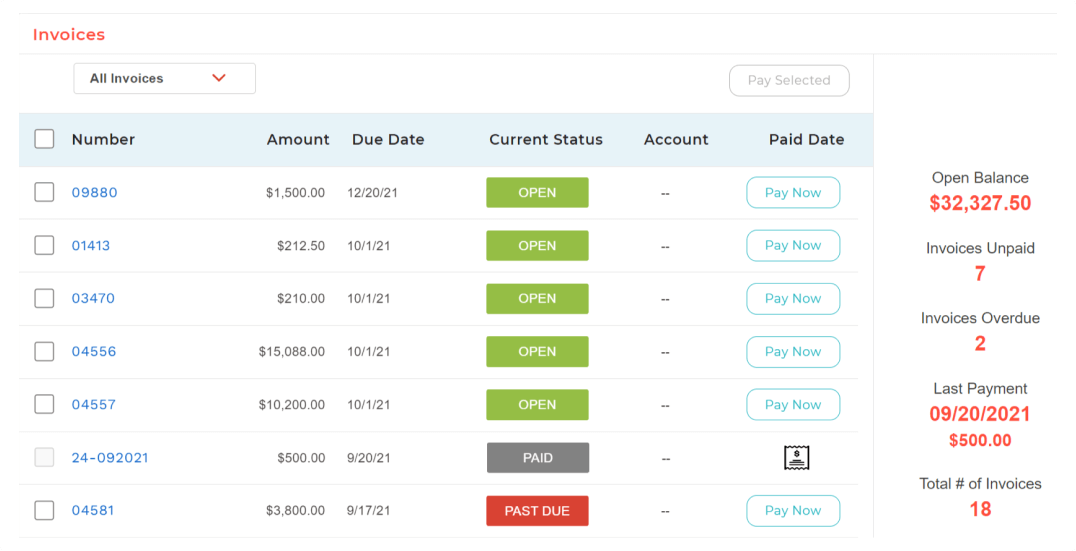
Screenshot of BigTime Wallet provides clients with a personalized experience to pay on time from anywhere, in one click.Screenshot of A big-picture view into operational insights to make adjustments to how resources are managed.Screenshot of Real-time, actionable insights for professional services firms.Screenshot of The platform is designed to work within existing workflows and software stack, acting as a single source of truth for data.Screenshot of BigTime's invoicing engine supports dozens of industry-standard billing scenarios and enough options to satisfy exacting customer needs.

Projector PSA Screenshots

Screenshot of Employee Dashboards help resources stay on task by displaying schedules and alerts.