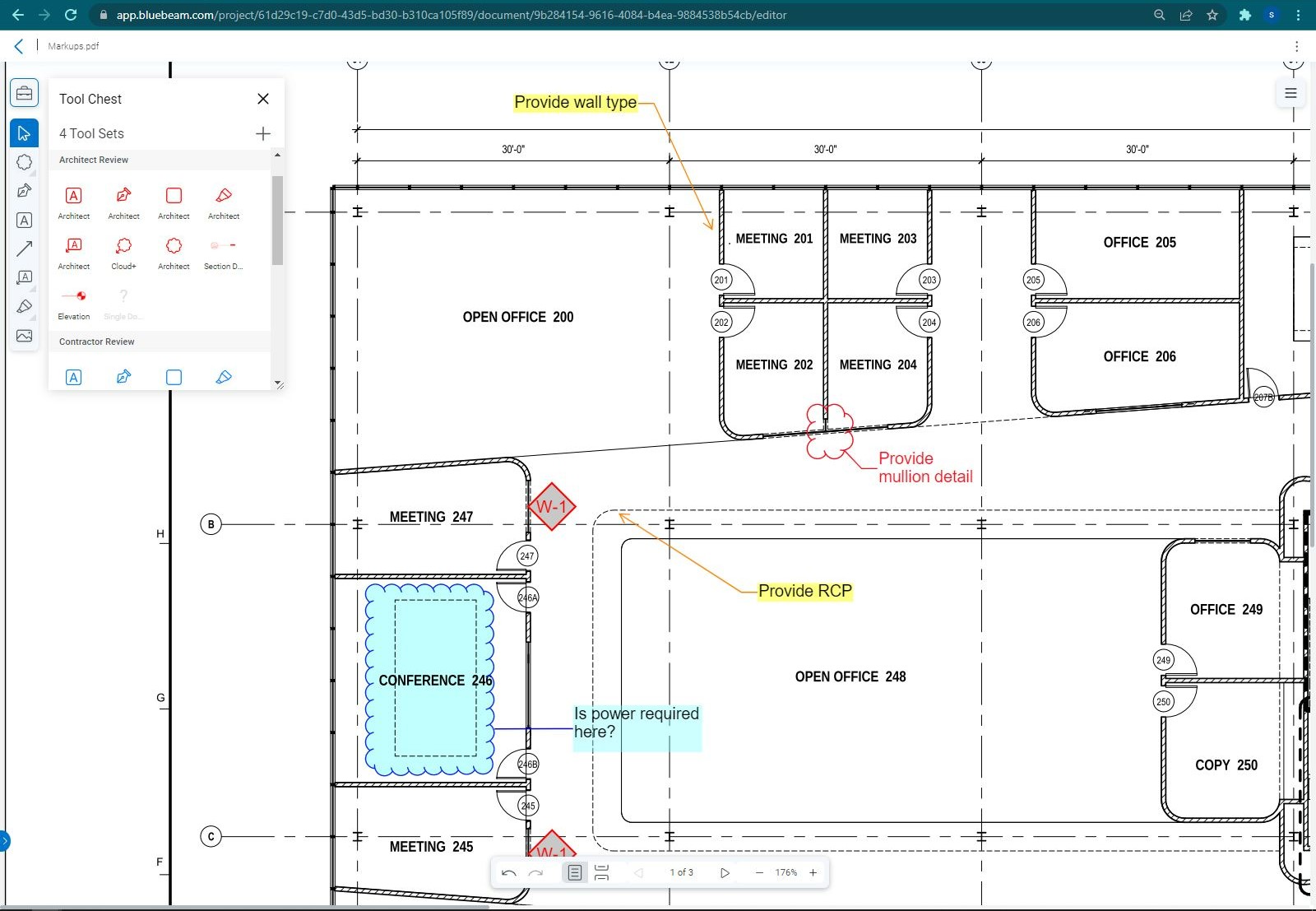
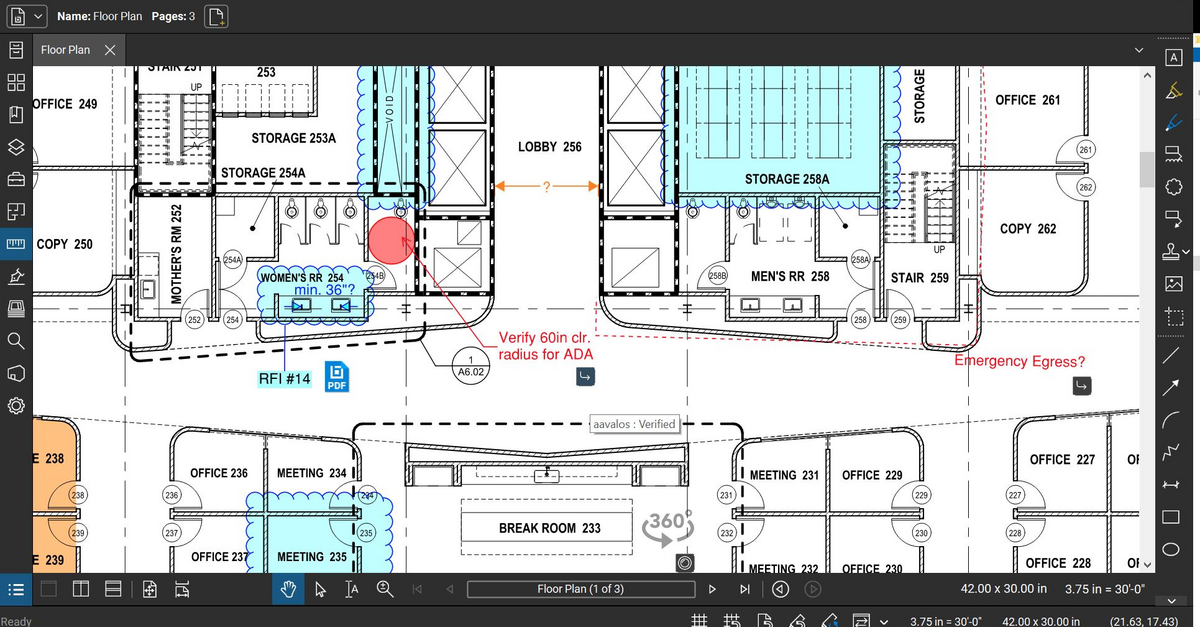
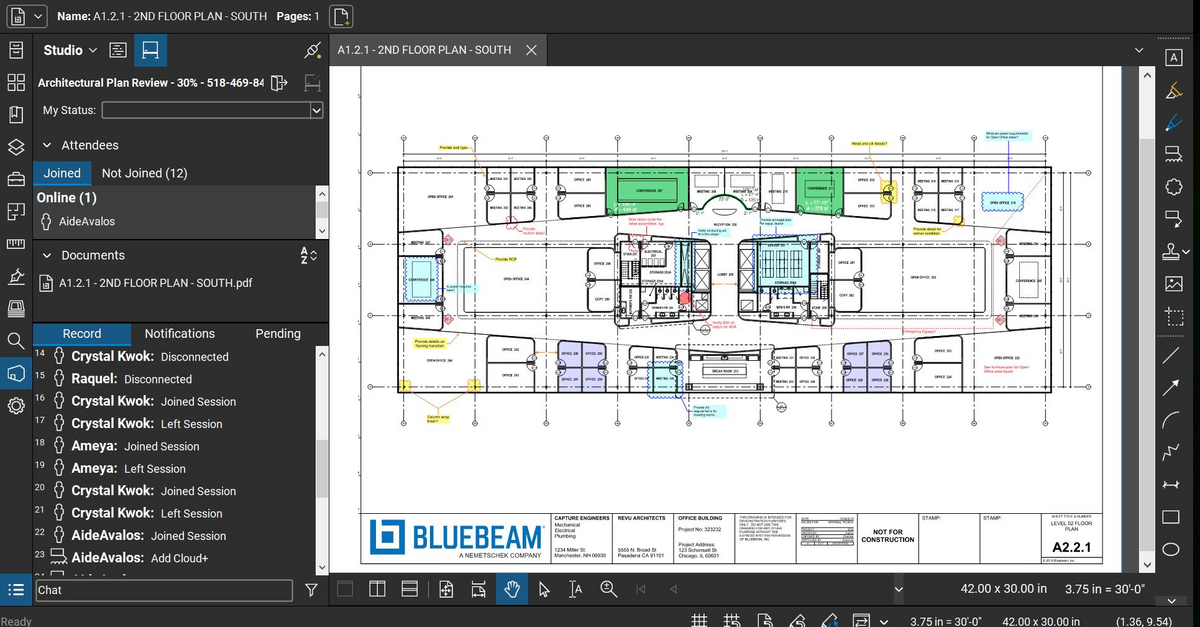
Bluebeam Revu is a PDF management, control, and editing tool. It enables collaboration and markup within shared documents across projects’ life cycles and has takeoff and bid creation capabilities.
$260
per year per user
OpenAir PSA
Score5.5 out of 10
N/A
NetSuite OpenAir is a cloud-based Professional Service Automation (PSA) product which includes capabilities around project management, resource management, project accounting, etc.
The program is great for editing construction drawings, stamping/approving official documents and overlaying revised documents to see design changes. You can use it as an estimating takeoff tool, estimating database, document control, cloud document storage, the list goes on! Bluebeam poses many applications for the user to utilize for the desired needs. There may be some other software that has one specific function that can perform the specific task better, but Bluebeam is a holistic program with many tools for use.
A de minimis incentive was given to thank the reviewer for their time. The incentive was not used to bias or drive a particular response, nor was the incentive contingent on a positive endorsement. More Info
This product is well suited for an organization that is focused on client services, project delivery, time tracking, expense reporting, and revenue recognition. From a pure project management perspective, this product is not as feature rich as say Microsoft Project Server. For organizations that are looking for detailed complex project plan and resource management (along with resource leveling, etc.), this is probably not the best suited product
A de minimis incentive was given to thank the reviewer for their time. The incentive was not used to bias or drive a particular response, nor was the incentive contingent on a positive endorsement. More Info
Once you set Bluebeam Revu as your default PDF handler, it launches immediately when clicking a PDF to open. The speed with which it opens documents is impressive.
Creating PDF's out of other documents, such as Word, Excel, JPG's, etc. is simple.
Digitally signing documents is a simple, secure process. You can keep your signature password-protected, yet still access it quickly.
The Bluebeam Revu mobile application ( I use the iOS version on an iPad Pro), is awesome. Not only does it handle PDF's like you would expect it to, it allows for effortless digital signing of documents on the fly. Nice to be able to quickly sign a document and email right back out from the tablet no matter where I am.
A de minimis incentive was given to thank the reviewer for their time. The incentive was not used to bias or drive a particular response, nor was the incentive contingent on a positive endorsement. More Info
Netsuite OpenAir PSA is highly configurable and has a large ecosystem of assets to work with.
Tasks are easily designed to automate processes in your business workflow.
OpenAir is designed in such a way that it can communicate and receive information from external systems without having to re-engineer your systems to make them work if you are following standard business practice.
A de minimis incentive was given to thank the reviewer for their time. The incentive was not used to bias or drive a particular response, nor was the incentive contingent on a positive endorsement. More Info
If you have several tabs open and you try to drag one out for a side by side view then you do not have all the modification options and you have to combine them back together.
There is a lag time when hitting the print option.
There is also a lag time when opening files, sometimes I think the window is frozen.
I wish the basic version also had basic file editing, as in editing a document as Adobe does.
A de minimis incentive was given to thank the reviewer for their time. The incentive was not used to bias or drive a particular response, nor was the incentive contingent on a positive endorsement. More Info
Compared to QuickArrow, setting up reports to reflect the data accurately seemed to require a bit more consultant time and collaboration. Getting the numbers correct is essential, so budget extra time for this iniative. We also learned that certain calculations can not be displayed in the executive dashboards. Ask these questions upfront to ensure your dashboards are complete for your needs (again, working backwards in the preparation stages).
Compared to QuickArrow, NetSuite OpenAir PSA falls short in the resource management capabilities. UI, flexibility, and scheduling options all could be improved. This is on their roadmap, timeline yet to be defined. Scheduling is vitally important to our company and this is THE area where we feel is the applications weakest. However, the application does provide everything critical to scheduling and provided the elements we needed in order to be successful. We altered our scheduling process accordingly.
During our System Administration 3 day online training, when a question was asked about detailed functionality, sometimes the trainer would share..."Yes, OpenAir has a configuration for that. Just inquire with your consultant and they can flip that flag in your instance." The responsibility for obtaining these special application configurations was placed on the System Admin [in training] to ask and to take notes. If your company needs the application to work a certain way, speak up and ask your OA consultant. There seems to be MANY flags that can be flipped in the background to allow for the system to meet your needs. My complaint is that these are not published, rather made available if one inquires.
OpenAir is able to generate invoices directly and we strongly encourage using this feature to keep everything housed under one application. However, this did not work for our organization and we leveraged a financial integration. A bit of a pioneer integrating with Softrax -- the integration works well, however is quite fragile. We do receive appropriate support when needed, but would prefer the integration to be a bit more stable. We recommend integrating with their stated supported financial systems, as staying the course will likely net a more stable integration.
Bluebeam is a powerful PDF viewer and mark-up tool. We are more familiar with it than Adobe Acrobat Pro or other viewers, and it has more features geared towards construction document managers than Acrobat Pro does.
A de minimis incentive was given to thank the reviewer for their time. The incentive was not used to bias or drive a particular response, nor was the incentive contingent on a positive endorsement. More Info
It all depends. We are still looking at moving our consultants to Oracle PAC, in order to get our financial systems in line (we use Oracle Financials currently). We are feeling a lot of pain with integration and segmented systems.
Ultimately,it depends on how much pain is felt there. OpenAir has given us a path to follow on from QuickArrow. I foresee either moving onto Oracle PAC by end of calendar, or staying on OpenAir.
OpenAir to Oracle integration is not easy. From a reporting and process perspective, there’s been pain from being in different systems
I'm constantly finding that Bluebeam Revu does more than I knew it could. And when I find something that it can't do, I've found that Bluebeam truly listens to its user base and will work to incorporate any good suggestion when feasible.
A de minimis incentive was given to thank the reviewer for their time. The incentive was not used to bias or drive a particular response, nor was the incentive contingent on a positive endorsement. More Info
In this day and age I should not have to read a manual to understand a product. It should be intuitive to administrate and perform basic tasks. It feels like a ton of intelligence was poured into making OpenAir feature rich but no where near as much attention was given to the user experience.
A de minimis incentive was given to thank the reviewer for their time. The incentive was not used to bias or drive a particular response, nor was the incentive contingent on a positive endorsement. More Info
Its hard for me to give a rating on this one as we rarely have to use the support feature for Bluebeam. However, when we have used it, they have been ultra supportive in helping us get exactly what we needed. I know another engineer was trying to figure out a feature and the rep gave a detailed tutorial on how to complete the task
A de minimis incentive was given to thank the reviewer for their time. The incentive was not used to bias or drive a particular response, nor was the incentive contingent on a positive endorsement. More Info
As an admin, I've had more contact with OA support than most. I've found their response to tickets typically timely and helpful, however many of the responses to tickets are "we will file an enhancement request" and then I never hear about it again. So not terrible, but not a very fulfilling experience.
A de minimis incentive was given to thank the reviewer for their time. The incentive was not used to bias or drive a particular response, nor was the incentive contingent on a positive endorsement. More Info
Very knowledgeable and able to articulate how other customers configured the solution to meet their needs as well as the best practices they recommended.
We did a 3 day online remote course back in April. NetSuite prefers training to occur before migration. We went over the functionality of tool and three months later we migrated. Personally, I didn’t find it that beneficial. Certain parts of it were beneficial as they applied to me – talked a lot about invoicing capabilities that didn’t apply to me. They also have knowledge base / e-learning assets, but I haven’t referred to them
It went fine. Everything came over the way we wanted. In addition to migrating the current projects we wanted to migrate historical data – did that seamlessly. The finished product looked pretty good – just needed to tweak – and they helped us with that
We feel there is not another program out there that would compare to Bluebeam at this current time. Some of the other programs out there do not include studio or the overlaying process which is one of our main uses. The ease of hyperlinking makes this product stand out the most.
A de minimis incentive was given to thank the reviewer for their time. The incentive was not used to bias or drive a particular response, nor was the incentive contingent on a positive endorsement. More Info
OpenAir accurately reflects changes in real-time as well as lends itself to see where a draw is at, when payment is expected and what percentage of the contract has been billed or approved to date. This helps with project billing and tracking as well as cash flow. Quickbooks lacks the ability to show progress draws, approved changes, and pending changes on a given project where OpenAir excels.
A de minimis incentive was given to thank the reviewer for their time. The incentive was not used to bias or drive a particular response, nor was the incentive contingent on a positive endorsement. More Info
A major positive aspect is being able to take your computer home without taking the entire set of paper drawings. They have made it so easy to navigate a set of drawings that I can work at home using only the digital drawings.
Collaboration with owners and architects has been a great feature. Setting up a Bluebeam studio and having everyone get in and mark things up, then having the architect be able to go in and see what markups have been added, has made the constructability review process much much better.
Even when not working on drawings, Bluebeam is a very good tool for working with standard PDF documents. The markup tools are very easy to use.
The negative aspect is the takeoff function because some people would like estimators to use the Bluebeam takeoff because it would make their job easier down the road; however, the actual act of doing a full scale takeoff in Bluebeam would require much more time.
A de minimis incentive was given to thank the reviewer for their time. The incentive was not used to bias or drive a particular response, nor was the incentive contingent on a positive endorsement. More Info
A de minimis incentive was given to thank the reviewer for their time. The incentive was not used to bias or drive a particular response, nor was the incentive contingent on a positive endorsement. More Info