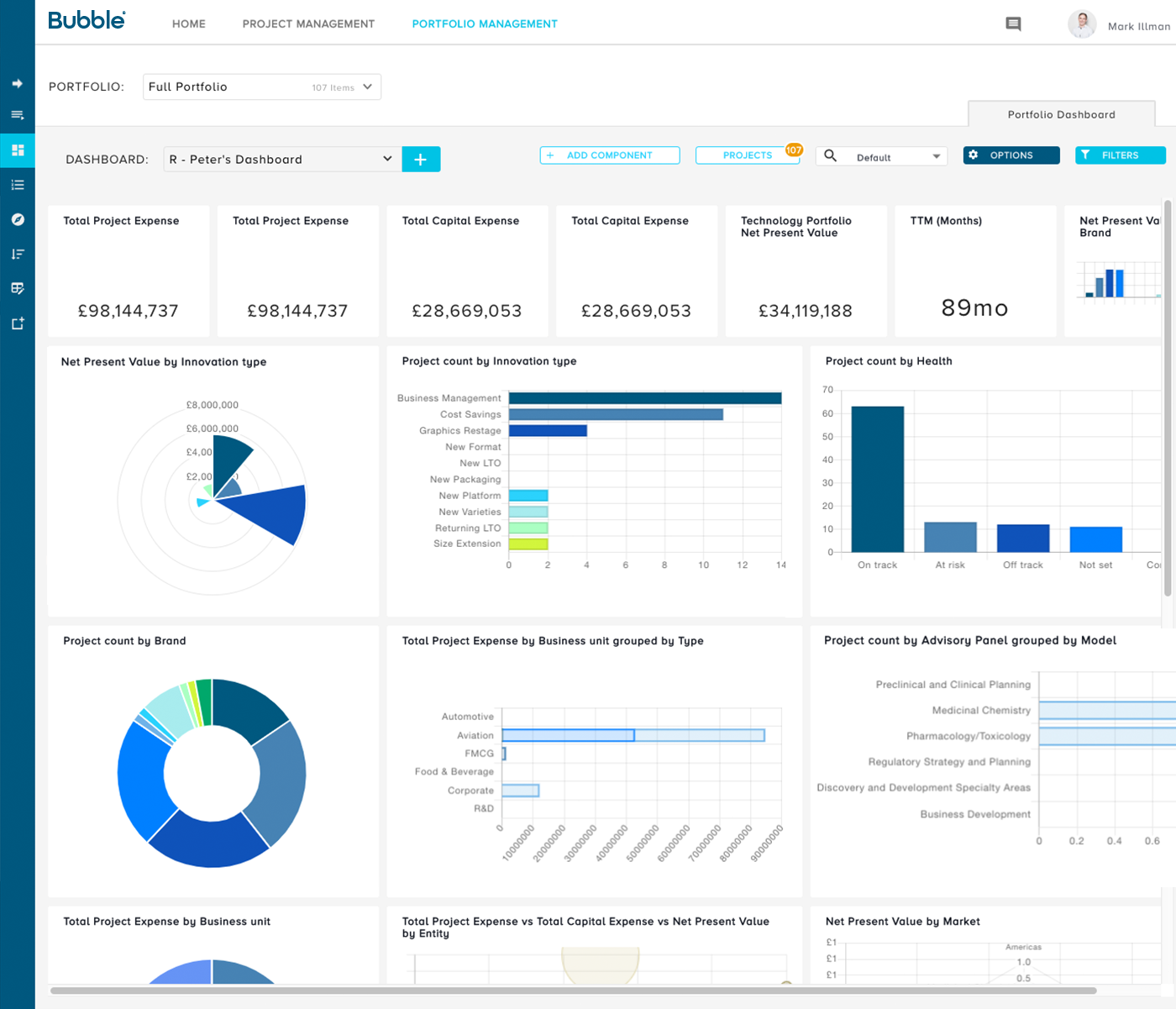
Bubble PPM is a cloud-based Project and Portfolio Management (PPM) software solution from Bubble®. Founded in 1999, the company serves clients globally via offices in London, Cambridge, and Melbourne. Its cloud-based solutions help customers improve the planning, governance, and delivery of Innovation, New Product Development, Engineering, IT, and other initiatives. Their software supports Portfolio Planning, ongoing Project and Portfolio Management, and Resource management.…
N/A
Microsoft Project
Score 7.9 out of 10
N/A
Microsoft Project is a project management software. It provides core PM functionality, including agile workflow support and resource management. Project can be deployed in the cloud or on-premise.
$0
Pricing
Bubble PPM
Microsoft Project
Editions & Modules
No answers on this topic
Project Server
$0
Planner Plan 1
$10
per month per user
Planner and Project Plan 3
$30
per month per user
Planner and Project Plan 5
$55
per month per user
Project Standard 2024
$679.99
one-time fee per installation
Project Professional 2024
$1,129.99
one-time fee per installation
Offerings
Pricing Offerings
Bubble PPM
Microsoft Project
Free Trial
Yes
Yes
Free/Freemium Version
No
No
Premium Consulting/Integration Services
No
No
Entry-level Setup Fee
Required
No setup fee
Additional Details
Element 1: One-time fixed SaaS set-up fee
One-time investment based on required configuration and deployment.
Element 2: Monthly license fee
Calculated on #users (per user type). Variable - According to required users/types.
Prior to Bubble PPM we attempted use of many of the well-known project management tools to manage our product development work. Those other project management tools were met with frustration in attempts to implement them because they are more focused with the timing and …
Agile PPM is modules-based on the agile spec system. It is more task-based, whereas Bubble Innovator is outcome-based. As a business, we needed something very simple to slowly get the teams used to using this type of software and also allowing for empowerment as opposed to …
We tried several systems before we went with Bubble Innovator - the key difference was that all the other systems were overly complex trying to do so many things that you just got lost in the processes they had created. Innovator seeks to stay simple and straightforward to use …
I don't have deep experience with this product, but with my limited exposure, the user interface and ability to customize reports are not comparable to Bubble Innovator. I can't speak for their service beyond the product, but have already mentioned that responsiveness is one of …
When evaluating Bubble Innovator against the competition, we felt that Bubble Innovator gave us the flexibility that we were looking for. Other solutions tended to have some hardwired functionality. Bubble Innovator was a great fit for managing our projects and was efficient to …
Stage Gate & Portfolio Process Developement Manager
Chose Bubble PPM
We found Innovator provided all the functionality we required in a lightweight solution that was easy to configure to our processes, provided benefits to almost all those who accessed it with little or no training. Other systems may offer more depth of functionality but this …
Jira and Miro are very visual, they provide us a very friendly interface (specially Miro), and in the case of Jira, it give us very customizable workflows that suit team needs.
Our company already has our client and tracking database in microsoft 365 so it was the logical step to stay with microsoft although it is a bit lacking compared to other offerings. If our team was on the go one of these other products might work better. We needed something …
Honestly, I am not really using those platforms, but I am familiar with them. Thing is, I know that Microsoft platforms is game changer for everyone not just the Microsoft Project, that's why I chose this platform because I have been using it for a longer time even when I still …
Microsoft Project provided more robust, collaborative solution to Turnkey Project Management. With Excel like sheets for Project Task Schedules are used for contractors and users it was well accepted i.e good UI UX. Integration capability of Microsoft Project Online with Power …
Dependency tracking and automated task management helped its raking above other competitors in the usage. Microsoft support and updates are also reliable. Security is also good for this tool. UI is also good and task management is very effective. Integrations are also easy.
Microsoft Project will continue to be my tool of choice for high stakes high complexity projects with over 100 tasks and many requirements to control costs and delivery but the assumption is that a dedicated PM is needed to keep the file updated and manage communication with …
As our IT is based on Microsft Office 365, we have privileged access to MS Project licences, resources, training and support, so we didn't use any other PM software.
Initially, I tried using Smartsheet and then Wrike, all for Gantt Chart availability and task management. They don't come close to the flexibility or depth of features that Microsoft Project provides.
Wrike does have better collaboration amongst team members and provides an …
Mostly I chose Microsoft Project due to the usage we're using for our clients. The primary reason for using Microsoft Project is because it's working well with our legacy in-house applications/solutions for our project management. We have many users who have multiple different …
Because is a powerful tool that include everything that you need to manage your projects also are on-line on cloud. On app very easy to use the other vendor offer minimal support and upgrades for the tool MS project is always improvement, new features a lots of information …
Microsoft Project was the most expensive project management software that we utilized aside from the costs associated with developing and in-house service. Microsoft Project provide a wealth of features for managing a large scale project like planning all of the tasks …
We picked Microsoft Project instead of Proofhub due to us already using Office 365. Microsoft Project was the cheaper of the two options and seemed to fit our needs better than Proofhub. It seemed to be easier to use on the front end since some of our less technology-savvy …
Microsoft Project is a reasonable price and provides all of the functions we need, and even more. The fancier tools will be more expensive but not necessarily be more effective, so sticking with the industry standard seems to be the reasonable choice.
I can't remember because it was many years ago. But Microsoft Project was very affordable and had a much larger set of features. Also the stability of its technology, as well as the number of existing users, the abundant documentation and the possibility of having well-defined …
ProjectLibre is a free or open source version of MS Project. It’s supported by a community of programmers that maintain its versions. It’s definitely not MS Project but definitely gives you a good idea what to expect from MS Project. I would recommend trying it first to see if …
Procore allows Microsoft Project schedules to be uploaded into it. It is not an easy feature to use. The uploading is a piece of cake, but changing anything after that is challenging and never seems to track correctly for me. Maybe I need more practice but it is not a feature I …
Microsoft Project had the strongest integrations and Gantt chart qualities. As a team that uses Outlook, Skype, DevOps and the Office Suite, it became clear that Project suited our needs best. Additionally, testing found that the user interface and security features pleased …
Project is comprehensive and many project professionals are familiar with it, however the other tools are more business user friendly. Little training needed, Airtable and Trello are more intuitive so anyone can make updates and understand progress.
Microsoft Project needs to do better job on the flexibility and user interface of the software. The colors used by Monday.com and shortcuts they have provided are much smoother. However, Microsoft project is more compatible with other Microsoft products like excel which gives …
Microsoft Project is similar in its setup, but as with other Microsoft products there are many features buried in the tabs. You have to know what you are looking for.
Microsoft Project is an excellent tool for most businesses to help visualize company progress. This software compares to many others out there, however it doesn't offer anything extra or "different". Since it is Microsoft brand, I will say it runs extremely smooth and you know …
Microsoft Project has all the functionalities of the others and Microsoft Project responds to all our needs to control the projects. Additionally, Microsoft Project is part of our licensing of Microsoft products. This advantage is the main key to adopt Microsoft Project against …
No stage gate or portfolio reporting solution can overcome poor input data. The organization has to be willing to commit to consistent and rigorous updates of the information, or the reporting becomes useless. From what I've seen of competitive systems, Bubble Innovator is the easiest to use in this regard, so the excuse of not having good data because it's painful to upload or cumbersome to retrieve goes away. And the ease with which you can produce customized reports allows you to immediately find the gaps and weak points in your data, and take action to address them. That's not to say that every report and function in Bubble Innovator is perfect. But the close collaboration and responsiveness of the Bubble Innovation team has made it relatively easy to triage, prioritize, and implement improvements along the way.
Microsoft Project is the perfect platform for medium and large companies. I do not recommend this software for small businesses, because all its functions in the work plans are high cost and this would cause the small business to not perform well in the use of MS Project in the long term. It is very easy to use software, it allows adding, modifying and eliminating all kinds of assignments and tasks for all employees, it allows monitoring the progress of all projects in real time and it also shows the gaps in the planned project. It has a very good performance, it does not take up many computer resources and all the information is stored in sync with the Office 365 service. It occasionally has crashing problems, but this is something that does not affect users as much.
The Bubble team is outstanding at providing technical support, query response times are often within an hour and resolutions (depending on the level of complexity of the query) follow very quickly after this. They provide a professional, reliable service.
The software design is simple, intuitive and more accessible than many of the alternatives on the market. It does not require licenses, installations, internal servers, extensive training programs. It doesn't interface directly with 'business management' software which provides flexibility and development opportunities.
The Bubble team have a depth of knowledge for new product development processes and relevant industries, and provide much more than just the software. The teams are actively involved in process design beyond the software, and their recommendations have been invaluable when establishing a new stage-gate process across our organisation.
It is part of Office365 subscription. The look and feel is similar to other tools like excel. Helps in creating project plans, Gantt charts, work break down structures etc.
Helps in resource allocation and tracking the projects. There is an option to use it to capture timesheets too.
Helps project managers in producing weekly status reports and integrates well with other collaboration tools like Skype, sharepoint etc.
Only thing I can think of is almost piddly, that is having to scroll on a screen within the web browser - so that you have to scroll the screen then scroll the browser screen to get to the bottom of a chart.
Remote work can be challenging - as Project must be downloaded to a specific computer.
Upgrading to the top of the line version can feel like a requirement. There is a lot of functionality that is not available unless in the most expensive pay-tiers.
Microsoft Project can be extremely expensive on a per user basis. Other tools can be much more cost-effective - especially for more basic project management needs.
The business has been extremely satisfied with Bubble Innovator and is in support of rolling this tool out to our other businesses within the overall franchise.
The user interface is highly visual and simple. Literally within 10-15 minutes of my introduction to the software, I was up and running. Of course, deeper capabilities become apparent after additional use, but the basic functionality is very simple to grasp. Where there are consistent challenges reported by multiple users, the Bubble Innovation team is quick to connect and put plans in place to address the challenges.
Microsoft Project is easy to operate because data could be inserted, changed and deleted like you are in an Excel timesheet. Besides, it provides a great level of automation beween his fields allowing few data changes. Also, its funcionalities are well defined and grouped in upper menus, so you can find a funcionality quickly
Outstanding response times, and solutions to issues requiring support are quickly implemented. For bigger issues or longer term developments, Bubble happily takes the time to meet in person and discuss requirements to drive detailed solutions.
I’m giving MS Project an 8 because in general this is a solid scheduling program. It’s definitely designed with the professional in mind, and they have done well preparing the program to integrate with their other Microsoft products. The program is a workhorse so if you have serious scheduling needs then I would highly recommend MS Project.
The number of variables made this extremely challenging (org changes, stage gate harmonization, pipeline prioritization, and new governance model). I think the implementation was handled very well in spite of this, and managed to deliver on time and on budget.
Prior to Bubble PPM we attempted use of many of the well-known project management tools to manage our product development work. Those other project management tools were met with frustration in attempts to implement them because they are more focused with the timing and scheduling of individual projects rather than capturing the full portfolio of possible candidate projects and selecting the most strategic and valuable projects to move forward. Bubble PPM was the first system we found that was purpose-built for managing product development work, and its implementation was very successful from the beginning with the personal help given by the team at Bubble.
Microsoft Project provided more robust, collaborative solution to Turnkey Project Management. With Excel like sheets for Project Task Schedules are used for contractors and users it was well accepted i.e good UI UX. Integration capability of Microsoft Project Online with Power App and Power Automate + Share point made collaboration most useful. Security features of Microsoft Project is managed by Azure Active Directory Settings.
Bubble Innovator helped us drive new product on time deliveries to 80% on-time product launches.
Our corporate target was new product making up 20% of our annual revenues. Bubble Innovator helped us manage our resources to plan and exceed that goal.
Bubble innovator allowed us to redeploy a full time team member that was managing spreadsheets of information for monthly updates. It also saved our project managers significant amounts of time that they could dedicate back to their projects.