TrustRadius: an HG Insights company

Save this comparison

Save this comparison

Add Product

Recommended Comparisons

    Overview
    ProductRatingMost Used ByProduct SummaryStarting Price

    Calendly

    Score8.6 out of 10
    N/ACalendly helps organizations globally automate the meeting lifecycle by removing the scheduling back and forth, with the goal of enabling companies to close deals, hire candidates faster, and build relationships.

    $12

    per month per seat

    OnePageCRM

    Score10 out of 10
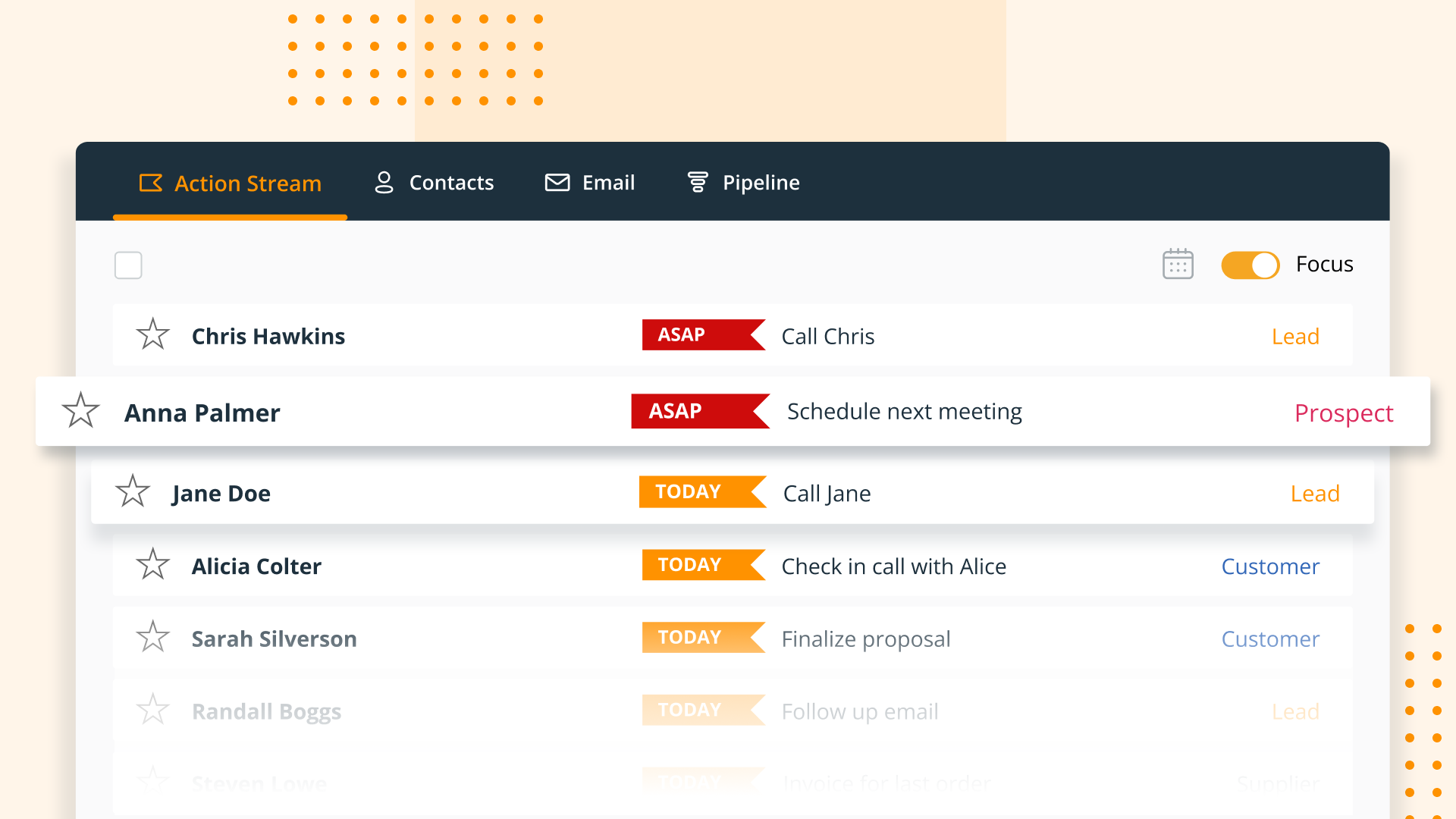
    N/AOnePageCRM aims to turn the complexity of a CRM into a simple to-do list. This action-focused CRM helps users interact with contacts by setting simple follow-up tasks. Just out of a promising sales call? Type the next action to "Send a quote", set a date, and move on to the next contact. Contacts will be sorted by task priority so the user can sell with focused attention to each prospect and client. OnePageCRM can be tried with a 21-day free trial today.

    $9.95

    per month per user

    Pricing
    CalendlyOnePageCRM
    Editions & Modules
    Standard
    $10
    per month (billed annually) per seat
    Teams
    $16
    per month (billed annually) per seat
    Enterprise
    Starts at $15k
    per year
    Professional Plan (Annually)
    $9.95
    per month per user
    Professional Plan (Monthly)
    $15
    per month per user
    Business Plan (Annually)
    $19.95
    per month per user
    Business Plan (Monthly)
    $29
    per month per user
    Offerings
    Pricing Offerings
    CalendlyOnePageCRM
    Free Trial
    YesYes
    Free/Freemium Version
    YesNo
    Premium Consulting/Integration Services
    YesNo
    Entry-level Setup FeeNo setup feeNo setup fee
    Additional DetailsMonthly billing also available.OnePageCRM offers 4 months free in annual subscriptions.
    More Pricing Information
    Community Pulse
    CalendlyOnePageCRM
    Considered Both Products
    Calendly
    No answer on this topic
    OnePageCRM
    No answer on this topic
    Key User Insights
    Would buy again
    98%
    Would buy again
    62 Answers
    No answers on this topic
    Delivers good value for the price
    98%
    Delivers good value for the price
    61 Answers
    No answers on this topic
    Happy with the feature set
    100%
    Happy with the feature set
    63 Answers
    No answers on this topic
    Lived up to sales and marketing promises
    100%
    Lived up to sales and marketing promises
    52 Answers
    No answers on this topic
    Implementation went as expected
    98%
    Implementation went as expected
    55 Answers
    No answers on this topic
    Features
    CalendlyOnePageCRM
    Sales Force Automation
    Comparison of Sales Force Automation features of Calendly and OnePageCRM
    Feature
    Calendly
    -
    Ratings
    OnePageCRM
    9.3
    4 Ratings
    17% above category average
    Customer data management / contact management00 Ratings9.94 Ratings
    Workflow management00 Ratings10.04 Ratings
    Territory management00 Ratings10.02 Ratings
    Opportunity management00 Ratings10.03 Ratings
    Integration with email client (e.g., Outlook or Gmail)00 Ratings10.02 Ratings
    Contract management00 Ratings5.43 Ratings
    Quote & order management00 Ratings10.02 Ratings
    Interaction tracking00 Ratings9.53 Ratings
    Channel / partner relationship management00 Ratings9.22 Ratings
    Customer Service & Support
    Comparison of Customer Service & Support features of Calendly and OnePageCRM
    Feature
    Calendly
    -
    Ratings
    OnePageCRM
    9.9
    3 Ratings
    25% above category average
    Case management00 Ratings9.93 Ratings
    Call center management00 Ratings9.93 Ratings
    Help desk management00 Ratings9.93 Ratings
    Marketing Automation
    Comparison of Marketing Automation features of Calendly and OnePageCRM
    Feature
    Calendly
    -
    Ratings
    OnePageCRM
    10.0
    4 Ratings
    26% above category average
    Lead management00 Ratings10.04 Ratings
    Email marketing00 Ratings10.03 Ratings
    CRM Project Management
    Comparison of CRM Project Management features of Calendly and OnePageCRM
    Feature
    Calendly
    -
    Ratings
    OnePageCRM
    10.0
    4 Ratings
    26% above category average
    Task management00 Ratings10.04 Ratings
    Reporting00 Ratings10.03 Ratings
    CRM Reporting & Analytics
    Comparison of CRM Reporting & Analytics features of Calendly and OnePageCRM
    Feature
    Calendly
    -
    Ratings
    OnePageCRM
    10.0
    4 Ratings
    27% above category average
    Forecasting00 Ratings10.02 Ratings
    Pipeline visualization00 Ratings9.94 Ratings
    Customizable reports00 Ratings10.02 Ratings
    Customization
    Comparison of Customization features of Calendly and OnePageCRM
    Feature
    Calendly
    -
    Ratings
    OnePageCRM
    10.0
    3 Ratings
    27% above category average
    Custom fields00 Ratings9.83 Ratings
    Custom objects00 Ratings10.02 Ratings
    Scripting environment00 Ratings10.02 Ratings
    API for custom integration00 Ratings10.01 Ratings
    Security
    Comparison of Security features of Calendly and OnePageCRM
    Feature
    Calendly
    -
    Ratings
    OnePageCRM
    10.0
    4 Ratings
    17% above category average
    Single sign-on capability00 Ratings9.94 Ratings
    Role-based user permissions00 Ratings10.02 Ratings
    Integrations with 3rd-party Software
    Comparison of Integrations with 3rd-party Software features of Calendly and OnePageCRM
    Feature
    Calendly
    -
    Ratings
    OnePageCRM
    10.0
    1 Ratings
    28% above category average
    Marketing automation00 Ratings10.01 Ratings
    Platform
    Comparison of Platform features of Calendly and OnePageCRM
    Feature
    Calendly
    -
    Ratings
    OnePageCRM
    10.0
    3 Ratings
    27% above category average
    Mobile access00 Ratings10.03 Ratings
    Best Alternatives
    CalendlyOnePageCRM
    Small Businesses
    Square Appointments
    Score10 out of 10
    Salesflare
    Score10 out of 10
    Medium-sized Companies
    Chili Piper
    Score8.8 out of 10
    Kintone
    Score9.7 out of 10
    Enterprises
    Doodle
    Score8.5 out of 10
    Oracle Sales
    Score8.9 out of 10
    All AlternativesView all alternativesView all alternatives
    User Ratings
    CalendlyOnePageCRM
    Likelihood to Recommend
    9.5
    (90 ratings)
    7.6
    (4 ratings)
    Likelihood to Renew
    9.1
    (2 ratings)
    -
    (0 ratings)
    Usability
    10.0
    (4 ratings)
    -
    (0 ratings)
    Support Rating
    8.7
    (32 ratings)
    -
    (0 ratings)
    User Testimonials
    CalendlyOnePageCRM
    Likelihood to Recommend
    Calendly
    It's well suited for music students' lessons. It's well suited for online coaching, primarily through places like Zoom and more. It helps simplify things for your clients, lets you program your schedule, and allows it all to go automatically! If you are working with a senior population, it may be a little tricky for them to sign up and then really hard for them to cancel lessons. There isn't a way to go to the site and cancel. You have to pull up the confirmed email and cancel from there, but people can lose emails.
    Incentivized
    Read full review
    OnePageCRM
    OnePage is great for any company with a sales team. Onepage is great for lead tracking, and showing all communication in one place. Its timeline is easy to use and understand. OnePage also makes it easy to manage a sales team. Their reporting capabilities are excellent and it is a great way to track deals.
    Incentivized
    Read full review
    Pros
    Calendly
    • Sync with multiple calendar types so my schedule is always current.
    • Integration with Zoom to schedule meetings, send invites, and populate my Zoom app accordingly.
    • Automatic email communication to all parties with all relevant details in a clear format.
    • Allowing team members to do the same in a way that I'm also notified of what meetings are taking place saves a lot of time in terms of coordinating to find out what other people are doing.
    • Well-designed interface that simplifies everything down to its clearest expression. Language instruction and interaction are wonderfully simple and clear.
    Incentivized
    Read full review
    OnePageCRM
    • It uses a split screen: one half is your action stream, the other is for a selected contact. This is really helpful.
    • You can do mass actions-- like rescheduling a group of actions for another day.
    • "Tags" are a handy feature... it's sophisticated enough to trigger automated follow-ups in our mail service, Klaviyo
    Incentivized
    Read full review
    Cons
    Calendly
    • After a meeting is booked, having the ability to change the location without canceling the entire booking.
    • Being able to offer 2 different locked in locations for certain time periods of the day within the same event. So you're not having to create 2 events for the same thing, only different locations.
    • Giving users permission to create their own routing forms. We run an independent business model where our users like to have control over their subscriptions.
    Incentivized
    Read full review
    OnePageCRM
    • The ability to interface with all or many VoIP services would be top of my priority list
    • Skype is not a favourite of mine, but Google hangouts is which is now included with OnePageCRM
    • The ability to create email templates would be good. I have a separate app for that, but it would be good to have it on board
    Incentivized
    Read full review
    Likelihood to Renew
    Calendly
    For all reasons like workflows, UI, and the way Calendly keeps all of us engaged through the Collective forum. It's indeed undeniable that no other product covers all business needs like Calendly does. On the other side, this has also reduced the workload by enabling us to focus more on other tasks for the day
    Incentivized
    Read full review
    OnePageCRM
    No answers on this topic
    Usability
    Calendly
    Calendly is extremely easy to use for selecting times and days for meetings. From my end, it's very easy to indicate the days and times that I am available for meetings. I have used other scheduling products, but Calendly has the smoothest way of operating. I highly recommend it for scheduling meetings
    Read full review
    OnePageCRM
    No answers on this topic
    Support Rating
    Calendly
    There is a lot of support for Calendly. Whenever I have had issues navigating through it, especially as a new user, I found multiple support on the web addressing my questions or concerns. There is a lot of in app informative notes accessible to users to navigate through Calendly when needed.
    Incentivized
    Read full review
    OnePageCRM
    No answers on this topic
    Alternatives Considered
    Calendly
    When I started using it, there were not many competitors in this space. I've seen some like Mixmax that seem to work well for solopreneurs or where free version might be better than Calendly's free version. I use the paid version of Calendly and it's just kept serving us well so why change?
    Incentivized
    Read full review
    OnePageCRM
    We use all these software for task management and email marketing. OnePage doesn't send out mass emails and we needed a more robust task management system, so we use SharpSpring and Asana as well.
    Incentivized
    Read full review
    Return on Investment
    Calendly
    • Positive: When people want to meet, I can simply send my Calendly link and it takes less than 5 seconds to do.
    • Positive: It integrates well with Zoom, which means that by default all my appointments include Zoom information for a remote call.
    Incentivized
    Read full review
    OnePageCRM
    • OnePage has helped with time efficiency for the sales team. Because OnePage is so easy to use and manage, our sales team can spend more time selling and less time working with the system.
    • OnePage is great for organization. It helps us track our daily schedules/tasks and shows all communication clearly in one place.
    Incentivized
    Read full review
    ScreenShots

    Calendly Screenshots

    Screenshot of how to share a scheduling linkScreenshot of automated workflowsScreenshot of browser extensionsScreenshot of routing formsScreenshot of round robin & collective eventsScreenshot of admin management

    OnePageCRM Screenshots

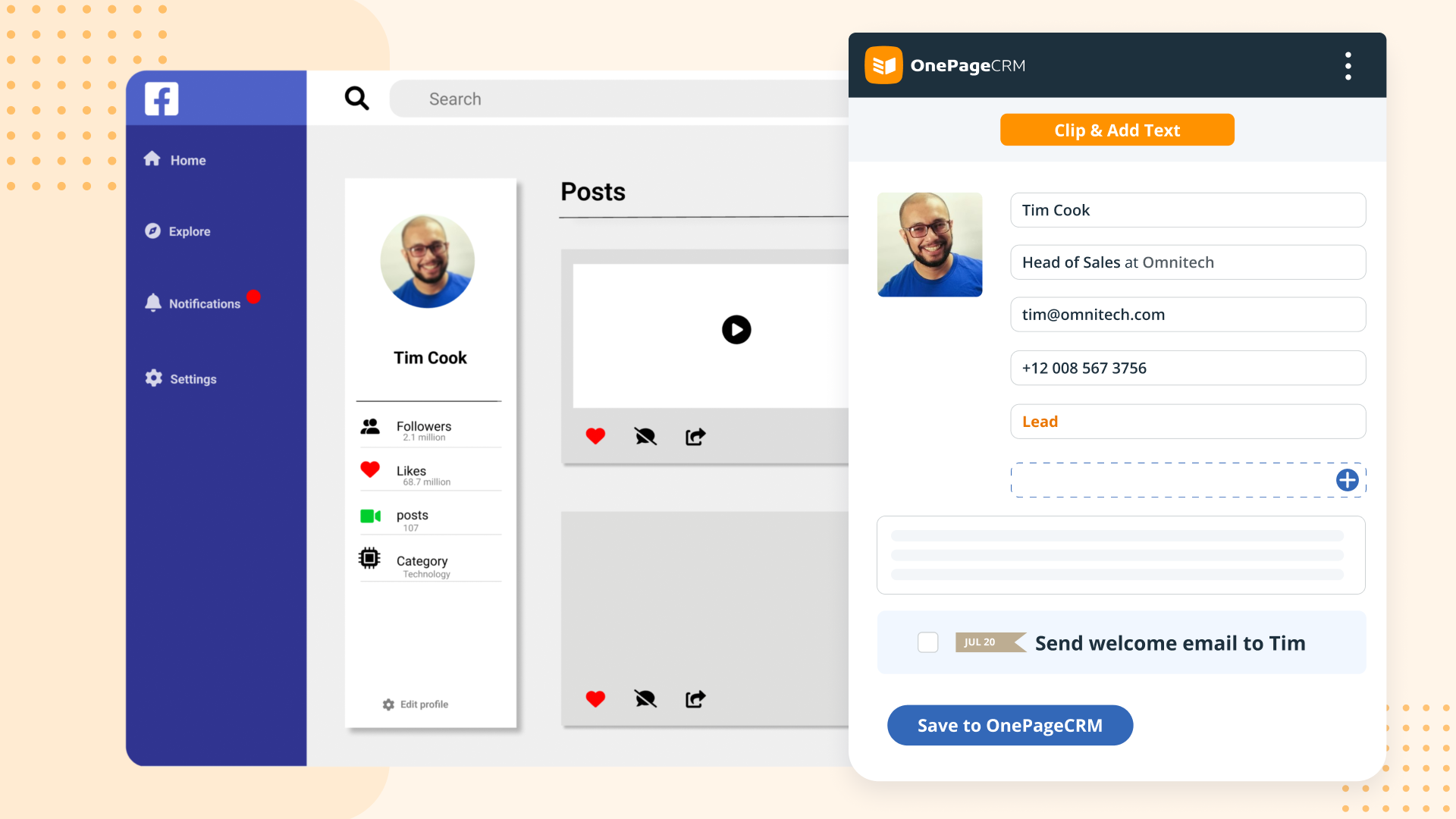
    Screenshot of OnePageCRM transforms the user's database into an actionable to-do list. Contacts are sorted into Action Stream by task priority so users know what to do next.Screenshot of OnePageCRM displays relevant calls, notes, deals, and golden nuggets about a contact in one place.Screenshot of OnePageCRM's email integration allows users to send emails in bulk, create templates, and track opens.Screenshot of For lead generation, OnePageCRM's browser extension lets users add leads to a CRM from any webpage in one click.Screenshot of For sales on the go, download the OnePageCRM mobile app (iOS & Android). Log calls and update deals.Screenshot of Manage deals with OnePageCRM's drag-and-drop feature and keep track of goals with a live KPI dashboard.