Chose Certinia FM Cloud
FinancialForce Subscription & Usage Billing has more features, more useability, and manages higher numbers of customers. The systems I have used in the past are easier to navigate but couldn't handle this number of customers.

| Product | Rating | Most Used By | Product Summary | Starting Price |
|---|---|---|---|---|
 Certinia FM Cloud | N/A | Certinia FM Cloud automates financial management on the Salesforce platform. The customer-centric software includes a general ledger, automated billing processes, and financial intelligence. | N/A | |
 Euna Budget | N/A | Euna Budget (Questica Budget and OpenBook) is a budgeting tool that enables organizations to share and communicate their financials and other data, when and where they need to. Additionally, its Project Explorer for Capital Budgets allows organizations to display on an interactive map every infrastructure project, including the budget, actual spend, funding sources, and accompanying documentation, images, video, etc. | N/A | |
 Microsoft Dynamics SL | N/A | Microsoft Dynamics SL is one of the ERP products in the Dynamics family. This product was acquired from Solomon 2000. The product is typically used by SMBs, particularly in project-based businesses (e.g. construction). It has strong accounting and project management capabilities. | N/A |
| Certinia FM Cloud | Euna Budget | Microsoft Dynamics SL | ||||||||||||||||||||||
|---|---|---|---|---|---|---|---|---|---|---|---|---|---|---|---|---|---|---|---|---|---|---|---|---|
| Editions & Modules | No answers on this topic | No answers on this topic | No answers on this topic | |||||||||||||||||||||
| Offerings |
| |||||||||||||||||||||||
| Entry-level Setup Fee | Required | No setup fee | No setup fee | |||||||||||||||||||||
| Additional Details | Certinia Professional Services Cloud software follows a subscription-based pricing model that is typically structured according to the number of users and the level of features required. The software’s pricing may vary depending on the organization’s size and needs, with options to select modules or add-ons for additional functionality. Specific pricing details may require a consultation or quote from Certinia for tailored solutions. | — | — | |||||||||||||||||||||
| More Pricing Information | ||||||||||||||||||||||||
| Certinia FM Cloud | Euna Budget | Microsoft Dynamics SL | |
|---|---|---|---|
| Considered Multiple Products | Certinia FM Cloud  Lynne Taylor CAO (Chief Administrative Officer) Chose Certinia FM Cloud Outside CPA was strong proponent of Quickbooks and it was evaluated initially, but size of company, complexity of transactions, eventual move to Salesforce and need for multi-company and multicurrency ruled it out almost from the start. As the only accounting system built … | Euna Budget | Microsoft Dynamics SL  Marisol Caamaño IT manager Chose Microsoft Dynamics SL When I arrived this product was being used.  Pamela Dalton Accounts Payable Manager Chose Microsoft Dynamics SL We started with QuickBooks Enterprise when our company was young. We quickly outgrew this program as it was not able to accommodate the financial reporting we needed to satisfy our investors. QuickBooks was also very limited in managing our revenue as we grew. We did try Great …  David Nero Chief Information Officer Chose Microsoft Dynamics SL Different class. Microsoft Dynamics SL isn't modern in design or interface.  Jeffrey Morin Accounting/Operation Chose Microsoft Dynamics SL I have been on this product for 17 years. I have worked with Great Plains and have worked with products in the Health Care industry and believe this product pulls in all the main functionality into basic core modules and allows users to quickly grasp how to use the product. …  Jerry McLellan, CPA Director of Business Applications Chose Microsoft Dynamics SL Of the comparable mid-range ERP systems, Dynamics SL competes at the lower end based on price, but also above the high-end based on flexibility, data, and reporting. Being able to stay with the same core accounting from a $100 million dollar company to a $3 billion dollar …  Bill Aiton President Chose Microsoft Dynamics SL We used Connectwise, which did a good job costing function, but had to be periodically integrated and lacked some reporting capability. We looked at GP but it does not have good project accounting, so it was not a good fit for our company. We looked at NAV but there was too much …  Jack Boyer President Chose Microsoft Dynamics SL We selected Dynamics SL because our business lives and dies by the success of our projects. A product that can tell you that you have a problem before you invoice, helps you get your project back on track much better. It's also much easier to evaluate across projects, tasks and … |
| Certinia FM Cloud | Euna Budget | Microsoft Dynamics SL | |||||||||||||||||||||||||||||||
|---|---|---|---|---|---|---|---|---|---|---|---|---|---|---|---|---|---|---|---|---|---|---|---|---|---|---|---|---|---|---|---|---|---|
| Payroll Management |
| ||||||||||||||||||||||||||||||||
| Customization |
| ||||||||||||||||||||||||||||||||
| Security |
| ||||||||||||||||||||||||||||||||
| Reporting & Analytics |
| ||||||||||||||||||||||||||||||||
| General Ledger and Configurable Accounting |
| ||||||||||||||||||||||||||||||||
| Inventory Management |
| ||||||||||||||||||||||||||||||||
| Order Management |
| ||||||||||||||||||||||||||||||||
| Subledger and Financial Process |
| ||||||||||||||||||||||||||||||||
| Project Financial Management |
| ||||||||||||||||||||||||||||||||
| Project Execution Management |
| ||||||||||||||||||||||||||||||||
| Grants Management |
| ||||||||||||||||||||||||||||||||
| Manufacturing |
| ||||||||||||||||||||||||||||||||
| Supply Chain |
|
| Certinia FM Cloud | Euna Budget | Microsoft Dynamics SL | |
|---|---|---|---|
| Small Businesses |  Zoho One Score 9.3 out of 10 |  MIP Fund Accounting Score 8.7 out of 10 | Zoho One Score 9.3 out of 10 |
| Medium-sized Companies |  Infor VISUAL Score 7.3 out of 10 |  Centage Score 9.4 out of 10 | Infor VISUAL Score 7.3 out of 10 |
| Enterprises |  24SevenOffice Score 9.0 out of 10 |  OneStream Score 8.8 out of 10 | 24SevenOffice Score 9.0 out of 10 |
| All Alternatives | View all alternatives | View all alternatives | View all alternatives |
| Certinia FM Cloud | Euna Budget | Microsoft Dynamics SL | |
|---|---|---|---|
| Likelihood to Recommend | 6.0 (0 ratings) | 6.0 (0 ratings) | 5.0 (0 ratings) |
| Likelihood to Renew | 10.0 (0 ratings) | - (0 ratings) | 5.4 (0 ratings) |
| Usability | 10.0 (0 ratings) | 6.0 (0 ratings) | 3.0 (0 ratings) |
| Availability | 10.0 (0 ratings) | - (0 ratings) | 9.9 (0 ratings) |
| Performance | 9.0 (0 ratings) | - (0 ratings) | 1.0 (0 ratings) |
| Support Rating | 10.0 (0 ratings) | 4.0 (0 ratings) | 9.5 (0 ratings) |
| Online Training | 10.0 (0 ratings) | - (0 ratings) | 1.0 (0 ratings) |
| Implementation Rating | 10.0 (0 ratings) | - (0 ratings) | 9.0 (0 ratings) |
| Product Scalability | - (0 ratings) | - (0 ratings) | 1.4 (0 ratings) |
| Certinia FM Cloud | Euna Budget | Microsoft Dynamics SL | |
|---|---|---|---|
| Likelihood to Recommend |
|
|
|
| Pros |
|
|
Jerry McLellan, CPA Director of Business Applications |
| Cons |
|
|
Jack Boyer, MCP, CPA (Inactive) President |
| Likelihood to Renew |
Lynne Taylor CAO (Chief Administrative Officer) | No answers on this topic |
|
| Usability |
Lynne Taylor CAO (Chief Administrative Officer) |
|
|
| Reliability and Availability |
Lynne Taylor CAO (Chief Administrative Officer) | No answers on this topic |
|
| Performance |
Lynne Taylor CAO (Chief Administrative Officer) | No answers on this topic | No answers on this topic |
| Support Rating |
Lynne Taylor CAO (Chief Administrative Officer) |
|
|
| Online Training |
Lynne Taylor CAO (Chief Administrative Officer) | No answers on this topic | No answers on this topic |
| Implementation Rating |
Lynne Taylor CAO (Chief Administrative Officer) | No answers on this topic |
|
| Alternatives Considered |
|
|
Pamela Dalton Accounts Payable Manager |
| Scalability | No answers on this topic | No answers on this topic |
|
| Return on Investment |
|
|
Bill Aiton President |
| ScreenShots | Euna Budget Screenshots     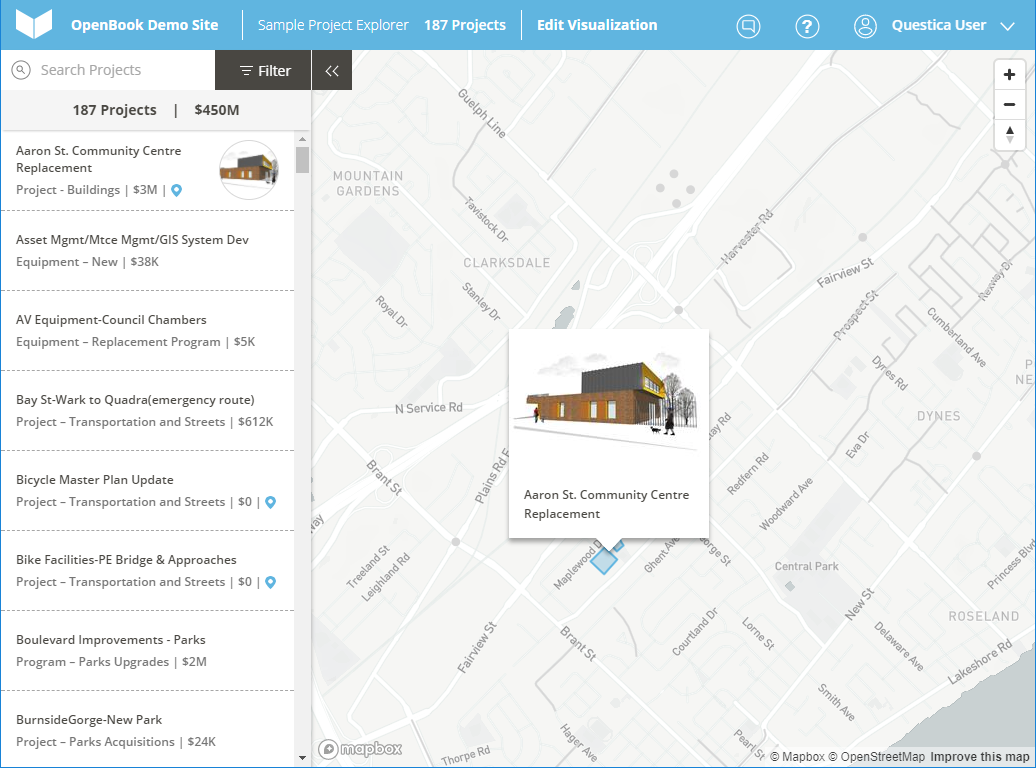 |