Clockify vs. PeopleGuru™

Overview
ProductRatingMost Used ByProduct SummaryStarting Price
Clockify
Score 8.5 out of 10
Small Businesses (1-50 employees)
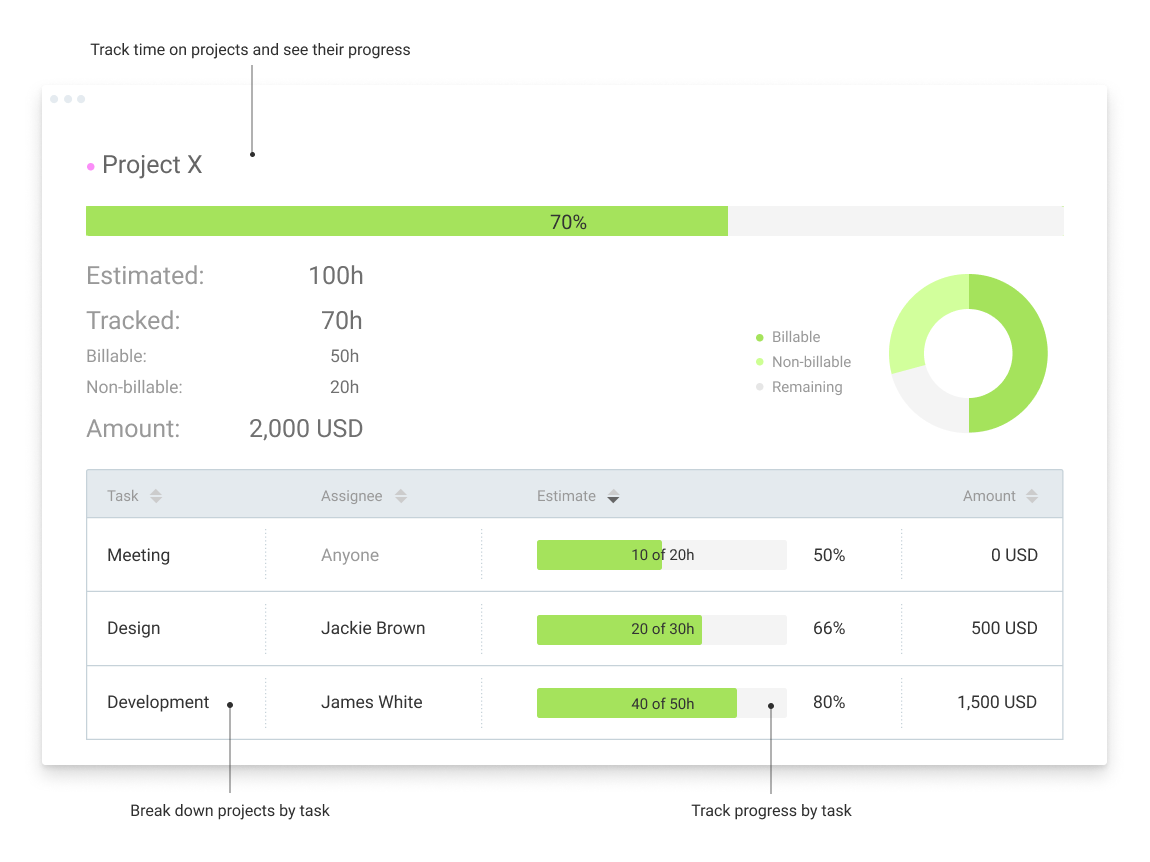
Clockify, from COING in Palo Alto, is a time tracker and employee timesheet software for teams of all sizes. Clockify lets users track how much time is spent working on tasks, as well as keep track of employee timesheets and billable hours, project completion, reports, and schedules.
$0
forever, unlimited everything
PeopleGuru™
Score 7.4 out of 10
N/A
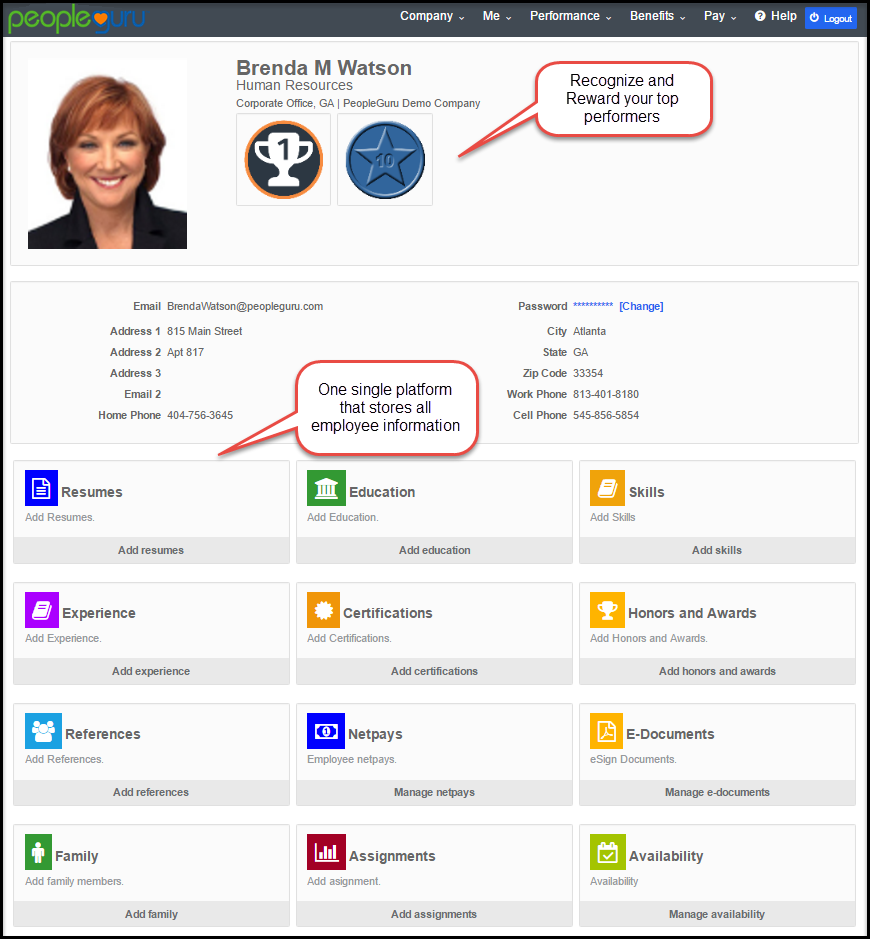
PeopleGuru is a cloud-based Human Capital Management solution designed for mid-market organizations. From recruitment to retirement, PeopleGuru HCM manages the entire employee life cycle. PeopleGuru's single platform, single database, solution includes: HR, Payroll, Benefits Management, Onboarding, Recruiting, Reporting and Analytics, ACA Management, Salary Administration, Performance Management, and Social Collaboration Tools. In addition to PeopleGuru's next generation technology, PeopleGuru…N/A
Pricing
ClockifyPeopleGuru™
Editions & Modules
Clockify Free
$0
forever, unlimited everything
Clockify Plus
$9.99
per month, per workspace
Clockify Enterprise
$9.99
per month, per user, per workspace
Clockify Premium
$29.99
per month, per workspace
Clockify Server
Starts at 450
No answers on this topic
Offerings
Pricing Offerings
ClockifyPeopleGuru™
Free Trial
YesNo
Free/Freemium Version
YesNo
Premium Consulting/Integration Services
NoNo
Entry-level Setup FeeOptionalRequired
Additional DetailsUnlimited usage and number of users for free. Paid plans are solely for access to additional features. Self-hosting software on own servers available.
More Pricing Information
Community Pulse
ClockifyPeopleGuru™
Considered Both Products
Clockify
Chose Clockify
Clockify is much more simple and straight-forward compared to their other tools that I have used. I would say that it is the most beginner and start up friendly as well, price wise. It offers the most freedom when it comes to doing edits and the submission of your timesheets.
Chose Clockify
More affordable, management of leaves, and expenses, overview of projects P&L. As disadvantage, Clockify schedule is worse than 10k ft and it doesn't have a drag and drop feature for scheduling projects.
Chose Clockify
It generated satisfactory timesheet for me comparing to other same softwares which was satisfying for me and my employer and the HR department. Each time explains my task and each task describes the time i have spent on during the days of the month. And also provide the …
Chose Clockify
I wound up using Harvest—Tried and true app that actually integrates with QBO.
Chose Clockify
Both Clockify and Hubstaff served our business well. I was not involved in the selection of Clockify to replace Hubstaff, but I believe the decision to move was financial reasons.
Chose Clockify
clockify is 100000% better than what I've used in the past - it makes the numbers real rather than guesstimates.
Chose Clockify
Clockify has a more specific organization, which makes it easier to find and work on a specific task and track time all in one place.
Chose Clockify
Harvest is very similar to Clockify. The only difference is that Harvest also has an invoicing and billing system built into it. So if you're billing your clients based off of time directly, Harvest may be a better option as far as that goes. Of course, Harvest only has minimum …
Chose Clockify
Clockify is a perfect cheaper alternative to Harvest and other software that are more expensive but provide more tools. If you need software that tracks time efficiently and generates the required project and employees time reports, Clockify is terrific. If you need software …
Chose Clockify
I did a Google search and tried a few. I don't remember which ones now. I wanted something that was free at first which was nice as I started my own business. Clockify has given me what I need for free and allows me to grow with more people if I want as well. I'd say I got …
PeopleGuru™
Chose PeopleGuru™
I used Paychex at a previous company, they would not work with Cannabis companies at the time we needed to switch. PeopleGuru is seamless, was easy to transfer data to, and even more user-friendly than Paychex.
Chose PeopleGuru™
We used both Kronos & Ultipro (now UKG) before switching to PeopleGuru, and the price is definitely better with PeopleGuru. As for performance from a payroll perspective, I liked both Kronos & Ultipro better. We left Kronos because the HR software was lacking, and left Ultipro …
Chose PeopleGuru™
Kronos data did not flow between the modules and they have horrible support.
Chose PeopleGuru™
most companies won't service our industry so I'm stuck with Peopleguru
Chose PeopleGuru™
All of these other systems have their strengths and have been around a long time. We choose PeopleGuru because we thought it could fit our unique needs compared to the others and pricing was considered as well.
Chose PeopleGuru™
PeopleGuru is better than other cannabis-friendly payroll systems, like CheckWriters or MyPaperlessOffice (companies so small they were not available in your dropdown). It is not as good as bigger companies that are not cannabis-friendly, like ADP or Paylocity. ADP is super …
Chose PeopleGuru™
PeopleGuru performs well against the other software. I find the PeopleGuru software to be more user-friendly and innovative compared to the others. Insperity TimeStar has a better layout for timekeeping and allows for more report options in regards to time and attendance.
Chose PeopleGuru™
PeopleGuru HCM is a not stop experience. I did not have to utilize multiple systems for all my data.
Chose PeopleGuru™
Paylocity, Paycor and ADP Enterprise HR
Chose PeopleGuru™
I was not part of the team that chose this software, but I believe ADP and Paychex Flex was two programs that were considered. The ultimate choice was made based on budget and tying it into our existing time clock and time and attendance we were already using.
Features
ClockifyPeopleGuru™
Human Resource Management
Comparison of Human Resource Management features of Product A and Product B
Clockify
-
Ratings
PeopleGuru™
6.5
Ratings
22% below category average
Employee demographic data00 Ratings5.80 Ratings
Employment history00 Ratings5.70 Ratings
Job profiles and administration00 Ratings7.70 Ratings
Workflow for transfers, promotions, pay raises, etc.00 Ratings7.00 Ratings
Organizational charting00 Ratings4.40 Ratings
Organization and location management00 Ratings8.10 Ratings
Compliance data (COBRA, OSHA, etc.)00 Ratings6.90 Ratings
Payroll Management
Comparison of Payroll Management features of Product A and Product B
Clockify
-
Ratings
PeopleGuru™
7.5
Ratings
8% below category average
Pay calculation00 Ratings7.70 Ratings
Off-cycle/On-Demand payment00 Ratings8.30 Ratings
Benefit plan administration00 Ratings4.20 Ratings
Direct deposit files00 Ratings8.20 Ratings
Salary revision and increment management00 Ratings7.80 Ratings
Reimbursement management00 Ratings9.00 Ratings
Leave and Attendance Management
Comparison of Leave and Attendance Management features of Product A and Product B
Clockify
-
Ratings
PeopleGuru™
6.6
Ratings
21% below category average
Approval workflow00 Ratings7.30 Ratings
Balance details00 Ratings5.90 Ratings
Annual carry-forward and encashment00 Ratings6.70 Ratings
Employee Self Service
Comparison of Employee Self Service features of Product A and Product B
Clockify
-
Ratings
PeopleGuru™
8.1
Ratings
1% below category average
View and generate pay and benefit information00 Ratings7.90 Ratings
Update personal information00 Ratings8.20 Ratings
View company policy documentation00 Ratings7.80 Ratings
Employee recognition00 Ratings8.90 Ratings
View job history00 Ratings7.90 Ratings
Asset Management
Comparison of Asset Management features of Product A and Product B
Clockify
-
Ratings
PeopleGuru™
6.0
Ratings
29% below category average
Tracking of all physical assets00 Ratings6.00 Ratings
HR Reporting
Comparison of HR Reporting features of Product A and Product B
Clockify
-
Ratings
PeopleGuru™
6.6
Ratings
13% below category average
Report builder00 Ratings5.90 Ratings
Pre-built reports00 Ratings6.30 Ratings
Ability to combine HR data with external data00 Ratings7.70 Ratings
Onboarding
Comparison of Onboarding features of Product A and Product B
Clockify
-
Ratings
PeopleGuru™
7.6
Ratings
5% below category average
New hire portal00 Ratings7.90 Ratings
Manager tracking tools00 Ratings7.20 Ratings
Performance and Goals
Comparison of Performance and Goals features of Product A and Product B
Clockify
-
Ratings
PeopleGuru™
7.3
Ratings
10% below category average
Corporate goal setting00 Ratings6.40 Ratings
Individual goal setting00 Ratings7.20 Ratings
Line-of sight-visibility00 Ratings8.20 Ratings
Performance tracking00 Ratings7.30 Ratings
Performance Management
Comparison of Performance Management features of Product A and Product B
Clockify
-
Ratings
PeopleGuru™
6.4
Ratings
21% below category average
Performance plans00 Ratings6.20 Ratings
Performance improvement plans00 Ratings6.40 Ratings
Review status tracking00 Ratings6.20 Ratings
Review reminders00 Ratings6.40 Ratings
Multiple review frequency00 Ratings6.50 Ratings
Succession Planning
Comparison of Succession Planning features of Product A and Product B
Clockify
-
Ratings
PeopleGuru™
6.1
Ratings
25% below category average
Create succession plans/pools00 Ratings5.50 Ratings
Candidate ranking00 Ratings6.40 Ratings
Candidate search00 Ratings6.30 Ratings
Candidate development00 Ratings6.40 Ratings
Recruiting / ATS
Comparison of Recruiting / ATS features of Product A and Product B
Clockify
-
Ratings
PeopleGuru™
6.9
Ratings
13% below category average
Job Requisition Management00 Ratings7.10 Ratings
Company Website Posting00 Ratings7.60 Ratings
Publish to Social Media00 Ratings6.30 Ratings
Job Search Site Posting00 Ratings6.40 Ratings
Duplicate Candidate Prevention00 Ratings8.10 Ratings
Applicant Tracking00 Ratings6.20 Ratings
Notifications and Alerts00 Ratings6.70 Ratings
Best Alternatives
ClockifyPeopleGuru™
Small Businesses
Traqq
Traqq
Score 9.1 out of 10
Dayforce Powerpay
Dayforce Powerpay
Score 9.2 out of 10
Medium-sized Companies
TimeClock Plus
TimeClock Plus
Score 9.5 out of 10
Paypro Workforce Management
Score 9.1 out of 10
Enterprises
Zoho People
Zoho People
Score 8.9 out of 10
PeopleStrong
PeopleStrong
Score 10.0 out of 10
All AlternativesView all alternativesView all alternatives
User Ratings
ClockifyPeopleGuru™
Likelihood to Recommend
8.6
(0 ratings)
7.3
(0 ratings)
Likelihood to Renew
10.0
(0 ratings)
9.1
(0 ratings)
Usability
9.2
(0 ratings)
6.4
(0 ratings)
Availability
10.0
(0 ratings)
-
(0 ratings)
Performance
9.0
(0 ratings)
-
(0 ratings)
Support Rating
8.2
(0 ratings)
7.7
(0 ratings)
Online Training
-
(0 ratings)
1.0
(0 ratings)
Implementation Rating
-
(0 ratings)
5.5
(0 ratings)
Configurability
-
(0 ratings)
7.6
(0 ratings)
Product Scalability
10.0
(0 ratings)
-
(0 ratings)
User Testimonials
ClockifyPeopleGuru™
Likelihood to Recommend
I would recommend this for someone who is a freelancer with multiple clients, but would not recommend to a company who has multiple employees doing the same job every single day. It'd be easier to have them clock in on one platform, like Square, for example, which automatically can take out taxes (for W9 employees)
Read full review
I'd say PeopleGuru is well suited for most businesses -- a more significant (200+ employees) company may want to use something with a sleeker design. This provider is willing to work with cannabis businesses, which is unusual for payroll providers now.
Read full review
Pros
  • They don't give refunds if their app doesn't work as advertised.
  • They blame you for not reading their terms of service.
  • They may give you a credit for a product you can't use if you complain loudly enough but they still keep your money.
Read full review
  • AdHoc Reports
  • Applicant Tracking System(ATS)
  • Flexibility in Performance Reviews
  • Ability to manage company set-up and reporting
  • Ability to customize standard company forms in PG for usage
Read full review
Cons
  • In general, manuals or how to use instructional videos are always welcome - just covering the very basic are very good to get everyone up and running.
  • Maybe work on your scalability - the main reason why we switched to a different provider is because the company was ramping up and the competitors have more features that come with not just time and productivity tracking.
  • I always like the classic blue and white pallets on the app but sometimes I just wish there's more option to customize how it looks just to give it a little more flavor.
Read full review
  • Recruiting module is very clunky and not streamlined. I've worked with recruiting platforms that are more efficient.
  • Job changes are a multi-step process that feels like it could be one screen asking all the necessary info regarding pay rate, date, labor, etc. whereas now you have to go through multiple tabs and screens to change someone's position.
  • Labor mapping seems to be a custom request every time when the pay rate is different for two different jobs. Feels like there is a lot of back-end work that needs to be accomplished before it pulls correctly into labor.
  • Would like to see an app with supervisor/time manager functions. At least to approve punch correction or time-off requests.
  • Advanced scheduling available to certain job roles instead of all or nothing.
Read full review
Likelihood to Renew
I'm using the free version at the moment and loving it. What a great product, easy, responsive and has better up time than Yahoo Mail. :) What isn't there to like?
Read full review
The software is cost-effective and exceeds our needs compared to the previous software.
Read full review
Usability
Very affordable, accessible and simple. For this very reason I would say, it culminates to Clockify being very beginner and start-up friendly. It is its strongest suit after all, and this is the main reason why I would recommend this to anyone. I am very thankful for me ex colleague who recommended this to me, we're no longer working together but I still hear that he's still using Clockify to this very day on his own business
Read full review
Some processes are cumbersome and the help guide does not offer all solutions.
Read full review
Reliability and Availability
I have never had an issue logging in or it not being available. I use Clockify every work day during the week, frequently starting/stopping projects. I've had past experience with other systems that suddenly aren't usable for an hour and that is something I have never experienced with Clockify. They are doing something right on their backend. Nice job, Clockify folks
Read full review
No answers on this topic
Performance
I already mentioned how it feels light across the wire. Pages load fast in the web browser. I have not tried the browser plug-in nor the mobile app. I give it a 9 instead of 10 as the desktop app seemed to hesitate when I clicked the start/stop of a project/task
Read full review
No answers on this topic
Support Rating
I dealt very little with customer support because Clockify is so easy to use. That being said, the few times I did, I got fast responses and any issues that I did have were solved in a very fast manner.
Read full review
The customer service is great for the most part. There are a few issues with tax filings but overall I am pleased with the customer service provided by PeopleGuru.
Read full review
Online Training
No answers on this topic
The trainer was difficult to understand.
Read full review
Implementation Rating
No answers on this topic
The implementation process was cumbersome and stressful. It took an extremely long time to complete this process. We had to learn a lot on the fly because this was the first implementation for all of us. The process would have been a lot easier if there was a third party that could assist with a lot of the work required to transfer and verify data.
Read full review
Alternatives Considered
Clockify is much more simple and straight-forward compared to their other tools that I have used. I would say that it is the most beginner and start up friendly as well, price wise. It offers the most freedom when it comes to doing edits and the submission of your timesheets
Read full review
PeopleGuru is better than other cannabis-friendly payroll systems, like CheckWriters or MyPaperlessOffice (companies so small they were not available in your dropdown). It is not as good as bigger companies that are not cannabis-friendly, like ADP or Paylocity. ADP is super expensive but given the choice I would be with Paylocity over PeopleGuru.
Read full review
Scalability
Because it feels light on the wire and runs so smoothly with great up-time. I have to assume that the same is true as it scales. I'm a single user so maybe I don't see if there are any scalability issues. With the way it seems architected to run so quickly across many platforms (desktop, mobile, web, browser plug-in), I have to think that it is using recent technology that provides scalability options
Read full review
No answers on this topic
Return on Investment
  • The free plan really did everything we needed for the 6 months or so we used it. Without Clockify, we would have had to pay roughly $40+/month for a software tool.
  • When we upgraded to the paid version, it was still only $10/month and helped us be able to have minimum billing increments which is a huge monetary increase.
Read full review
  • Cost is reasonable
  • User experience has gotten worse
  • Report writing had become much easier & less limited with variables that we can use
Read full review
ScreenShots

Clockify Screenshots

Screenshot of Time trackerScreenshot of TimesheetScreenshot of Time tracking appsScreenshot of DashboardScreenshot of ReportsScreenshot of Projects

PeopleGuru™ Screenshots

Screenshot of A single employee profile panel stores all employee data including personal documents, PTO requests, banking, skills, certifications, and awards.Screenshot of PeopleGuru HCM is delivered with client defined dashboards which can be configured and controlled by an employee and/or administrator to improve the employee experience and drive user adoption. All dashboards can be exported to Excel.Screenshot of A user experience designed to help employees select the right benefits for themselves, family members, and dependents.Screenshot of The Employee Master, which can be used to manage a large, dynamic workforce. Filter by different locations, departments, or other various structures.Screenshot of the employee portal, available either via mobile or self-service, where employees have access to their pay stubs, W-2s, compensation statements, and PTO management.Screenshot of PeopleGuru's Daily Feed- communication platform to engage, reward, recognize, and collaborate with people. With the Daily Feed, employees can communicate with work groups, use direct private messaging, and publish posts for their peers.