Commanders Act offers Enterprise Tag Manager, a product designed to handle website tags - and also SDKs in a single SDK container - through a management interface without the need for technical expertise.
N/A
Crownpeak Digital Accessibility and Quality
Score 7.4 out of 10
N/A
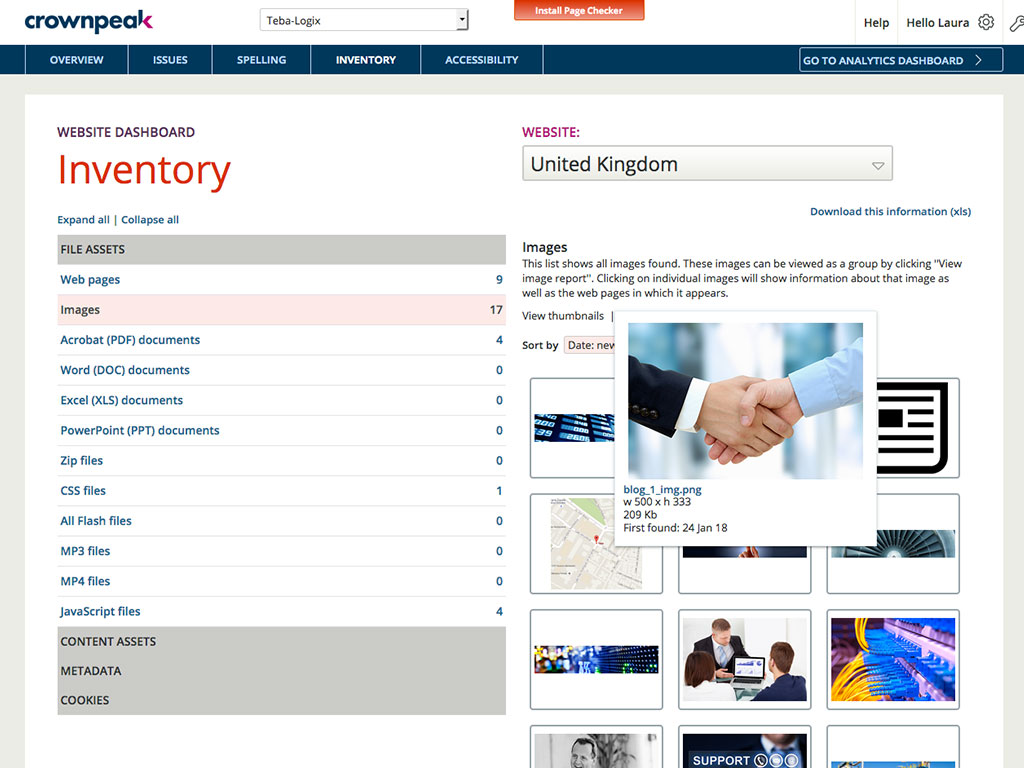
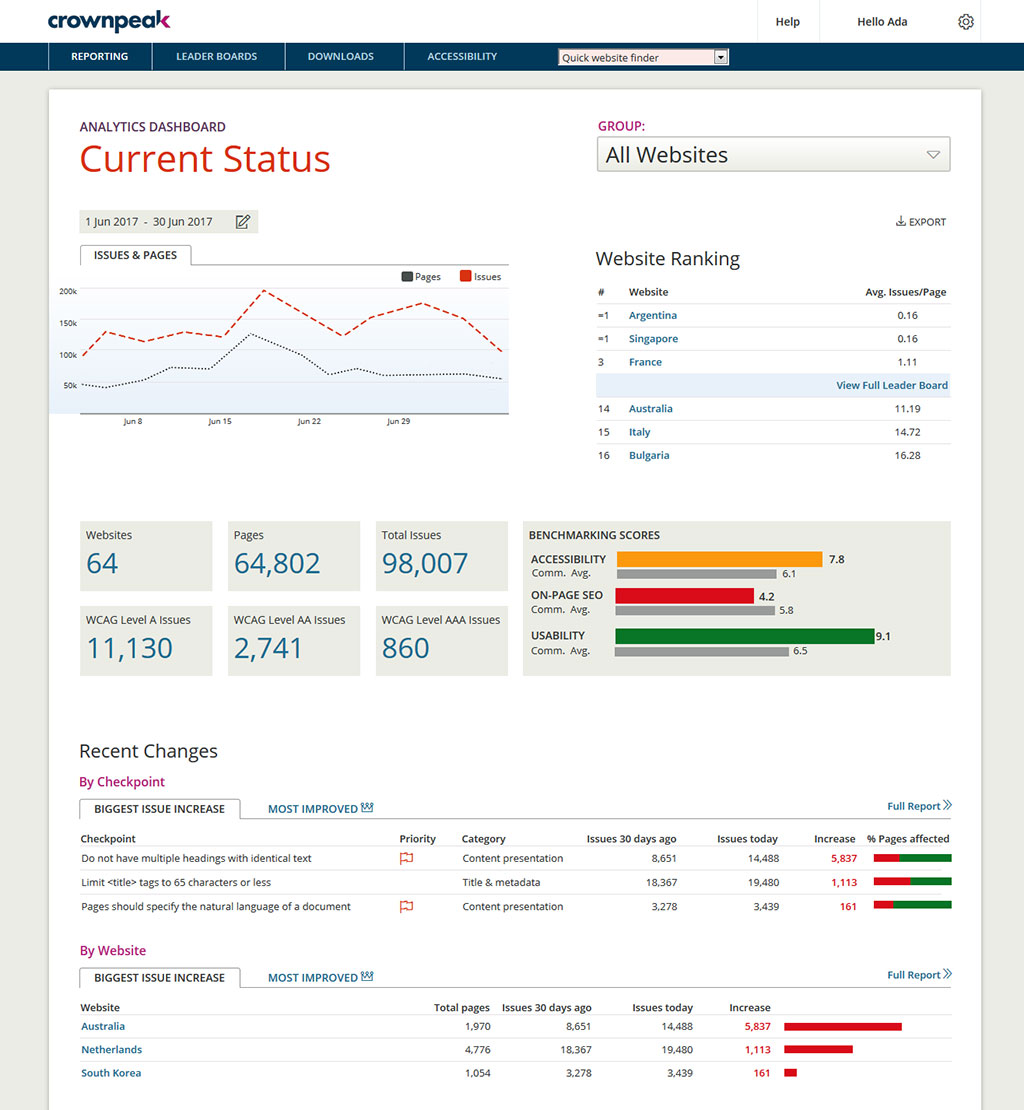
Crownpeak Digital Accessibility and Quality is a digital governance and web content management and monitoring solution designed to support excellent customer experience across all digital touchpoints, supporting web accessibility needs, error catching, SEO best practices, brand compliance, and analytics with benchmarking. Crownpeak Digital Accessibility and Quality can be integrated into an existing CMS.
One of the most similar solutions to Crownpeak is the Yext tool because it has a good set of functions that can be managed from content to customer experiences, it is fascinating to be able to track all user interactions through users, in the same way as in Crownpeak that …
We find Crownpeak DQM to be more user-friendly and offers a broader range of functions than Siteimprove. The interface offers better granularity and the real-time tracking of issues provides a great deal of insight.
We did a demo between two companies and everything one lacked Crownpeak could provide, better pricing, better help, friendlier customer service, better tooling, allowing more customization, etc.
Having worked on hundreds of accessibility projects across many types and sizes of organizations, my recommendation is that Crownpeak DQM is the most effective automated accessibility testing tool for achieving the end goals of:
Episerver DXP is a quality product that we used for a number of years. For us, the advantage Crownpeak DXP has over Episerver and other DXP products in the same Enterprise category is in the following areas: - Composability: great 'out of the box' features, combined with the …
Better all-around alternative. Crownpeak Digital Quality Management (DQM) focuses on a wider range of issues and we found each element to be competitive or superior.
Crownpeak Digital Quality Management (DQM) has all the tools in one dashboard for all possible needs of a website to resolve SEO and other issues. Whereas WordPress is more of searching for the right plugin to assist in finding all the issues you might have a need to address.
If you need a single place where you can handle all the third party pixels, this is a well-suited platform. As well as if you want to keep the deployment independent from all other (and more complex) deployments driven by IT. If you need a pixel to be fired not just when the page loads, but based on user actions, you should use the events and that's pretty complex to handle.
DQM deals with quality assurance across most areas of website content and customer experience; including content quality, brand updates, product detail and SEO effectiveness (including broken links, H-tags etc.). It does overlap with some of the other custom tools we already use in areas such as SEO quality and effectiveness. The advantage it gives however, is bringing all the factors listed above into a single tool and dashboard, making the process of highlighting, reporting and addressing all the website factors that affect customer experience and business effectiveness into a single space. DQM is also useful for isolating single business and Customer Experience (CX) issues for our clients using the 'custom checkpoint' tools. For example, our most recent custom usage has been in the management of diversity and inclusion language and terminology across a global web estate, to ensure consistency of language and approach across an ecosystem of websites managed by distributed teams.
Reports. Tag Commander lacks in term of reports of what's happening. There is an additional module called Attribution Management System that gives you a lot of insights, but more basic reports to understand what has been fired will be useful.
Support. Tag Commander support is very low responsive. It took several days to have the first feedback and generally, it takes a lot of emails to get what you need.
Deduplication engine flexibility. The engine is there and it works pretty well, until you have a slightly different need. In that case you need to implement something custom in terms of implementation, reports, etc. A more flexible approach would be useful.
It would be helpful if the Issues page under Website showed the WCAG level for each issue (A, AA, AAA). You currently have to look up the guideline to find the level.
There is no indicator that a page is currently being scanned. During a website scan, some of the reports are blank or missing information. Having a notification on the main page showing which websites are being scanned would be helpful.
Some ADA compliance items are left off, such as keyboard navigation, tabbing, etc.
It doesn't view the websites on mobile devices or if using a screen reader. Some pages or formatting changes depending on resolution. The DQM, from what I have seen, doesn't account for that.
It doesn't take a lot of training to get people up to speed with Crownpeak Digital Quality Management (DQM), meaning the time can be spent fixing issues rather than asking questions and muddling through! For any issues we have encountered, the support team [has] been really quick at responding and assisting us.
DQM support teams are responsive and knowledgeable, and will spend time working directly with client and agency teams to ensure the best outcomes are achieved. I can't fault the level of input and engagement from Crownpeak support teams across the board.
Having worked on hundreds of accessibility projects across many types and sizes of organizations, my recommendation is that Crownpeak DQM is the most effective automated accessibility testing tool for achieving the end goals of:
Getting teams to successfully complete their remediation
Understanding where an automated tool has limits and manual testing is required
Meeting the WCAG guidelines
Prioritizing issues that are the highest risk so it's clear what to address first
Considering an organization's existing brand and visual identity
Doesn't provide a false sense of security like other tools
It let us deploy new pixels/fixes to pixels independently from the IT deployment process.
It let us easily turn on/off and sort the pixel execution based on partners' priority, assuring better data tracking for more important partners.
It provides out of the box pixel implementation for tons of partners, but really often we need to rewrite the pixel from scratch as they're not up to date.