DATABASICS Time vs. Smartsheet

Overview
ProductRatingMost Used ByProduct SummaryStarting Price
DATABASICS Time
Score 8.0 out of 10
Mid-Size Companies (51-1,000 employees)
DATABASICS is a web-based time tracking and project management solution for freelancers, employees, and small companies alike used to track time on projects without the need to install software. Users can collect timesheets from employees, and track those hours to expenses on any computer, tablet, or smartphone. Its key benefits and features include: Leave management Geo-fencing Notifications & alerts Budgeting & analytics Global…
$800
per month
Smartsheet
Score 8.3 out of 10
N/A
Smartsheet is an online project management and collaboration tool. It includes automated alerts, instantaneous updating and sharing across team members, resource management, nested tasks organized in a hierarchy, a Gantt chart view, exportable and automated reports, and integration with email.
$12
per month per user (up to 10 users)
Pricing
DATABASICS TimeSmartsheet
Editions & Modules
No answers on this topic
Pro
$12
per month per user (up to 10 users)
Business
$24
per month per user (3 user minimum)
Enterprise
Contact Sales
Advanced Work Management
Contact Sales
Offerings
Pricing Offerings
DATABASICS TimeSmartsheet
Free Trial
NoYes
Free/Freemium Version
NoNo
Premium Consulting/Integration Services
YesNo
Entry-level Setup FeeRequiredNo setup fee
Additional DetailsAnnual subscription Billed monthly or quarterly in advance Starting at $800/month Pricing based on volume (see above) with negotiated monthly minimum and overage rates Fixed fee for implementation and other projects Technical support included in monthly subscriptionA discount is offered for annual billing.
More Pricing Information
Community Pulse
DATABASICS TimeSmartsheet
Features
DATABASICS TimeSmartsheet
Project Management
Comparison of Project Management features of Product A and Product B
DATABASICS Time
-
Ratings
Smartsheet
9.1
129 Ratings
17% above category average
Task Management00 Ratings9.8126 Ratings
Resource Management00 Ratings9.9108 Ratings
Gantt Charts00 Ratings9.0109 Ratings
Scheduling00 Ratings9.8111 Ratings
Workflow Automation00 Ratings9.2100 Ratings
Team Collaboration00 Ratings10.0122 Ratings
Support for Agile Methodology00 Ratings8.981 Ratings
Support for Waterfall Methodology00 Ratings9.079 Ratings
Document Management00 Ratings9.2101 Ratings
Email integration00 Ratings9.0100 Ratings
Mobile Access00 Ratings8.096 Ratings
Timesheet Tracking00 Ratings9.762 Ratings
Change request and Case Management00 Ratings8.169 Ratings
Budget and Expense Management00 Ratings8.075 Ratings
Professional Services Automation
Comparison of Professional Services Automation features of Product A and Product B
DATABASICS Time
-
Ratings
Smartsheet
7.9
66 Ratings
3% above category average
Quotes/estimates00 Ratings8.144 Ratings
Invoicing00 Ratings7.537 Ratings
Project & financial reporting00 Ratings8.760 Ratings
Integration with accounting software00 Ratings7.432 Ratings
Best Alternatives
DATABASICS TimeSmartsheet
Small Businesses
Buddy Punch
Buddy Punch
Score 10.0 out of 10
Kintone
Kintone
Score 9.7 out of 10
Medium-sized Companies
Buddy Punch
Buddy Punch
Score 10.0 out of 10
Kintone
Kintone
Score 9.7 out of 10
Enterprises
Zoho People
Zoho People
Score 8.6 out of 10
Planview AgilePlace
Planview AgilePlace
Score 7.7 out of 10
All AlternativesView all alternativesView all alternatives
User Ratings
DATABASICS TimeSmartsheet
Likelihood to Recommend
9.0
(2 ratings)
9.3
(146 ratings)
Likelihood to Renew
-
(0 ratings)
9.0
(24 ratings)
Usability
-
(0 ratings)
9.2
(17 ratings)
Performance
-
(0 ratings)
10.0
(1 ratings)
Support Rating
9.0
(2 ratings)
8.1
(45 ratings)
Online Training
-
(0 ratings)
7.0
(1 ratings)
Implementation Rating
-
(0 ratings)
10.0
(6 ratings)
User Testimonials
DATABASICS TimeSmartsheet
Likelihood to Recommend
DATABASICS
Easy to use with lots of customization. The PTO request and calendar is a great tool with real-time balances easy to access. The validation table is large enough to handle hundreds of projects with dozens of sub-categories. We also like the ability to send notices on our own schedule.
Read full review
Smartsheet
Smartsheet shines for collaboration. When you have multiple people involved with planning events Smartsheet makes it easy to share and collaborate. For instance, multiple people can be in Smartsheet working at the same time. Also setting permissions for exactly those who need to know is quite easy with Smartsheet. For data analytics and general spreadsheet purposes Excel is better but for project management and event planning Smartsheet is superior
Read full review
Pros
DATABASICS
  • I can use a mobile phone to submit timesheets.
  • The approver can approve from a mobile phone.
  • Can force organization policies in the system.
  • Notify users about holidays.
Read full review
Smartsheet
  • Its hard to overstate the value of familiarity. Being able to use a tool that has some familiarity takes away the time needed to train and orient employees on a new tool and allows an organization to hit the ground running.
  • Smartsheet covers most of the basics of a project management tool, the usual tasks, milestones and project viewing options.
  • For data viewing, you get multiple data viewing options including a calendar view (good for marketing teams and those who work around scheduling), Kanban, Gaant etc
Read full review
Cons
DATABASICS
  • The site is pretty plain and boring to look at.
  • I hear there is a mobile app in the works?
Read full review
Smartsheet
  • Smartsheet set up is similar to Excel, yet when you upload an Excel file, things like conditional formatting are lost. Smartsheet has its own conditional formatting, and you have to reinstate the rules. It would be great if those would apply automatically once a file is uploaded
  • Some Smartsheet management and access rules can take some tweaking to work properly. This may be a case of offering more info to admins so they can apply these better and with more efficiency
Read full review
Likelihood to Renew
DATABASICS
No answers on this topic
Smartsheet
It definitely meets our needs as far as organizing and archiving our tasks and files. As we train more staff to view it, I see opportunities for more improvement, which I am sure this program can handle. I look forward to seeing continued improvement from Smartsheet on their capabilities and functionality.
Read full review
Usability
DATABASICS
No answers on this topic
Smartsheet
Smartsheet is very easy to learn. However, while I have been able to pick it easily, Microsoft Excel and Project super users that I have trained on Smartsheet get bogged down in the differences and can find it frustrating. Explaining the differences ahead of time and why Smartsheet is being chosen instead of a different software seems to counteract those reactions
Read full review
Support Rating
DATABASICS
Good value of money. Sped up the month-end closing time.
Read full review
Smartsheet
I give this rating because it fills a niche in the market. MS Project scares many away from proper task management but there are limited tools our there, especially cloud-based that are mobile-friendly. Smartsheet fills this market gap, especially for small to medium-sized businesses. IT is not fair to compare it to MS Project, but fairer to see what gaps it fills.
Read full review
Implementation Rating
DATABASICS
No answers on this topic
Smartsheet
It's absolutely paramount to take a few minutes to actually play with the software. It's nearly impossible to do anything wrong or make a mistake which cannot be fixed easily. Under the help menu is Live Training option. After you familiarize yourself with the commands, watch the live training for some in depth understanding of how to make the software fit your needs perfectly.
Read full review
Alternatives Considered
DATABASICS
DATABASICS is the only system capable of handling our complex project dimensions. It's a basic system that's easy to use and easy to navigate. It does everything we need without being overcomplicated, unlike Deltek.
Read full review
Smartsheet
Jira and Redmine are much more robust and technologically advanced project management solutions. I enjoy using either when managing a very large project. However, I prefer to use Smartsheet for my smaller to medium sized projects. As for Google Drive - I would say that Google sheets and Smartsheet are almost identical in my opinion when it comes to functionality. Personally I prefer to manage smaller projects via Google Drive, but it is a personal preference!
Read full review
Return on Investment
DATABASICS
  • Easy for staff to submit timesheets.
  • Leave management is a good tool to track leave days.
Read full review
Smartsheet
  • This has really opened up collaboration across teams. A lot less working in silos.
  • It hasn't fully replaced any one tool so it means having to go to another place. Hopefully, we can eliminate a tool or two in the next six months.
Read full review
ScreenShots

DATABASICS Time Screenshots

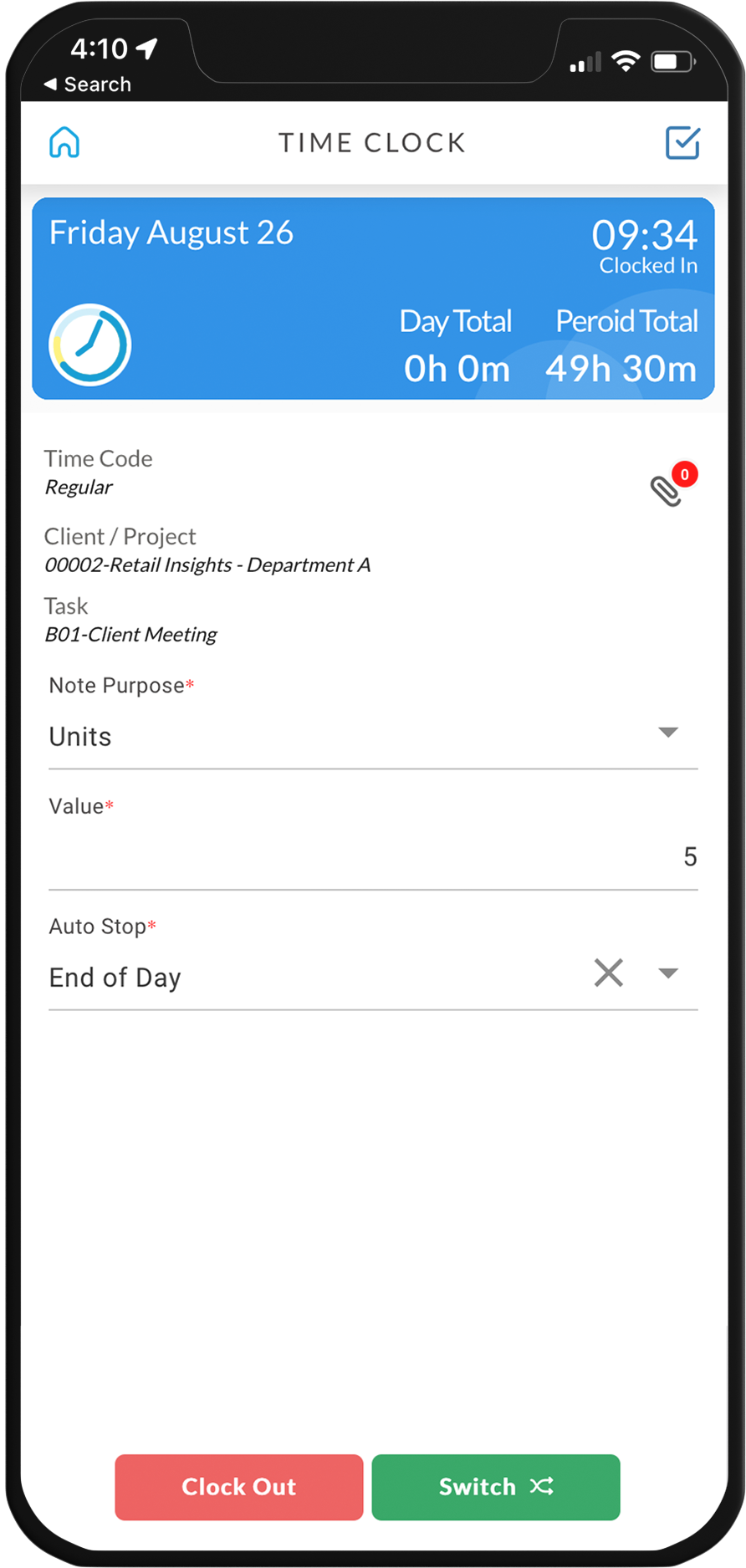
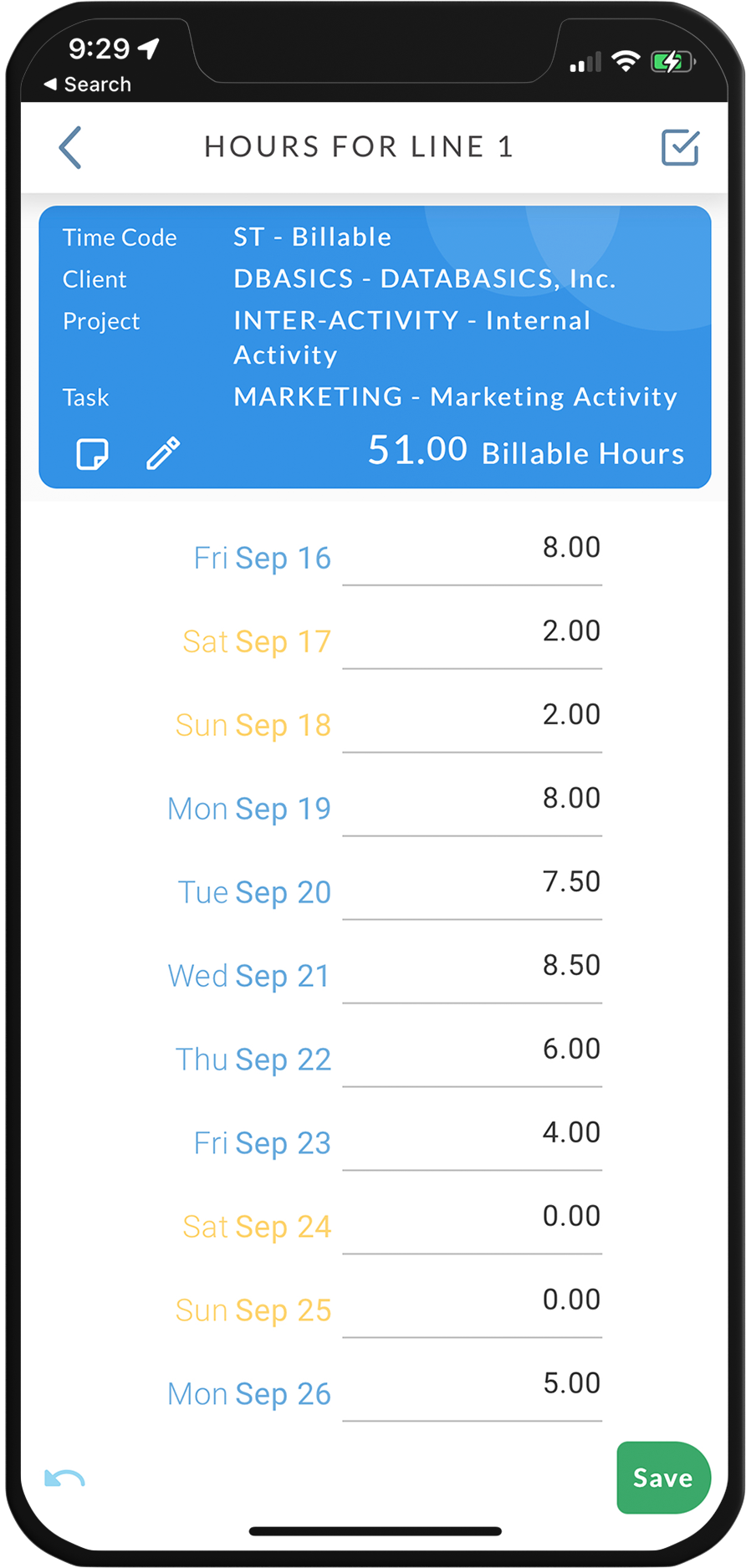
Screenshot of the interface to track all employee timesheetsScreenshot of where to clock in and out on mobileScreenshot of where hours for the whole week are entered, on mobileScreenshot of the interface to track time to multiple projectsScreenshot of the phone, tablet, and desktop interfaces, used to manage timesheets