BILL Spend & Expense vs. U.S. Bank Spend Management

Overview
ProductRatingMost Used ByProduct SummaryStarting Price
BILL Spend & Expense
Score 8.7 out of 10
N/A
BILL Spend and Expense (formerly Divvy) is an all-in-one expense management solution that combines free software with corporate cards to provide you with real-time visibility and customizable control over your business finances.
$0
U.S. Bank Spend Management
Score 10.0 out of 10
Small Businesses (1-50 employees)
Replacing the former Bento for Business acquired in 2021, the U.S. Bank Spend Management solution provides employee expense cards with spend controls that allow business owners to control where, when and how much employees can spend.
$0
2 People or Cards (1 must be business owner)
Pricing
BILL Spend & ExpenseU.S. Bank Spend Management
Editions & Modules
No answers on this topic
Free
$0
2 People or Cards (1 must be business owner)
Team
$29/month
Up to 10 People or Cards
Professional
$69/month
Up to 20 People or Cards
Enterprise
$149/month
More than 20 People or Cards
Offerings
Pricing Offerings
BILL Spend & ExpenseU.S. Bank Spend Management
Free Trial
YesYes
Free/Freemium Version
YesYes
Premium Consulting/Integration Services
YesNo
Entry-level Setup FeeNo setup feeNo setup fee
Additional DetailsBILL Spend & Expense is free for all users
More Pricing Information
Community Pulse
BILL Spend & ExpenseU.S. Bank Spend Management
Features
BILL Spend & ExpenseU.S. Bank Spend Management
Expense Management
Comparison of Expense Management features of Product A and Product B
BILL Spend & Expense
9.2
8 Ratings
11% above category average
U.S. Bank Spend Management
-
Ratings
Employee Expense Reporting8.76 Ratings00 Ratings
Corporate Card Reconciliation9.67 Ratings00 Ratings
Payment Management
Comparison of Payment Management features of Product A and Product B
BILL Spend & Expense
8.8
7 Ratings
10% above category average
U.S. Bank Spend Management
-
Ratings
Customizable Approval Policies9.27 Ratings00 Ratings
Financial Document Management9.07 Ratings00 Ratings
Payment Status Tracking9.04 Ratings00 Ratings
Payment Audit Trail9.65 Ratings00 Ratings
Duplicate Bill Detection7.43 Ratings00 Ratings
Advanced OCR8.73 Ratings00 Ratings
Electronic Funds Transfer9.05 Ratings00 Ratings
Best Alternatives
BILL Spend & ExpenseU.S. Bank Spend Management
Small Businesses
Dext
Dext
Score 9.7 out of 10
BILL Spend & Expense
Score 8.7 out of 10
Medium-sized Companies
Precoro
Precoro
Score 9.4 out of 10
Lola.com
Lola.com
Score 8.0 out of 10
Enterprises
Emburse Chrome River
Score 7.8 out of 10
SAP Concur
SAP Concur
Score 8.3 out of 10
All AlternativesView all alternativesView all alternatives
User Ratings
BILL Spend & ExpenseU.S. Bank Spend Management
Likelihood to Recommend
8.7
(18 ratings)
10.0
(4 ratings)
Usability
9.4
(7 ratings)
-
(0 ratings)
Support Rating
8.6
(2 ratings)
-
(0 ratings)
User Testimonials
BILL Spend & ExpenseU.S. Bank Spend Management
Likelihood to Recommend
BILL
There is a lot of functionality available for any company, and when you combine it with their A/P processing software, I'm sure the value of the software only increases. If you don't look back through your credit card receipts often, or don't have a lot of volume, the receipts not uploading into the accounting software isn't as much of an issue. For us, with roughly $200k of credit card spending each month, it became an issue. The rewards program was hard for us to take advantage of also, mostly because of our spending being spread across multiple companies. Even though we had everything set up together as one business, they still recognized each one as it's own, with it's own rewards requirements. I wouldn't deter anyone from going with Bill Spend & Expense, it's a solid program with a lot of capability, there are just a few small items that mattered to us more than the capabilities we take advantage of.
Read full review
U.S. Bank
Our organization runs a lot of short-term or one-off programs where the program staff need to buy supplies -- Bento is perfect for these scenarios. The staff who make the purchases are not staff who would typically have a company card, so we wanted a solution other than giving them a credit card. Bento was perfect because it makes the purchasing & bookkeeping processes for these programs easy and efficient for both the staff and the finance team
Read full review
Pros
BILL
  • Divvy does purchases very well. Getting money into the hands of those who need it, when they need it.
  • Budgeting is a breeze because card holders can only spend what is in their specific budget or on their card.
  • Customer support is usually pretty quick to respond
Read full review
U.S. Bank
  • Track expenses by employee
  • Restrict purchases based on amount and category
  • Import transactions directly into QuickBooks
Read full review
Cons
BILL
  • I wish there were more options in the BILL reimbursement platform - for example, the ability to do a report instead of submit a single expense.
  • We would love for reimbursements to feed into QuickBooks differently, but we understand that this is an early feature and hope it is further developed in the future.
Read full review
U.S. Bank
  • easier way for employees to access their statements without setting them up as admins
  • monthly statements generated by card
  • monthly fee needs to be added to one of the card statements
Read full review
Usability
BILL
The Divvy card provides convenience and flexibility for Finance to manage and monitor each user's transactions at any time. User can issue many virtual cards for different purposes. Transactions can be easily approved. Since we can monitor transaction closely, fraud can be prevented effectively. Mobile app is user friendly and safe.
Read full review
U.S. Bank
No answers on this topic
Support Rating
BILL
We have enjoyed using Divvy and its functions. The Divvy team has been great, and their support team is outstanding. They have a chatbox on the platform, and they only seem to be someone on call. I have found its benefits to be outstanding, that I recommend it to my clients. I also feel that Divvy rolling out new features only makes it more compelling to stay on as a user.
Read full review
U.S. Bank
No answers on this topic
Alternatives Considered
BILL
Nothing out there compares to the agility and ease of use of Divvy. Adoption by those most resistant to any expense reporting tool has always been the #1 painpoint to all other such software. Divvy takes the pain away even for creatives and salespeople!
Read full review
U.S. Bank
If you are looking for prepaid business care or a business expense card, I highly do not recommend using Bento for Business. Do yourself and your business a favor and use a more customer service orientated services such as Pex, Wex, or Expensify. Bento for Business is bad business. Just don't do it.
Read full review
Return on Investment
BILL
  • Divvy is free, so it was tough for us to turn down. We decided to withhold our larger transactions from Divvy to receive those rewards directly.
  • Divvy has saved our Finance/Accounting team tons of time digging through expenses, reimbursements, invoices, etc.
Read full review
U.S. Bank
  • Saving time by eliminating reimbursements
  • Allowing many staff to have a card to make purchases without worrying about financial control/risk of too many people having a company card
  • Efficiently synchs with Quickbooks
Read full review
ScreenShots

BILL Spend & Expense Screenshots

Screenshot of Company Dashboard - High level overview of a business's available credit and current spending.Screenshot of Mobile Wallet - Spend Smarter™ - To manage budgets and expenses on the goScreenshot of Budget Detail - For monitoring business budgetsScreenshot of Insights - Real-time visibilityScreenshot of Transactions - Displays a complete list of all transactions and their current status on a business's physical and virtual cards.

U.S. Bank Spend Management Screenshots
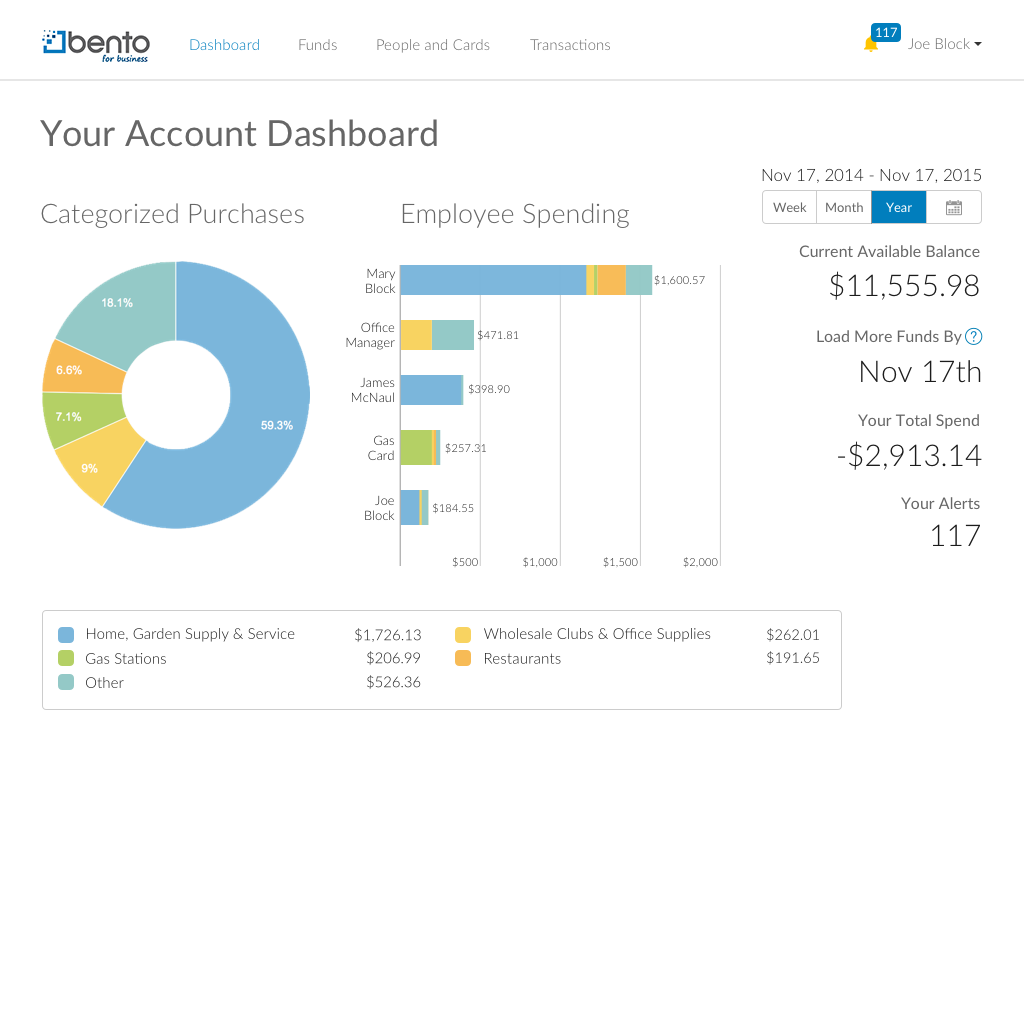
Screenshot of Create Employee cards or Utility cards with spend limits (e.g. $500/month)Screenshot of Dashboard provides a snapshot of spending activity across all cards.Screenshot of See transactions in real-time.  Add tags, notes and upload receipts.