Edmodo was a blended learning and distance learning platform for schools and districts, educators, and learners, providing tools for classroom instruction, professional collaboration, communication, and community building. The platform has been discontinued since 2022.
$2,500
per month
Inno
Score 1.0 out of 10
N/A
N/A
N/A
PowerSchool SIS
Score 6.5 out of 10
Mid-Size Companies (51-1,000 employees)
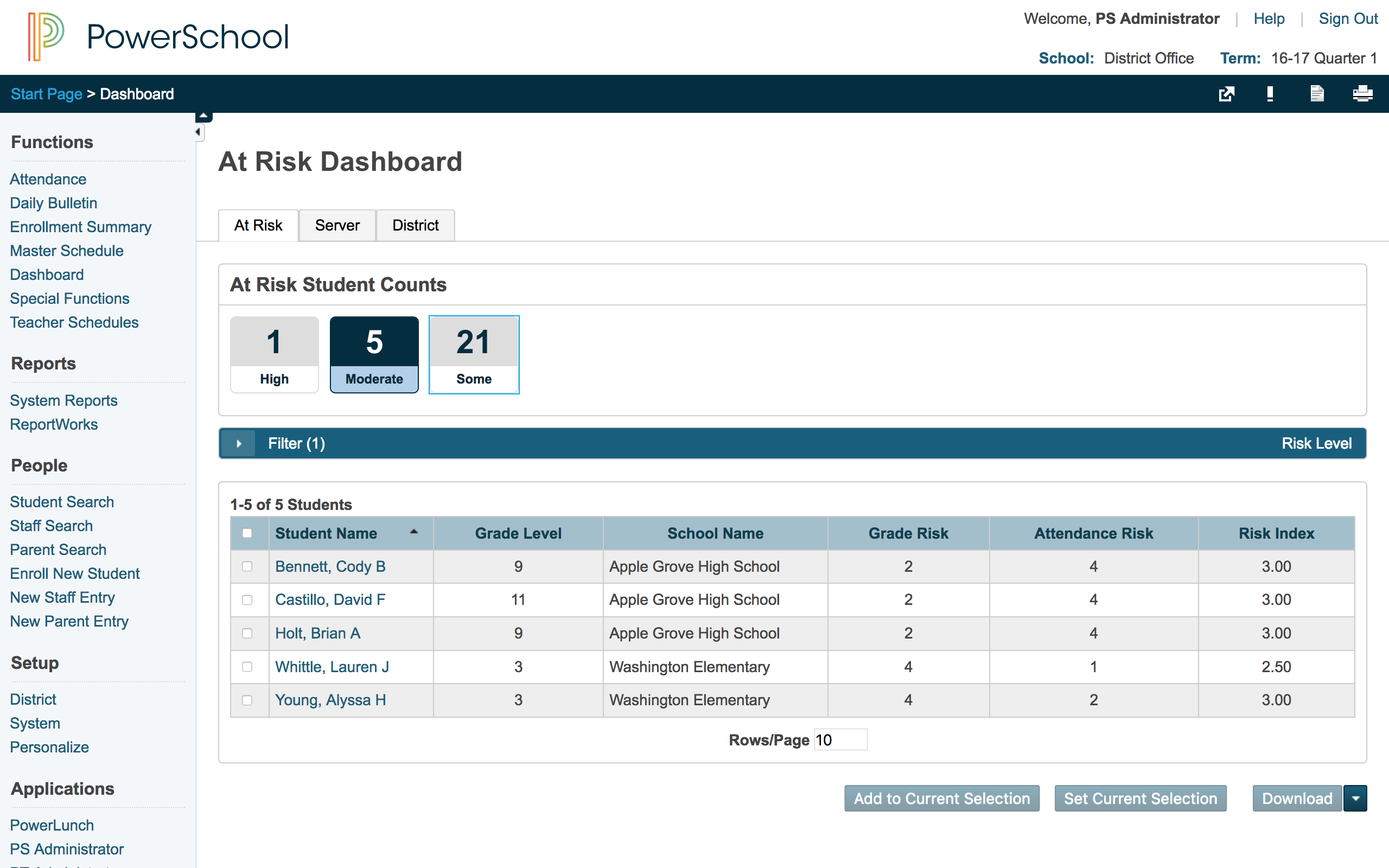
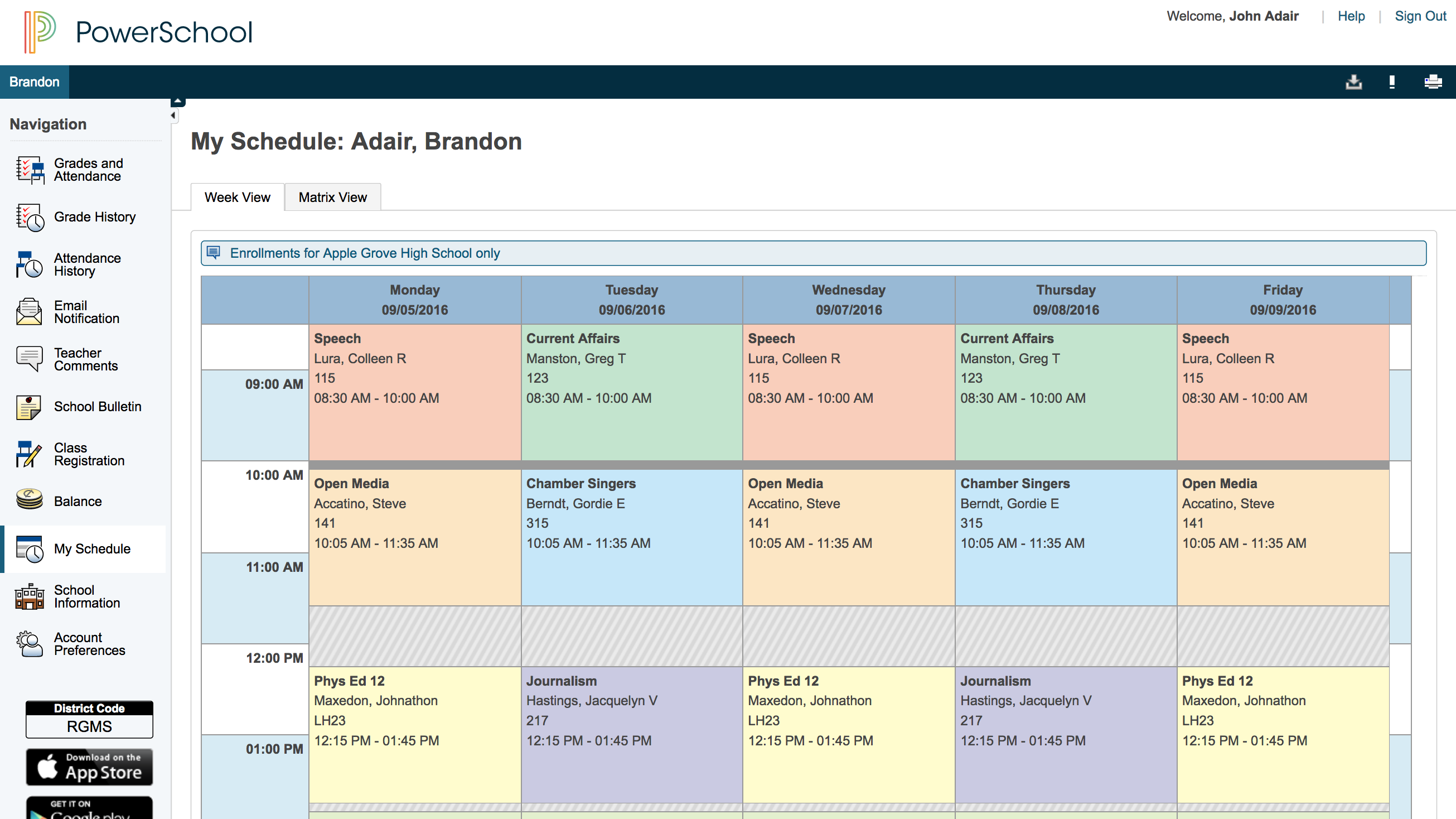
The PowerSchool Student
Information System covers administrative needs, such as scheduling, attendance,
reporting, data management, faculty management, emergency/medical and health
management, registration, and more for K-12 schools and districts. It is easy
to use and boasts an industry-leading gradebook, PowerTeacher Pro. Users enjoy
a fully web-based SIS that is flexible, configurable, and scalable with
real-time updates on any operating system, browser or device.
Edmodo provides the services that I love, unlike some of the other sites. Edmodo appeals to teachers connecting on numerous topics and subjects from science and coding to SEL and Professional Development. The groups are all protected and monitored for teachers and students. The …
Edmodo is very similar, and they all share essential functions. Edmodo allows us to track student progress with visuals that are a bit easier than Google Classroom or Schoology. The learning community aspect of Edmodo is also a great tool to use for helping staff learn …
Canvas provides the most features as compared to Edmodo. I like the ease of Edmodo and its ease of use. It provides the basics of what someone needs who doesn't want every bell and whistle under the sun. There are times when all the extras make it difficult to simply do what …
I like Edmodo more because it is much more visually appealing than other similar products. It is very similar to other social media platforms that students use all of the time at home. This makes it more fun, and it is definitely very user friendly. Although there are other …
Edmodo is inferior to the two listed products. I did not have a choice in selecting Edmodo. Wonder Workshop mandates that all users sign up for Edmodo as a condition for participation in a student competition. Edmodo is less user-friendly, less robust, and less effective. …
I think that Edmodo is a good choice for younger kids, as well as for teachers with many students. It has a lot of fun features and ways to take the temperature of the classroom in a quick informal manner. It has good integration with popular services, better than Canvas has …
Edmodo finds itself more user-friendly for the younger grades. As a 4th grade teacher, I find students navigate the user interface better than other alternatives.
Edmodo has proven to be more useful and resourceful. Community support + onboarding is good. You can be on this platform without having trouble with your cookies being used or search history being tracked and thrown back at you.
I tried a different software like Edmodo but I always had trouble with ads on the system so often. I then decided to change software and saw Edmodo. This software provided me different and safe features. Also, my students like Edmodo because the system is easy to use and …
Edmodo is easy to use especially since it is very similar to commonly used software called Facebook. That is why I was willing to choose Edmodo for myself and my students. I have used another software similar to Edmodo, but I did not like it too much because it has been giving …
I used both of them. I will say Classroom by Google can beat Edmodo, or it is the best one in market. But believe me Edmodo is more trustworthy and more suitable. I can't say Google Classroom sucks or it does not work, but it is working good too. First of all if you wanna use …
When I first decide to think about changing our teaching method from traditionary to modern, online method, Google Classroom seems to the best one, because it is from Google, and everyone knows Google is the best, I lost so much time to receive the access for Google Classroom. …
I have taught hybrid classrooms using WebCT, Blackboard, and D2L. I have used Schoology in the past for a brief time. Edmodo is a good LMS because students like its Facebook style; I like it because I feel it is a K-12 appropriate means of getting secondary students used to the …
We ended up choosing Google Classroom as it connects easily and automatically with our Google Apps for Education applications. Drive folders are automatically created and set up for our students. Teachers are able to share copies of documents and even create individual …
Ease of use, a very familiar Facebook-like platform, and an incredible community make Edmodo an amazing LMS platform to use for educators. I find this to be probably the best LMS platform for teachers to start with. However, when you are looking to up-the-ante and want to …
Since we use Edmodo within the classroom only, it allows students to work in a function that is similar to that of Facebook, without the concern of them becoming distracted with status updates that are posted outside of the classroom. There are no distracting pages, likes, or …
The advantage of Edmodo over Google Classroom is mainly the assessment component, some applications that are very worth using, and the professional community that can help any teacher in regards to instruction, information, or resources.
I actually utilize Google Classroom over Edmodo in most of my school functions. I still use Edmodo as a coach and club adviser but prefer Google Classroom as a classroom teacher. Google Classroom offers everything that Edmodo does but seems to be more efficient, particularly …
Our previous SIS went out of business, and we needed something fairly soon. PowerSchool was the SIS that had the best ability for our state reporting. We liked what we heard from other states and districts about the innovation and continued improvement by PowerSchool.
Each software I used in my career had special features which were specifically unique for them. PowerSchool Student Information System was an impressive software that offered the ability to ease student registrations and admissions online using web forms where students and …
I have heard good things for Infinite Campus and Skyward. I would [evaluate] each of them and see what fits your needs. Each has their strengths and weaknesses and so picking the right one for your needs is important. PowerSchool [Student Information System] does have some …
PowerSchool was the learning management system that was in place when I started at this institution but I approve of it. It definitely does help simplify the amount of work that goes into the grading process. Grades can easily be calculated as long as a proper setup has been …
I have been a PowerSchool Student Information System user since 2003 and we were one of the very first districts to adopt it. Since I have used it for so long, entertaining the idea of moving to another platform is not on the table.
I have used Desire 2 Learn (D2L) and Synergy Student Information System (Synergy SIS) and PowerSchool Student Information System stacks up against them this way:
I was a huge advocator for Boardingware and worked closely with them to try and create a more well-rounded program for the private school I worked at, but definitely think PowerSchool works best and most effectively for public school. In terms of grading PowerSchool works much …
PowerSchool replaced an old version of Apple School. PowerSchool outperforms Apple's product and is so much easier to use. It was even simple to convert the old Apple student files to the PowerSchool system for a seamless transition. Once we transitioned, we were able to see …
PowerSchool has many more features than Blackboard such as attendance, grades, performance review standards platform, lunch, etc. Blackboard makes it easy to find a parent’s email or phone number quickly which is not in PowerSchool.
Nothing stacks up against PowerSchool in terms of usability and flexibility. Every other product I have used has not come close to the user friendliness of PowerSchool, nor they do not allow immediate flexibility.
We used a different grade management system over 5 years ago that was efficient but not as user-friendly as Powerschool. I cannot remember the name of that application. Our school system has been using PowerSchool for over 5 years and so far it has served our purpose. Each year …
As noted, I think it would be hard to find anything else that is better than this tool for your school or district, this SIS is really the total package. It has a great teacher grade book, and while there are always things that can be improved, because you can customize it, the …
Each of the above products has great features, but PowerSchool has features that each of the above products has, all in one system. This means that you could more easily use JUST PowerSchool without needing extensions and other systems to supplement features. This is less …
I used Blackbaud at a different school system so there was not a choice or selection. I feel that it was pretty similar to PowerSchool so I had a very smooth transition from one platform to the other. The gradebooks felt very similar, along with the recording and reports …
We found that PowerSchool Student Information System provided the platform we needed to manage student information, assignments and grades, school schedules, etc. Although Schoolnet provided assessment and instructional management tools, it did not allow us to keep track of the …
I have used a product called SASI. It does not compare to this at all. SASI was a site based system and the backend was not a true database. I have also use Sungard Pentamation before. Although it was a centralized system, it wasn't as user-friendly and the interface was has to …
PowerSchool Student Information is the gold standard for Student Information Systems. They know what they are doing, how to serve K-12 schools and school districts. The other Student Information Systems did not meet our districts minimum standards for the needs that we have, …
PowerSchool blows the other Student Information System that my school used out of the water. The other Student Information System was a glorified grade book/report creator, and had no other function. PowerSchool has so many functions and elements inside of one program that it …
I used Infinite Campus previously while working at a different school. My position was the same at both schools. PowerSchool is more user-friendly than Infinite Campus for those staff members who are not strong with utilizing technology. Infinite Campus allows users to print …
The systems seem to stack up pretty well, however we have stuck with PowerSchool mostly due to our history with the product. The cost and feature set differences wasn't substantial enough to warrant a migration. The amount of work involved with training staff and end users is …
I find Edmodo to be especially suited to secondary school. It is a great way to accommodate the busy schedules of teens who are often working their first jobs or attending sports and have limited time for homework, but can benefit from looking up assignments or receiving reminders on their phones. It also prepares them for college in that it resembles many collegiate LMS systems
I can think of no business or scenario that would benefit from any relationship with this company. They are horrible from the initial sale, to the installation, to the billing, to the customer service, to lies posted in response to unfavorable reviews of their company. Literally the worst company I have had the displeasure of dealing with in over 21 years in business.
PowerSchool is great for schools to keep track of student information, schedules, and grades. It integrates with other programs to make setting up classes easier and faster. PowerSchool gives teachers a singular place to find information or input students' grades. It also has an app for parents or guardians to use to check their student's grades which is very useful.
Edmodo is an excellent communication tool. Its Facebook style of posts makes it a familiar environment for teachers to communicate what's happening in class with both students and parents.
Edmodo's ability to submit and grade assignments online is easy to use and very similar to some other popular LMS platforms. Assignment collection is straightforward and the digital grading tools are simple and effective.
Edmodo makes it extremely easy to get both students and parents into the the LMS system. Edmodo also has an easy to use subgrouping feature as well, allowing teachers to divide individual classrooms into smaller groups for particular assignments.
Edmodo's online testing feature is fairly easy to use. I have found this a useful feature for both informal and formal assessment of students.
Edmodo's polling feature is simple and effective. There are many uses for polling both in and out of the classroom.
Edmodo's messaging feature is a nice way to communicate between student and teacher or parent and teacher.
Edmodo's app (Android or iOS), although not as feature rich as the website, works well with many of the features already listed above.
Edmodo has a very nice Calendar feature, allowing the teacher to easily post important information and/or due dates of assignments.
Edmodo makes it easy to share folders, either with the public or with your classes.
Edmodo, like many other popular LMS platforms, integrates nicely with Google Drive.
Edmodo has a great many community forums. This really is an amazing feature of their LMS. It is so very easy to connect with other teachers and bounce ideas off of each other.
PowerSchool houses student or staff information that can be easily accessed by those teachers and administrators who need the information. This allows everyone to go to one place to access information.
Parents can view their child's grades at any time with their protected login on a parent portal. This allows teachers to keep parents informed and involved in their child's progress at school. When everyone works together it increases our students' chance for success.
PowerSchool offers videos to train new users. When we have new employees, the videos can be accessed at any time the employee needs as opposed to them waiting for someone to help them.
The user interface could be more intuitive. Because of the many features, it can sometimes be difficult for administrators to find what they are looking for.
A recent upgrade allowing for more flexibility in the relationship between students and parents was long in coming and didn't go very smoothly. We are now dealing with a ton of clean-up after the upgrade. Even after we have cleaned everything up, there is still a ways to go before PowerSchool is on par with other SIS systems in that area. In their defense though, they are actively working on getting caught up.
Edmodo is a LEARNING tool. Not "one more thing" I have to use or integrate. It was my one stop shop for everything for my classes. More importantly, I was able to watch my students grow. My students who were timid, and quiet, became my discussion leaders. Students who didn't do their homework, never missed an assignment once I started doing "e-tickets" and discussion groups. Everyone felt they had a voice, which made our classroom community that much stronger.
If used for its intended purpose, Edmodo is a great service. It's free, meaning teachers can actually afford it. Plus, it offers a lot of tools that make communicating with students and parents simple and painless, in addition to allowing basic assignments and quizzes. It's totally easy to learn, making it less intimidating to teachers who don't have a lot of time and who may not be completely comfortable with technology.
You can't use a kiosk within a hospital that is shut down for COVID; furthermore they put the wrong ad in the wrong place (reversed two of our ads)...the public facing ad was put in the employee break room and the one intended for healthcare providers was put in the ER waiting area. We only discovered this months later when we personally visited the hospital. They did reverse them but no concession was made for their mistake.
If there is an issue, concern, suggestion, or question, Edmodo support is helpful and willing to listen. Many Edmodians are former teachers and have a sense of how classrooms work. This is crucial when building a platform to use in education. Edmodo does an excellent job of staying connected and collaborating with teachers.
Overall, I have not had to use support for PowerSchool Student Information System because our school district gives us training in each area in which we will be utilizing PowerSchool Student Information System. In terms of in-user support, I feel that there is mild to moderate user support that is built into PowerSchool SIS.
Plan a little extra time to let them play with the platform with fun assignments. This made them comfortable submitting work, finding items, communicating with me or each other
When I first decide to think about changing our teaching method from traditionary to modern, online method, Google Classroom seems to the best one, because it is from Google, and everyone knows Google is the best, I lost so much time to receive the access for Google Classroom. So I researched about other online classroom platforms and when I found Edmodo, I gave it a try. And I can say that now, it's a good experience and I love It.
Each software I used in my career had special features which were specifically unique for them. PowerSchool Student Information System was an impressive software that offered the ability to ease student registrations and admissions online using web forms where students and parents could submit and upload their information and necessary documents to the school/institute with just a few clicks. Even though this feature is available on a few other similar software, PowerSchool Student Information System was the only software that was specialized in this area.
Definitely better customer service! Once the parents figured out the tool and students were proficient with it. It was an excellent way to communicate student's strengths and weaknesses in their learning.
Increased employee efficiency. Especially since teachers can share assignments easily too. And, as I've referred to many times, the grading feature is a huge time saver!
A negative impact is we have had some cyberbulling. But, used the blocking features and handled it with face-to-face interaction with the students in question and their families.
Having one system within the school district is beneficial. Teachers are able to access a variety of information and also do input all within the same program.
Communication with parents has been impacted greatly, as they always have information at their fingertips without teachers having to call or email them with a grade update. Parents are able to check student's grades at any time.