eXo Platform is an open-source, social-collaboration software designed for enterprises. Some key features include: Enterprise Social Network, Enterprise Content Management and Social Collaboration.
$0
engaged user/month
Sococo
Score10 out of 10
N/A
Sococo is a remote collaboration tool with integrations with third-party applications such as Google Docs, Atlassian JIRA, and Box.
$14.99
per month per seat
Pricing
eXo Platform
Sococo
Editions & Modules
Community
$0
engaged user/month
Social Intranet
$3
per month per user
Digital Workplace Cloud
$5
per month per user
Digital Workplace On-Premise
$5
per month per user
Enterprise Unlimited
9$
engaged user/month
Sococo
$14.99 or $13.99 if paid annually
per month per seat
Sococo Unlimited
$24.99
per month per seat
Offerings
Pricing Offerings
eXo Platform
Sococo
Free Trial
Yes
No
Free/Freemium Version
Yes
No
Premium Consulting/Integration Services
Yes
No
Entry-level Setup Fee
No setup fee
No setup fee
Additional Details
—
Sococo pricing plan includes a 10 seat minimum and 500 minutes per seat per month. Additional minutes price at $5 per 1,000 minutes. Sococo unlimited include a 100 seat minimum with unlimited minutes per seat per user.
More Pricing Information
Features
eXo Platform
Sococo
Project Management
Comparison of Project Management features of eXo Platform and Sococo
Feature
eXo Platform
9.2
5 Ratings
17% above category average
Sococo
4.7
3 Ratings
49% below category average
Task Management
10.05 Ratings
5.01 Ratings
Gantt Charts
8.02 Ratings
00 Ratings
Scheduling
10.04 Ratings
5.01 Ratings
Workflow Automation
8.33 Ratings
4.01 Ratings
Mobile Access
10.05 Ratings
3.03 Ratings
Search
10.05 Ratings
3.02 Ratings
Visual planning tools
8.03 Ratings
8.01 Ratings
Communication
Comparison of Communication features of eXo Platform and Sococo
Feature
eXo Platform
9.5
4 Ratings
17% above category average
Sococo
5.3
5 Ratings
40% below category average
Chat
10.04 Ratings
5.05 Ratings
Notifications
10.04 Ratings
5.05 Ratings
Discussions
10.04 Ratings
6.03 Ratings
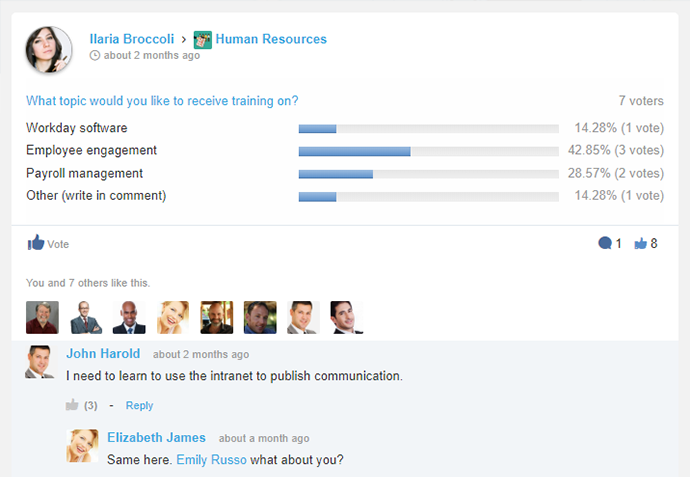
Surveys
7.13 Ratings
00 Ratings
Internal knowledgebase
10.04 Ratings
5.02 Ratings
Integrates with GoToMeeting
9.01 Ratings
5.01 Ratings
Integrates with Gmail and Google Hangouts
10.02 Ratings
7.01 Ratings
Integrates with Outlook
10.03 Ratings
4.01 Ratings
File Sharing & Management
Comparison of File Sharing & Management features of eXo Platform and Sococo
It is especially suitable for working together remotely or from disconnected locations, allowing them to access collaborative work and tools to facilitate communication. Internal and cloud options also seem to offer a flexible adoption roadmap. It addresses the problems of efficient collaboration and effective communication between employees, particularly with regard to working and completing projects
A de minimis incentive was given to thank the reviewer for their time. The incentive was not used to bias or drive a particular response, nor was the incentive contingent on a positive endorsement. More Info
We tried Sococo as means of gamifying a natively remote office. It does the job but the tool suffers from a lack of integrations. You will run out of free minutes very quickly and the additional charges are too high to make business sense.
I personally love the user-friendly interface. Often you find software which is difficult to learn, and not utilized as often as it should be because of this. With eXo Platform, the interface is easy to understand, and is not particularly challenging to new users and non-tech savvy individuals.
It allows you to get work done, without feeling like using the platform is part of the actual work. It feels more like a natural system you would use in your leisure time to connect with friends and family, rather than a social intranet designed to facilitate employee communication and help you meet project deadlines.
The cloud platform allows users to easily share information and files, and collaborate on project work. Another benefit to this is it makes mobile collaboration possible.
Visual layout - the virtual office visible was very helpful because it made the organization feel closer and as a whole, much more connected. Further, you can group departments in your layout, so it gave a good visual understanding of who was part of each 'department/team.'
Sound - the sound quality was good overall in meetings, and I liked the realistic sounds for opening and closing an office, etc. It allowed for a real office feel, and this is especially important since a lot of companies offer the option to work from home now - this removes the 'disconnect' that usually exists when working from home.
Communication options - it allowed for multiple ways to communicate and places to communicate - i.e., in the auditorium, lunchroom, conference room, or a smaller room. Very realistic and a variety in that sense.
A de minimis incentive was given to thank the reviewer for their time. The incentive was not used to bias or drive a particular response, nor was the incentive contingent on a positive endorsement. More Info
As the platform appears to be packed with features and functionality it may be a bit daunting at first to get used to it.
The initial adoption in a corporate setting would involve a number of questions, such as integration with other applications, data migration and security and the optimum adoption road map in order to maximise the benefit from the platform.
A de minimis incentive was given to thank the reviewer for their time. The incentive was not used to bias or drive a particular response, nor was the incentive contingent on a positive endorsement. More Info
This platform has a pleasant user interface, is very easy to use, and offers a lot of useful accessories and add-ons. At first it can be a little intimidating, but it doesn't take long to get used to it. It is considerably reliable and safe. Facilitates connection and collaboration with coworkers. It provides tools that allow you to capture, organize and act according to the internal knowledge of your team.
A de minimis incentive was given to thank the reviewer for their time. The incentive was not used to bias or drive a particular response, nor was the incentive contingent on a positive endorsement. More Info
A de minimis incentive was given to thank the reviewer for their time. The incentive was not used to bias or drive a particular response, nor was the incentive contingent on a positive endorsement. More Info
The eXo platform offers a high quality support, which satisfies the requirements of our company, especially when the platform begins to be used, due to the amount of tools that can be overwhelming. Support responses are made in a short period of time.
A de minimis incentive was given to thank the reviewer for their time. The incentive was not used to bias or drive a particular response, nor was the incentive contingent on a positive endorsement. More Info
Sococo didn't seem to have a strong support line. In comparison to other products, such as Microsoft Teams, it did not regularly check in with us. There should be opportunities to give feedback on the quality of the program periodically and if we had any issues. Sometimes, Sococo would crash, and we would 'restart it' but not know why it happened.
A de minimis incentive was given to thank the reviewer for their time. The incentive was not used to bias or drive a particular response, nor was the incentive contingent on a positive endorsement. More Info
We selected this product firstly because it's easy to use for end-users, even if it's not so simple to configure from an administrative point of view. Managing and tracking overall activities is quite easy and it's also possible to have an immediate vision of everything that is done on the platform. Users feel confident and are encouraged to share resources.
A de minimis incentive was given to thank the reviewer for their time. The incentive was not used to bias or drive a particular response, nor was the incentive contingent on a positive endorsement. More Info
I prefer Sococo over Lync/Skype for a few reasons. I feel the user interface is slicker, better voice clarity, easier to hop between calls. And, all call members can go to a common chat room on their own accord instead of one person trying to invite everybody. I also feel that it's easier to share one's screen and swap between different shared screens with Sococo.
A de minimis incentive was given to thank the reviewer for their time. The incentive was not used to bias or drive a particular response, nor was the incentive contingent on a positive endorsement. More Info
A de minimis incentive was given to thank the reviewer for their time. The incentive was not used to bias or drive a particular response, nor was the incentive contingent on a positive endorsement. More Info
Morning meetings are much simpler with sococo than without. Small powwows with coworkers to work out little bugs are also a lot more enticing since setup is essentially nonexistent.
It might be argued that the cost of sococo isn't worth the benefits of simplicity and ease of use.
A de minimis incentive was given to thank the reviewer for their time. The incentive was not used to bias or drive a particular response, nor was the incentive contingent on a positive endorsement. More Info