Flowgear vs. Jitterbit

Overview
ProductRatingMost Used ByProduct SummaryStarting Price
Flowgear
Score 9.0 out of 10
N/A
Flowgear is an integration platform that enables organizations to build and manage application, data, and API integrations across cloud and on-premise environments from a single interface. The platform supports both technical and non-technical users, allowing teams to create, edit, and maintain enterprise-grade integrations for internal systems, customers, and partners. Flowgear provides a code-free, drag-and-drop visual designer with a library of prebuilt…
$1,499
per month (billed annually) per installation
Jitterbit
Score 9.2 out of 10
N/A
Jitterbit is a cloud integration technology for cloud, social or mobile apps. It provides accessibility for non-technical users, including easily creating API’s and data transformation scripts within the integrations.
$100
Starting Price Per Month
Pricing
FlowgearJitterbit
Editions & Modules
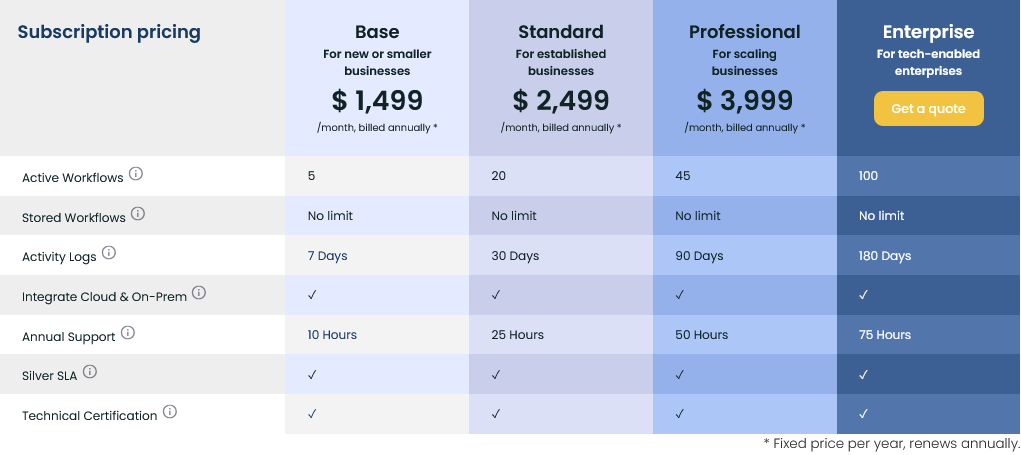
Base
$1,499
per month (billed annually) per installation
Standard
$2,499
per month (billed annually) per installation
Professional
$3,999
per month (billed annually) per installation
Enterprise
$7,999
per month (billed annually) per installation
Jitterbit
$100.00
Starting Price Per Month
Offerings
Pricing Offerings
FlowgearJitterbit
Free Trial
YesYes
Free/Freemium Version
NoNo
Premium Consulting/Integration Services
NoNo
Entry-level Setup FeeOptionalNo setup fee
Additional Details
More Pricing Information
Community Pulse
FlowgearJitterbit
Considered Both Products
Flowgear
Chose Flowgear
Flow gear is much easier to use with alot of functionality and processes that are readily available. Support is great as well as having indept learning videos and guides. Efficiency and productivity scores a 10 out of 10 when trying to find quick and easy solutions that are …
Chose Flowgear
From a cost perspective, for what it provides and delivers compared to its rivals, its functionality is right up there. If you're looking to get started with a Saas platform, there really is no better tool than Flowgear.
Chose Flowgear
Flowgear has solved our problem in getting our integration and mapping out faster. Easily being able to change workflows and great with facilitating a production ready product through its CI\CD functionalities. Taking the products through various stages of development ensures …
Jitterbit
Chose Jitterbit
Jitterbit plays well in the general-purpose integration that can be used to integrate multiple systems and used by different departments within an Enterprise. I see it as a more basic option for Boomi that is less expensive. So if you are looking for something like Boomi, and …
Chose Jitterbit
Scribe - we had problems with this product (jobs were running long, some jobs would finish incomplete without any warning or info, etc) and we wanted more functionality/configurability -- keep in mind this was 3 years ago, so the product may have changed since then!

CozyRoc …
Chose Jitterbit
Evaluated Dell Boomi and Celigo as alternatives prior to purchasing Jitterbit. We went with Jitterbit at that time because we could handle all changes ourselves without any assistance from Jitterbit, and we liked their size and nimbleness. Dell Boomi was too big for us, and …
Chose Jitterbit
Jitterbit is completely cloud-based and offers a cleaner way to connect to SOAP API endpoints. SQL Server Integration Services has a larger ecosystem of plugin connectors by third parties (at a cost), but the downside is that you still need to use something like Visual Studio …
Chose Jitterbit
Our decision was based on the cost at the time. Jitterbit's cost model has changed since then, so it might be a different decision now if we have to re-evaluate.
Chose Jitterbit
For me, it gives the best ratio:
  • It is the most intuitive and easy to use tool, but it still gives you a lot of options and capabilities to handle all requirements.
  • Add to that, it has cloud agent options and has the better community of the other tools I encountered.
Chose Jitterbit
Hands down, Jitterbit is more cost-effective than Informatica, either on-prem or cloud and the value only goes up from there. Reusability and ease of creation make in-house training simple and the end result is we leverage Jitterbit for much more than what we initially …
Chose Jitterbit
I prefer Jitterbit mainly for its easy to navigate history files and the way you can map your updates.
Chose Jitterbit
I actually use all three of these products: Jitterbit free, DemandTools and PeopleImport. I use DemandTools and PeopleImport most often and usually only use Jitterbit free when the other two won't launch or connect.
Chose Jitterbit
The support that Jitterbit has provided on paper as well as in the real world is great and this was certainly in our top pick list when we did our build/buy analysis.
Chose Jitterbit

Other Products: IBM- Cast Iron, Krise.

Jitterbit provides both cloud and on premise solution and pricing was also fair.

Chose Jitterbit
The Jitterbit data loader is a dramatic improvement over the standard Salesforce Apex Data Loader. Both applications are free or included with Salesforce but I would only recommend Jitterbit for users who need to run data jobs against Salesforce.
Chose Jitterbit
We did not compare it with other integration tools.
Chose Jitterbit
Jitterbit was a better match for the project we used it for because of the depth and breadth of scripting language and the nature of the platform. That being said, the project we threw at it was a tough one. I am almost certain we could not have completed it with the other …
Chose Jitterbit
Initially we were looking at building our own integration capability from scratch, but deliverable timelines pushed us to purchase this product. Other than Biztalk, I do not know which other products we looked at.
Chose Jitterbit
Jitterbit works flawlessly for simple data loading tasks. Anything more complicated, such as deduping objects or cleaning data on a grid would require a more substantial program such DemandTools, but for small, ad-hoc tasks Jitterbit is hard to beat.
Chose Jitterbit
What set Jitterbit apart was the flexibility and the capability to copy existing transformations. Since we were rolling out a world-wide data integration program for an enterprise ERP, it was essential that we could implement once and reuse. We could add error captures really …
Chose Jitterbit
Honestly we didn't evaluate too many other middle ware products, at least that i am aware of its possible our system architect did without my input. But we were given a trial of JitterBit a very good training session and decided it was a perfect fit for us and it has been a …
Features
FlowgearJitterbit
Cloud Data Integration
Comparison of Cloud Data Integration features of Product A and Product B
Flowgear
8.8
Ratings
9% above category average
Jitterbit
7.2
Ratings
11% below category average
Pre-built connectors9.00 Ratings8.00 Ratings
Connector modification8.80 Ratings7.20 Ratings
Support for real-time and batch integration9.10 Ratings7.00 Ratings
Data quality services8.90 Ratings8.00 Ratings
Data security features9.20 Ratings7.00 Ratings
Monitoring console8.00 Ratings6.00 Ratings
Best Alternatives
FlowgearJitterbit
Small Businesses
Make
Make
Score 9.3 out of 10
Make
Make
Score 9.3 out of 10
Medium-sized Companies
IBM App Connect
IBM App Connect
Score 9.2 out of 10
IBM App Connect
IBM App Connect
Score 9.2 out of 10
Enterprises
IBM App Connect
IBM App Connect
Score 9.2 out of 10
IBM App Connect
IBM App Connect
Score 9.2 out of 10
All AlternativesView all alternativesView all alternatives
User Ratings
FlowgearJitterbit
Likelihood to Recommend
9.0
(0 ratings)
7.0
(0 ratings)
Likelihood to Renew
-
(0 ratings)
8.0
(0 ratings)
Support Rating
-
(0 ratings)
10.0
(0 ratings)
Online Training
10.0
(0 ratings)
-
(0 ratings)
User Testimonials
FlowgearJitterbit
Likelihood to Recommend
Flowgear has been exceptionally well suited to automate workflows allowing my product to interface with other products without the need for my team to develop these integration points. The ability to run workflows against multiple environments, in a secure manner, has facilitated rapid development of key client requirements and aided my team in delivering a quality solution.
Read full review
Small to medium sized companies are great prospects for this product. It's pretty easy to set up, learn and maintain. You can scale it too, so start with an easy integration, learn the ropes and expand your usage. If you have fairly simply needs for a handful of fields and just one or two external systems to feed into Salesforce, this is the go-to product. If you're a larger company needing more complex integrations where extremely high reliability is needed and any downtime means revenue loss, you probably already have a different product in mind. Then again, you probably have an entire team that handles integrations and a data warehouse to support it!
Read full review
Pros
  • Easy node code front end
  • Excellent Customer Service
  • Adding new pre-built integrations on a regular basis
Read full review
  • Ease of use - while being more technical is useful, you don't need to be a developer to use many of JItterbit's capabilities
  • Customer Support - we have always had great responsiveness to any questions or issues encountered
  • Reliability - Jitterbit has been extremely reliable with no major outages in the recent past
Read full review
Cons
  • Learning should be easy for even a beginner
  • Users may find the platform a bit overwhelming if they do not understand it
Read full review
  • Some of the more advanced transformation possibilities aren't exactly clear without a lot of digging. Very basic connections (e.g. map this field to this field) along with basic transformation scripts (e.g. multiply X * Y) are super easy. But I know there are a ton more features and functionality that I feel is somewhat buried in the product
Read full review
Likelihood to Renew
No answers on this topic
I have been evaluating other tools as a continuous improvement practice. I would like something that would be easier to use for a non-technical user. I work for a small organization and have no back-up for Jitterbit if something happens to me. We don't have the technically savvy employees to understand it.
Read full review
Support Rating
No answers on this topic
They have some of the best support of any software vendor that we use. They always get our issues resolved quickly
Read full review
Online Training
Training material is excellent with in depth videos and material that are readily available and easy to understand. Materials are upgraded when new features are out. First time users do not find it difficult to follow and understand all modules. Tests are easily completed due to this. Overall training was great
Read full review
No answers on this topic
Alternatives Considered
Flowgear has solved our problem in getting our integration and mapping out faster. Easily being able to change workflows and great with facilitating a production ready product through its CI\CD functionalities. Taking the products through various stages of development ensures that we are always able to test extensively first and then get our integration working in a production ready environment.
Read full review
Hands down, Jitterbit is more cost-effective than Informatica, either on-prem or cloud and the value only goes up from there. Reusability and ease of creation make in-house training simple and the end result is we leverage Jitterbit for much more than what we initially considered it for. Having used Oracle and TIBCO before as well, I find they are the tools of yesterday, not able to keep up in terms of functionality or price. Mulesoft would be a more relevant comparison, and I feel we lean on Mule far more than Jitterbit, but both tools have their place and their strengths (and weaknesses!).
Read full review
Return on Investment
  • increased productivity
  • efficiency
  • and reduced time and costs
Read full review
  • We moved from a product that was failing regularly (jobs were running long, some jobs would finish incomplete without any warning or info, etc) to Jitterbit - a very stable product if you give it the recommended server size it needs.
  • It has made crafting solutions for data movement and transformation quick!
Read full review
ScreenShots

Flowgear Screenshots

Screenshot of Pricing ModelScreenshot of Flowgear Key FeaturesScreenshot of High Cadence Value PropositionsScreenshot of No CodeScreenshot of Design Canvas and Activity LogsScreenshot of Sample workflow - Import Sales and Purchase Order