GetFeedback from Momentive is a customer feedback solution designed to be easy-to-use, and measure the voice of the customer so companies can take action and provide an exceptional experience.
$20
per month
NiCE CXone
Score8.1 out of 10
N/A
NICE CXone is a cloud-based contact center platform that manages customer interactions across multiple communication channels. It includes features such as automatic call distribution (ACD), interactive voice response (IVR), omnichannel routing, workforce optimization, feedback management, and interaction analytics.
The Salesforce integration is fantastic. I have seen it evolve over the years and it is clear there is some considered investment going on here. In its first guise, the integration was fine at pushing survey response data to objects of your choosing. More recently, the integration has introduced a managed package, which has brought a really flexible object structure to what GetFeedback, by SurveyMonkey writes to. In a nutshell, you get a Survey -> Response -> Answer three tiered structure, meaning that you don't have to configure every time you mix up your survey design to b more complex. Finally, the forthcoming managed package is now being updated to bring a nice home page with it, with some nice top down analytics. This is great stuff and brings a lot of hope for the future of the platform. That Salesforce use it as their preferred surveying platform over their own on platform one is telling.
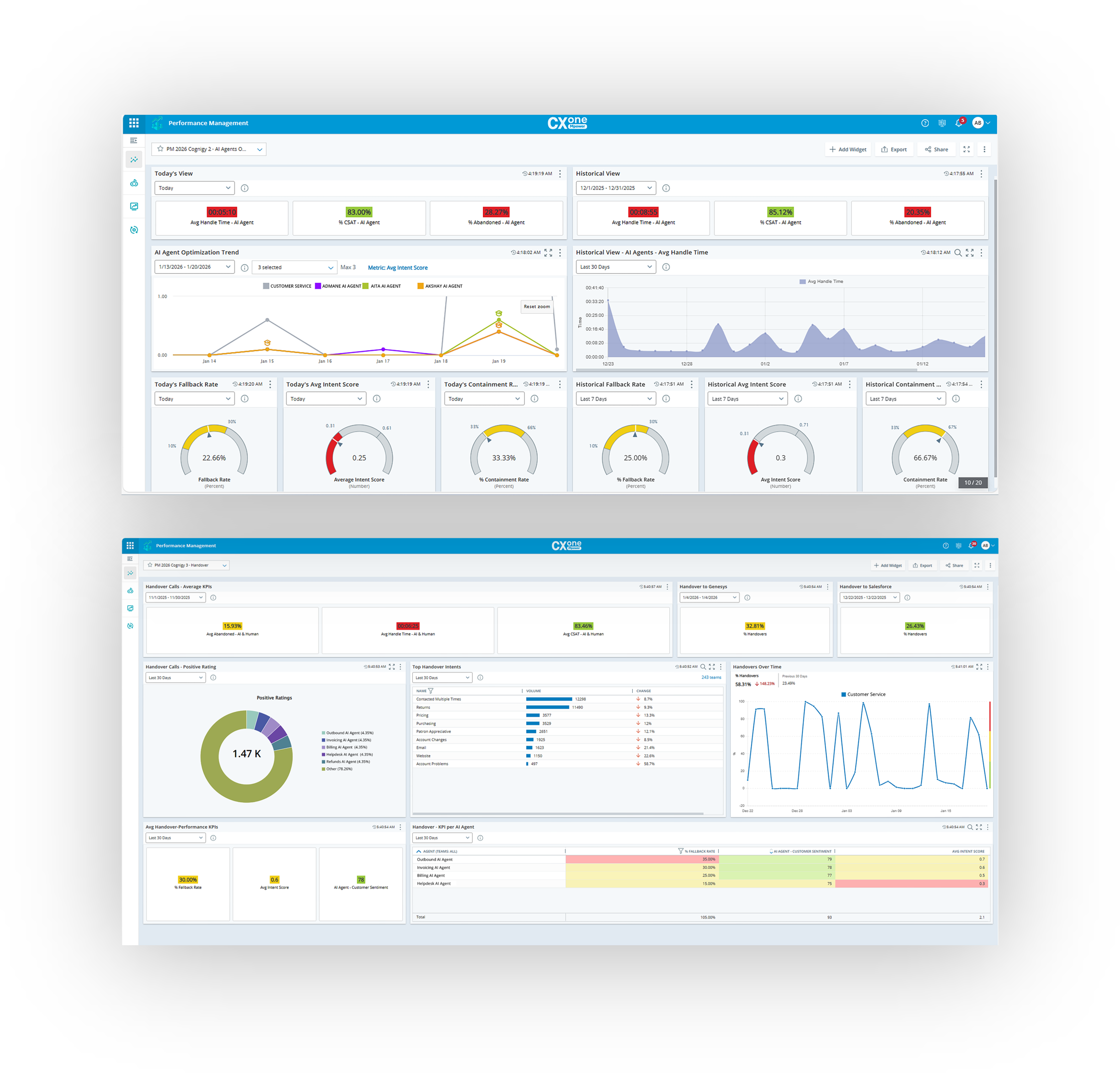
NICE CXone Mpower offers a great suite of products and tools appropriate for contact centers. It is a one stop shop for all of the monitoring, scheduling, reporting, and quality tools a large or small contact center may need. It is very feature rich and has many components, some of which we haven't even grown to adopt yet but may in the near future.
A de minimis incentive was given to thank the reviewer for their time. The incentive was not used to bias or drive a particular response, nor was the incentive contingent on a positive endorsement. More Info
Embed survey responses into an email to allow for easier data capture from customers.
Automatically creates GetFeedback records in SFDC, which allows for greater visibility and better integration of reporting. This also drives a number of calls to action with internal teams via SFDC workflows and Gainsight.
Very customizable look and feel of the survey to stay on corporate brand.
A de minimis incentive was given to thank the reviewer for their time. The incentive was not used to bias or drive a particular response, nor was the incentive contingent on a positive endorsement. More Info
A de minimis incentive was given to thank the reviewer for their time. The incentive was not used to bias or drive a particular response, nor was the incentive contingent on a positive endorsement. More Info
The only real challenge I've encountered is that they don't have a simple way to use a defined drop-down list that is in our CRM.
I wish I could get a custom icon for ratings vs. just stars, hearts, circles or numbers. That was not a deal breaker, but it would be kind of cool to have.
The process of creating a URL (distributing a Salesforce Aware Survey) to embed in an email template is a little complicated and takes some practice, especially for a novice admin that, at the time, didn't have much experience in adding modifiers and merge fields.
A de minimis incentive was given to thank the reviewer for their time. The incentive was not used to bias or drive a particular response, nor was the incentive contingent on a positive endorsement. More Info
There can be changes in interface of the app, however it's still very good
I would appreciete detailed web page with all necessary information, but when I need anything, the customer support is very quick and provide all the information
A de minimis incentive was given to thank the reviewer for their time. The incentive was not used to bias or drive a particular response, nor was the incentive contingent on a positive endorsement. More Info
Nice made it possible for employees to work from anywhere with access to the internet, it made it possible to extract data from contacts in a very thorough way. In addition, the meticaes can be fully customized and the day-to-day monitoring of the operation is more visible.With nice, contacts with clients abroad became easier.
A de minimis incentive was given to thank the reviewer for their time. The incentive was not used to bias or drive a particular response, nor was the incentive contingent on a positive endorsement. More Info
It is incredibly straightforward to use. Setup time is hours to days. When it is up and running, you can forget it exists. The Lightning Platform integration then starts to provide many options around creative use of the tools. It becomes more about where you can extend to your hearts content. Lightning App developers will have a great time here.
The lack of written SOPs makes some features (WFM / Performance management) very difficult to use. The training provided by NICE is extensive, but it's hard to remember everything shared in the hour. We spend so much time on the platform just trying to figure out how to use the features; it would be much easier with written instructions and screenshots.
A de minimis incentive was given to thank the reviewer for their time. The incentive was not used to bias or drive a particular response, nor was the incentive contingent on a positive endorsement. More Info
NICE inContact CXone is available when you need it. I have been using it for about a year and I have never suffered any issues that caused my not to have access to the product. If there are updates, they must be downloaded and install in the background because I do not see them
A de minimis incentive was given to thank the reviewer for their time. The incentive was not used to bias or drive a particular response, nor was the incentive contingent on a positive endorsement. TR verified that a representative sample of customers was invited. More Info
NICE inContact CXone performs very well even on old computers that are limited in resources. I use a older computer with limited memory and it seems to handle NICE inContact CXone very well in most cases. There will be times when it acts up for whatever reason bust over ninety percent of the time.
A de minimis incentive was given to thank the reviewer for their time. The incentive was not used to bias or drive a particular response, nor was the incentive contingent on a positive endorsement. TR verified that a representative sample of customers was invited. More Info
The few times, and I mean few, I have had to reach out to the support staff they were very helpful. I was also lucky enough to meet the developer at a users' conference. His willingness to hear what I had to say was impressive. After understanding his background coming from the CRM world I knew that he knew what we as users needed in the way of integration.
A de minimis incentive was given to thank the reviewer for their time. The incentive was not used to bias or drive a particular response, nor was the incentive contingent on a positive endorsement. More Info
inContact only allows specific users to contact them for support. Even though I use the product daily and it accounts for a large amount of my workload, I still have to contact an authorized user to create an incident. These users are managers and their schedules are very busy. This can result in delays in incidents being opened and resolved.
A de minimis incentive was given to thank the reviewer for their time. The incentive was not used to bias or drive a particular response, nor was the incentive contingent on a positive endorsement. More Info
The In-person training was fine for a general overview. I think it would have been really helpful to have a review of pre-built reports and how to use them as tools.
A de minimis incentive was given to thank the reviewer for their time. The incentive was not used to bias or drive a particular response, nor was the incentive contingent on a positive endorsement. More Info
I would rate 10, since the explanations were far enough to catch all the usabilities.I would rate 10, since the explanations were far enough to catch all the usabilities.I would rate 10, since the explanations were far enough to catch all the usabilities.I would rate 10, since the explanations were far enough to catch all the usabilities.
A de minimis incentive was given to thank the reviewer for their time. The incentive was not used to bias or drive a particular response, nor was the incentive contingent on a positive endorsement. More Info
We love the use of our new tools. However, NICE staff turnover was frustrating. We lost ground each time a new team took over. Some people were good some were not as much. Some people did great training while others were not as helpful
A de minimis incentive was given to thank the reviewer for their time. The incentive was not used to bias or drive a particular response, nor was the incentive contingent on a positive endorsement. More Info
GetFeedback has a professional appearance and dynamic content UI that is more trustworthy than other solutions. Additionally, the transitions and branding of GetFeedback are user-friendly on any device making survey response easy to manage. Finally, Salesforce integration is made not only easy but encouraged with a comprehensive ability to customize survey content.
A de minimis incentive was given to thank the reviewer for their time. The incentive was not used to bias or drive a particular response, nor was the incentive contingent on a positive endorsement. More Info
When it comes to this specific situation (cell centers) NICE definitely has an ADP beat. The analytics, scheduling, and forecasts are extremely well-tailored for this situation. ADP has a more comprehensive solution in my opinion - I feel their UI and mobile app are also more user-friendly. But in terms of performance management functionality, NICE has a more robust system and is able to create additional metrics if we need them When I used ADP there were no custom options available.
A de minimis incentive was given to thank the reviewer for their time. The incentive was not used to bias or drive a particular response, nor was the incentive contingent on a positive endorsement. More Info
I rated 10, because Nice CX one is very much functional. You can simply acess it by website Nice, in any navigator, desktop, notebook or mobile, so you can in a fast way run on every departament of the company.
A de minimis incentive was given to thank the reviewer for their time. The incentive was not used to bias or drive a particular response, nor was the incentive contingent on a positive endorsement. More Info
Our response rate for our lead qualifying survey has been hovering around 55%. That doesn't mean that they complete the entire thing, but at least we are getting some answers back. It also allows us to weed out any leads that are outside of our scope of work. The survey when answered in its entirety gets a lead 13 steps down our customer journey map.
The automation of sending out the recruiting survey has allowed our recruiting manager to focus on qualified applicants and has completely eliminated the duplicate data entry of key information that the hiring managers required for determining if a candidate should be scheduled for a phone interview. Over the past year of using this survey we received 145 survey back. That is 145 manual emails that no longer had to be sent out by staff. You do the math on that time savings.
The new hire training feedback has allowed internal trainers to understand how to better tailor each session to on-board future employees in a more effective manner. With over 33 different training modules you can imagine how intensive our on-boarding process can be and if we can understand what works and what doesn't this only adds to the effectiveness of each trainer.
A de minimis incentive was given to thank the reviewer for their time. The incentive was not used to bias or drive a particular response, nor was the incentive contingent on a positive endorsement. More Info
A de minimis incentive was given to thank the reviewer for their time. The incentive was not used to bias or drive a particular response, nor was the incentive contingent on a positive endorsement. More Info