Google Surveys vs. Pointerpro

Overview
ProductRatingMost Used ByProduct SummaryStarting Price
Google Surveys
Score 8.0 out of 10
N/A
Google Surveys is an app for custom surveys, and is part of Google Apps for Work. The insights from audience targeted surveys can be expressed in instant, easy-to-digest graphs and charts help you make sense of the survey data. Surveys natively integrates with other solutions, allowing you to use data from one product while working in another. Survey responses from real people can be sourced by Google's Opinion Rewards app, where respondents answer questions in exchange for incentives.
$10
per completed survey
Pointerpro
Score 10.0 out of 10
N/A
Pointerpro is an assessment platform designed for professionals who want to turn their expertise into personalized, scalable guidance. Instead of stopping at data collection, Pointerpro transforms each completed assessment into an automatically generated, fully branded PDF or PowerPoint report containing personalized results and recommendations. This enables organizations to deliver insights instantly, without manual analysis. The platform supports advanced scoring…
$69
per month 2000 monthly responses
Pricing
Google SurveysPointerpro
Editions & Modules
Surveys
10¢
per completed survey
Professional Plan
$69
per month 2000 monthly responses
Enterprise
On Request
5000+ monthly responses
ReportR
On Request
10000+ monthly responses
DistributR
On Request
15000+ monthly responses
Offerings
Pricing Offerings
Google SurveysPointerpro
Free Trial
NoYes
Free/Freemium Version
NoNo
Premium Consulting/Integration Services
NoYes
Entry-level Setup FeeNo setup feeNo setup fee
Additional DetailsProfessional Plan Price: $69 per month (billed annually) Unlimited questionnaires & questions Large variety of question types Removable Pointerpro branding Advanced question logic & piping Offline functionality Zapier and Make integration Emails with customizable content Questionnaire in multiple languages Custom scoring Variable end messages & outcomes Show dynamic final screen messages based on scores and answers. Email invitations with unique tracking link Enterprise Plan Custom pricing available upon request Professional features plus: Custom formulas for advanced calculations Response upload Use formulas in question logic & piping Payment processing Before, during or after completing a survey or assessment. Extended design options with custom CSS Integration via WebHooks A Webhook is a notification sent over the web, which transfers data from one app to another. Questionnaire campaigns (on request) A campaign shows a group of questionnaires all in one screen which can be accessed with just a single link. Full white labeling URL and email domain white labeling. Multiple users and team management (on request) Dashboard Builder (on request) ReportR Plan Custom pricing available upon request Enterprise features plus: Drag & drop PDF report builder with preview Large variety of report widgets Use logic to show and hide report widgets based on responses and scores Individual, aggregated & team PDF reports Generate a PDF right after taking the questionnaire PDF distribution via email & download Extended design options with custom CSS Integrate with external databases Multiple users and team management (on request) Dashboard Builder (on request) Aggregate Reports (on request) optional AI prompt widget to scale report content faster DistributR Plan Custom pricing available upon request ReportR features plus: Distribution Portal to leverage assessment distribution Respondent base feeding by customers/co-workers Respondent invitation templates with unique links You create the templates for customers/co-workers. Unique respondent links are generated. Real-time response collection and result view Real-time response collection and result view Your customers/co-workers collect responses. You view overall results. Email campaign template creation Created by your customers/co-workers Optional: charge for assessment/report access Overview of to-do assessments for respondents Overview of responses and reports for respondents Dashboard Builder Multiple users and team management (on request) Aggregate Reports (on request)
More Pricing Information
Community Pulse
Google SurveysPointerpro
Features
Google SurveysPointerpro
Survey Format & Appearance
Comparison of Survey Format & Appearance features of Product A and Product B
Google Surveys
7.6
17 Ratings
5% below category average
Pointerpro
-
Ratings
Survey templates8.417 Ratings00 Ratings
Themes7.015 Ratings00 Ratings
Custom logo/branding7.214 Ratings00 Ratings
Survey Content
Comparison of Survey Content features of Product A and Product B
Google Surveys
8.2
16 Ratings
3% below category average
Pointerpro
-
Ratings
Changes to live survey9.515 Ratings00 Ratings
Question design help7.713 Ratings00 Ratings
Multiple question types7.316 Ratings00 Ratings
Survey Logic
Comparison of Survey Logic features of Product A and Product B
Google Surveys
6.5
15 Ratings
24% below category average
Pointerpro
-
Ratings
Survey logic flexibility6.515 Ratings00 Ratings
Survey Reporting & Analytics
Comparison of Survey Reporting & Analytics features of Product A and Product B
Google Surveys
7.5
16 Ratings
7% below category average
Pointerpro
-
Ratings
Response tracking7.616 Ratings00 Ratings
Data export8.215 Ratings00 Ratings
Standard reports7.214 Ratings00 Ratings
Custom reports7.212 Ratings00 Ratings
Analytics7.414 Ratings00 Ratings
Survey Administration & Security
Comparison of Survey Administration & Security features of Product A and Product B
Google Surveys
8.0
16 Ratings
7% below category average
Pointerpro
-
Ratings
Access controls7.715 Ratings00 Ratings
Compliance8.213 Ratings00 Ratings
Survey Distribution
Comparison of Survey Distribution features of Product A and Product B
Google Surveys
5.6
13 Ratings
36% below category average
Pointerpro
-
Ratings
Vendor-offered crowdsourcing5.610 Ratings00 Ratings
Respondent restrictions5.612 Ratings00 Ratings
Best Alternatives
Google SurveysPointerpro
Small Businesses
Square 9 Softworks
Square 9 Softworks
Score 9.7 out of 10
Renaissance Accelerated Reader
Score 9.9 out of 10
Medium-sized Companies
Qualaroo
Qualaroo
Score 6.1 out of 10
Renaissance Accelerated Reader
Score 9.9 out of 10
Enterprises
Verint Voice of the Customer
Score 9.3 out of 10
Renaissance Accelerated Reader
Score 9.9 out of 10
All AlternativesView all alternativesView all alternatives
User Ratings
Google SurveysPointerpro
Likelihood to Recommend
6.4
(16 ratings)
7.7
(28 ratings)
Usability
7.0
(14 ratings)
8.0
(10 ratings)
Support Rating
7.5
(12 ratings)
7.8
(11 ratings)
User Testimonials
Google SurveysPointerpro
Likelihood to Recommend
Google
Google Surveys is perfect when trying to collaborate with co-workers and find a date & time that works best for them to get together, whether it's for a regular meeting, team photo session, celebratory dinner, or Christmas celebration. It's also great for getting feedback on proposed changes that would affect the team.
Read full review
Pointerpro
They get the job done. We were able to do everything that our client wanted and needed. Its a free quiz on their website, so having to pay $1,500 a year for this service is hurting our bank. My only complaint is the price. If you are able to lower your price or offer promotions, then I would have no problem staying. We are currently looking for cheaper alternatives.
Read full review
Pros
Google
  • Measure the pulse of how our members are feeling (yes/no questions, multiple-choice questions).
  • Learn how students are doing with specific projects (textual-based questions, essay-type answers).
  • Run an election for board members (use of the "other" notation so that people can write in their own choices).
Read full review
Pointerpro
  • Intuitive branching logic mechanics. Survey Anyplace offers a nicely pipeline/process map format to visually see the branching logic for more robust question sets.
  • Reliable results. Survey Anyplace offers important tracking data to evaluate and hold respondents accountable to completing the surveys.
  • Users can save progress and come back. This allows busy respondents time to think about deeper questions, specifically when the surveys are being used in an interviewing approach.
Read full review
Cons
Google
  • While it is very intuitive, there are many ways you can fine-tune your survey (such as word limits, counts, etc) and these are not always obvious where those settings are.
  • I would like to see some ways of changing the formatting (and maybe I just haven't explored that yet), ie: colors, set up on the screen.
Read full review
Pointerpro
  • Creating something highly customized at the ReportR level means you will need to have some savvy with CSS if you want to do it yourself. But it also means you can create something truly incredible and they do not have the same limitations as other similar software.
Read full review
Usability
Google
Relatively simple so that those who are less than familiar with computers can figure it out. User friendly and already embedded with other Google products. Receives an 8 because many features available with Google Surveys are also available with similar, free products on the internet today. Good, but not stellar.
Read full review
Pointerpro
This is a great platform. The ease of use and ability to generate instant reports is killer. I highly recommend this platform for those who want to showcase a professional survey to impress their clients and employees. For us, this helps expand our product offering greatly, which also supplements our other services. [Survey Anyplace is a] great product and platform!
Read full review
Support Rating
Google
This is by far the only area where I think that there is room for improvement because Google does not respond as fast as I would like them to. We live in a fast-paced world and this is probably the only area where Google can improve on and as a teacher, I find it challenging to wait for a day or two for a response when everything that I am doing in the Google Classroom is running instantly and with no breaks in between.
Read full review
Pointerpro
I wish there was a better live chat feature. Seems like I have to wait 30-60 every time I need to talk to someone. Though once I am able to speak with someone via the chat in my account, they have been very helpful in answering my questions or pointing me in the right direction.
Read full review
Alternatives Considered
Google
Google is a quick and easy to use survey analysis tool that allows you to send cheap or free surveys to an audience. In comparison to tools like SurveyMonkey I would have more faith in the Google technology and robustness of sample. As we have Microsoft 365, sometimes Microsoft forms is a preferred internal source of surveying for free and easily analysing the data. For more robust and accurate market research projects, or even just insights that I can trust more, I would recommend a Market Research Provider as they offer a lot more options to target a key audience and you can rely on their data a bit more - it is weighted, nationally representative etc. Companies with their own research panels tend to have greater data quality that you can put more trust in
Read full review
Pointerpro
Survey Anyplace is an excellent piece of software.
It can create in depth surveys and has a huge functional capability! I would highly recommend using Survey Anyplace for any business as it is so adaptable!
The support team are fabulous and always on hand to answer any queries and set up Zoom calls for more tailored help! Mark has been brilliant in helping me to create a complex survey!
Read full review
Return on Investment
Google
  • Google Surveys are responded by our customers - dealers, retailers and end users. As it's easy to handle, greater is its adoption and hence it definitely has a good ROI.
  • Employees as internal stakeholders also use it well to drive initiatives & projects within the organization. This enhances their engagement showcasing digital workplace and hence again a good ROI.
Read full review
Pointerpro
  • As a publisher, the quizzes provide us with compelling type of "advertising" product to engage our clients' audiences.
  • We use the quizzes to direct respondents to thought leadership content for lead gen. The "correct response" feature in the quizzes provide the most interesting sample of our clients' content.
Read full review
ScreenShots

Pointerpro Screenshots

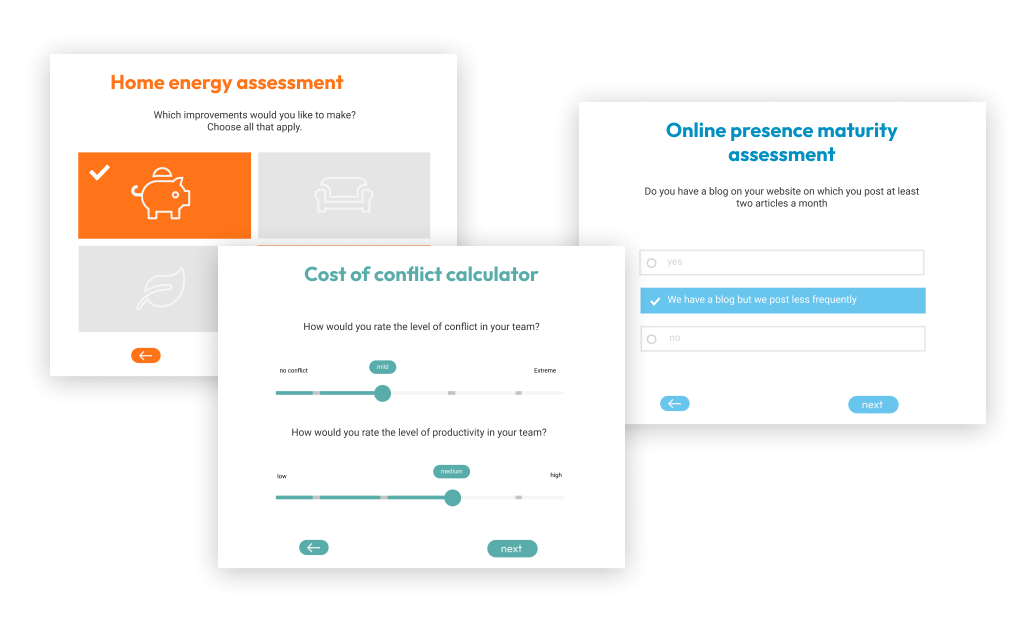
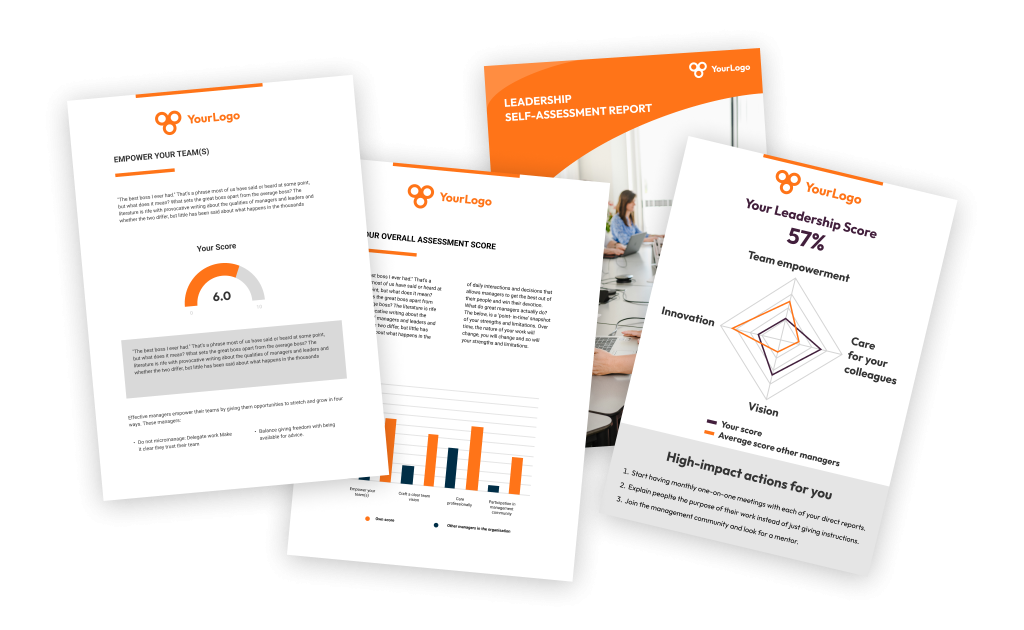
Screenshot of the Pointerpro assessment app, used to build maturity assessments, personality tests, 360 assessments, competency quizzes, self-assessments, or quote calculators.Screenshot of how respondents can immediately receive their personalized report after they complete their assessment. Of course the tool also offers the possibility of giving postponed feedback.Screenshot of the tool's no-code assessment builder.Screenshot of how Pointerpro allows respondents to download their personalized PDF with a download button at the end of the assessment.Screenshot of some examples of Pointerpro's branded assessments.