
HCL DataConnect vs. OpenText Core Endpoint Backup
HCL DataConnect vs. OpenText Core Endpoint Backup
| Product | Rating | Most Used By | Product Summary | Starting Price |
|---|---|---|---|---|
 HCL DataConnect | Mid-Size Companies (51-1,000 employees) | HCL DataConnect (formerly Actian DataConnect) is a hybrid integration solution that enables users to integrate anything, anywhere, anytime. It can be deployed in on-premise, cloud, and/or hybrid environments and offers quick onboarding. With its emphasis data quality, data reuse, adaptability and self-service integration, DataConnect is designed to support rapid onboarding and deliver the fast time to value. | N/A | |
 OpenText Core Endpoint Backup | N/A | OpenText Core Endpoint Backup, formerly Carbonite Endpoint, provides an enterprise-grade backup solution for all endpoints, including mobile devices or devices spread across a distributed enterprise network. | $24 per month |
| HCL DataConnect | OpenText Core Endpoint Backup | |||||||||||||||
|---|---|---|---|---|---|---|---|---|---|---|---|---|---|---|---|---|
| Editions & Modules | No answers on this topic |
| ||||||||||||||
| Offerings |
| |||||||||||||||
| Entry-level Setup Fee | Optional | No setup fee | ||||||||||||||
| Additional Details | — | — | ||||||||||||||
| More Pricing Information | ||||||||||||||||
| HCL DataConnect | OpenText Core Endpoint Backup |
|---|
| HCL DataConnect | OpenText Core Endpoint Backup | ||||||||||||||||||||||||||||||||||||
|---|---|---|---|---|---|---|---|---|---|---|---|---|---|---|---|---|---|---|---|---|---|---|---|---|---|---|---|---|---|---|---|---|---|---|---|---|---|
| Data Source Connection |
| ||||||||||||||||||||||||||||||||||||
| Data Transformations |
| ||||||||||||||||||||||||||||||||||||
| Data Modeling |
| ||||||||||||||||||||||||||||||||||||
| Data Governance |
| ||||||||||||||||||||||||||||||||||||
| Data Center Backup |
| ||||||||||||||||||||||||||||||||||||
| Enterprise Backup |
|
| HCL DataConnect | OpenText Core Endpoint Backup | |
|---|---|---|
| Small Businesses |  Skyvia Score 10.0 out of 10 |  Cove Data Protection Score 9.2 out of 10 |
| Medium-sized Companies |  IBM InfoSphere Information Server Score 8.0 out of 10 |  Bacula Enterprise Score 9.6 out of 10 |
| Enterprises | IBM InfoSphere Information Server Score 8.0 out of 10 | Bacula Enterprise Score 9.6 out of 10 |
| All Alternatives | View all alternatives | View all alternatives |
| HCL DataConnect | OpenText Core Endpoint Backup | |
|---|---|---|
| Likelihood to Recommend | 8.9 (2 ratings) | 7.0 (23 ratings) |
| Likelihood to Renew | - (0 ratings) | 1.0 (1 ratings) |
| Support Rating | - (0 ratings) | 9.7 (6 ratings) |
| HCL DataConnect | OpenText Core Endpoint Backup | |
|---|---|---|
| Likelihood to Recommend |  HCL Technologies
 David Byrd Sr Integration Engineer - Dual Certified in Dell Boomi Developer 1 & 2, and Actian DataConnect |  OpenText
 Derek Schroeder Service Manager |
| Pros | HCL Technologies
 Justin Duperre Data Management Support Specialist | OpenText
 Namrata D Proprietor |
| Cons | HCL Technologies
David Byrd Sr Integration Engineer - Dual Certified in Dell Boomi Developer 1 & 2, and Actian DataConnect | OpenText
 Todd Frazier Systems Administrator |
| Likelihood to Renew | HCL Technologies No answers on this topic | OpenText
 Nathan Venno IT Manager |
| Support Rating | HCL Technologies No answers on this topic | OpenText
 John Watson Director Non-Clinical Development |
| Alternatives Considered | HCL Technologies
Justin Duperre Data Management Support Specialist | OpenText
|
| Return on Investment | HCL Technologies
David Byrd Sr Integration Engineer - Dual Certified in Dell Boomi Developer 1 & 2, and Actian DataConnect | OpenText
|
| ScreenShots | HCL DataConnect Screenshots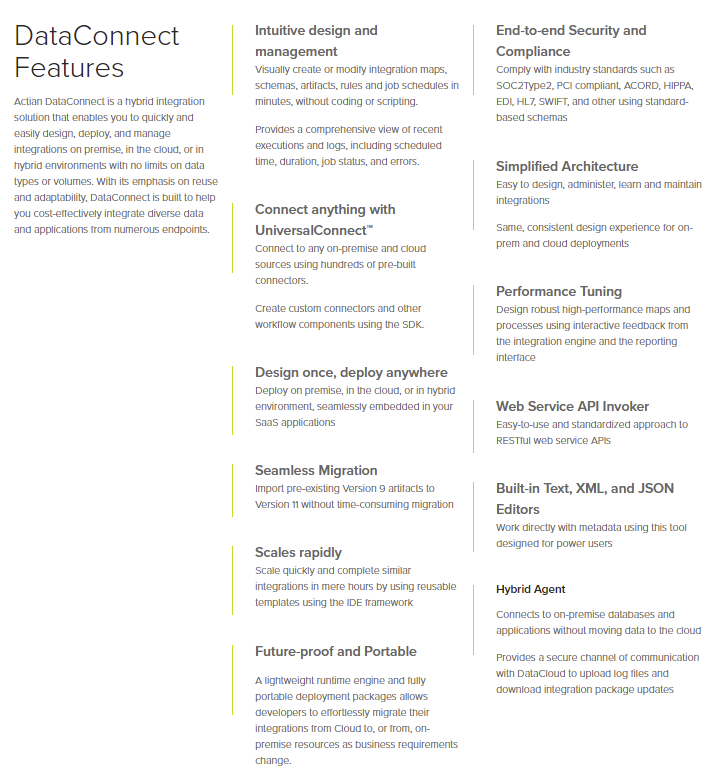      |