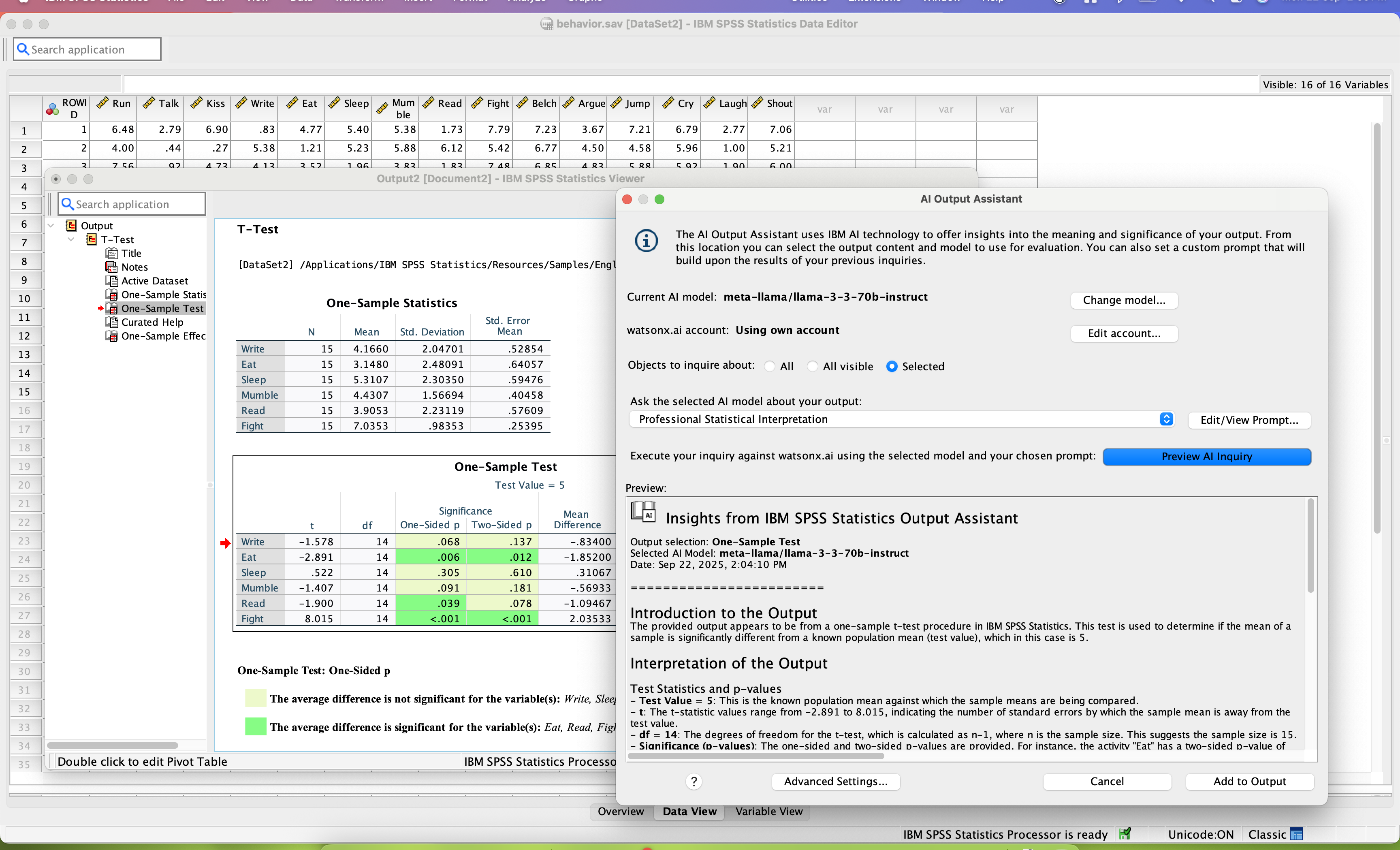
SPSS Statistics is a software package used for statistical analysis. It is now officially named "IBM SPSS Statistics". Companion products in the same family are used for survey authoring and deployment (IBM SPSS Data Collection), data mining (IBM SPSS Modeler), text analytics, and collaboration and deployment (batch and automated scoring services).
$105
per month per user
Jupyter Notebook
Score8.6 out of 10
N/A
Jupyter Notebook is an open-source web application that allows users to create and share documents containing live code, equations, visualizations and narrative text. Uses include: data cleaning and transformation, numerical simulation, statistical modeling, data visualization, and machine learning. It supports over 40 programming languages, and notebooks can be shared with others using email, Dropbox, GitHub and the Jupyter Notebook Viewer. It is used with JupyterLab, a web-based IDE for…
N/A
Posit
Score10 out of 10
N/A
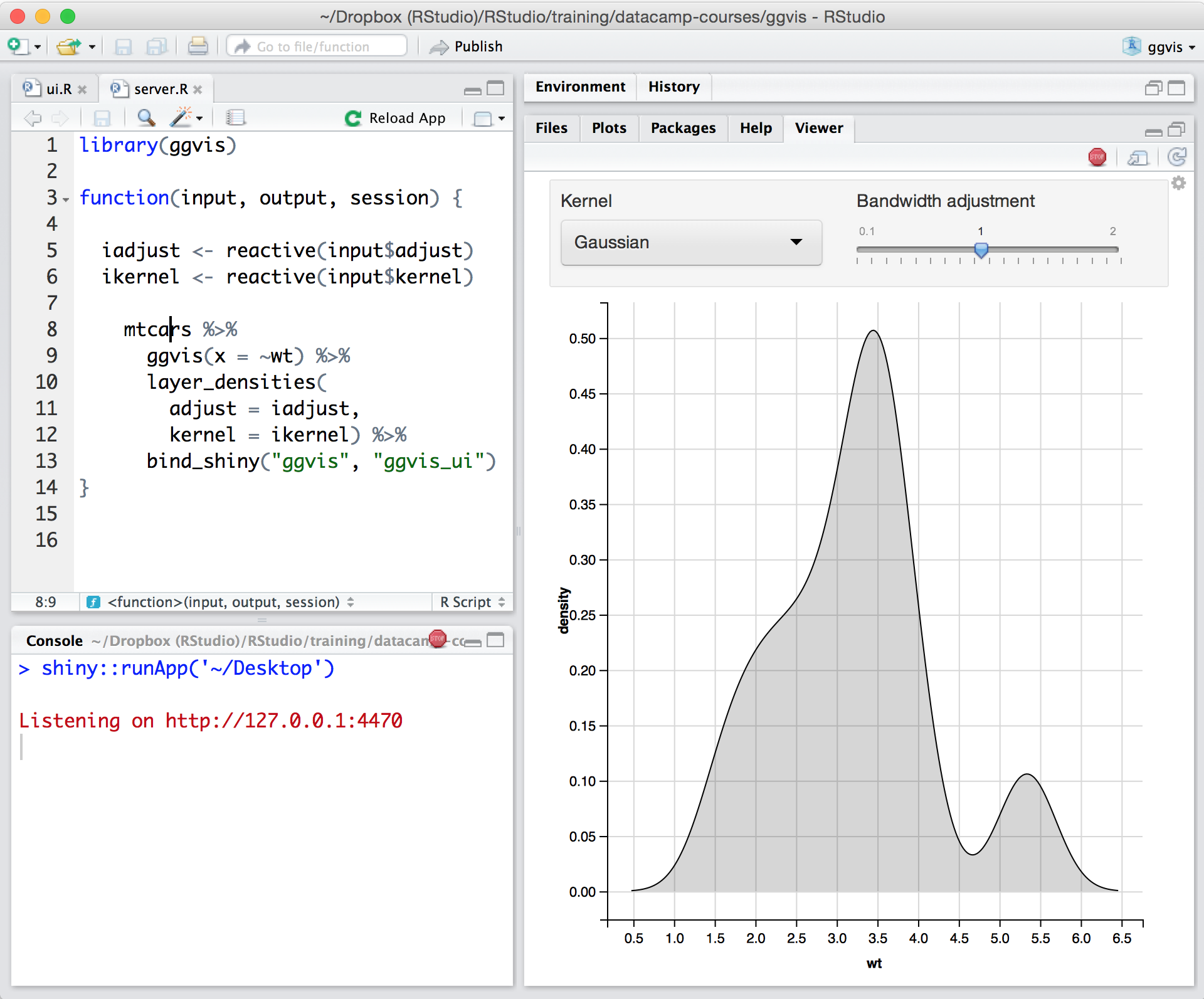
Posit, formerly RStudio, is a modular data science platform, combining open source and commercial products.
For my own statistical analyses, I personally use R and MPlus. However, these tools have a steep learning curve and require dedicated time and a course on their own. In m yopinion, they are not useful for trying to quickly acclimate undergrads to the new world of stats and …
A de minimis incentive was given to thank the reviewer for their time. The incentive was not used to bias or drive a particular response, nor was the incentive contingent on a positive endorsement. TR verified that a representative sample of customers was invited. More Info
internal it in Information Technology at FM (Information Technology & Services, 201-500 employees)
Chose IBM SPSS Statistics
We tend to shy away from open source where possible. with SPSS from our feeder university system for our co-op interns, this is a great transition and a low barrier to getting them working quickly.
A de minimis incentive was given to thank the reviewer for their time. The incentive was not used to bias or drive a particular response, nor was the incentive contingent on a positive endorsement. TR verified that a representative sample of customers was invited. More Info
Research Assistant in Research & Development at Arizona State University (Research, 5001-10,000 employees)
Chose IBM SPSS Statistics
[IBM] SPSS is by far the best of the statistics software applications in terms of functionality and accessibility, but its biggest drawback is price. SPSS is prohibitively expensive in comparison to the other competing statistics applications such as R and SAS, making the …
A de minimis incentive was given to thank the reviewer for their time. The incentive was not used to bias or drive a particular response, nor was the incentive contingent on a positive endorsement. More Info
Verified User
Chose IBM SPSS Statistics
I don't really know this. I messed with RStudio and several other programs as I started data evaluation, but since my school required SPSS that is all I ended up really using and working with.
A de minimis incentive was given to thank the reviewer for their time. The incentive was not used to bias or drive a particular response, nor was the incentive contingent on a positive endorsement. More Info
Verified User
Chose IBM SPSS Statistics
Other software that I can compare to SPSS include R, Excel and SAS. Overall, SPSS is easier to get familiar with and more user friendly which is why I can see it as more appropriate for taught courses. The computational capabilities are not similar to R, but on the other hand …
A de minimis incentive was given to thank the reviewer for their time. The incentive was not used to bias or drive a particular response, nor was the incentive contingent on a positive endorsement. TR verified that a representative sample of customers was invited. More Info
Graduate Research Assistant in Research & Development at Western Kentucky University (Higher Education, 1001-5000 employees)
Chose IBM SPSS Statistics
Overall, IBM SSPS outperforms competitors in almost every arena. It's ability to both perform statistical analysis and geospatial analysis is unrivaled. Additionally, it is superior in handling large or complex datasets over many of the other similar programs. The only program …
A de minimis incentive was given to thank the reviewer for their time. The incentive was not used to bias or drive a particular response, nor was the incentive contingent on a positive endorsement. TR verified that a representative sample of customers was invited. More Info
Project Manager in Quality Assurance at The University of Colorado Center for Bioethics and Humanities (Hospital & Health Care, 11-50 employees)
Chose IBM SPSS Statistics
I have also used RStudio and SAS previously. In fact, I'm currently using RStudio since our SPSS license has expired. SPSS lacks the capabilities of these other two programs and it is far less intuitive. Larger data sets can be analyzed with R and SAS, but using these programs …
A de minimis incentive was given to thank the reviewer for their time. The incentive was not used to bias or drive a particular response, nor was the incentive contingent on a positive endorsement. More Info
Senior Implementation Services Assistant in Information Technology at Mercer (Hospital & Health Care, 5001-10,000 employees)
Chose Jupyter Notebook
Jupyter Notebook is very attractive platform for new developers to code and to learn programming and perform tasks as compared to other IDE. It has very well and easy visualization, interactive programming and sharing the live code and slideshow is very easy as compare to …
A de minimis incentive was given to thank the reviewer for their time. The incentive was not used to bias or drive a particular response, nor was the incentive contingent on a positive endorsement. More Info
Verified User
Chose Jupyter Notebook
Jupyter Notebook has a nicer interface than RStudio in our opinion and since most of our group is familiar with Jupyter Notebook it has made it a default choice. Overall the interactive programming as well as the easy visualizations, model deployment, and markdown made Jupyter …
A de minimis incentive was given to thank the reviewer for their time. The incentive was not used to bias or drive a particular response, nor was the incentive contingent on a positive endorsement. More Info
Verified User
Chose Jupyter Notebook
Jupyter Notebook is the core feature extended on by many commercial alternatives. The commercial alternatives have more feature integration with the rest of their portfolio. RStudio is another competitor for interactive and literate programming.
A de minimis incentive was given to thank the reviewer for their time. The incentive was not used to bias or drive a particular response, nor was the incentive contingent on a positive endorsement. More Info
Software Engineer in Product Management at Fidelity Information Services (Financial Services, 5001-10,000 employees)
Chose Jupyter Notebook
With Jupyter Notebook besides doing data analysis and performing complex visualizations you can also write machine learning algorithms with a long list of libraries that it supports. You can make better predictions, observations etc. with it which can help you achieve better …
A de minimis incentive was given to thank the reviewer for their time. The incentive was not used to bias or drive a particular response, nor was the incentive contingent on a positive endorsement. More Info
Data Analyst in Research & Development at LOAK (Research, 1-10 employees)
Chose Jupyter Notebook
I like Jupyter Notebook over the other two because it keeps my work more organized. It helps me to structure my workflow and the ability to run commands in chunks keeps me from being confused when coming back to the work after some time.
A de minimis incentive was given to thank the reviewer for their time. The incentive was not used to bias or drive a particular response, nor was the incentive contingent on a positive endorsement. More Info
Data Scientist at Genpact (Pharmaceuticals, 10,001+ employees)
Chose Posit
Posit is far better than Jupyter Notebook and Minitab in this regard that Posit is actually capable of doing all kind of analytical stuffs like data pre-processing, wrangling, validation and visualization. On the other hand, Jupyter Notebook can be used for python programming …
A de minimis incentive was given to thank the reviewer for their time. The incentive was not used to bias or drive a particular response, nor was the incentive contingent on a positive endorsement. More Info
Data Science Consultant in Professional Services at ZS (Management Consulting, 10,001+ employees)
Chose Posit
RStudio works really well compared to competitors such as Jupyter Notebook where there is no environment to visualize variables. RStudio on the other hand is much easier to use and provides the right set of environments for users.
A de minimis incentive was given to thank the reviewer for their time. The incentive was not used to bias or drive a particular response, nor was the incentive contingent on a positive endorsement. More Info
Verified User
Chose Posit
The most similar products to RStudio that I have used include IBM SPSS and Tableau Prep. In my experience, SPSS is more intuitive and has less of a learning curve; I used it extensively in my undergraduate career in Statistics and Cognitive Science research. While RStudio has …
A de minimis incentive was given to thank the reviewer for their time. The incentive was not used to bias or drive a particular response, nor was the incentive contingent on a positive endorsement. More Info
Verified User
Chose Posit
RStudio stacks up pretty well against Anaconda. However, Anaconda might be the first choice for someone who likes Python for their analytics and machine learning needs. In the past, I have found it seamless to connect Jupyter Notebook (in Anaconda suite) to integrate with other …
A de minimis incentive was given to thank the reviewer for their time. The incentive was not used to bias or drive a particular response, nor was the incentive contingent on a positive endorsement. TR verified that a representative sample of customers was invited. More Info
Verified User
Chose Posit
Jupyter Notebook is a similar tool, which is also good. RStudio has better support on R, and it's easier to generate and share analysis reports through the RStudio connect.
A de minimis incentive was given to thank the reviewer for their time. The incentive was not used to bias or drive a particular response, nor was the incentive contingent on a positive endorsement. More Info
Lead Data Scientist (Industrial Applications) in Engineering at Siemens Energy (Oil & Energy, 10,001+ employees)
Chose Posit
We feel that RStudio Teams is so far one of the best prototyping environments for data scientists. It is much more robust than standard JupyterLab/Jupyter Notebook instances in the cloud and it supports better authentication methods, allows to share your content via RStudio …
A de minimis incentive was given to thank the reviewer for their time. The incentive was not used to bias or drive a particular response, nor was the incentive contingent on a positive endorsement. More Info
Verified User
Chose Posit
Python IDEs like Spyder or Jupyter Notebooks are not steady and stable as compared to RStudio. The newer version of Python or Installing new Library corrupted the Spyder or Jupyter Notebook versions, not same with RStudio! There are not easily available tools like RShiny in order …
A de minimis incentive was given to thank the reviewer for their time. The incentive was not used to bias or drive a particular response, nor was the incentive contingent on a positive endorsement. More Info
Verified User
Chose Posit
I used them to run Python codes, so that not really comparable here. I will describe my experience around it. I feel that Jupyter Notebook is the closest product to RMarkdown file, as it allows users to run line by line and share outcomes underneath. PyCharm and Visual Studio …
A de minimis incentive was given to thank the reviewer for their time. The incentive was not used to bias or drive a particular response, nor was the incentive contingent on a positive endorsement. TR verified that a representative sample of customers was invited. More Info
Verified User
Chose Posit
RStudio's user interface is easier to use than Jupyter Notebook (particularly for users that are new to programming). Many of our users have experience with RStudio Desktop, so switching to RStudio Server Pro was very easy. Deploying applications is also much easier thanks to …
A de minimis incentive was given to thank the reviewer for their time. The incentive was not used to bias or drive a particular response, nor was the incentive contingent on a positive endorsement. TR verified that a representative sample of customers was invited. More Info
Verified User
Chose Posit
SPSS is good for folks who are not as familiar with statistics, and for those who are older or more technologically-experienced and may be overwhelmed by Posit's products. It's also really great for teaching students and getting them exposed. However, because Posit is free, …
A de minimis incentive was given to thank the reviewer for their time. The incentive was not used to bias or drive a particular response, nor was the incentive contingent on a positive endorsement. More Info
Verified User
Chose Posit
inter-departmental collaboration - my first choice would be TIBCO Spotfire natural language processing and knowledge graphs - my first choice would be Python information security & visualizations (including d3.js libraries) - my first choice is RStudio
A de minimis incentive was given to thank the reviewer for their time. The incentive was not used to bias or drive a particular response, nor was the incentive contingent on a positive endorsement. More Info
Verified User
Chose Posit
RStudio stacks up pretty well against its competition. For me, it is really up to personal preference and what you are used to when deciding between the competitions. I like that Python packages have the most external resources, so it's easier to troubleshoot. But RStudio does …
A de minimis incentive was given to thank the reviewer for their time. The incentive was not used to bias or drive a particular response, nor was the incentive contingent on a positive endorsement. TR verified that a representative sample of customers was invited. More Info
Graduate Research Assistant in Research & Development at Arizona State University (Research, 5001-10,000 employees)
Chose Posit
Personally, I would prefer SPSS over RStudio and SAS, but the cost for licenses for SPSS deters me from continuing to go with IBM's statistics software. RStudio has the advantage in that it is low cost and there are a lot of available resources on YouTube available for users …
A de minimis incentive was given to thank the reviewer for their time. The incentive was not used to bias or drive a particular response, nor was the incentive contingent on a positive endorsement. More Info
Verified User
Chose Posit
RStudio is free and so that is the main reason that I use it. I like that it is open source and so there are lots of support on the internet. I tried SAS JMP and Python in a text editor but RStudio was better than either of those options for cost and code flexibility …
A de minimis incentive was given to thank the reviewer for their time. The incentive was not used to bias or drive a particular response, nor was the incentive contingent on a positive endorsement. More Info
Verified User
Chose Posit
These all work synergistically and fulfill slightly different roles. In general this is determined by complexity of task and the degree of training and expertise of the end user. RStudio works well for organisations looking to move into doing more complex analytics. In general …
A de minimis incentive was given to thank the reviewer for their time. The incentive was not used to bias or drive a particular response, nor was the incentive contingent on a positive endorsement. More Info
Verified User
Chose Posit
Most bioinformaticians and scientists prefer coding in R, however python is the widely used language also. I have seen that Rstudio has definitely improved and the addition of python capability has made it easier for both python and R programmers. The built in terminal has also …
A de minimis incentive was given to thank the reviewer for their time. The incentive was not used to bias or drive a particular response, nor was the incentive contingent on a positive endorsement. More Info
Verified User
Chose Posit
Spyder allows auto-write and recommendations in code, RStudio could potentially offer such integrations easily.
A de minimis incentive was given to thank the reviewer for their time. The incentive was not used to bias or drive a particular response, nor was the incentive contingent on a positive endorsement. TR verified that a representative sample of customers was invited. More Info
Digital Corporate Technology Manager – R&D in Information Technology at Eastman Chemical Company (Chemicals, 10,001+ employees)
Chose Posit
In the space of data science tools, code is king. It enables use of standard version control systems like git, access to a wealth of expertise via StackOverflow and others, is commonly used in modern education programs, and more. Other solutions in this space are built on …
A de minimis incentive was given to thank the reviewer for their time. The incentive was not used to bias or drive a particular response, nor was the incentive contingent on a positive endorsement. TR verified that a representative sample of customers was invited. More Info
Verified User
Chose Posit
RStudio gives a more integrated R experience compared to Jupyter. RStudio is the ideal tool for running R interactively.
A de minimis incentive was given to thank the reviewer for their time. The incentive was not used to bias or drive a particular response, nor was the incentive contingent on a positive endorsement. More Info
Verified User
Chose Posit
Honestly there is no other player in the R IDE game that I would even consider worthy of comparison. If you code in R, you need RStudio.
A de minimis incentive was given to thank the reviewer for their time. The incentive was not used to bias or drive a particular response, nor was the incentive contingent on a positive endorsement. More Info
Lead Data Scientist in Information Technology at Brown-Forman (Consumer Goods, 1001-5000 employees)
Chose Posit
I've been pitched a few different data science notebook tools that tend to be more expensive and less suited to R development. I don't think I've actually seen another product that really compares to RStudio Connect for publishing Shiny Apps. I think the alternative there is …
A de minimis incentive was given to thank the reviewer for their time. The incentive was not used to bias or drive a particular response, nor was the incentive contingent on a positive endorsement. TR verified that a representative sample of customers was invited. More Info
Verified User
Chose Posit
Rodeo, jupyter and other editors RStudio like for both R and Python are simply not at the level of RStudio and they do not provide the same range of features that comes with it.
A de minimis incentive was given to thank the reviewer for their time. The incentive was not used to bias or drive a particular response, nor was the incentive contingent on a positive endorsement. TR verified that a representative sample of customers was invited. More Info
Faculty in Finance and Accounting at Johns Hopkins (Education Management, 10,001+ employees)
Chose Posit
Far better integrated and easy to use. The only full-blown Python IDE is PyCharm, and it is a monolith. I used Spyder instead. I was very happy when RStudio added Python support so I can ditch Jupyter Notebooks, which really isn't an IDE but is more like RMarkdown, a small …
A de minimis incentive was given to thank the reviewer for their time. The incentive was not used to bias or drive a particular response, nor was the incentive contingent on a positive endorsement. More Info
Verified User
Chose Posit
While many of these are great, RStudio is the best for R work. There is also native support in the IDE for combining other languages, like Python, into workflows easily so work across languages can be handled in one location.
A de minimis incentive was given to thank the reviewer for their time. The incentive was not used to bias or drive a particular response, nor was the incentive contingent on a positive endorsement. More Info
IBM SPSS Statistics is well suited for pretty much any data analytic scenario. It can handle extremely complex and large-scale datasets with ease. It especially shines if you have to do any kind of analyses that involve significance testing. Being able to do any number of significance tests (i.e., t-tests, chi-square, ANOVAs, etc.) right inside the tool is very valuable. The only scenario I would say it is less appropriate is if you need to work on a very small dataset and answer very simple questions, like frequencies or averages. In those cases, something like Excel could probably do the job just as easily.
A de minimis incentive was given to thank the reviewer for their time. The incentive was not used to bias or drive a particular response, nor was the incentive contingent on a positive endorsement. TR verified that a representative sample of customers was invited. More Info
I've created a number of daisy chain notebooks for different workflows, and every time, I create my workflows with other users in mind. Jupiter Notebook makes it very easy for me to outline my thought process in as granular a way as I want without using innumerable small. inline comments.
A de minimis incentive was given to thank the reviewer for their time. The incentive was not used to bias or drive a particular response, nor was the incentive contingent on a positive endorsement. More Info
In my humble opinion, if you are working on something related to Statistics, RStudio is your go-to tool. But if you are looking for something in Machine Learning, look out for Python. The beauty is that there are packages now by which you can write Python/SQL in R. Cross-platform functionality like such makes RStudio way ahead of its competition. A couple of chinks in RStudio armor are very small and can be considered as nagging just for the sake of argument. Other than completely based on programming language, I couldn't find significant drawbacks to using RStudio. It is one of the best free software available in the market at present.
A de minimis incentive was given to thank the reviewer for their time. The incentive was not used to bias or drive a particular response, nor was the incentive contingent on a positive endorsement. TR verified that a representative sample of customers was invited. More Info
SPSS has been around for quite a while and has amassed a large suite of functionality. One of its longest-running features is the ability to automate SPSS via scripting, AKA "syntax." There is a very large community of practice on the internet who can help newbies to quickly scale up their automation abilities with SPSS. And SPSS allows users to save syntax scripting directly from GUI wizards and configuration windows, which can be a real life-saver if one is not an experienced coder.
Many statistics package users are doing scientific research with an eye to publish reproducible results. SPSS allows you to save datasets and syntax scripting in a common format, facilitating attempts by peer reviewers and other researchers to quickly and easily attempt to reproduce your results. It's very portable!
SPSS has both legacy and modern visualization suites baked into the base software, giving users an easily mountable learning curve when it comes to outputting charts and graphs. It's very easy to start with a canned look and feel of an exported chart, and then you can tweak a saved copy to change just about everything, from colors, legends, and axis scaling, to orientation, labels, and grid lines. And when you've got a chart or graph set up the way you like, you can export it as an image file, or create a template syntax to apply to new visualizations going forward.
SPSS makes it easy for even beginner-level users to create statistical coding fields to support multidimensional analysis, ensuring that you never need to destructively modify your dataset.
In closing, SPSS's long and successful tenure ensures that just about any question a new user may have about it can be answered with a modicum of Google-fu. There are even several fully-fledged tutorial websites out there for newbie perusal.
A de minimis incentive was given to thank the reviewer for their time. The incentive was not used to bias or drive a particular response, nor was the incentive contingent on a positive endorsement. More Info
A de minimis incentive was given to thank the reviewer for their time. The incentive was not used to bias or drive a particular response, nor was the incentive contingent on a positive endorsement. More Info
The support is incredibly professional and helpful, and they often go out of their way to help me when something doesn't work.
The one-click publishing from RStudio Connect is absolutely amazing, and I really like the way that it deploys your exact package versions, because otherwise, you can get in a terrible mess.
Python doesn't feel quite as native as R at the moment but I have definitely deployed stuff in R and Python that works beautifully which is really nice indeed.
A de minimis incentive was given to thank the reviewer for their time. The incentive was not used to bias or drive a particular response, nor was the incentive contingent on a positive endorsement. More Info
Availability of procedures in the base package seems to be dwindling.
The copy-and-paste function from output to Excel is not as easy as it once was (now I have to do a "paste special").
Text and date handling are terrible.
Need to include AI-based NLP for survey verbatims and other text-based fields. This is becoming increasingly important in the CX world, yet SPSS seems to be ignoring it.
A de minimis incentive was given to thank the reviewer for their time. The incentive was not used to bias or drive a particular response, nor was the incentive contingent on a positive endorsement. More Info
Need more Hotkeys for creating a beautiful notebook. Sometimes we need to download other plugins which messes [with] its default settings.
Not as powerful as IDE, which sometimes makes [the] job difficult and allows duplicate code as it get confusing when the number of lines increases. Need a feature where [an] error comes if duplicate code is found or [if a] developer tries the same function name.
A de minimis incentive was given to thank the reviewer for their time. The incentive was not used to bias or drive a particular response, nor was the incentive contingent on a positive endorsement. More Info
Python integration is newer and still can be rough, especially with when using virtual environments.
RStudio Connect pricing feels very department focused, not quite an enterprise perspective.
Some of the RStudio packages don't follow conventional development guidelines (API breaking changes with minor version numbers) which can make supporting larger projects over longer timeframes difficult.
A de minimis incentive was given to thank the reviewer for their time. The incentive was not used to bias or drive a particular response, nor was the incentive contingent on a positive endorsement. TR verified that a representative sample of customers was invited. More Info
Both money and time are essential for success in terms of return on investment for any kind of research based project work. Using a Likert-scale questionnaire is very easy for data entry and analysis using IBM SPSS. With the help of IBM SPSS, I found very fast and reliable data entry and data analysis for my research. Output from SPSS is very easy to interpret for data analysis and findings
A de minimis incentive was given to thank the reviewer for their time. The incentive was not used to bias or drive a particular response, nor was the incentive contingent on a positive endorsement. More Info
There is no viable alternative right now. The toolset is good and the functionality is increasing with every release. It is backed by regular releases and ongoing development by the RStudio team. There is good engagement with RStudio directly when support is required. Also there's a strong and growing community of developers who provide additional support and sample code.
A de minimis incentive was given to thank the reviewer for their time. The incentive was not used to bias or drive a particular response, nor was the incentive contingent on a positive endorsement. TR verified that a representative sample of customers was invited. More Info
Probably because I have been using it for so long that I have used all of the modules, or at least almost all of the modules, and the way SPSS works is second nature to me, like fish to swimming.
A de minimis incentive was given to thank the reviewer for their time. The incentive was not used to bias or drive a particular response, nor was the incentive contingent on a positive endorsement. More Info
Jupyter is highly simplistic. It took me about 5 mins to install and create my first "hello world" without having to look for help. The UI has minimalist options and is quite intuitive for anyone to become a pro in no time. The lightweight nature makes it even more likeable.
A de minimis incentive was given to thank the reviewer for their time. The incentive was not used to bias or drive a particular response, nor was the incentive contingent on a positive endorsement. More Info
For someone who learns how to use the software and picks up on the "language" of R, it's very easy to use. For beginners, it can be hard and might require a course, as well as the appropriate statistical training to understand what packages to use and when
A de minimis incentive was given to thank the reviewer for their time. The incentive was not used to bias or drive a particular response, nor was the incentive contingent on a positive endorsement. More Info
A de minimis incentive was given to thank the reviewer for their time. The incentive was not used to bias or drive a particular response, nor was the incentive contingent on a positive endorsement. More Info
RStudio is very available and cheap to use. It needs to be updated every once in a while, but the updates tend to be quick and they do not hinder my ability to make progress. I have not experienced any RStudio outages, and I have used the application quite a bit for a variety of statistical analyses
A de minimis incentive was given to thank the reviewer for their time. The incentive was not used to bias or drive a particular response, nor was the incentive contingent on a positive endorsement. TR verified that a representative sample of customers was invited. More Info
A de minimis incentive was given to thank the reviewer for their time. The incentive was not used to bias or drive a particular response, nor was the incentive contingent on a positive endorsement. More Info
I have not contacted IBM SPSS for support myself. However, our IT staff has for trying to get SPSS Text Analytics Module to work. The issue was never resolved, but I'm not sure if it was on the IT's end or on SPSS's end
A de minimis incentive was given to thank the reviewer for their time. The incentive was not used to bias or drive a particular response, nor was the incentive contingent on a positive endorsement. More Info
Since R is trendy among statisticians, you can find lots of help from the data science/ stats communities. If you need help with anything related to RStudio or R, google it or search on StackOverflow, you might easily find the solution that you are looking for.
A de minimis incentive was given to thank the reviewer for their time. The incentive was not used to bias or drive a particular response, nor was the incentive contingent on a positive endorsement. More Info
Have a plan for managing the yearly upgrade cycle. Most users work in the desktop version, so there needs to be a mechanism for either pushing out new versions of the software or a key manager to deal with updated licensing keys. If you have a lot of users this needs to be planned for in advance.
A de minimis incentive was given to thank the reviewer for their time. The incentive was not used to bias or drive a particular response, nor was the incentive contingent on a positive endorsement. More Info
If you have made it this far, you should have a very good idea of how SPSS stacks up the competition (data processing and analytics tools). Even the free ones, such as r Studio or Stata, are leaps and bounds ahead of SPSS. IBM is resting on a reputation developed nearly 30 years ago and has shown no desire to improve.
A de minimis incentive was given to thank the reviewer for their time. The incentive was not used to bias or drive a particular response, nor was the incentive contingent on a positive endorsement. TR verified that a representative sample of customers was invited. More Info
With Jupyter Notebook besides doing data analysis and performing complex visualizations you can also write machine learning algorithms with a long list of libraries that it supports. You can make better predictions, observations etc. with it which can help you achieve better business decisions and save cost to the company. It stacks up better as we know Python is more widely used than R in the industry and can be learnt easily. Unlike PyCharm jupyter notebooks can be used to make documentations and exported in a variety of formats.
A de minimis incentive was given to thank the reviewer for their time. The incentive was not used to bias or drive a particular response, nor was the incentive contingent on a positive endorsement. More Info
RStudio was provided as the most customizable. It was also strictly the most feature-rich as far as enabling our organization to script, run, and make use of R open-source packages in our data analysis workstreams. It also provided some support for python, which was useful when we had R heavy code with some python threaded in. Overall we picked Rstudio for the features it provided for our data analysis needs and the ability to interface with our existing resources.
A de minimis incentive was given to thank the reviewer for their time. The incentive was not used to bias or drive a particular response, nor was the incentive contingent on a positive endorsement. TR verified that a representative sample of customers was invited. More Info
A de minimis incentive was given to thank the reviewer for their time. The incentive was not used to bias or drive a particular response, nor was the incentive contingent on a positive endorsement. More Info
RStudio is very scalable as a product. The issue I have is that it doesn't necessarily fit in nicely with the mainly Microsoft environment that everybody else is using. Having RStudio for us means dedicated servers and recruiting staff who know how to manage the environment. This isn't a fault of the product at all, it's just part of the data science landscape that we all have to put up with. Having said that RStudio is absolutely great for running on low spec servers and there are loads of options to handle concurrency, memory use, etc.
A de minimis incentive was given to thank the reviewer for their time. The incentive was not used to bias or drive a particular response, nor was the incentive contingent on a positive endorsement. More Info
I found SPSS easier to use than SAS as it's more intuitive to me.
The learning curve to use SPSS is less compared to SAS.
I used SAS, to a much lesser extent than SPSS. However, it seems that SAS may be more suitable for users who understand programming. With SPSS, users can perform many statistical tests without the need to know programming.
A de minimis incentive was given to thank the reviewer for their time. The incentive was not used to bias or drive a particular response, nor was the incentive contingent on a positive endorsement. TR verified that a representative sample of customers was invited. More Info
A de minimis incentive was given to thank the reviewer for their time. The incentive was not used to bias or drive a particular response, nor was the incentive contingent on a positive endorsement. More Info
Using it for data science in a very big and old company, the most positive impact, from my point of view, has been the ability of spreading data culture across the group. Shortening the path from data to value.
Still it's hard to quantify economic benefits, we are struggling and it's a great point of attention, since splitting out the contribution of the single aspects of a project (and getting the RStudio pie) is complicated.
What is sure is that, in the long run, RStudio is boosting productivity and making the process in which is embedded more efficient (cost reduction).
A de minimis incentive was given to thank the reviewer for their time. The incentive was not used to bias or drive a particular response, nor was the incentive contingent on a positive endorsement. TR verified that a representative sample of customers was invited. More Info