
IDERA SQL Diagnostic Manager vs. Looker
| Product | Rating | Most Used By | Product Summary | Starting Price |
|---|---|---|---|---|
 IDERA SQL Diagnostic Manager | Score8 out of 10 | N/A | SQL Diagnostic Manager for Microsoft SQL Server helps database administrators to find and fix Microsoft SQL Server performance problems in physical, virtual, and cloud environments. Unlike its competition, it provides effective scalability, advanced SQL query analysis and optimization, prescriptive analysis with corrective SQL scripts, powerful automated alert responses, broad PowerShell integration, complete customization, and extensive support for current and legacy Microsoft SQL Server and… | $1,996 per instance with first year maintenance included |
 Looker | Score8.1 out of 10 | N/A | Looker is a BI application with an analytics-oriented application server that sits on top of relational data stores. It includes an end-user interface for exploring data, a reusable development paradigm for data discovery, and an API for supporting data in other systems. | N/A |
| IDERA SQL Diagnostic Manager | Looker | |||||||||||||||
|---|---|---|---|---|---|---|---|---|---|---|---|---|---|---|---|---|
| Editions & Modules |
| No answers on this topic | ||||||||||||||
| Offerings |
| |||||||||||||||
| Entry-level Setup Fee | No setup fee | Required | ||||||||||||||
| Additional Details | — | Must contact sales team for pricing. | ||||||||||||||
| More Pricing Information | ||||||||||||||||
| IDERA SQL Diagnostic Manager | Looker | |
|---|---|---|
| Considered Both Products | No answer on this topic | No answer on this topic |
| Key User Insights | ||
| Would buy again | ||
No answers on this topic | 98% Would buy again 85 Answers | |
| Delivers good value for the price | ||
No answers on this topic | 99% Delivers good value for the price 75 Answers | |
| Happy with the feature set | ||
No answers on this topic | 100% Happy with the feature set 87 Answers | |
| Lived up to sales and marketing promises | ||
No answers on this topic | 98% Lived up to sales and marketing promises 55 Answers | |
| Implementation went as expected | ||
No answers on this topic | 97% Implementation went as expected 69 Answers | |
| IDERA SQL Diagnostic Manager | Looker | |||||||||||||||||||
|---|---|---|---|---|---|---|---|---|---|---|---|---|---|---|---|---|---|---|---|---|
| SQL Performance Monitoring |
| |||||||||||||||||||
| BI Standard Reporting |
| |||||||||||||||||||
| Ad-hoc Reporting |
| |||||||||||||||||||
| Report Output and Scheduling |
| |||||||||||||||||||
| Data Discovery and Visualization |
| |||||||||||||||||||
| Access Control and Security |
| |||||||||||||||||||
| Mobile Capabilities |
| |||||||||||||||||||
| IDERA SQL Diagnostic Manager | Looker | |
|---|---|---|
| Small Businesses | No answers on this topic |  Cyfe Score4 out of 10 |
| Medium-sized Companies |  SolarWinds SQL Sentry Score10 out of 10 |  Qlik Cloud Analytics (Qlik Sense) Score8.1 out of 10 |
| Enterprises | SolarWinds SQL Sentry Score10 out of 10 |  Jaspersoft Community Edition Score7 out of 10 |
| All Alternatives | View all alternatives | View all alternatives |
| IDERA SQL Diagnostic Manager | Looker | |
|---|---|---|
| Likelihood to Recommend | 9.0 | 8.0 |
| Likelihood to Renew | - | 9.2 |
| Usability | - | 8.8 |
| Availability | - | 10.0 |
| Performance | - | 6.0 |
| Support Rating | - | 8.8 |
| Implementation Rating | - | 10.0 |
| Configurability | - | 10.0 |
| Contract Terms and Pricing Model | - | 10.0 |
| Data Sharing and Collaboration | - | 8.5 |
| Data Sources | - | 7.3 |
| Ease of integration | - | 10.0 |
| Product Scalability | - | 10.0 |
| Professional Services | - | 10.0 |
| Vendor post-sale | - | 10.0 |
| Vendor pre-sale | - | 10.0 |
| IDERA SQL Diagnostic Manager | Looker | |
|---|---|---|
| Likelihood to Recommend |
|
|
| Pros |
|
|
| Cons |
|
|
| Likelihood to Renew | No answers on this topic |
|
| Usability | No answers on this topic |
|
| Reliability and Availability | No answers on this topic |
|
| Performance | No answers on this topic |
|
| Support Rating | No answers on this topic |
|
| Implementation Rating | No answers on this topic |
|
| Alternatives Considered |
|
|
| Contract Terms and Pricing Model | No answers on this topic |
|
| Return on Investment |
|
|
| ScreenShots | IDERA SQL Diagnostic Manager Screenshots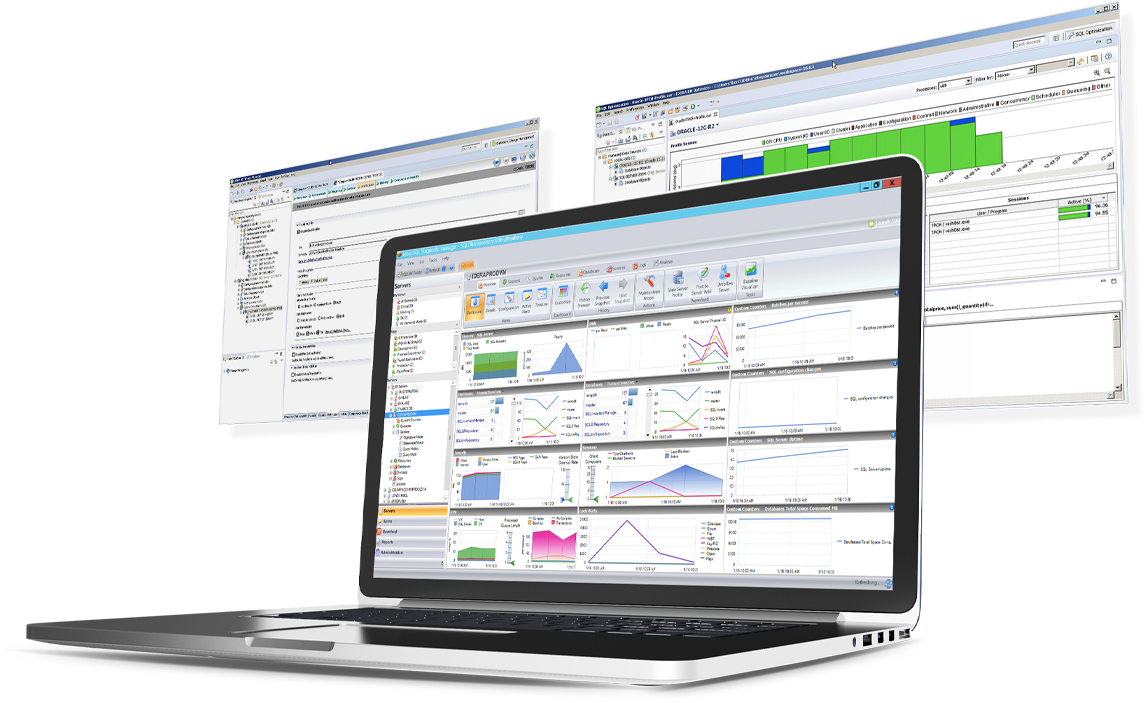 | Looker Screenshots |





