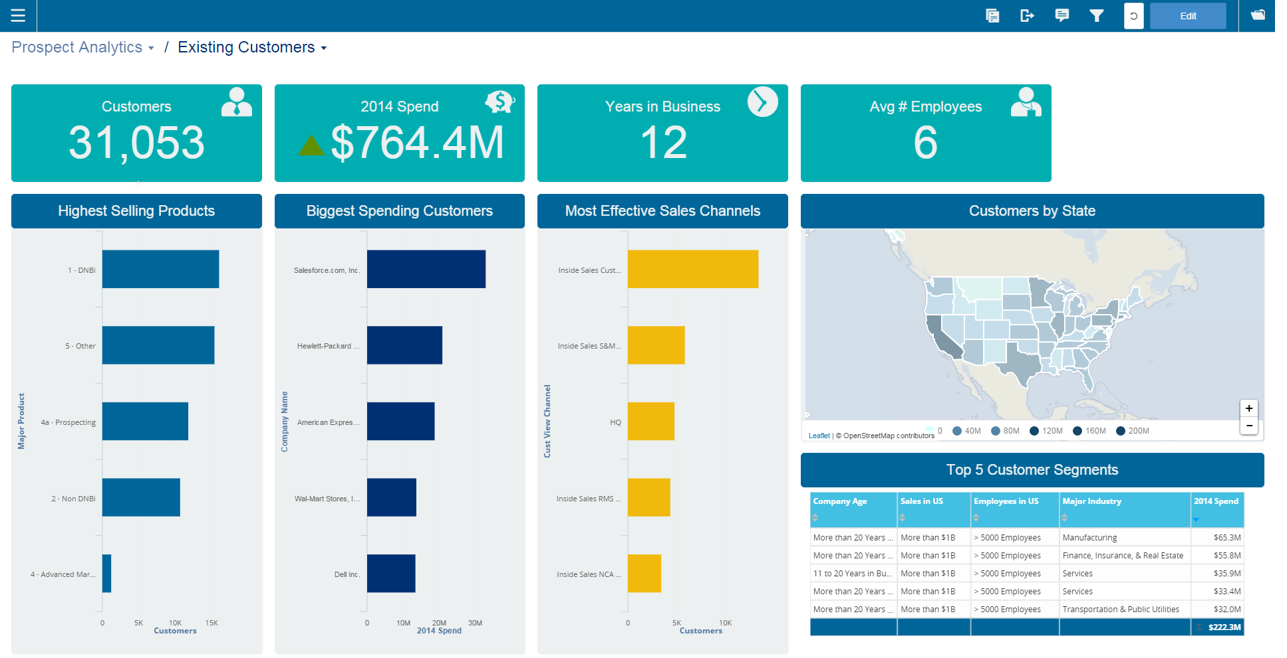
Infor Birst offers multi-tenant cloud BI for deployment in a public or private cloud, or on-premises. It provides an in-memory columnar data store and a BI layer comprising a reporting engine, predictive analytics tools, mobile native apps, dashboards, discovery tools, and an open client interface.
N/A
Microsoft Access
Score7.5 out of 10
N/A
Microsoft Access is a database management system from Microsoft that combines the relational Microsoft Jet Database Engine with a graphical user interface and software-development tools.
Infor Birst OEM and embedded analytics are well suited for advanced analytics and business intelligence. It has flexible deployment features and a lot of configuration ability with low code - no coding ability. Ability to ingest data from multiple live data sources. Source data from multiple sources can be segregated into multiple sections based on business criteria. Easily searchable business terms (metadata) across all enterprise analytic content.
As a Material Purchasing/Planning/inventory tracking application, Microsoft Access serves its purpose well. It's presentation is clean, data entry is simple and the ability to customize search fields is welcome. It does, however, come with some caveats; namely, when setting search filters and the need arises to back up a step or two, with Microsoft Access you have to reset, or "clear all", adding extra steps/time to a query.
A de minimis incentive was given to thank the reviewer for their time. The incentive was not used to bias or drive a particular response, nor was the incentive contingent on a positive endorsement. More Info
End-to-end solution, from raw source data, ETL, warehousing and reporting, Birst is able to do everything we need in one package instead of needing to develop and maintain multiple technologies
Intuitive report development. The drag and drop creation of reports is simple. More complicated queries are easy to generate.
Very user-friendly and interactive. A lot of nice features are available both for developers and end users to streamline the process of preparing and consuming data
Rich API which allows us to programmatically interact with Birst
A de minimis incentive was given to thank the reviewer for their time. The incentive was not used to bias or drive a particular response, nor was the incentive contingent on a positive endorsement. More Info
A de minimis incentive was given to thank the reviewer for their time. The incentive was not used to bias or drive a particular response, nor was the incentive contingent on a positive endorsement. More Info
A de minimis incentive was given to thank the reviewer for their time. The incentive was not used to bias or drive a particular response, nor was the incentive contingent on a positive endorsement. TR verified that a representative sample of customers was invited. More Info
Microsoft Access has not really changed at all for several years. It might be nice to see some upgrades and changes.
The help info is often not helpful. Need more tutorials for Microsoft Access to show how to do specific things.
Be careful naming objects such as tables, forms, etc. Names that are too long can get cut off in dialog boxes to choose a table, form, report, etc. So, I wish they would have resizable dialog boxes to allow you to see objects with long names.
I wish it could show me objects that are not in use in the database for current queries, tables, reports, forms, and macros. That way unused objects can be deleted without worrying about losing a report or query because you deleted the underlying object.
A de minimis incentive was given to thank the reviewer for their time. The incentive was not used to bias or drive a particular response, nor was the incentive contingent on a positive endorsement. More Info
We have been able to overcome any of the drawbacks we've found with Birst easily and it has fulfilled almost all of our analytic needs to date. Having seen their roadmap it would be highly unlikely we would move away from this platform any time soon. You simply can't beat the functionality that Birst provides for the price and the things I see coming out of the company solidify that our decision to choose Birst was the best possible choice. We have never regretted the decision.
I and the rest of my team will renew our Microsoft Access in the future because we use and maintain many different applications and databases created using Microsoft Access so we will need to maintain them in the future. Additionally, it is a standard at our place of work so it is at $0 cost to us to use. Another reason for renewing Microsoft Access is that we just don' t have the resources needed to extend into a network of users so we need to remain a single-desktop application at this time.
I would like to see additional usability put into the ETL scripting. Recently, Birst added a nice function reference inline to formula creation which has kept me from having to return to documentation so much. The same in ETL would be very beneficial. The interface problems related to the Flex framework are being addressed in a rewrite to HTML 5, but for now they are still a hindrance to a higher usability rating.
Microsoft Access is easy to use. It is compatible with spreadsheets. It is a very good data management tool. There is scope to save a large amount of data in one place. For using this database, one does not need much training, can be shared among multiple users. This database has to sort and filtering features which seem to be very useful.
A de minimis incentive was given to thank the reviewer for their time. The incentive was not used to bias or drive a particular response, nor was the incentive contingent on a positive endorsement. More Info
We frequently experience -103 errors due to us using the Live Connect functionality, which does not seem to handle even minor interruptions in connectivity, and treats all future connection attempts or data requests as errors, even if the issue does not exist any longer
A de minimis incentive was given to thank the reviewer for their time. The incentive was not used to bias or drive a particular response, nor was the incentive contingent on a positive endorsement. More Info
Everything runs very fast and smoothly. The only process that I wish was faster would be processing the data after uploading new data or making changes to the existing data model. It can take 15-20 minutes (roughly) to upload and process new data once you start getting into 10's of millions of rows. Given my experience with how long it takes me to pull the same data using SQL Server Management Studio, I don't think Birst is unreasonably slow - but for me to give a higher rating, I would want it to be unreasonably fast
A de minimis incentive was given to thank the reviewer for their time. The incentive was not used to bias or drive a particular response, nor was the incentive contingent on a positive endorsement. TR verified that a representative sample of customers was invited. More Info
While I have never contacted Microsoft directly for product support, for some reason there's a real prejudice against MS Access among most IT support professionals. They are usually discouraging when it comes to using MS Access. Most of this is due to their lack of understanding of MS Access and how it can improve one's productivity. If Microsoft invested more resources towards enhancing and promoting the use of MS Access then maybe things would be different.
A de minimis incentive was given to thank the reviewer for their time. The incentive was not used to bias or drive a particular response, nor was the incentive contingent on a positive endorsement. TR verified that a representative sample of customers was invited. More Info
I have attended two different training sessions. The first one was my initial training on the system. It was well paced, clear and concise. If there were questions that were not able to be answered by the instructor, he took down the question and actually followed up and provided us a response quickly. The second session was specific to the dashboard and report design components. This training was very good though there were some attendants who had little or no experience and their questions slowed the class.
Although I found the online resources helpful, a lack of appropriate examples for certain tasks key to report creation and advanced modeling make the online training/documentation less than perfect. For an inexperienced BI professional, the online training would not enable a streamlined launch of the product.
Have clean data! Birst flexibility allows - Start small, then introduce functionality and complexity along the way. If you try to present all the functionality [bells and whistles] and wow them, but bad data is uncovered, the end user blames the new application and turns away.
Birst was better than Domo for our needs because we could get in and tinker with it. Our impression of Domo was that it had a lot of connectors and ready to go reports, but it made too many assumptions about applications we use. We customize too much to use a "ready to go" solution like that. When we looked at Tableau, we liked its visualization capabilities, but it wasn't going to help us do the extractions, ETL, and warehousing of data. It may have come some distance since then.
A de minimis incentive was given to thank the reviewer for their time. The incentive was not used to bias or drive a particular response, nor was the incentive contingent on a positive endorsement. TR verified that a representative sample of customers was invited. More Info
Excel is a fantastic - robust application that can do so much so easily. Its easy to train and understand. However - excel does not provide a reporting function and that is typically where we will suggest a move to [Microsoft] Access. [Microsoft] Access requires a little more knowledge of data manipulation.
A de minimis incentive was given to thank the reviewer for their time. The incentive was not used to bias or drive a particular response, nor was the incentive contingent on a positive endorsement. More Info
we can see that loading a lot of data can cause a noticable slow down in performance. Birst support indicated that they don't really consider anything less than 30 seconds to be an issue, but that is not the case for our customers, so we have had to change some of implementation to address this
Being a manufacturing company we tend to lag behind technologically. But having all the data for different ERP systems in one place has been an eye opener for the executives. It has lessened the need to convert some legacy ERP systems.
Having such a simple reporting tool is a great asset to some of our sites that have traditionally had trouble gathering data from AS400 systems.
A de minimis incentive was given to thank the reviewer for their time. The incentive was not used to bias or drive a particular response, nor was the incentive contingent on a positive endorsement. TR verified that a representative sample of customers was invited. More Info
A de minimis incentive was given to thank the reviewer for their time. The incentive was not used to bias or drive a particular response, nor was the incentive contingent on a positive endorsement. More Info