Jama Analyze (Discontinued) vs. Zoho Analytics

Overview
ProductRatingMost Used ByProduct SummaryStarting Price
Jama Analyze (Discontinued)
Score 8.0 out of 10
Mid-Size Companies (51-1,000 employees)
Jama Analyze (formerly called Notion) was a solution for quickly creating shareable, custom dashboards. However, the product is no longer available. Jama Software sunset the Analyze product in 2019. Some of the benefits of Jama Analyze included the ability to: Create custom metrics across all teams with data from any source with the intuitive metric builder. Experience self-serve BI with no coding and no IT to get started making custom dashboards.…
$23
per month
Zoho Analytics
Score 8.4 out of 10
Small Businesses (1-50 employees)
Zoho Analytics is a self-service BI and analytics platform that uncovers patterns, spots emerging trends, tracks business metrics, and detects anomalies. Designed for ease of use, it enables business users to create reports and dashboards independently, without relying on IT.
$60
per month 5 users
Pricing
Jama Analyze (Discontinued)Zoho Analytics
Editions & Modules
Starter Teams - 2 users
$23
per month
Small Teams - 5 users
$89
per month
Growing Teams - 10 users
$179
per month
Growing Teams - 15 users
$259
per month
Growing Teams - 20 users
$339
per month
Standard
$60
per month Starts at 5 Users
Premium
$145
per month Starts at 15 Users
Enterprise
$575
per month Starts at 50 Users
Offerings
Pricing Offerings
Jama Analyze (Discontinued)Zoho Analytics
Free Trial
YesYes
Free/Freemium Version
NoYes
Premium Consulting/Integration Services
NoYes
Entry-level Setup FeeNo setup feeNo setup fee
Additional DetailsThere is a 20% discount for all plans if subscribed yearly. Customers can buy add-on rows and users, in addition to the plans listed above.
More Pricing Information
Community Pulse
Jama Analyze (Discontinued)Zoho Analytics
Features
Jama Analyze (Discontinued)Zoho Analytics
BI Standard Reporting
Comparison of BI Standard Reporting features of Product A and Product B
Jama Analyze (Discontinued)
9.3
1 Ratings
13% above category average
Zoho Analytics
8.7
135 Ratings
6% above category average
Pixel Perfect reports9.01 Ratings8.9106 Ratings
Customizable dashboards10.01 Ratings8.5135 Ratings
Report Formatting Templates9.01 Ratings00 Ratings
Ad-hoc Reporting
Comparison of Ad-hoc Reporting features of Product A and Product B
Jama Analyze (Discontinued)
8.0
1 Ratings
0% below category average
Zoho Analytics
8.2
137 Ratings
2% above category average
Report sharing and collaboration8.01 Ratings8.7137 Ratings
Drill-down analysis00 Ratings8.1131 Ratings
Formatting capabilities00 Ratings7.7136 Ratings
Report Output and Scheduling
Comparison of Report Output and Scheduling features of Product A and Product B
Jama Analyze (Discontinued)
7.0
1 Ratings
16% below category average
Zoho Analytics
8.5
129 Ratings
3% above category average
Publish to Web7.01 Ratings8.4108 Ratings
Report Versioning7.01 Ratings00 Ratings
Publish to PDF00 Ratings8.6127 Ratings
Report Delivery Scheduling00 Ratings8.5112 Ratings
Data Discovery and Visualization
Comparison of Data Discovery and Visualization features of Product A and Product B
Jama Analyze (Discontinued)
10.0
1 Ratings
22% above category average
Zoho Analytics
8.1
84 Ratings
1% above category average
Pre-built visualization formats (heatmaps, scatter plots etc.)10.01 Ratings8.380 Ratings
Location Analytics / Geographic Visualization00 Ratings8.672 Ratings
Predictive Analytics00 Ratings7.466 Ratings
Access Control and Security
Comparison of Access Control and Security features of Product A and Product B
Jama Analyze (Discontinued)
7.7
1 Ratings
10% below category average
Zoho Analytics
8.5
129 Ratings
0% above category average
Multi-User Support (named login)8.01 Ratings8.7127 Ratings
Role-Based Security Model7.01 Ratings8.972 Ratings
Multiple Access Permission Levels (Create, Read, Delete)8.01 Ratings8.6122 Ratings
Report-Level Access Control00 Ratings7.930 Ratings
Single Sign-On (SSO)00 Ratings8.674 Ratings
Mobile Capabilities
Comparison of Mobile Capabilities features of Product A and Product B
Jama Analyze (Discontinued)
6.5
1 Ratings
17% below category average
Zoho Analytics
6.7
97 Ratings
14% below category average
Responsive Design for Web Access7.01 Ratings7.571 Ratings
Dashboard / Report / Visualization Interactivity on Mobile6.01 Ratings6.486 Ratings
Mobile Application00 Ratings4.973 Ratings
Application Program Interfaces (APIs) / Embedding
Comparison of Application Program Interfaces (APIs) / Embedding features of Product A and Product B
Jama Analyze (Discontinued)
6.0
1 Ratings
25% below category average
Zoho Analytics
8.3
65 Ratings
7% above category average
REST API6.01 Ratings8.161 Ratings
iFrames00 Ratings8.653 Ratings
Best Alternatives
Jama Analyze (Discontinued)Zoho Analytics
Small Businesses
Yellowfin
Yellowfin
Score 8.7 out of 10
Yellowfin
Yellowfin
Score 8.7 out of 10
Medium-sized Companies
Reveal
Reveal
Score 10.0 out of 10
Reveal
Reveal
Score 10.0 out of 10
Enterprises
Kyvos Semantic Layer
Score 9.5 out of 10
Kyvos Semantic Layer
Score 9.5 out of 10
All AlternativesView all alternativesView all alternatives
User Ratings
Jama Analyze (Discontinued)Zoho Analytics
Likelihood to Recommend
8.0
(1 ratings)
7.6
(139 ratings)
Likelihood to Renew
-
(0 ratings)
8.9
(9 ratings)
Usability
-
(0 ratings)
7.9
(83 ratings)
Availability
-
(0 ratings)
9.1
(1 ratings)
Performance
-
(0 ratings)
9.1
(2 ratings)
Support Rating
-
(0 ratings)
5.3
(18 ratings)
Implementation Rating
-
(0 ratings)
5.5
(3 ratings)
Ease of integration
-
(0 ratings)
7.3
(1 ratings)
Product Scalability
-
(0 ratings)
7.4
(71 ratings)
Vendor post-sale
-
(0 ratings)
7.3
(1 ratings)
Vendor pre-sale
-
(0 ratings)
8.2
(1 ratings)
User Testimonials
Jama Analyze (Discontinued)Zoho Analytics
Likelihood to Recommend
Jama Software
The integration with JIRA is quite a handy tool to have. It allows for team progress to be easily tracked and visualized using the software while key metrics are brought to the forefront through the software's business intelligence. It makes presenting data and milestones achieved to non-technical management quite simple and can be extremely useful.
Read full review
Zoho
Zoho Analytics is the best way to consume data created by Zoho products . It's robust and quick build formula libraries and auto generated reports. A data source can be integrated and be ready for consumption within minutes. This gives a well developed baseline for organizing to develop advance analytics. It's mobile dashboards are very intuitive and useful for leaders who are on the move.
Read full review
Pros
Jama Software
  • This allows us to keep track of our team's work by integrating with our product boards on JIRA.
  • It allows us to create visualized reports for our team's progress.
  • It allows us to gain insights about things that are going well in our product pipeline as well as potential areas of concern based on the data that is collected.
Read full review
Zoho
  • Zoho Analytics’ predictive analytics capabilities can help forecast future trends, allowing for proactive planning and risk management.
  • Performance Monitoring: We can track key performance indicators (KPIs) across departments, such as sales, marketing, finance, and HR. This aids in identifying bottlenecks and areas for improvement.
  • Decision making regarding resource allocation.
Read full review
Cons
Jama Software
  • The service tends to be slow at times and working offline can be a pain.
  • It has a bit of a learning curve when you start out.
  • The price is quite high for the features it offers.
Read full review
Zoho
  • I'm guessing it's out there somewhere but I really could have used a 'quick start guide' or guided start.
  • Once I figured it out, it makes sense how to make sure the right data is provided in order to make dashboards quite flexible--- but without examples, I found it quite a challenge
  • The initial organization of Analytics is NOT intuitive. Once in context, the organizational features make sense, but (at least initially) it would have been most useful if the organization of Analytics reports in Zoho Analytics had saved me a lot of time.
Read full review
Likelihood to Renew
Jama Software
No answers on this topic
Zoho
I'd give this an 11 if I could! As our business moves forward we hope to use Zoho Analytics more then we do now. Creating better reports and dashboards for our management team to evaluate the health of our business and to provide more insightful reports for our customers. The possibilities are endless with this tool
Read full review
Usability
Jama Software
No answers on this topic
Zoho
For an end user, Zoho Analytics is pretty easy to use and very easy to access the dashboard. Linking data from multiple sources is very convenient. Multiple people can work on preparing and publishing the dashboards simultaneously, which helps delegate tasks.
Read full review
Reliability and Availability
Jama Software
No answers on this topic
Zoho
ZOHO is a very reliable company/product. We never had any issues with downtime or inaccessibility to our data. Any type of maintenance that they had to perform was clearly communicated and never an issue. We use a lot of external hooks and we've never had any issues with getting ZOHO to communicate with any of those hooks.
Read full review
Performance
Jama Software
No answers on this topic
Zoho
ZOHO has obviously invested a lot of time effort and money in to creating a reliable infrastructure with high availability. We've never had any issues with performance and all of our data crunching small to large has always been well within reason. We have come to appreciate the performance of ZOHO and will continue to use it for all of our data needs.
Read full review
Support Rating
Jama Software
No answers on this topic
Zoho
The support team is honestly not that great. At times, it seems as if members of our own team know more about the product than the support team. They must not have a lot of training or the turnaround is quick
Read full review
Implementation Rating
Jama Software
No answers on this topic
Zoho
If your external data sources are previously organized and correlated (e.g.: in your datawarehouse or database) your implementation will be easier. Of cource some not previously predicted correlation would be necessary to be done during the implementation, but if your organization let it to be all done into Zoho Analytics, it will take more time from your team.
Read full review
Alternatives Considered
Jama Software
Jama Analyze, as well as Asana, connect with JIRA to visualize milestone tracking and team progress. While Asana is cheaper, Jama Analyze provides better reports and visual data. Google Data Studio, through a bit of tinkering from your software development team, can achieve similar results, however, the charts and graphs leave a bit to be desired in terms of design. In all, Jama Analyze is great if you have few users and don't need to go for the licensing option. Otherwise, there are definitely cheaper options available but you may have to sacrifice on performance and look-and-feel.
Read full review
Zoho
Zoho Analytics has the best UI and user friendly to create reports and dashboard along with features like Zia Assistance that guide in creating reports and dashboard and also help in the forecasting of the data based on the past records.
Read full review
Scalability
Jama Software
No answers on this topic
Zoho
As far as I know, Zoho Analytics has been able to fulfill every need we've had for it. Our reports have gotten better and more detailed with pretty much every new issue of our magazine. It just keeps getting better, and we keep feeding it more data to digest and present to us.
Read full review
Return on Investment
Jama Software
No answers on this topic
Zoho
  • Analytics has been the foundation of my role. I manage 2000 accounts myself, so I need analytics to help me know whom to serve first.
  • Analytics provides a lot of visualization options that I need to serve my customers.
  • Analytics has excellent options for accountability with our training team to know where each account is in their customer journey.
Read full review
ScreenShots

Jama Analyze (Discontinued) Screenshots

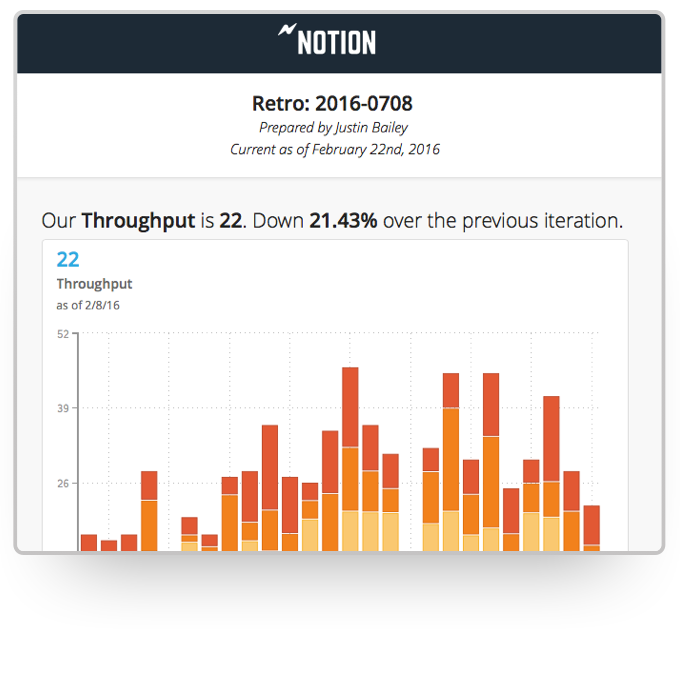
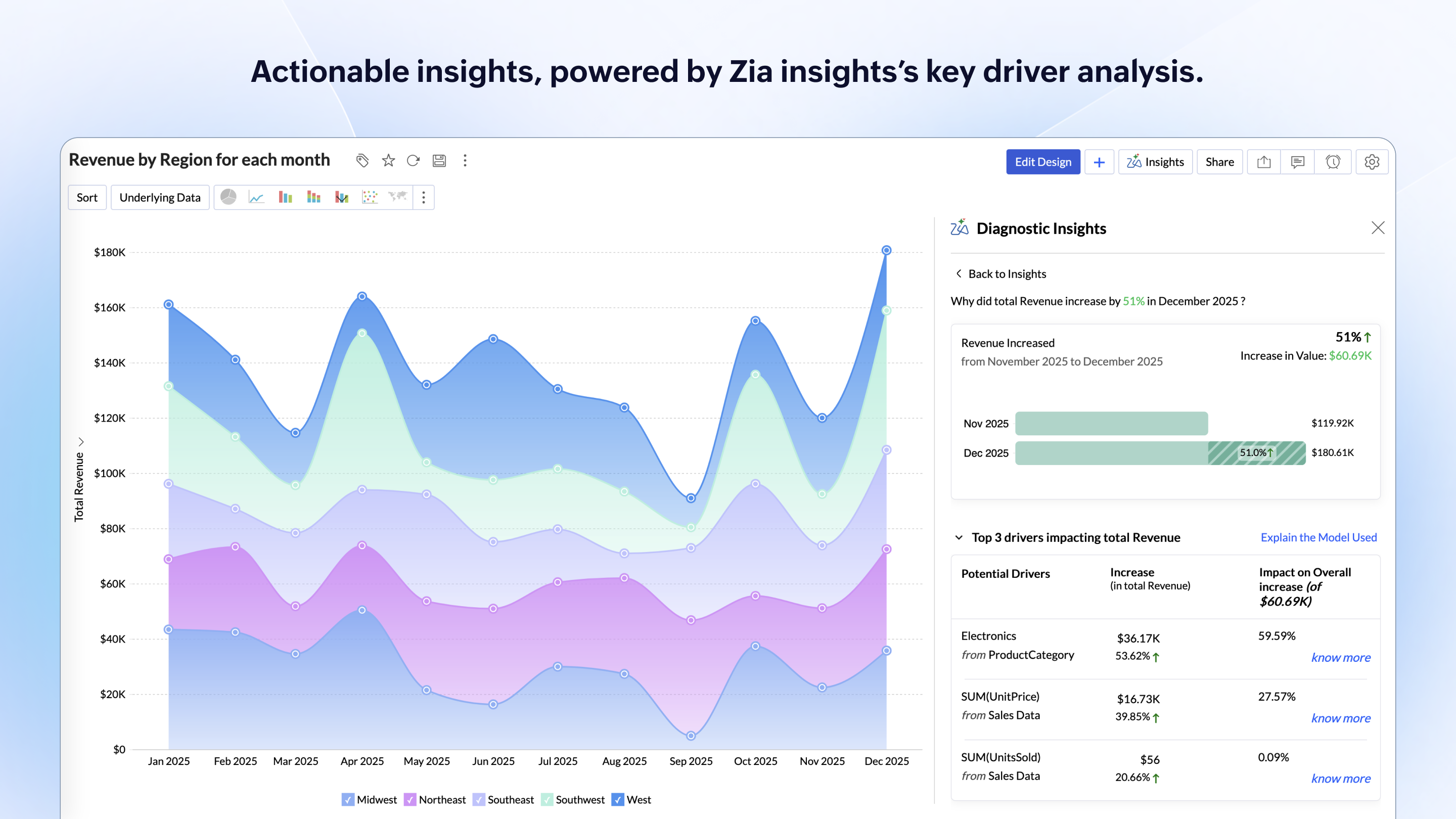
Screenshot of An example of a Notion dashboard with custom team metrics, a variety of visualizations, and summaries of the data at the top of each card.Screenshot of The Notion directory is where metrics from all your data sources live, making it easy to compare and combine. Give your team a single source of truth for the metrics that matter most.Screenshot of You can also assign metric ownership to members of your team. They'll got automatic reminders to report the data.Screenshot of Build custom metrics and quickly change how they're visualized or the reporting interval.Screenshot of Every metric has built-in commenting to help you capture context around the data.Screenshot of One click reporting means it's easy to share important team or product performance data with key stakeholders.

Zoho Analytics Screenshots

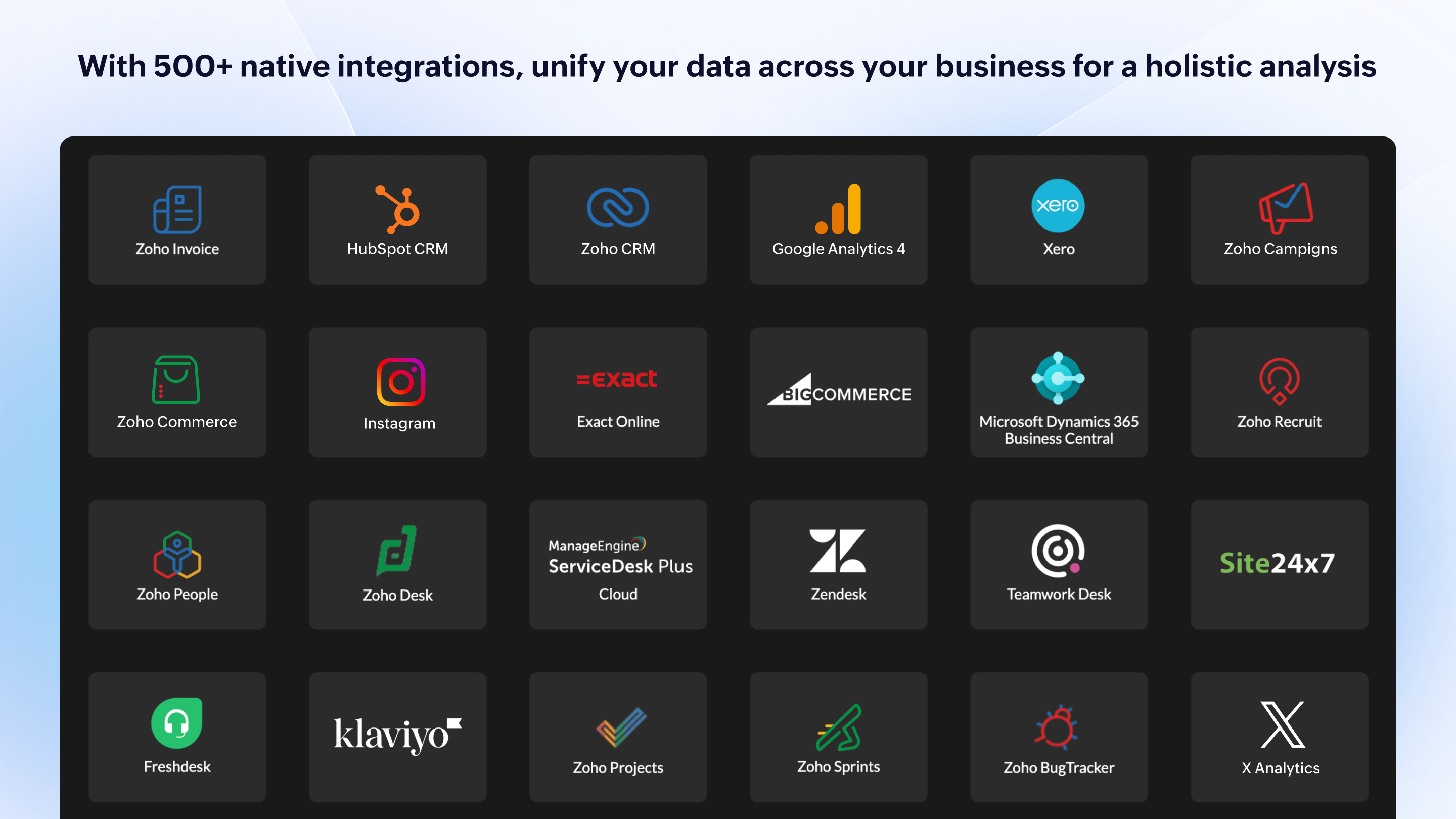
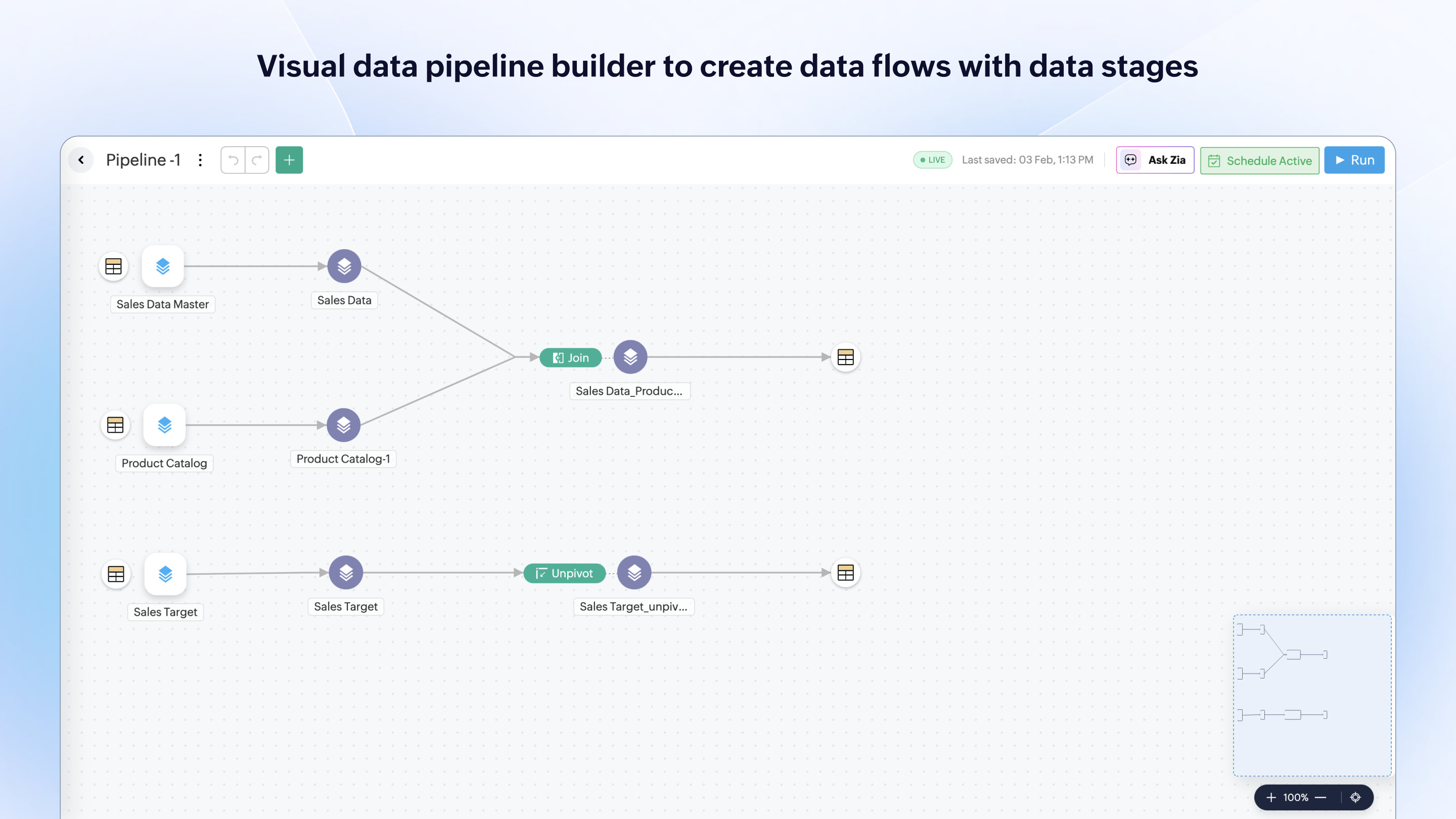
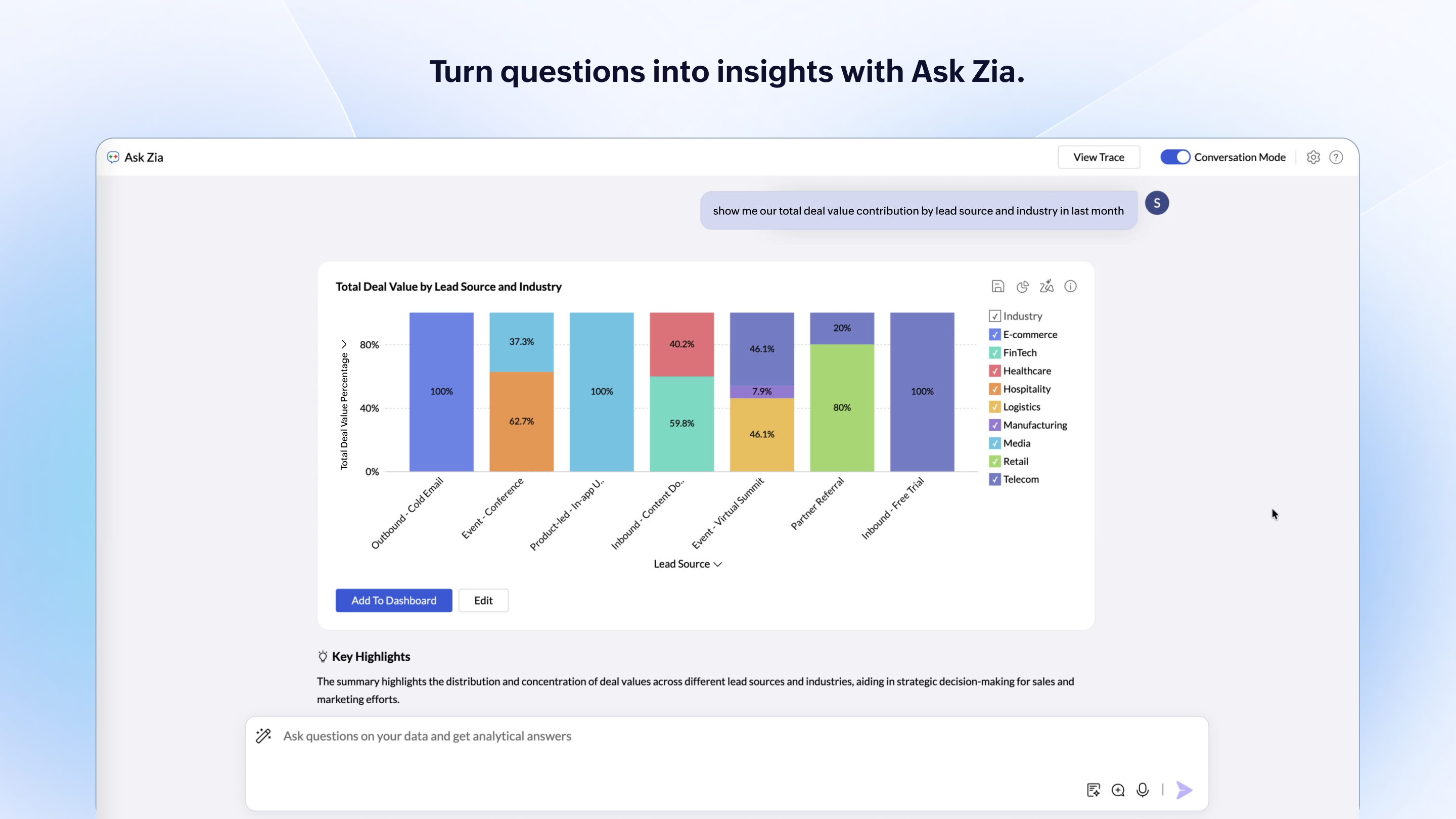
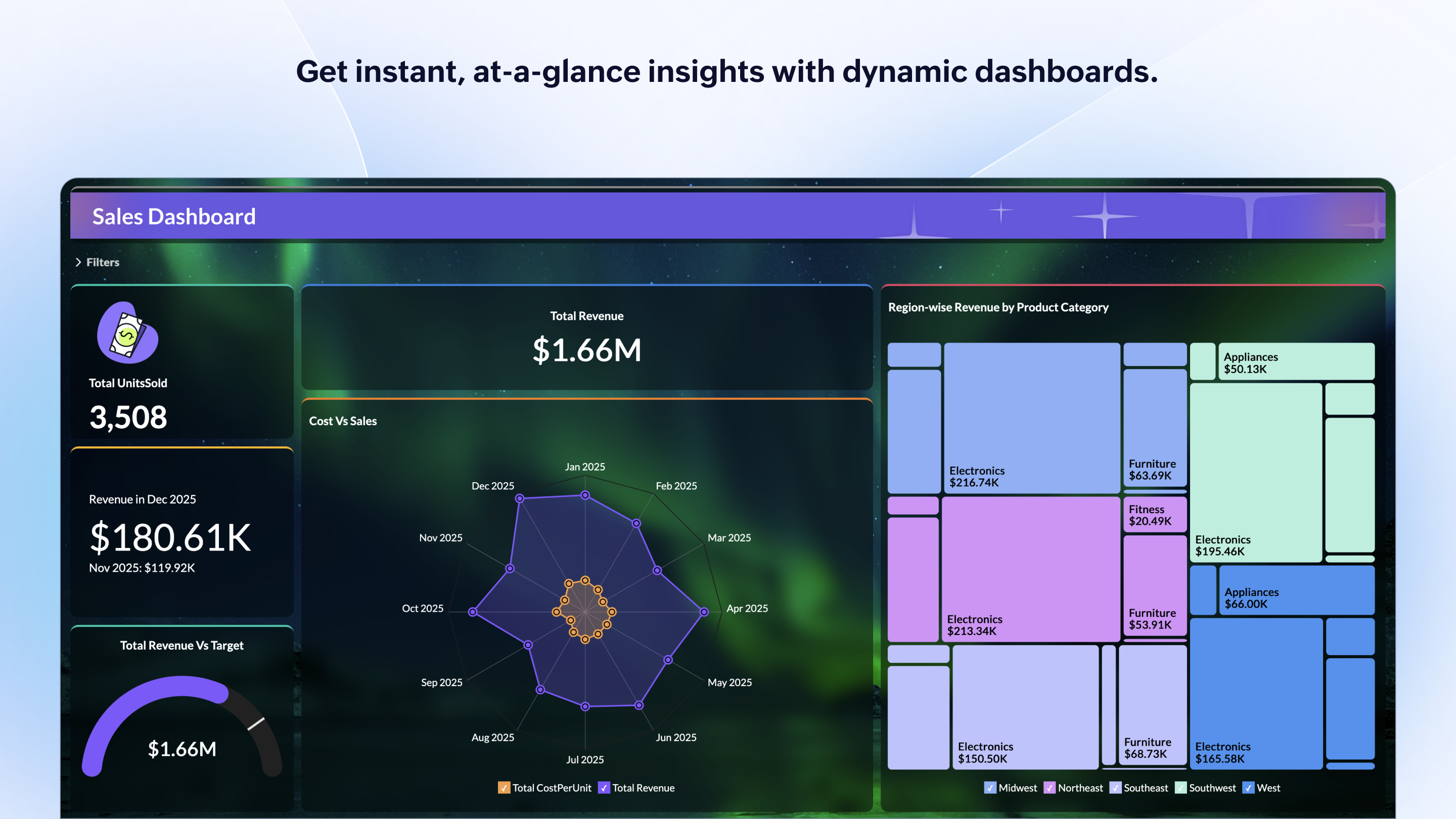
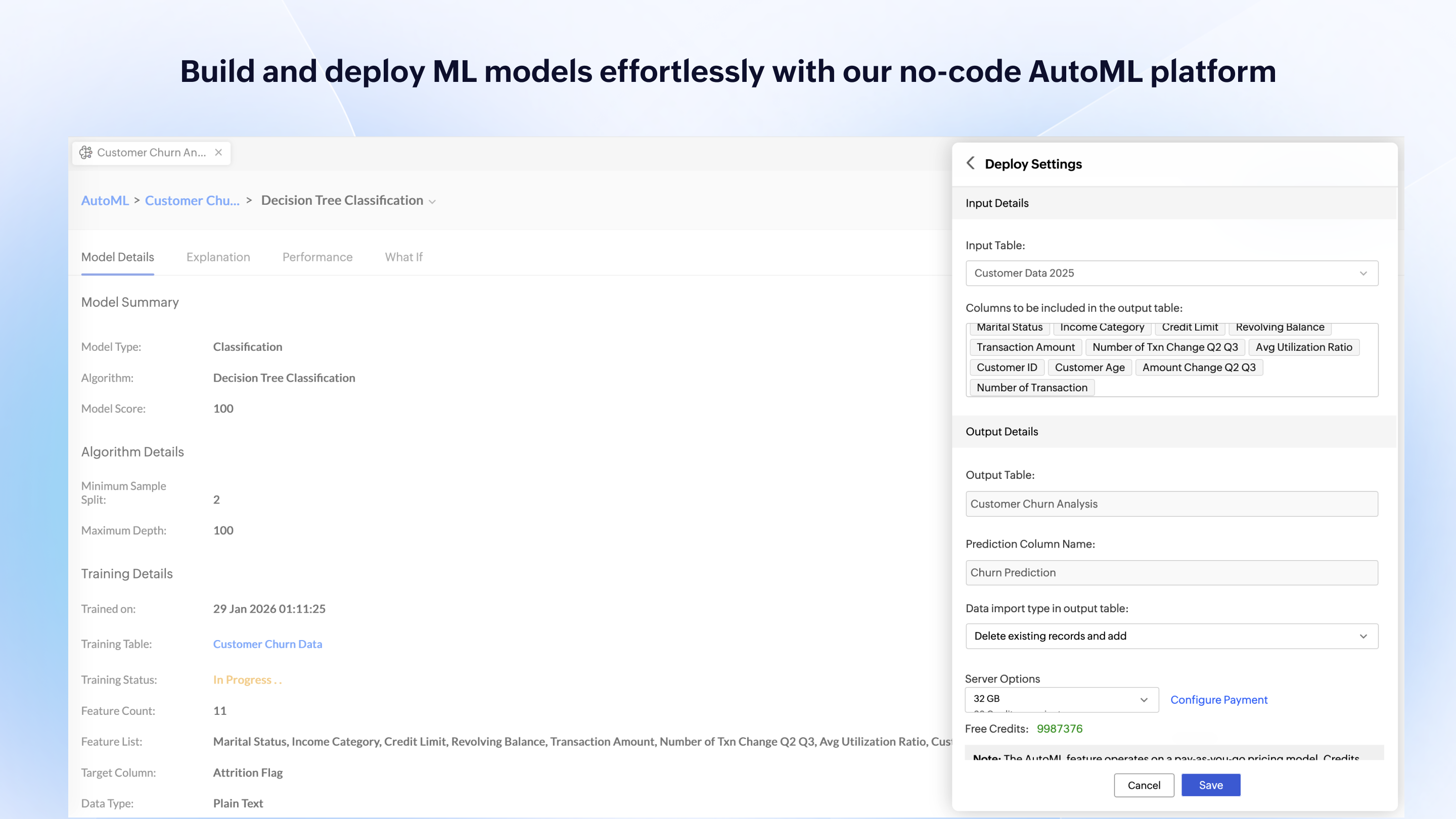
Screenshot of some of the available 500+ native integrations that unify data across a business for a holistic analysisScreenshot of the visual data pipeline builder used to create data flows with data stagesScreenshot of where to turn questions into insights with Ask Zia.Screenshot of an example of the actionable insights, powered by Zia insights's key driver analysis.Screenshot of Get instant, at-a-glance insights with dynamic dashboards.Screenshot of the interface to build and deploy ML models with the no-code AutoML platform