TrustRadius: an HG Insights company

Save this comparison

Save this comparison

Add Product

Recommended Comparisons

    Overview
    ProductRatingMost Used ByProduct SummaryStarting Price

    Keeper

    Score8.3 out of 10
    N/AKeeper's password security and management platform boasts millions of people and thousands of businesses as users, who manage, secure and enforce strong passwords across all employee logins, applications and sites. Employees can access Keeper natively on all mobile operating systems, desktops and browsers. Keeper enables businesses to auto-generate high-strength passwords, protect sensitive files in an encrypted digital vault, securely share records with teams and integrate with SSO, LDAP and…

    $2

    per month per user

    Lightning Tools DeliverPoint

    Score8.2 out of 10
    Enterprise companies (1,001+ employees)
    DeliverPoint supports reporting and managing SharePoint permissions. Site Owners, Site Collection Administrators, and SharePoint Administrators can run permission reports that reflect the permissions of every user. Site collections, Teams Channels, Hub Sites, SharePoint Sites, OneDrive, Lists, Folders and Items can all be reported on individually or in bulk. Permissions can be modified, transferred, copied or deleted between accounts as staff changes occur.

    $2,500

    per year per installation

    RoboForm

    Score8.2 out of 10
    N/ARoboForm for Business is a password automation and centralized management solution for businesses and government agencies. The software helps companies to organize logins and passwords, making password generation, storing, and sharing easier and more secure. RoboForm for Business integration aims to eliminate forgotten passwords, loss of productivity caused by it, and costs related to their reset. A RoboForm for Business company account can be created in minutes. It is customizable and…

    $39.95

    per year

    Pricing
    KeeperLightning Tools DeliverPointRoboForm
    Editions & Modules
    Keeper Business Starter
    $2.00
    per month per user
    Keeper Enterprise
    Contact Keeper for pricing
    DeliverPoint OnPrem
    From $1950
    per year per installation
    DeliverPoint OnPrem Enterprise Edition
    POA
    per year per installation
    DeliverPoint Online
    From $2500
    per year per installation
    DeliverPoint Online Enterprise Edition (>10,000 users)
    POA
    per year per installation
    5-year subscription
    $16.46
    101-1000 users/per year
    Offerings
    Pricing Offerings
    KeeperLightning Tools DeliverPointRoboForm
    Free Trial
    YesYesYes
    Free/Freemium Version
    NoNoNo
    Premium Consulting/Integration Services
    YesYesYes
    Entry-level Setup FeeNo setup feeNo setup feeNo setup fee
    Additional Details—Prices listed are starting prices for "stock" product. $2.50 per user/year on top of base price Enterprise product is designed for 10,000+ users, and can be customised if required to meet business needs. Prices are based on 12 month contract from 1st purchase month. Installation included in price. Full technical support available. Online versions will have access to free product updates during contract period.Multi-year discounts available: Save with discounted pricing on 3-year and 5-year Business plan purchases. Enterprise plan: For large organizations requiring tailored solutions, RoboForm offers an Enterprise plan that includes all Business plan features plus additional services customized to meet enterprise-scale needs. Contact sales for Enterprise pricing and to start a trial.
    More Pricing Information
    Community Pulse
    KeeperLightning Tools DeliverPointRoboForm
    Considered Multiple Products
    Keeper Security
    No answer on this topic
    Lightning Tools
    No answer on this topic
    Siber Systems Inc.
    No answer on this topic
    Key User Insights
    Would buy again
    No answers on this topic
    No answers on this topic
    100%
    Would buy again
    10 Answers
    Delivers good value for the price
    No answers on this topic
    No answers on this topic
    100%
    Delivers good value for the price
    9 Answers
    Happy with the feature set
    No answers on this topic
    No answers on this topic
    90%
    Happy with the feature set
    9 Answers
    Lived up to sales and marketing promises
    No answers on this topic
    No answers on this topic
    100%
    Lived up to sales and marketing promises
    10 Answers
    Implementation went as expected
    No answers on this topic
    No answers on this topic
    100%
    Implementation went as expected
    10 Answers
    Features
    KeeperLightning Tools DeliverPointRoboForm
    Identity Management
    Comparison of Identity Management features of Keeper and Lightning Tools DeliverPoint and RoboForm
    Feature
    Keeper
    -
    Ratings
    Lightning Tools DeliverPoint
    7.7
    1 Ratings
    6% below category average
    RoboForm
    -
    Ratings
    ID-Management Access Control00 Ratings7.31 Ratings00 Ratings
    Account Provisioning and De-provisioning00 Ratings8.21 Ratings00 Ratings
    Best Alternatives
    KeeperLightning Tools DeliverPointRoboForm
    Small Businesses
    No answers on this topic
    JumpCloud
    Score9.2 out of 10
    Bitwarden
    Score9.3 out of 10
    Medium-sized Companies
    No answers on this topic
    OneLogin by One Identity
    Score9.4 out of 10
    1Password
    Score9.1 out of 10
    Enterprises
    No answers on this topic
    RSA Access Manager (Discontinued)
    Score10 out of 10
    KeePass
    Score8.9 out of 10
    All AlternativesView all alternativesView all alternativesView all alternatives
    User Ratings
    KeeperLightning Tools DeliverPointRoboForm
    Likelihood to Recommend
    10.0
    (22 ratings)
    8.2
    (1 ratings)
    9.7
    (10 ratings)
    Likelihood to Renew
    -
    (0 ratings)
    -
    (0 ratings)
    10.0
    (1 ratings)
    Usability
    9.0
    (2 ratings)
    -
    (0 ratings)
    10.0
    (1 ratings)
    Support Rating
    10.0
    (2 ratings)
    -
    (0 ratings)
    10.0
    (5 ratings)
    User Testimonials
    KeeperLightning Tools DeliverPointRoboForm
    Likelihood to Recommend
    Keeper Security
    Would recommend both for organisations and personal users where passwords management is needed. Particularly in 2026 and the large emphasis of security in your day to day uses.
    Having a secure management tool will assist with breaches and organisation of your credentials and confidential data that can be stored within the tenant.
    Incentivized
    Read full review
    Lightning Tools
    Copy user permissions through the whole sites of SharePoint farm
    Read full review
    Siber Systems Inc.
    I use it on an almost hourly basis. With probably 10+ years of use, I have used it for everything and have found very little that it won't complete, but it isn't very good on mobile devices. I use it on my phone strictly as a reference because it does not work with either Samsung internet browser or Chrome for Android.
    Incentivized
    Read full review
    Pros
    Keeper Security
    • Ease of use. User find it simple and intuitive to use and I find they rapidly adjust to the software with minimal training.
    • Single-sign-on. Super important and really makes things simple for the users and easy to manage for us in the IT team.
    • Sharing features. We knew sharing was a key component of our password management solution. Keeper makes it easy for users and simple to administer.
    Incentivized
    Read full review
    Lightning Tools
    • Discover Site Permisions
    • Sheduled reports of required lists, libraries, sites...
    • Compact set of commands which works with user permissions
    Read full review
    Siber Systems Inc.
    • It remembers all our logons
    • It has a good alphabetizing system
    • You can store multiple users
    • It also has a mobile app which is great
    Incentivized
    Read full review
    Cons
    Keeper Security
    • I find that Keeper could use some work with their desktop interface, a sleeker and friendlier user interface would definitely benefit them.
    • Keeper doesn’t have a Security Dashboard, which makes it more complicated to evaluate the strengths and weaknesses of your passwords.
    • The automatic web form filling is somewhat limited at the time, but im sure they will improve it soon.
    Incentivized
    Read full review
    Lightning Tools
    • Linking basic information to the object selected in the left panel (site structure view)
    Read full review
    Siber Systems Inc.
    • Recommend periodic purging of unused passwords.
    • Offer a "compromised password" alert feature.
    • Don't remind me about a recent update as often as you do now. (I might be able to control this on my desktop's notification settings?)
    Read full review
    Usability
    Keeper Security
    It's just easy to use, plain and simple. It has the complexity and user-interface that gives you confidence in its build but the ease-of-use that keep things from getting too complicated. A huge plus when you have to onboard new members of the team or summer interns when you need them to step in and make orders on your behalf.
    Incentivized
    Read full review
    Lightning Tools
    No answers on this topic
    Siber Systems Inc.
    it is simple and intuitive
    Incentivized
    Read full review
    Support Rating
    Keeper Security
    Because it is so good. It always works, has not crashed even in 3 years; I have a lot of data in it (never any problems).
    Read full review
    Lightning Tools
    No answers on this topic
    Siber Systems Inc.
    For the few times, in the many years that I have used RoboForm, and that I have needed to contact support they were very responsive.
    Incentivized
    Read full review
    Alternatives Considered
    Keeper Security
    I do not recall the other products I tested. I believe Keeper provided a free trial that allowed me to verify that it met my needs before I was required to purchase. I also found their support team to be responsive when I experienced some problems. The cliche, "If it ain't broke don't fix it" fits well in this case. I am able to create and use online profiles safe in the knowledge that my passwords cannot be easily hacked and my data is safe.
    Read full review
    Lightning Tools
    No answers on this topic
    Siber Systems Inc.
    The number one alternative we see is LastPass. Many of our clients use it and are happy with it and I'm sure it's very close to RoboForm. I have personally used RoboForm for at least 10 years and have been extremely happy with it, so we did not do much comparing recently.
    Read full review
    Return on Investment
    Keeper Security
    • We all know how difficult it can be in the workplace when you forget your password, or enter the wrong password, and you get blocked out. You have to go through the hassle of having it reset, which could mean sitting on hold, waiting for IT to pick up. This isn’t a problem when you have Keeper. If you forget your password once, you don’t have to take the chance of trying it 4 more times and getting locked out. Just pick up your phone, and your password is right there. It’s really just as simple as that.
    Read full review
    Lightning Tools
    • Speeds up the management of user permissions
    • Provides a comprehensive overview of permissions and settings of individual security levels across areas of company informations
    Read full review
    Siber Systems Inc.
    • It helps to keep my business secure.
    • Saves time filling out forms.
    • Saves more time than writing out all of your passwords with pen and paper.
    Incentivized
    Read full review
    ScreenShots

    Keeper Screenshots

    Screenshot of Autofill Passwords in Websites & AppsScreenshot of Business & Enterprise ProtectionScreenshot of Dark Web Monitoring & AlertsScreenshot of Enhanced Two-Factor AuthenticationScreenshot of Increase Organization with SubfoldersScreenshot of Secure File & Password Sharing

    Lightning Tools DeliverPoint Screenshots
    Screenshot of CONTEXTUAL SHAREPOINT PERMISSION REPORTING
SharePoint Permissions are not just the responsibility of IT. Business Users (Content Owners) can create sites, lists, libraries and of course list and library content. The business user is capable of sharing the content with internal users, but perhaps also external users. Sharing such content can result in users gaining permissions to sites or content not intended to be shared. For example, if a site is shared, the user who the site is shared with becomes a member of the members group by default. That members group may have Edit permissions to other sites or content elsewhere within the site collection. DeliverPoint gives visibility of such permissions to support better SharePoint permission decisions from within the Site, List or Library itself.Screenshot of GRANULAR SHAREPOINT CONTENT PERMISSION REPORTS
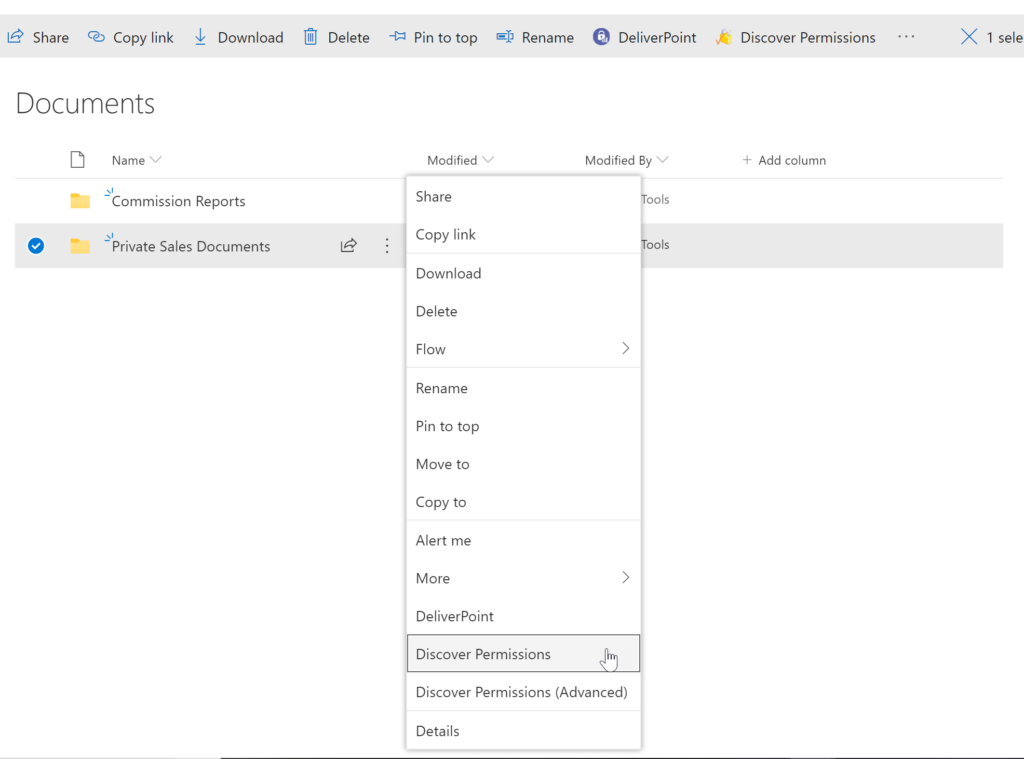
The DeliverPoint Discover Permissions report displays a full transparent report of all users that have permissions to the site, list/library or item. This displays what permissions each account has to the selected object, as well as how the permissions were assigned. Filter can be used for each user to check for duplicate permissions, filter by Permission Level to see which users are granted each permission level, and also filter by the ‘Permissioned Via’ column to see who has received permissions via a particular SharePoint, Microsoft 365 Group, or Azure AD Security group. The Discover Permissions report can be executed against multiple documents or items, lists and within the site or subsites.Screenshot of EXTERNAL SHARING LINKS REPORTING AND MANAGEMENT
Within SharePoint, users can share links with anyone, internal users and external users. DeliverPoint provides an External Sharing Links report that can be used within a site or across sites. The user can see who shared the link, when they shared the link, and optionally remove the link if it’s required.Screenshot of REPORT AND MANAGE PERMISSIONS FROM WITHIN MICROSOFT TEAMS
DeliverPoint is also available within Microsoft Teams. Team Owners can produce Microsoft Teams Permission reports within their Teams Channels and across Private Channels. The reports provide confidence and assurance that permissions are set correctly and that sharing isn’t out of control. Changes to permissions can be made contextually within a Team or centrally across multiple Teams should permissions need to be removed or managed.Screenshot of MANAGE SHAREPOINT PERMISSIONS
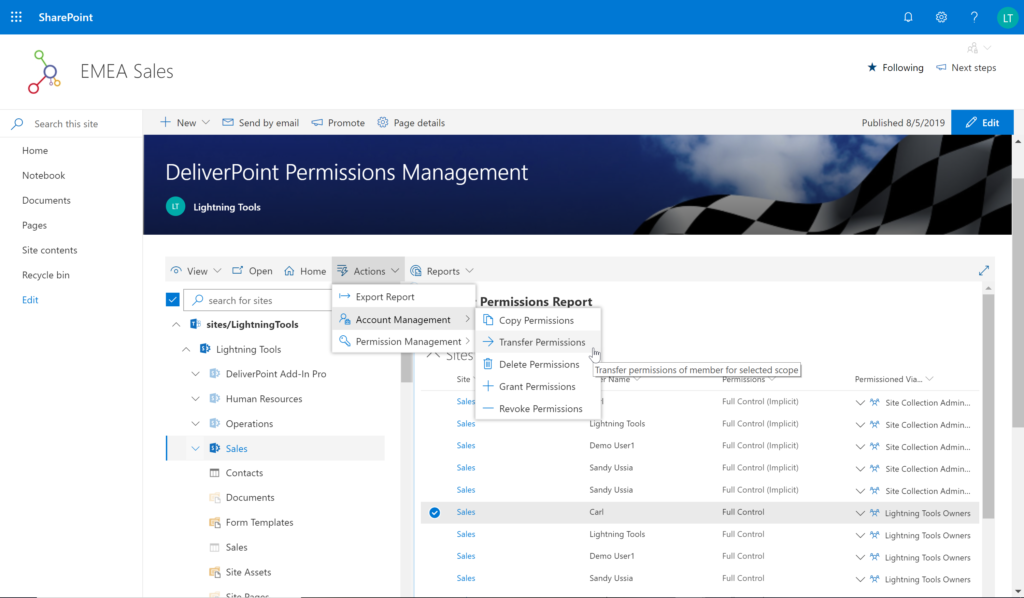
Using DeliverPoint, Site Owners, Site Collection Administrators and Tenant Administrators can manage permissions across the objects that they have Full Control to. Within organizations, users change roles, leave organizations, or join organizations. Making permission changes to accounts to reflect these changes is time consuming. DeliverPoint can be used to simply select the scope to change, and perform the change as one operation. The operations include Transfer, Delete, Copy or Revoke Permissions.Screenshot of UNIQUE PERMISSION REPORTING
The DeliverPoint Unique Permissions Report enables Site Collection Administrators or SharePoint Administrators to view the permissions assigned to a specific user account or group throughout site collections. The report includes all Microsoft 365 Groups, SharePoint Groups and Active Directory Security Groups that the user is a member of. A list of Site Permissions, List Permissions and Item Permissions that the user has been assigned permissions to are listed, allowing  the permissions to be removed or transferred if they are incorrect.