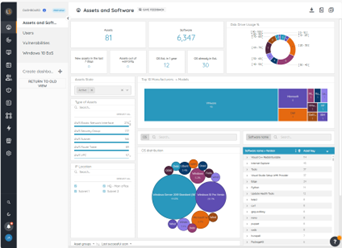
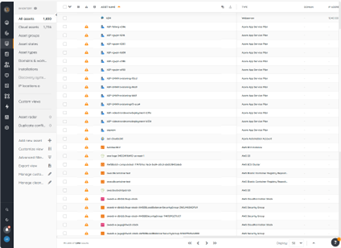
Lansweeper helps organizations see, understand, and make confident decisions about their technology estate across IT, OT, IoT, and Cloud. Lansweeper automatically discovers and inventories every asset: hardware, software, and user—then connects that data to insights about usage, lifecycle, and risk. This is to create what the vendor describes as Technology Asset Intelligence (TAI): a trusted foundation of knowledge that turns raw inventory data into clear, actionable…
$2,868
per year (includes 2000 assets)
Qualys TruRisk Platform
Score6 out of 10
N/A
Qualys TruRisk Platform (formerly Qualys Cloud Platform, or Qualysguard), from San Francisco-based Qualys, is network security and vulnerability management software featuring app scanning and security, network device mapping and detection, vulnerability prioritization schedule and remediation, and other features to provide vulnerability management and network attack surface reduction.
Lansweeper I believe is well suited for any environment - its low cost and small footprint make it an easy addition to any organization, big or small, that is looking for an asset inventory solution that can either replace or supplement existing asset management systems. It may not be well suited for situations where a lot of customization is necessary, such as pulling in custom fields or details from equipment that don't reside in a registry.
A de minimis incentive was given to thank the reviewer for their time. The incentive was not used to bias or drive a particular response, nor was the incentive contingent on a positive endorsement. More Info
Qualys Cloud Platform is well suited for organizations that need additional tools to secure and bolster their security from end to end. The automated, real-time threat protection is very quick to notify an admin of potential vulnerabilities and risks, as well as recommending quick fixes to resolve/close the gap before an incident occurs. QCP excels at portraying all of these in a single pane of glass, and find that the Qualys reports are more detailed than competitor product lines. One of our big issues with QCP is that you do have to pay for each scanner, which can quickly add up to large costs. For this reason, I would rate Qualys at a ~7 due to great features and functionality, but overall value could be better for a large organization. I would also say that QCP may make more sense for smaller organizations due to this pricing model.
A de minimis incentive was given to thank the reviewer for their time. The incentive was not used to bias or drive a particular response, nor was the incentive contingent on a positive endorsement. More Info
Inventory - LANSweeper scans the network for devices - anything with an SNMP trap or using AD or local credentials. We can get an in-depth look at devices.
Reporting - LANSweeper can generate just about any report you can imagine. We can check RAM in groups and determine where upgrades are needed. We can find local printers (which aren't allowed on our network) and address that issue with the user. We can check CPU type to help determine end of life without our network.
Printers - It's nice to have a quick look at printer statuses. Toner levels, out of paper, and service errors are all reported via LANSweeper.
A de minimis incentive was given to thank the reviewer for their time. The incentive was not used to bias or drive a particular response, nor was the incentive contingent on a positive endorsement. More Info
It really does well at vulnerability scanning, which it is well known for. It's accuracy at finding vulnerabilities is top notch, more so than a lot of other vulnerability tools out there. In an organization/company you want this kind of accuracy at finding vulnerabilities in your network/endpoints
It is very good at managing endpoints on a consistent basis, meaning you can add endpoints to Qualys and have the platform scan/track/protect for vulnerabilities on an ongoing basis, without user intervention
It does really well at separating out and identifying what levels of criticality each vulnerability should fall into. This way, an organization/company can attack the more critical vulnerabilities first
A de minimis incentive was given to thank the reviewer for their time. The incentive was not used to bias or drive a particular response, nor was the incentive contingent on a positive endorsement. More Info
Can only scan what it sees. Doesn't show every item on the machine. Patches are also absent.
Software Recognition is OK with Microsoft. It is dire within our network of multiple products. Recognition is at about 35% with constant manual work needed to baseline for each manufacturer in each network
Datacenter compliance is a manual project. We used Excel extensively.
License optimization is limited to installations v surplus licenses. We need to know who's using what and how.
A de minimis incentive was given to thank the reviewer for their time. The incentive was not used to bias or drive a particular response, nor was the incentive contingent on a positive endorsement. More Info
This program is really complicated, the multiple functions that are presented to us are not very clear and in some cases, it is a matter of intuition to execute a function, it is not very informative.
The interface of this program can be a real problem; for our taste, this program looks a bit messy, and the interface does not help or guide you to find the options you need.
A de minimis incentive was given to thank the reviewer for their time. The incentive was not used to bias or drive a particular response, nor was the incentive contingent on a positive endorsement. More Info
The tool is a web gui, and is mostly easy to navigate, but certain areas are more unclear than others. Identifying what im filtering for, or what menu option has what impact can be less straightforward than I'd like. Overall though, this tool will provide me with information other tools in my box just don't.
A de minimis incentive was given to thank the reviewer for their time. The incentive was not used to bias or drive a particular response, nor was the incentive contingent on a positive endorsement. More Info
Again, the usability of Qualys has been a pinpoint for this entire review. It was easily the worst thing about the product and because of this, I would not recommend Qualys to anybody in my field. This should be something that Qualys strives to improve if they wish to stay in business.
A de minimis incentive was given to thank the reviewer for their time. The incentive was not used to bias or drive a particular response, nor was the incentive contingent on a positive endorsement. More Info
Lots of info online there are tons of SQL Reports you can copy from the web as Lansweeper and users post many of them. They also send out alerts that pop up on Lansweeper, letting you know of an update that you need for certain software and provide an SQL report so you can scan your system to see what PCs need this update.
A de minimis incentive was given to thank the reviewer for their time. The incentive was not used to bias or drive a particular response, nor was the incentive contingent on a positive endorsement. More Info
They had a support page within the WAS to report any concerns or seek help. But the UI of that is not smooth. Regardless support staff were pretty responsive and helpful. They scheduled calls to understand and address our problems. Email support is good as well.
A de minimis incentive was given to thank the reviewer for their time. The incentive was not used to bias or drive a particular response, nor was the incentive contingent on a positive endorsement. More Info
In short it has more features and its a more robust solution and it works well with those solutions. I am sure it will keep track with Ai and action recommendations in the future as I didnt see any of it on the platform (at least the one we use) I thin that is the only thing that is missing in the current product
A de minimis incentive was given to thank the reviewer for their time. The incentive was not used to bias or drive a particular response, nor was the incentive contingent on a positive endorsement. More Info
As described before Qualys is used to scan periodically the environment in order to check if there are some packages (Linux) or Applications (Windows) outdated, generating reports to the Service Owners, fulfilling what's is expected from us, attending all our expectations regarding the tool. That's why we'd choose Qualys to our organization.
A de minimis incentive was given to thank the reviewer for their time. The incentive was not used to bias or drive a particular response, nor was the incentive contingent on a positive endorsement. More Info
It had a positive impact on solutions expense cause several teams we're using different solutions with different costs that used several servers and DB resources. Now, we've been able to simply that a lot with Lansweeper.
With my previous point, people had to train and learn about each of their solutions. Now we can put a team in charge and so the other teams can focus on other tasks.
Last year Lansweeper changed their licencing prices a lot so it slashed our budget.
A de minimis incentive was given to thank the reviewer for their time. The incentive was not used to bias or drive a particular response, nor was the incentive contingent on a positive endorsement. More Info
A de minimis incentive was given to thank the reviewer for their time. The incentive was not used to bias or drive a particular response, nor was the incentive contingent on a positive endorsement. More Info