LeadFuze vs. Salesflare

Overview
ProductRatingMost Used ByProduct SummaryStarting Price
LeadFuze
Score 8.7 out of 10
Small Businesses (1-50 employees)
Find any business professional's contact information. Search entire market segments, or for specific individuals or accounts. Used by salespeople, recruiters, and marketers to help them build their ideal list of leads and candidates. LeadFuze aggregates the world’s professional data to continue to deliver fresh leads. It's prospecting, automated!N/A
Salesflare
Score 9.5 out of 10
Small Businesses (1-50 employees)
Salesflare headquartered in Antwerp offers their small business intelligent CRM, providing automated event tracking and related features designed to aid the operations of SMBs.
$39
per month per user
Pricing
LeadFuzeSalesflare
Editions & Modules
No answers on this topic
Growth
$39
per month per user
Pro
$64
per month per user
Enterprise
$124
per month per user
Offerings
Pricing Offerings
LeadFuzeSalesflare
Free Trial
YesYes
Free/Freemium Version
NoNo
Premium Consulting/Integration Services
NoYes
Entry-level Setup FeeNo setup feeNo setup fee
Additional DetailsThe LeadFuze team offers to write your cold email copy for you on our Professional and Rainmaker subscriptions for no additional cost. We have sent over 2 million cold emails and know what works and you can take advantage of this expertise with this offer.Discount available for annual billing.
More Pricing Information
Community Pulse
LeadFuzeSalesflare
Considered Both Products
LeadFuze

No answer on this topic

Salesflare
Chose Salesflare
Pipedrive was another option but I chose Salesflare for the seamless integration into my regular everyday workflow as well as its ability to integrate with just about any app you can think of. It plays nice with all of my other apps and makes using a CRM actually fun. I love …
Features
LeadFuzeSalesflare
Sales Force Automation
Comparison of Sales Force Automation features of Product A and Product B
LeadFuze
-
Ratings
Salesflare
8.4
17 Ratings
8% above category average
Customer data management / contact management00 Ratings9.516 Ratings
Workflow management00 Ratings9.017 Ratings
Territory management00 Ratings5.12 Ratings
Opportunity management00 Ratings9.017 Ratings
Integration with email client (e.g., Outlook or Gmail)00 Ratings10.017 Ratings
Contract management00 Ratings10.01 Ratings
Quote & order management00 Ratings6.12 Ratings
Interaction tracking00 Ratings8.315 Ratings
Channel / partner relationship management00 Ratings8.910 Ratings
Customer Service & Support
Comparison of Customer Service & Support features of Product A and Product B
LeadFuze
-
Ratings
Salesflare
8.3
1 Ratings
8% above category average
Case management00 Ratings9.01 Ratings
Call center management00 Ratings7.01 Ratings
Help desk management00 Ratings9.01 Ratings
Marketing Automation
Comparison of Marketing Automation features of Product A and Product B
LeadFuze
-
Ratings
Salesflare
9.7
15 Ratings
23% above category average
Lead management00 Ratings9.515 Ratings
Email marketing00 Ratings10.014 Ratings
CRM Project Management
Comparison of CRM Project Management features of Product A and Product B
LeadFuze
-
Ratings
Salesflare
8.2
15 Ratings
7% above category average
Task management00 Ratings8.515 Ratings
Billing and invoicing management00 Ratings8.01 Ratings
Reporting00 Ratings8.215 Ratings
CRM Reporting & Analytics
Comparison of CRM Reporting & Analytics features of Product A and Product B
LeadFuze
-
Ratings
Salesflare
9.2
16 Ratings
19% above category average
Forecasting00 Ratings8.513 Ratings
Pipeline visualization00 Ratings10.016 Ratings
Customizable reports00 Ratings9.014 Ratings
Customization
Comparison of Customization features of Product A and Product B
LeadFuze
-
Ratings
Salesflare
8.9
15 Ratings
15% above category average
Custom fields00 Ratings10.015 Ratings
Custom objects00 Ratings10.02 Ratings
API for custom integration00 Ratings6.812 Ratings
Security
Comparison of Security features of Product A and Product B
LeadFuze
-
Ratings
Salesflare
8.1
14 Ratings
3% below category average
Single sign-on capability00 Ratings7.910 Ratings
Role-based user permissions00 Ratings8.213 Ratings
Social CRM
Comparison of Social CRM features of Product A and Product B
LeadFuze
-
Ratings
Salesflare
6.8
10 Ratings
9% below category average
Social data00 Ratings6.810 Ratings
Social engagement00 Ratings6.810 Ratings
Integrations with 3rd-party Software
Comparison of Integrations with 3rd-party Software features of Product A and Product B
LeadFuze
-
Ratings
Salesflare
8.4
11 Ratings
12% above category average
Marketing automation00 Ratings7.811 Ratings
Compensation management00 Ratings9.01 Ratings
Platform
Comparison of Platform features of Product A and Product B
LeadFuze
-
Ratings
Salesflare
8.9
15 Ratings
17% above category average
Mobile access00 Ratings8.915 Ratings
Best Alternatives
LeadFuzeSalesflare
Small Businesses
Lead411
Lead411
Score 8.2 out of 10
Salesmate
Salesmate
Score 10.0 out of 10
Medium-sized Companies
Lead411
Lead411
Score 8.2 out of 10
Creatio
Creatio
Score 9.1 out of 10
Enterprises
Dialpad Sell
Dialpad Sell
Score 9.4 out of 10
Creatio
Creatio
Score 9.1 out of 10
All AlternativesView all alternativesView all alternatives
User Ratings
LeadFuzeSalesflare
Likelihood to Recommend
9.3
(59 ratings)
9.1
(16 ratings)
Likelihood to Renew
4.0
(2 ratings)
-
(0 ratings)
Usability
9.6
(6 ratings)
8.8
(14 ratings)
Support Rating
7.3
(12 ratings)
9.0
(9 ratings)
Implementation Rating
9.1
(1 ratings)
-
(0 ratings)
User Testimonials
LeadFuzeSalesflare
Likelihood to Recommend
LeadFuze
I give Lead Fuze an excellent rating because the double-checking feature for email addresses makes it so you don't have to purchase additional software and you don't have to worry about emails bouncing back from old, wrong emails like some other lead scrapers do. You can scrape 1000 quality leads in about 1 day and feed them directly into your cold emailing software like High Level, Woodpecker, Active Campaign, etc.
Read full review
Salesflare
If a client or friend of mine was in search of a quality tool that is a robust CRM and has a great team behind it, I would highly recommend SalesFlare. The team has consistently updated the application; it is a robust and useful tool, and most importantly, the team behind SalesFlare is easy to work with when needed.
Read full review
Pros
LeadFuze
  • I really like the 'no nonsense' interface and simplicity of LeadFuse. As a digital marketing agency, I also really like the AdWords budget filter... This is great! I can target prospects who are already spending at least 'X' amount of money on paid ads, so I have a basic idea of their budget before I even approach them. This avoids the 'what's your budget' question evasiveness that prospects often give. I can tell them I already know how much they are spending on PPC and cut through the BS.
  • I also like the 'technology used' filter. Since we work primarily with Wordpress, I can target prospects NOT using WordPress and pitch web design in a more meaningful way. Or, conversely, I can target ONLY companies using WordPress.
  • Finally, I like the semi-automation feature. I can have FuseBot pull down 100 new leads based on my criteria every Monday and, before I dump them into my automated email outreach/nurture campaign, I can glance over them and make sure the all look ok (admittedly, sometimes there are some weird strays in the results that are not in the geography or industry I'm looking for, so I can skip those).
Read full review
Salesflare
  • Organization of our clients as well lead and opportunity tracking and management.
  • Pipeline management and a significant amount of depth when it comes to monitoring sales and other opportunities.
  • It provides an overview of the sales process and custom fields for individual accounts (such as branding).
Read full review
Cons
LeadFuze
  • LeadFuze could use more leads in other countries, we service Canada and find it not as robust as the US options
  • While a large %, we do find invalid lead data when we run them through verification
  • When contacts leave jobs or change positions, it's not always updated
Read full review
Salesflare
  • Salesflare automatically captures and organises data about leads so it can effectively surface the ones that require your attention. It also provides you with the tools to do just that. What it doesn't cover as much right now is feeding top of the funnel: I would for example happily pay extra to have a website visitor identification functionality into the mix.
Read full review
Usability
LeadFuze
LeadFuze is super easy to get going and start to work with. There are videos to walk you through it but all you have to do is fill out the form that tells the system what kind of leads you're looking for and you're good to go - it does the rest of the work for you!
Read full review
Salesflare
The pipeline, which is the core of the platform, is very clear and full of features. On top of that Salesflare added automations, integrations, plugins and emails. You can easily get your leads there from any platform and nurture your leads until you get the deal done. I think any business can benefit from using this sales CRM.
Read full review
Support Rating
LeadFuze
Very poor again. I booked 3 demonstrations with them, the first failed to support due to tech issues, the second one failed to arrive for the meeting, as did the third meeting arranged. I had difficulty trying to find anywhere to engage online with them, so the customer experience is very low down in my opinion.
Read full review
Salesflare
Hit them on Chat support, and you are gonna get a response within a few minutes (if not in a few hours, during weekends) But they are gonna keep following with you till they make sure that your query has been resolved. Keep it up!
Read full review
Alternatives Considered
LeadFuze
LeadFuze has more filters than other software I've been using such as FindThatLead and Snovio and that gives me the chance to drill down even further into specific niches. Also, the system is really more user friendly and simple to use even more than other software I used in the past.
Read full review
Salesflare
Pipedrive was another option but I chose Salesflare for the seamless integration into my regular everyday workflow as well as its ability to integrate with just about any app you can think of. It plays nice with all of my other apps and makes using a CRM actually fun. I love the fact it works inside my Gsuite account and automatically pulls data from Gsuite into Salesflare.
Read full review
Return on Investment
LeadFuze
  • We have been able to reduce PPC spend and spend a fraction of that with LeadFuze. We are producing leads and a reasonable percentage is converting into orders and long term clients. Can't beat that.
  • We now spend less time chasing and generating leads. LeadFuze does all the heavy lifting and we have more time to build the business.
  • We have obtained several larger, long term clients from being able to get in front of them due to LeadFuze. LeadFuze helps us make that initial contact....the rest is up to us. That is the way it should be and the way I like it.
Read full review
Salesflare
  • As a start up, Salesflare was perfect for me. It was easy to get up and running; easy for me to import my contacts, and easy to earn the features.
  • I like the price point - lots of features for a reasonable price.
Read full review
ScreenShots

LeadFuze Screenshots

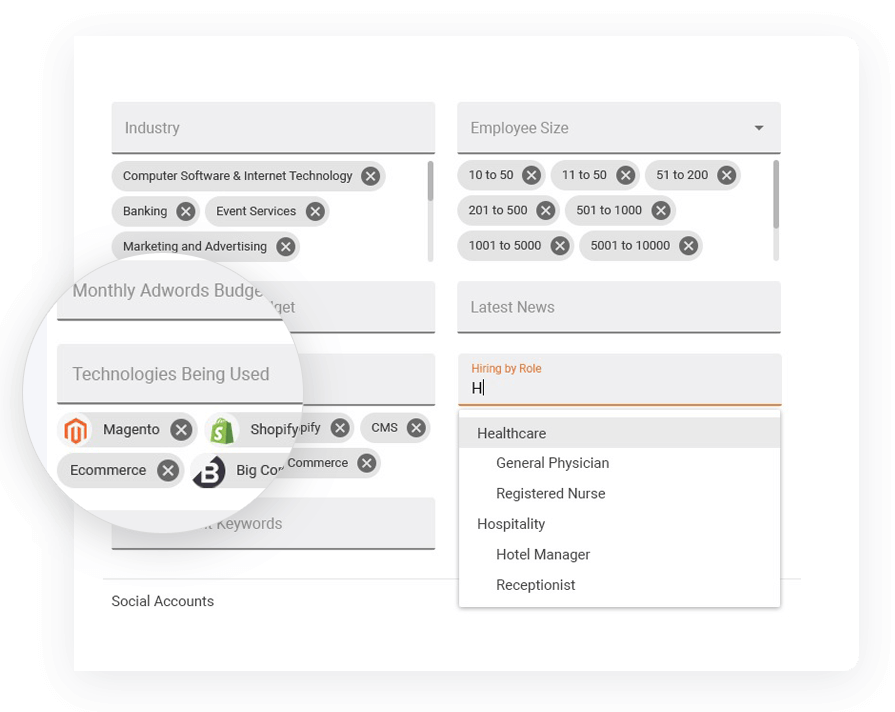
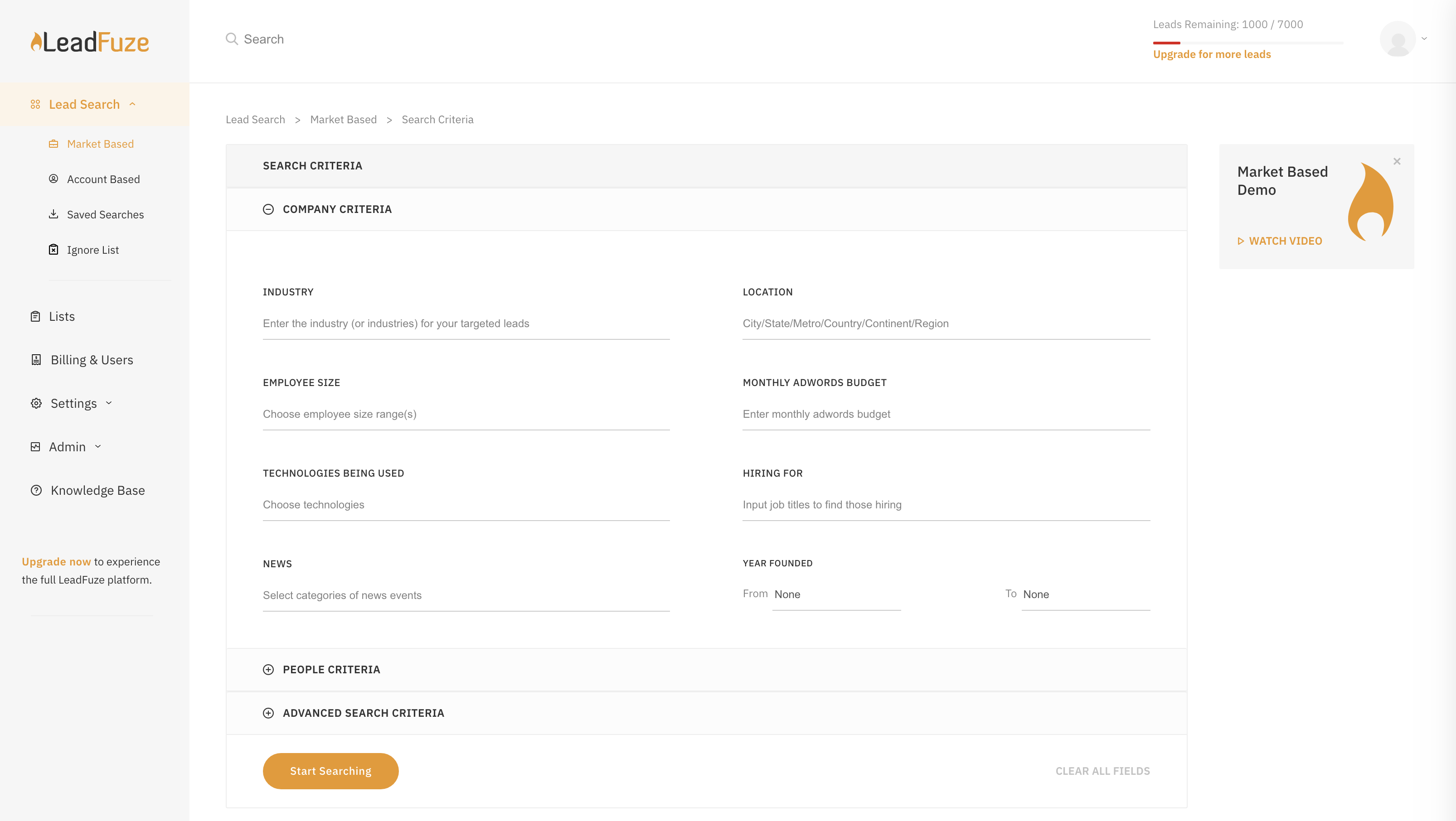
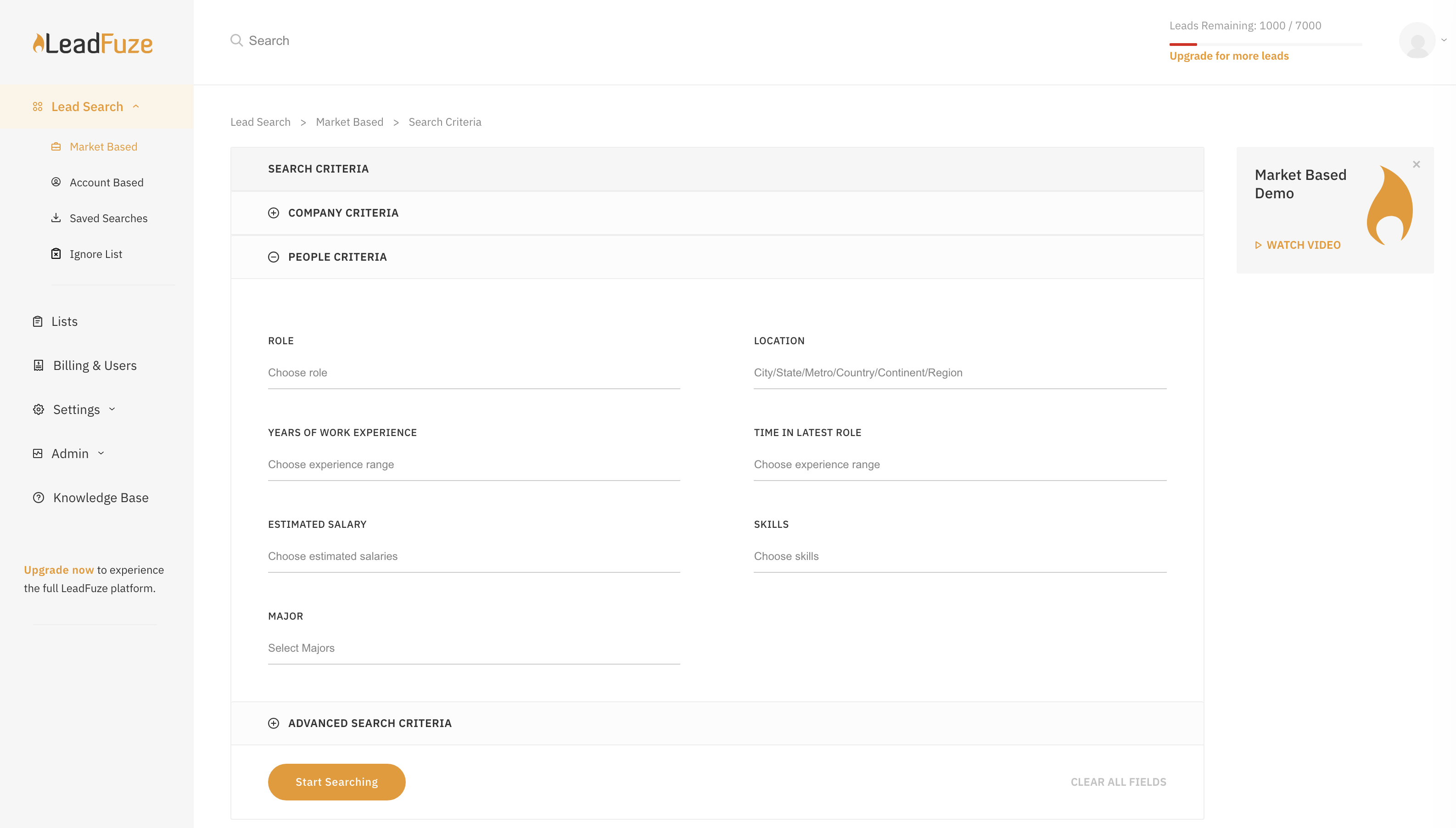
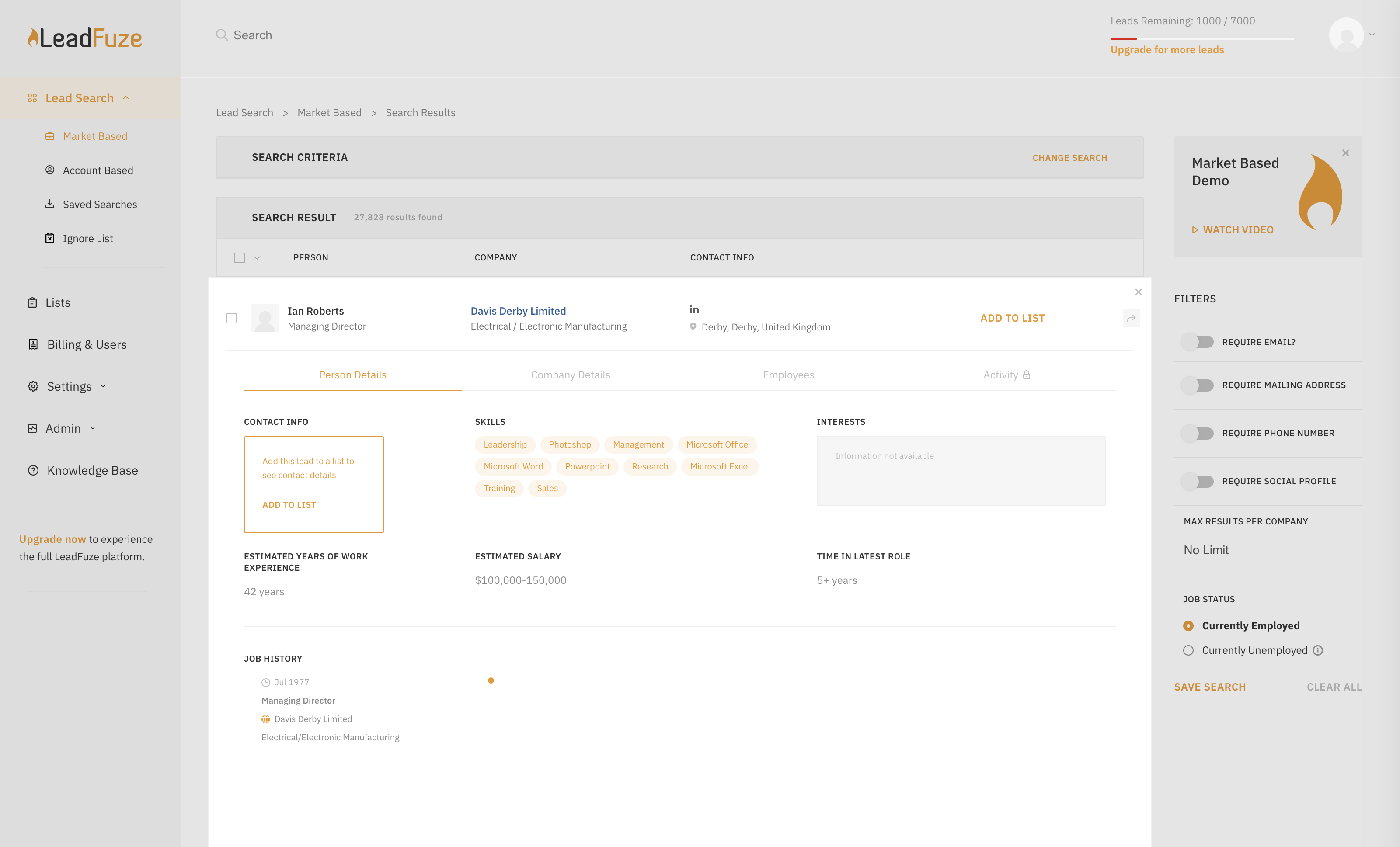
Screenshot of Search for new potential customers by industry, role, location, size, technologies used (or not used), Adwords budget, company news and signals, if a company is hiring for different roles, and more!Screenshot of Find ideal potential leads by industry, size, Adwords budget, latest news and signals, technologies currently used (or not used), if companies are hiring for certain roles, and more.Screenshot of Search entire market segments using personal criterial like their role, skills, education, time in role, and even estimated salary.Screenshot of Add a list of companies or domains you want to target, select your ideal role you're targeting and viola - you have a list of the ideal potential targets you're after.  You can look up individuals using just the first, last, and company fields and you can even find anyone that has ever worked for a company.Screenshot of Grab contact information and social profiles, as well as see additional information about the lead and the company they work for. You'll see all recent company news, job postings, technologies used, and more.Screenshot of Find additional employees at the company, and easily get their contact information as well.

Salesflare Screenshots

Screenshot of the visual, drag-and-drop sales pipeline used to track leads.Screenshot of the centralized dashboard to visualize conversations with leads.Screenshot of an example of the sales reporting.Screenshot of where to send email sequences or automated email campaigns from within a CRM.Screenshot of how a connected CRM can be used from within an email inbox, to stop switching tabs.Screenshot of where to add and track leads straight from LinkedIn, with a built-in email finder.