Lightning Tools Data Viewer vs. Sisense

Overview
ProductRatingMost Used ByProduct SummaryStarting Price
Lightning Tools Data Viewer
Score 9.1 out of 10
Mid-Size Companies (51-1,000 employees)
The Data Viewer provides data visualization in the form of reports or charts that can be created and customized to suit a business's needs. Silos of data exist in most organizations and yet contain valuable insights into how well the organization is performing and where action is needed. Those silos often include Microsoft Excel workbooks, Microsoft SQL Azure databases, On-Premises data sources accessible through OData or Business Connectivity Services and even SharePoint Lists. These data…
$2,200
per year per installation
Sisense
Score 7.7 out of 10
N/A
Sisense is a BI software and analytics platform. With what the vendor calls their In-Chip™ and Single Stack™ technologies, users have access to a comprehensive tool to analyze and visualize large, disparate data sets without IT resources.N/A
Pricing
Lightning Tools Data ViewerSisense
Editions & Modules
Data Viewer OnPrem
$1,000
per year Per installation, 1 x WFE
Data Viewer Online
$2,200
per year per installation
Data Viewer OnPrem Enterprise Edition
POA
per year Per installation, 4+ WFE
Data Viewer Online Enterprise Edition
POA
per year per installation
No answers on this topic
Offerings
Pricing Offerings
Lightning Tools Data ViewerSisense
Free Trial
YesYes
Free/Freemium Version
NoNo
Premium Consulting/Integration Services
YesYes
Entry-level Setup FeeNo setup feeNo setup fee
Additional DetailsPrices stated are minimum per installation for "stock" products. $2.20 per user / year on top of base price. Enterprise editions can be amended to suit business needs if deemed necessary, additional costs incurred and TBD. All packages include free technical support. Free upgrades available to latest versions of tool as they are released. (online version)Must contact sales team for pricing.
More Pricing Information
Community Pulse
Lightning Tools Data ViewerSisense
Features
Lightning Tools Data ViewerSisense
BI Standard Reporting
Comparison of BI Standard Reporting features of Product A and Product B
Lightning Tools Data Viewer
9.1
1 Ratings
12% above category average
Sisense
9.7
47 Ratings
17% above category average
Customizable dashboards9.11 Ratings10.047 Ratings
Report Formatting Templates9.11 Ratings9.033 Ratings
Pixel Perfect reports00 Ratings10.037 Ratings
Ad-hoc Reporting
Comparison of Ad-hoc Reporting features of Product A and Product B
Lightning Tools Data Viewer
8.2
1 Ratings
5% above category average
Sisense
8.8
47 Ratings
9% above category average
Drill-down analysis6.41 Ratings10.047 Ratings
Formatting capabilities9.11 Ratings9.047 Ratings
Report sharing and collaboration9.11 Ratings7.33 Ratings
Integration with R or other statistical packages00 Ratings9.027 Ratings
Data Discovery and Visualization
Comparison of Data Discovery and Visualization features of Product A and Product B
Lightning Tools Data Viewer
3.6
1 Ratings
73% below category average
Sisense
9.5
45 Ratings
18% above category average
Pre-built visualization formats (heatmaps, scatter plots etc.)3.61 Ratings10.045 Ratings
Location Analytics / Geographic Visualization00 Ratings9.042 Ratings
Predictive Analytics00 Ratings9.029 Ratings
Pattern Recognition and Data Mining00 Ratings10.01 Ratings
Report Output and Scheduling
Comparison of Report Output and Scheduling features of Product A and Product B
Lightning Tools Data Viewer
-
Ratings
Sisense
10.0
46 Ratings
20% above category average
Publish to Web00 Ratings10.036 Ratings
Publish to PDF00 Ratings10.046 Ratings
Report Versioning00 Ratings10.024 Ratings
Report Delivery Scheduling00 Ratings10.039 Ratings
Access Control and Security
Comparison of Access Control and Security features of Product A and Product B
Lightning Tools Data Viewer
-
Ratings
Sisense
10.0
45 Ratings
16% above category average
Multi-User Support (named login)00 Ratings10.045 Ratings
Role-Based Security Model00 Ratings10.044 Ratings
Multiple Access Permission Levels (Create, Read, Delete)00 Ratings10.045 Ratings
Report-Level Access Control00 Ratings10.01 Ratings
Mobile Capabilities
Comparison of Mobile Capabilities features of Product A and Product B
Lightning Tools Data Viewer
-
Ratings
Sisense
9.7
40 Ratings
22% above category average
Responsive Design for Web Access00 Ratings10.040 Ratings
Mobile Application00 Ratings10.025 Ratings
Dashboard / Report / Visualization Interactivity on Mobile00 Ratings10.034 Ratings
Best Alternatives
Lightning Tools Data ViewerSisense
Small Businesses
Supermetrics
Supermetrics
Score 9.9 out of 10
Yellowfin
Yellowfin
Score 8.8 out of 10
Medium-sized Companies
Supermetrics
Supermetrics
Score 9.9 out of 10
Reveal
Reveal
Score 10.0 out of 10
Enterprises
IBM Analytics Engine
Score 8.5 out of 10
Kyvos Semantic Layer
Score 9.5 out of 10
All AlternativesView all alternativesView all alternatives
User Ratings
Lightning Tools Data ViewerSisense
Likelihood to Recommend
9.1
(1 ratings)
10.0
(58 ratings)
Likelihood to Renew
-
(0 ratings)
8.9
(14 ratings)
Usability
-
(0 ratings)
10.0
(6 ratings)
Availability
-
(0 ratings)
8.2
(1 ratings)
Performance
-
(0 ratings)
8.2
(1 ratings)
Support Rating
-
(0 ratings)
9.0
(6 ratings)
In-Person Training
-
(0 ratings)
7.3
(1 ratings)
Online Training
-
(0 ratings)
8.2
(1 ratings)
Implementation Rating
-
(0 ratings)
7.1
(3 ratings)
Configurability
-
(0 ratings)
8.2
(1 ratings)
Ease of integration
-
(0 ratings)
8.2
(1 ratings)
Product Scalability
-
(0 ratings)
8.2
(1 ratings)
Vendor post-sale
-
(0 ratings)
9.1
(1 ratings)
Vendor pre-sale
-
(0 ratings)
9.1
(1 ratings)
User Testimonials
Lightning Tools Data ViewerSisense
Likelihood to Recommend
Lightning Tools
Lightning Tools Data Viewer is well suited for re-surfacing data and customizing its look and feel.
Read full review
Sisense Ltd
I believe Sisense is perfectly suited for any organization of any size that have access to the proper resources, as the tool is very expensive. The data connectors come in all shapes and sizes out of the box, which allows a great deal of data control within the ElastiCubes. Additionally, while the platform only runs on Windows platforms, the web application can be accessed on any client: mobile, Apple, Windows, etc. This allows a much more flexible user experience, resulting in data and dashboards reaching further than any other tool.
Read full review
Pros
Lightning Tools
  • Shows Lists created on different sites to be seen and controlled on another site in a Tenant
  • Allows selection of layouts and coloring way beyond what other programs do.
  • Easy to learn and very functional.
Read full review
Sisense Ltd
  • Customization - lots of supported and community plugins available. Users can also adjust the look and feel through JavaScript.
  • Innovation - Sisense is continuing to push the envelope by developing new features through Sisense Labs.
  • Customer support - the commitment to excellent customer service and ensuring organizations get the most out of their investment.
Read full review
Cons
Lightning Tools
  • Data Viewer has a graph feature that is old school flat design. We loved the In House real 3D graph Lightning Tools program.
Read full review
Sisense Ltd
  • The usability of the application on mobile devices needs some improvement, especially navigation and filtering.
  • Dashboards that are created by multiple users can be a bit of a hassle to share by Admins.
  • If you need to embed dashboards into your website, you are require to buy a license separate from the user and platform license. This is a norm on most BI visualization tools, but Sisense can seem a bit on the high side, cost-wide.
Read full review
Likelihood to Renew
Lightning Tools
No answers on this topic
Sisense Ltd
I think the business and myself as a user has come to rely on SiSense as a dashboarding and quick ad-hoc reporting tool. I am hoping to integrate SiSense dashboards into more parts of the business in the future. We have reduced our report turn-around time for the most part from hours/days to minutes and in some cases almost the speed of thought. Reports are also easier on the eye and more easily distributed. I would also like to say that the support and professionalism from the SiSense team has been excellent.
Read full review
Usability
Lightning Tools
No answers on this topic
Sisense Ltd
New V5 is ground floor of an exciting collection of possibilities. Weekly Sisense developers come up with new functionality that they share with us in their forums. The move to HTML5 has been pleasing in that widgets auto size themselves into appropriate forms in the board but everyone of them can be popped out to full page size to be looked at in more detail
Read full review
Reliability and Availability
Lightning Tools
No answers on this topic
Sisense Ltd
There are very few situations when there is unexpected downtime. Mostly during development, new dashboard implementation and during upgrades. other then that there were very few crashes.
Read full review
Performance
Lightning Tools
No answers on this topic
Sisense Ltd
SiSense is usually performing better then other solutions even if going for complex reports/dashboards(of course within reasonable frames). I haven't noticed any bad influence on other systems, usually if something happens it stays within SiSense.
Read full review
Support Rating
Lightning Tools
No answers on this topic
Sisense Ltd
SiSense's support ninjas are very knowledgeable and are exceptionally responsive. So far, all of the issues we ran into were resolved within minimum time. My sense of dealing with the support staff at SiSense is that they are very focused on not just answering your immediate question, but also to delve into the cause of the matter.
Read full review
In-Person Training
Lightning Tools
No answers on this topic
Sisense Ltd
Easy and free training that allowed us quickly understand basics in SiSense and start using them. More advanced features requires some browsing through SiSense forums, but there is always support to help, and SiSense support is one of the best whith which I worked so far.
Read full review
Online Training
Lightning Tools
No answers on this topic
Sisense Ltd
Many examples, videos and scenarios which you try on your own right away. This combined with in-person training gives you enough to utilize most of SiSense's power.
Read full review
Implementation Rating
Lightning Tools
No answers on this topic
Sisense Ltd
Remember to migrate the plugins. The documentation however is pretty straight forward.
Read full review
Alternatives Considered
Lightning Tools
Lightning Tools Data Viewer is much easier and more powerful than Infowise similar viewer in their lineup. In this case, we use Data Viewer over the one offered by Infowise.
Read full review
Sisense Ltd
1) Easy to use, really, there is nothing too much to say. The set up is easy and not confusing. You can use it internally or externally.
2) Customer Service, having spoken to various product reps from similar industry. Sisense rep provides you with the best support to get started, and it is really appreciated.
Read full review
Scalability
Lightning Tools
No answers on this topic
Sisense Ltd
Product is quite easily scalable. The whole installation can be easily moved to stronger machine if needed.
Read full review
Return on Investment
Lightning Tools
  • It allows us to do things that would take a great deal more time to duplicate in SharePoint
  • It cuts down on ugly looking built in SP list layouts
  • Users find it easy to access, thus this product is more productive
Read full review
Sisense Ltd
  • Report development time is reduced from 2~3 days to 2~3 hours.
  • Report querying time is improved from 0.5~10 mins to 2~30 seconds.
  • A 2-staff team delivers 10 times the BI output that we did on the old system.
  • We were able to deliver BI and data analysis for all business functions instead of a very limited group of users
Read full review
ScreenShots

Lightning Tools Data Viewer Screenshots
Screenshot of DISPLAYING EXTERNAL DATA WITHIN SHAREPOINT OR MICROSOFT TEAMS
The Data Viewer Client Side Web Part can be configured by Business Users within a few minutes to display Line of Business Data from Data Sources such as Excel,  SQL Azure, Business Connectivity Services, OData and SharePoint Lists.  Connections to an organizations data such as Customer Relationship Management Systems, Accounting Systems, or Custom Databases can be connected, giving business users a live up-to-date view of business information within the context of their SharePoint Team Sites or Microsoft Teams Tabs.Screenshot of HIGHLIGHTING KEY BUSINESS DATA (NO CODE)
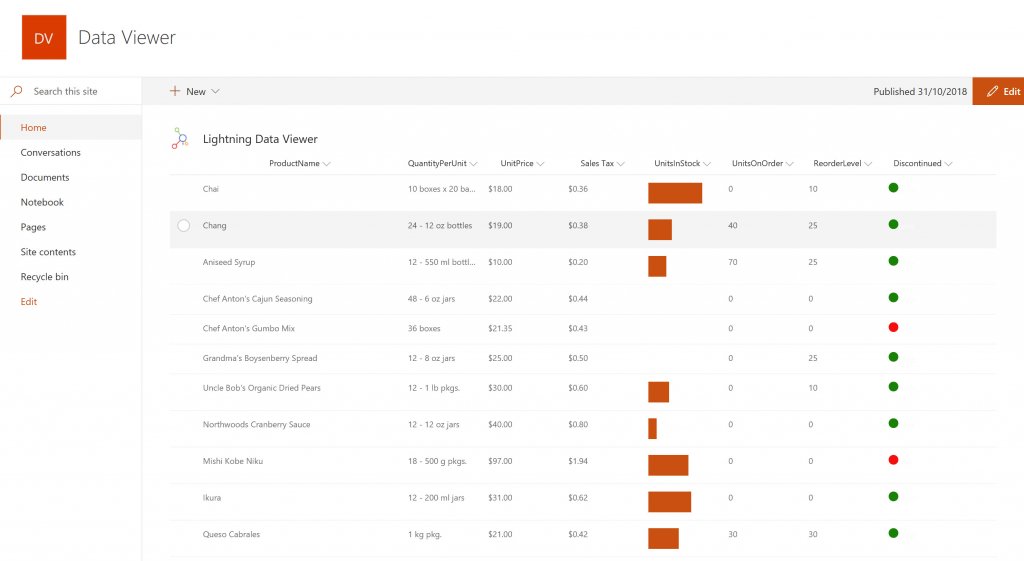
Conditional formatting can be used to highlight key business data. Overdue Tasks, Low Stock, Currency Exchange Rates, Sales Revenue are examples of data to highlight visually allowing for a quick reaction time. Key Financial Indicators and Key Performance Indicators can be configured with a simple dialog and no need to write any code. Choose colours, icons or data bars to highlight key data.Screenshot of SELECTING AND STYLING ICONS
Icons can be chosen as part of the conditional formatting to make data stand out. The Office 365 Fabric icons can be selected and styled and applied to cell values. Pepper pots, Smileys, Envelopes and more icons are available. There are hundreds of options to choose from to highlight data that needs to be acted upon.Screenshot of DATA VIEWER CAN BE A GRID OF DATA OR A CHART IN SHAREPOINT OR MICROSOFT TEAMS
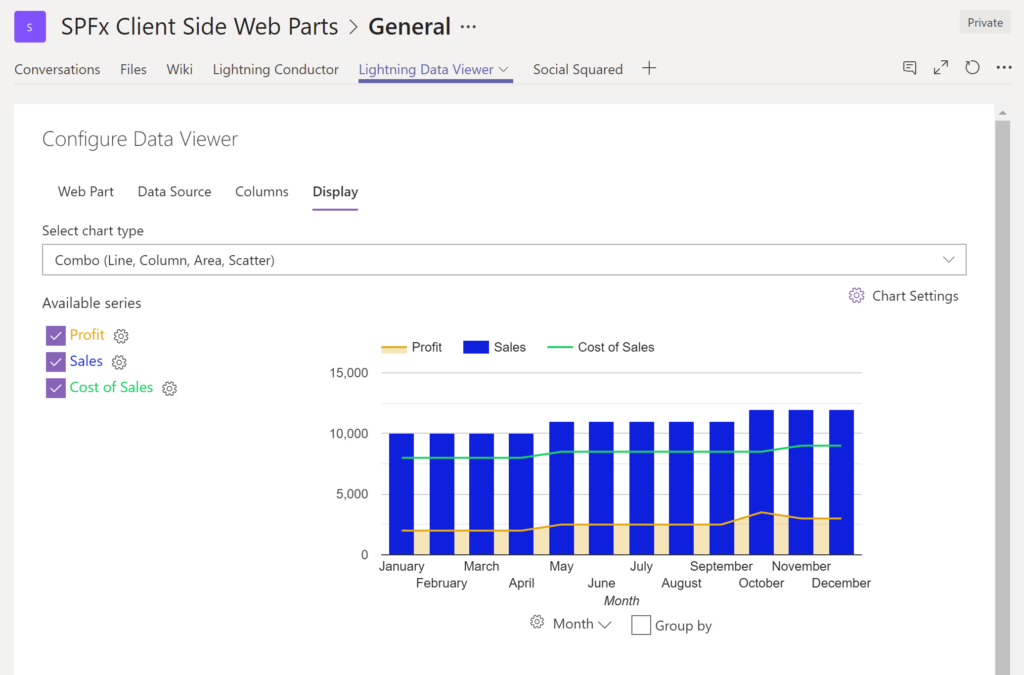
The Data Viewer can be used within Microsoft SharePoint Modern Sites or Microsoft Teams Tabs as a Grid of Data with styling or as a Chart which can be configured. The Charting Feature allows for Pie, Donut, Column, Line, Area, and Scatter Charts which can all be configured and displayed in 2D or 3D.Screenshot of TREEMAPS
summary information can be displayed within a TreeMap next to the detail. Users will be able to see trends, and how the business is performing  using the TreeMap view of data.Screenshot of CHARTS AND GAUGES
The Data Viewer is used to represent data in multiple ways using Gauges, TreeMaps, Multiple Series Charts, and Pie Charts.