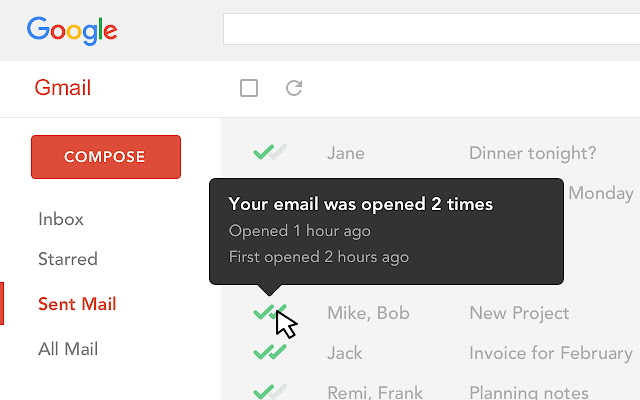
Mailtrack is a free email tracker for Gmail, boasting over 1,5 million active users. The vendor states users will Ffollow up with more accuracy, find out the moment emails have been read, track the…
N/A
Maximizer CRM
Score 8.5 out of 10
N/A
Maximizer CRM is a customer relationship management (CRM) software built to maximize sales leads and calls.
$29
Per User / Month
Pricing
Mailtrack
Maximizer CRM
Editions & Modules
No answers on this topic
Small Office
$29
Per User / Month
Business Plus
$49
Per User / Month
Business Plus
$49
Per User / Month
Insights
$89
Per User / Month
Insights
$89
Per User / Month
Offerings
Pricing Offerings
Mailtrack
Maximizer CRM
Free Trial
No
Yes
Free/Freemium Version
Yes
No
Premium Consulting/Integration Services
No
Yes
Entry-level Setup Fee
No setup fee
$29 per user/Month
Additional Details
—
All pricing in USD. Monthly no contract subscription option available.
More Pricing Information
Community Pulse
Mailtrack
Maximizer CRM
Features
Mailtrack
Maximizer CRM
Sales Force Automation
Comparison of Sales Force Automation features of Product A and Product B
Mailtrack
-
Ratings
Maximizer CRM
1.8
5 Ratings
126% below category average
Customer data management / contact management
00 Ratings
1.15 Ratings
Workflow management
00 Ratings
1.14 Ratings
Territory management
00 Ratings
1.14 Ratings
Opportunity management
00 Ratings
1.15 Ratings
Integration with email client (e.g., Outlook or Gmail)
00 Ratings
1.14 Ratings
Contract management
00 Ratings
3.14 Ratings
Quote & order management
00 Ratings
1.13 Ratings
Interaction tracking
00 Ratings
4.05 Ratings
Channel / partner relationship management
00 Ratings
2.15 Ratings
Customer Service & Support
Comparison of Customer Service & Support features of Product A and Product B
Mailtrack
-
Ratings
Maximizer CRM
1.1
4 Ratings
150% below category average
Case management
00 Ratings
1.14 Ratings
Call center management
00 Ratings
1.13 Ratings
Help desk management
00 Ratings
1.13 Ratings
Marketing Automation
Comparison of Marketing Automation features of Product A and Product B
Mailtrack
-
Ratings
Maximizer CRM
1.1
5 Ratings
151% below category average
Lead management
00 Ratings
1.15 Ratings
Email marketing
00 Ratings
1.15 Ratings
CRM Project Management
Comparison of CRM Project Management features of Product A and Product B
Mailtrack
-
Ratings
Maximizer CRM
1.1
5 Ratings
150% below category average
Task management
00 Ratings
1.15 Ratings
Billing and invoicing management
00 Ratings
1.13 Ratings
Reporting
00 Ratings
1.14 Ratings
CRM Reporting & Analytics
Comparison of CRM Reporting & Analytics features of Product A and Product B
Mailtrack
-
Ratings
Maximizer CRM
1.1
5 Ratings
150% below category average
Forecasting
00 Ratings
1.15 Ratings
Pipeline visualization
00 Ratings
1.15 Ratings
Customizable reports
00 Ratings
1.15 Ratings
Customization
Comparison of Customization features of Product A and Product B
Mailtrack
-
Ratings
Maximizer CRM
1.1
5 Ratings
150% below category average
Custom fields
00 Ratings
1.15 Ratings
Custom objects
00 Ratings
1.04 Ratings
Scripting environment
00 Ratings
1.15 Ratings
API for custom integration
00 Ratings
1.15 Ratings
Security
Comparison of Security features of Product A and Product B
Mailtrack
-
Ratings
Maximizer CRM
1.1
5 Ratings
154% below category average
Single sign-on capability
00 Ratings
1.13 Ratings
Role-based user permissions
00 Ratings
1.14 Ratings
Social CRM
Comparison of Social CRM features of Product A and Product B
Mailtrack
-
Ratings
Maximizer CRM
1.1
3 Ratings
149% below category average
Social data
00 Ratings
1.13 Ratings
Social engagement
00 Ratings
1.13 Ratings
Integrations with 3rd-party Software
Comparison of Integrations with 3rd-party Software features of Product A and Product B
Mailtrack
-
Ratings
Maximizer CRM
1.0
5 Ratings
153% below category average
Marketing automation
00 Ratings
1.05 Ratings
Compensation management
00 Ratings
1.04 Ratings
Platform
Comparison of Platform features of Product A and Product B
Mailtrack is great for tracking emails if you do not want to pay for larger more complicated tools that do the same thing. If you already love your system but just want to add some convenient read tracking, that's exactly what this is for. If you have a system that doesn't work well, I would take the time to evaluate alternatives that also include read tracking (Salesforce for example). This also applies if you're trying to use this for large outbound sales emails - there are a lot of applications that have email tracking built in (Outreach.io is a great example) so it may just be worth switching your whole system.
It was not a good experience. Nothing was as advertised, from the user experience to the security of purchase. The address book was not able to be converted from the Leads module and the maps feature wasn’t able to connect from Leads. The mobile version has a lot of bugs and isn’t very functional. They have a tutorial, yet [I think they] aren’t proactive in distributing it to new users. Their focus is on sales. And it’s not a very salable product in my opinion. The worst aspect of this company is that they aren’t risk free. If you purchase a year software and decide after a few weeks it simply isn’t for your company, there are no refunds. I had to initiate a chargeback with my bank after being told that “unfortunately, due to the terms and conditions...” No customer wants to hear that. [I feel] they tried to bully me into keeping their software. There are far too many options in 2021 for CRM to be forced into one, especially one so difficult to use. When I asked about a feature that I needed, I was told, “Perhaps later this year...” Not what I need if I’m paying good money for a software. Their sales VP wouldn’t call me when I requested a call after being denied a refund. When I went through their main website again after my experience with Maximizer, I [felt] that everything they advertise is not in line with the product they put out. They say that there’s a free trial available. Not the truth [in my experience]. This maybe would have been a good CRM in say, 1999. [I think] it’s antiquated and didn’t serve the needs of my business. I used well-known CRM previously and didn’t find Maximizer to be better than the free version of that one. There was a disconnect in usage that wasn’t able to be overcome by myself or my employees in several weeks of trials.
We are heavily entrenched in Maximizer and trying to pull our data out and into another CRM, with the same amount of customization and workflow would take a lot of effort.
I would rate Mailtrack's overall usability as a ten out of ten. The reasons for this are actually quite simple. For now, only I have been using Mailtrack. However, looking at the rather easy to use characteristics Mailtrack has to offer, I would not hesitate to recommend it to the rest of my colleagues.
I didn't really need to use the customer support but the fact that they proactively make the installation process so easy by providing step by step instructions with videos and everything is kind of pro-active customer support that is needed. Good for them because at the end of the day, it's everyone's dream to use a product that they don't need support for.
There's a free tier. Obviously, there are other things to love, like notifications about your email being read, the fact that if an email hasn't been responded to in some time it gets bumped up. The fact that if other people have Mailtrack you will actually get notified who read your email. But the fact that there is a free tier is HUGE.
We chose to go with Microsoft Dynamics CRM over Maximizer because of the customization and marketing options that were associated with Dynamics. The ease of use with Maximizer, however, was far better than that of Microsoft Dynamics.
I'm currently using the free version so my investment was time spent downloading the browser extension. I would say it's worth the investment because I can make more value through each email by finding the right time to send replies or know when is the exact time I should follow up.
Knowing when an email is read multiple times helps me know the importance of the content in my email.
The paid version allows Mailtrack to tell you which recipient read the email if there was more than 1.