ManageEngine Site24x7 vs. PingPlotter

Overview
ProductRatingMost Used ByProduct SummaryStarting Price
ManageEngine Site24x7
Score 10.0 out of 10
N/A
Site24x7 from ManageEngine is a full-stack application, website, server, cloud and network monitoring tool. Site24x7 offers code-level diagnostics and customizable error thresholds, end-to-end monitoring with topology visualization tools, and mobile accessibility.
$9
10 monitors
PingPlotter
Score 8.8 out of 10
N/A
PingPlotter is a graphical traceroute and ping tool that visualizes network performance in a way that makes identifying the source of problems quicker and easier for everyone from online gamers and video streamers to VoIP admins and IT pros. Features for remote deployment, network monitoring, scripting, and a web interface are included along with several additional capabilities.
$0
per user
Pricing
ManageEngine Site24x7PingPlotter
Editions & Modules
Starter
$9.00
10 monitors
Pro
$35.00
40 Monitors
Classic
$89.00
100 Monitors
Elite
$225.00
250 Monitors
Enterprise
$449.00
500 Monitors
Enterprise Plus Web
$899.00
2500 Monitors
PingPlotter Free
$0.00
per user
PingPlotter Free
$0.00
per user
PingPlotter Standard
$6.99
per user per month
PingPlotter Professional
$29.00
per user per month
PingPlotter Standard
$39.99
per user
PingPlotter Professional
$349.00
per user
Offerings
Pricing Offerings
ManageEngine Site24x7PingPlotter
Free Trial
YesYes
Free/Freemium Version
YesYes
Premium Consulting/Integration Services
NoNo
Entry-level Setup Fee$1 monitorsNo setup fee
Additional DetailsEach Pack will also support additional benefits such as Network interfaces, Applogs, Alert credits etc. You can also, purchase add-ons to create custom pricing options. Please visit the vendor's pricing page, for more information.
More Pricing Information
Community Pulse
ManageEngine Site24x7PingPlotter
Considered Both Products
ManageEngine Site24x7
Chose ManageEngine Site24x7
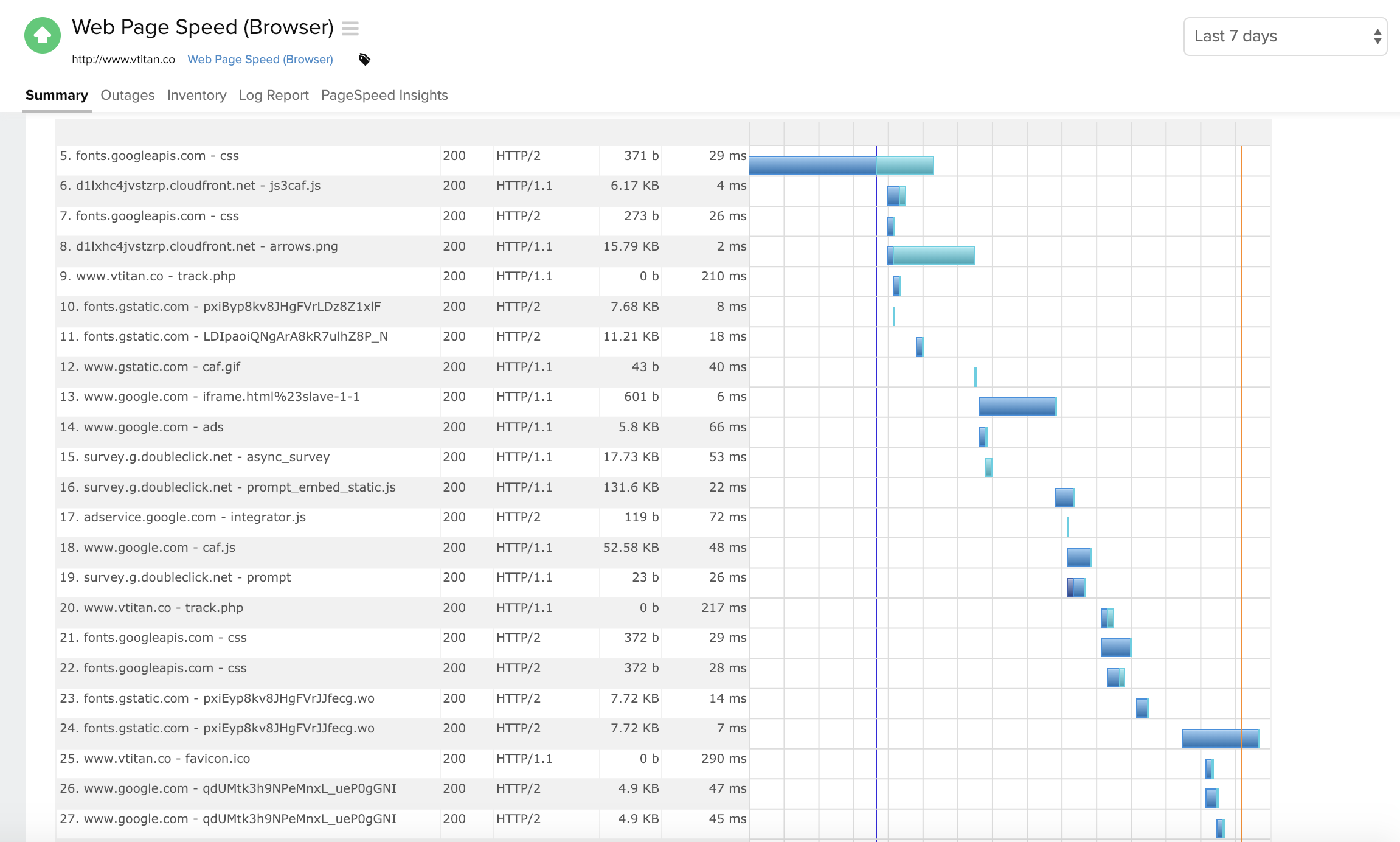
Site24x7 [All-in-One Monitoring] has some similarities to ThousandEyes. Especially in the troubleshooting aspect where both offer Web performance waterfall charts to analyze the issue better. Both have cloud-based servers globally that allow to determine performance on the …
Chose ManageEngine Site24x7
Manage engine had OPs manager for alerting and security monitoring alerts, but is just not as robust an offering as [Site24x7 All-in-One Monitoring] (RUM.APM features etc..). Originally we had used Nagios on low, to no-cost linux platform, but Nagios will require license also, …
Chose ManageEngine Site24x7
Initially, it came down to price. But, if you don't mind having a cloud monitoring solution (versus on-prem) then in my opinion Site24x7 is much easier to setup/manage/configure/use than other options I have managed in the past. Adding monitors takes seconds and I spend almost …
Chose ManageEngine Site24x7
The biggest difference between Site24x7 and products like PRTG, Nagios, or Icinga, is that Site24x7 is hosted off the network, completely externally. The others do a great job on network alerts-- and some can even be configured to send SMS or phone calls with the right …
Chose ManageEngine Site24x7
Each solution excels in their own areas. Site24x7 provides the easiest and most cost-effective transactional monitoring from the previous and existing solutions which we use. However, Solarwinds Orion suite, which includes the virtualization manager, gives us full-stack …
Chose ManageEngine Site24x7
I haven't had a lot of experience evaluating Datadog but from the research and basic demo that we got I understand that it is significantly more expensive, but it does seem to have more AI features and can assist in predicting when/if applications or essential services may go …
Chose ManageEngine Site24x7
site24x7 is really unique, I have been using it for many years and always recommend it in my classes. It is ideal for monitoring all web, apps, servers together in one place. Never let a website go down again.
Chose ManageEngine Site24x7
I selected this [roduct because I needed something really quick to deploy and that we could easily integrate with our environment without having to deal with firewall setup and other stuff.
Chose ManageEngine Site24x7
Simply put, Alertsite from Smartbear is a great product, with top-notch functionality. However, the cost of the platform when using multi-step transactions is incredibly pricey and the cost does not scale well when you want to increase your monitoring. Site24x7 alleviates the …
Chose ManageEngine Site24x7
While Applications Manager and CA CEM can give a deep understanding of the services and applications, neither can compare with the shear speed at which Site24x7 can provide for the web performance of sites and how customer satisfaction is associated as well!!!
PingPlotter
Chose PingPlotter
I used Ping.app and UptimeLog.app on the Mac. These both provided different aspects. These two had a menubar to show me green or red for multiple connections. UptimeLog showed me very clearly when my connectivity was on or off and for exactly how long.
Chose PingPlotter
PingPlotter is much easy to work with
Chose PingPlotter
Okta is a mment in time, PingPlotter is continuous
Chose PingPlotter
There program is unmatched for what it does, I wouldn't even recommend to myself trying another.
Chose PingPlotter
I've tried more products that are not in the list but PingPlotter is the easiest to use and the better one so far because of the interface and function.
Chose PingPlotter
PingPlotter has better visualizations and a stronger ability to capture historical data than other tools I've used. This makes it easier to find the root cause by looking back in the log data to find where latency or packet loss occurred.
Chose PingPlotter
Wireshark doesn't have this functionality and the commandline ping tool built into windows doesn't do plots.
Chose PingPlotter
PingPlotter has a better UI and more customizable features.
Chose PingPlotter
I am not aware of any tools like PingPlotter.
Chose PingPlotter
A balance of a generic tool vs a network equipment product is necessary when investigating network incidents or disruptions. Need to train the engineer to use both tools to perform their analysis and to dive down to the issues as fast as they can. Experience with the tools will …
Chose PingPlotter
PingPlotter stacks up very well to Solarwinds NPM and can provide many of the same benchmark tests that Solarwinds can. PingPlotter is most certianly much better at doing Traceroutes than NPM, and you can run a lot of the same reports.
Chose PingPlotter
PingPlotter is a basic version of Auvik, although it is easier to setup and there is less intrusion in the customers network. This allows us to use PingPlotter as a prospecting tool and allows to accurately gather network information very quickly. Basic troubleshooting is great …
Chose PingPlotter
I have tried a few free products and some paid ones but never really did what I wanted. I just needed a simple, always-on link monitor specifically with a traceroute element and this is what PingPlotter delivers. The others were either overly complex or too expensive, some just …
Features
ManageEngine Site24x7PingPlotter
Monitoring Tasks
Comparison of Monitoring Tasks features of Product A and Product B
ManageEngine Site24x7
8.4
Ratings
0% below category average
PingPlotter
-
Ratings
Remote monitoring9.10 Ratings00 Ratings
Network device monitoring7.50 Ratings00 Ratings
Multiple Server Monitoring8.60 Ratings00 Ratings
Multi-device monitoring8.00 Ratings00 Ratings
Automated alerts and notifications9.00 Ratings00 Ratings
Management Tasks
Comparison of Management Tasks features of Product A and Product B
ManageEngine Site24x7
7.4
Ratings
9% below category average
PingPlotter
-
Ratings
Policy-based automation7.40 Ratings00 Ratings
Reporting
Comparison of Reporting features of Product A and Product B
ManageEngine Site24x7
8.5
Ratings
3% above category average
PingPlotter
-
Ratings
Performance data reports8.10 Ratings00 Ratings
Customizable reporting8.40 Ratings00 Ratings
Data visualization8.80 Ratings00 Ratings
Risk analysis8.60 Ratings00 Ratings
Security
Comparison of Security features of Product A and Product B
ManageEngine Site24x7
6.6
Ratings
15% below category average
PingPlotter
-
Ratings
Antivirus and malware management6.60 Ratings00 Ratings
Network Performance Monitoring
Comparison of Network Performance Monitoring features of Product A and Product B
ManageEngine Site24x7
-
Ratings
PingPlotter
8.3
Ratings
5% above category average
Automated network device discovery00 Ratings8.10 Ratings
Network monitoring00 Ratings9.20 Ratings
Baseline threshold calculation00 Ratings9.40 Ratings
Alerts00 Ratings7.00 Ratings
Customizable reports00 Ratings7.90 Ratings
Best Alternatives
ManageEngine Site24x7PingPlotter
Small Businesses
Amazon CloudWatch
Amazon CloudWatch
Score 7.7 out of 10
NinjaOne
NinjaOne
Score 9.0 out of 10
Medium-sized Companies
ScienceLogic AI Platform
Score 8.8 out of 10
SolarWinds NetFlow Traffic Analyzer (NTA)
Score 9.2 out of 10
Enterprises
ScienceLogic AI Platform
Score 8.8 out of 10
SolarWinds NetFlow Traffic Analyzer (NTA)
Score 9.2 out of 10
All AlternativesView all alternativesView all alternatives
User Ratings
ManageEngine Site24x7PingPlotter
Likelihood to Recommend
8.6
(0 ratings)
8.9
(0 ratings)
Usability
-
(0 ratings)
9.1
(0 ratings)
Support Rating
8.0
(0 ratings)
9.0
(0 ratings)
User Testimonials
ManageEngine Site24x7PingPlotter
Likelihood to Recommend
I have tried other tools (PRTG etc) in the past, and switched from US monitor to [Site24x7 All-in-One Monitoring], for all the built-in features and ability to implement by using with or without the agents deployed (ip discovery LAN). This is one tool that encompasses the entire organization and allows that single pane of glass feel (NOC screen view) for an accurate virtual snapshot of your entire organization, either cloud and/or LAN.
Read full review
It is well suited for performing monitoring and testing from a single device. It is less appropriate if you have to monitor from multiple different endpoints. That type of deployment would be more of an enterprise application. If you are looking for an end user monitoring solution then PingPlotter is the one for you.
Read full review
Pros
  • Alerts: Site24x7 can be configured to send alerts in all sorts of ways, from email, to text messages, to even direct automated phone calls.
  • Internal monitoring: An agent installed on one or more machines can monitor internal connectivity to other network devices. This means if connectivity to a server goes down, we often know about it before users alert us.
  • External monitoring: Site24x7 also watched our websites and sends alerts if they're unreachable. It uses multiple locations to do so, which means if there's a partial network outage in some part of the country, we know who is affected.
Read full review
  • Monitor traffic in network
  • Measure stops when contacting network locations such as websites
  • Measures the lag and latency it takes to contact network locations
  • Gives you both induvidual measurements as well as good oversight
  • identifies when network lag or disconnect occurs
Read full review
Cons
  • I wish the advanced monitors were not so expensive.
  • It is a cloud solution, so it is necessary to open up outbound ports in all security zones.
  • If you lose outbound internet service, all your internal servers will throw alarms and life gets extremely noisy.
Read full review
  • Its a little confusing to see which targets are currently running pings and which ones are displayed in the plots.
  • Starting and stopping pings requires a right click and that would be better with a play/pause button I think.
  • Ability to drag and drop the graphs to reorder them.
  • more columns to show which targets are running and which are displayed. Currently this is done with symbols so you cant sort by just the running targets for example I've found.
Read full review
Usability
No answers on this topic
I installed it and it just started working. I realized I could then tweak it to show what I needed but didn't have to spend a long time configuring it before use, editing YAML files etc. Maybe that's fine for a network professional, but I only need this software if something goes wrong, and then need it to work quickly out of the box.
Read full review
Support Rating
I have only had to use support once, so I can't go into much detail about their support team. The one time I did use it the response was fast but the resolution took some time.
Read full review
I have not had much contact with the PingPlotter support, only one time have I went to them and it was a positive experience. The questions I had were answered quickly and professionally. I have no issue with the experience I had with the Support team. This was from before and after the purchase of the product.
Read full review
Alternatives Considered
Site24x7 [All-in-One Monitoring] has some similarities to ThousandEyes. Especially in the troubleshooting aspect where both offer Web performance waterfall charts to analyze the issue better. Both have cloud-based servers globally that allow to determine performance on the Internet. Site24x7 has more features available so we selected it instead.
Read full review
I used Ping.app and UptimeLog.app on the Mac. These both provided different aspects. These two had a menubar to show me green or red for multiple connections. UptimeLog showed me very clearly when my connectivity was on or off and for exactly how long
Read full review
Return on Investment
  • Positivity wise, we're spending a third of what we were on our website monitoring, this has allowed us to focus funding elsewhere (namely SolarWinds).
  • We have enhanced our core monitoring by now also being able to provide better coverage, whereas we were handicapped with our previous supplier due to the scaling costs of multi-step transactions.
  • The general feeling from our IT staff is that the platform is not great, which obviously reduces confidence in the ability for the platform to provide accurate monitoring data for our websites.
Read full review
  • Great ROI, troubleshooting time has been reduced by 90%
  • Network Discoveries used to take 2 to 3 hours and were inconsistent - now it is a matter of minutes
  • lacks integration into our MSP toolkit, and we now use it as a stand alone product
Read full review
ScreenShots

ManageEngine Site24x7 Screenshots

Screenshot of Component wise metric breakdown in a Webpage Speed (Browser) monitorScreenshot of Summary page for a windows server monitorScreenshot of Response time and outages summary for a DNS server monitorScreenshot of Summary page for traces run on a Java applicationScreenshot of Desktop and mobile view of a Website monitorScreenshot of Homepage view

PingPlotter Screenshots

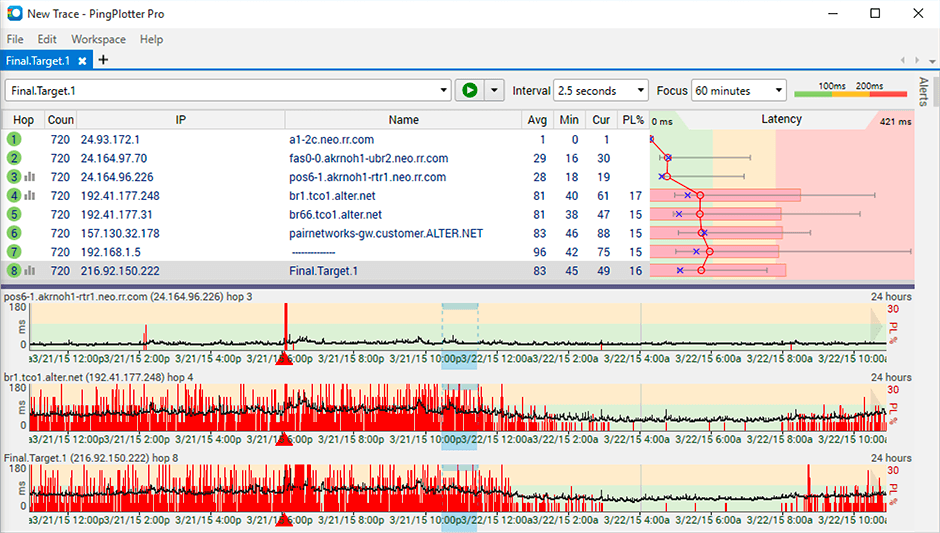
Screenshot of Screenshot of Screenshot of