Microsoft Exchange Online Archiving vs. RMail

Overview
ProductRatingMost Used ByProduct SummaryStarting Price
Microsoft Exchange Online Archiving
Score 8.6 out of 10
N/A
Exchange Online Archiving from Microsoft is a tool that helps the user solve archiving, compliance, regulatory, and eDiscovery challenges. Hosted on Microsoft globally redundant servers, with IT-level phone support 24 hours a day, seven days a week, Exchange Online Archiving is compatible with Exchange Server 2019, 2016, 2013, and 2010. It’s also available as an add-on service for mailboxes that are hosted online.
$3
per month per user
RMail
Score 10.0 out of 10
N/A
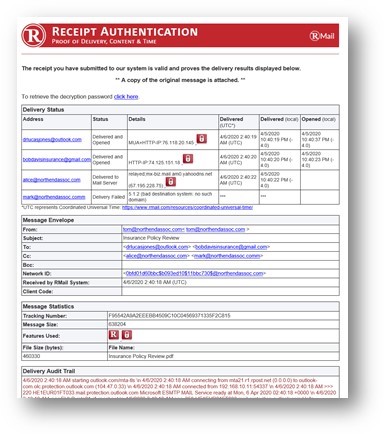
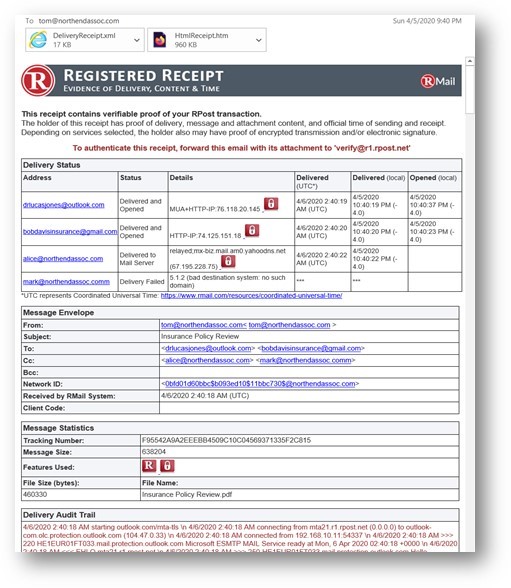
RMail is RPost’s software-as-a-service solution that enables business users to track and prove email delivery and encrypt sensitive emails. Available as a MS Outlook add-in and for other popular software platforms, RMail works with any email address without any customization required. RMail provides users with a Registered Receipt email record proving delivery status, time of delivery, and exact content.
$7
per month
Pricing
Microsoft Exchange Online ArchivingRMail
Editions & Modules
No answers on this topic
RMail Personal
$7.00
per user, per month
RMail Standard
$15.00
per user, per month
Shared Volume
Varies by Plan
for 5 or more users
Offerings
Pricing Offerings
Microsoft Exchange Online ArchivingRMail
Free Trial
YesYes
Free/Freemium Version
NoNo
Premium Consulting/Integration Services
NoYes
Entry-level Setup FeeNo setup feeNo setup fee
Additional Details
More Pricing Information
Community Pulse
Microsoft Exchange Online ArchivingRMail
Best Alternatives
Microsoft Exchange Online ArchivingRMail
Small Businesses
Cove Data Protection
Score 9.1 out of 10
Paubox Email Suite
Paubox Email Suite
Score 9.0 out of 10
Medium-sized Companies
Cove Data Protection
Score 9.1 out of 10
OpenText Core Email Encryption
Score 9.6 out of 10
Enterprises
Microsoft Exchange
Microsoft Exchange
Score 8.6 out of 10
DataMotion
DataMotion
Score 9.3 out of 10
All AlternativesView all alternativesView all alternatives
User Ratings
Microsoft Exchange Online ArchivingRMail
Likelihood to Recommend
8.3
(7 ratings)
10.0
(7 ratings)
Likelihood to Renew
-
(0 ratings)
9.1
(2 ratings)
Usability
-
(0 ratings)
9.1
(2 ratings)
Performance
-
(0 ratings)
9.1
(1 ratings)
Support Rating
-
(0 ratings)
9.1
(1 ratings)
Implementation Rating
-
(0 ratings)
6.4
(2 ratings)
User Testimonials
Microsoft Exchange Online ArchivingRMail
Likelihood to Recommend
Microsoft
Microsoft has a variety of models and tiers available to choose from. Depending on the nature of your firm, you should seek the advice of a specialist. Also, if you're like most people and use Microsoft Office, ask about it. Having the ability to collaborate online while still saving your documents to SharePoint increases your overall productivity.
Read full review
RPost
RMail is great for sending emails with information that is sensitive but that the recipient is not going to put a lot of work into retrieving. I do psychological evaluations for criminal courts and I use it to send reports to courts and attorneys. I need to use something compatible with HIPAA privacy rules, which courts and attorneys are typically not as concerned about. If they had to use a password or go to an outside web address to retrieve the email, they wouldn't do it. It's also common for an attorney to say they didn't get an email, but I always know if they did or not, and I have clear documentation of it, which is important in legal cases.
Read full review
Pros
Microsoft
  • Great granular-level management and backup of all Microsoft 365 mailboxes
  • Content search and investigation of mailboxes without modifying a user's password (without the user knowing)
Read full review
RPost
  • Read receipts tell you the time a message was actually opened
  • The electronic signature feature is nice, and usually not included with these types of services
  • Many times, a recipient doesn't need a password to open their email. RMail leverages TLS technology in most cases
  • Recipients do have the option of creating an account, but generally they don't need to
  • Outlook integration is very easy to set up
  • Gmail integration within Chrome is pretty amazing
Read full review
Cons
Microsoft
  • Time to restore the mailings
  • To change the characteristics of the archive I need to communicate with the administrator
  • When the administrator eliminates the mail account it also eliminates the archives created
Read full review
RPost
  • Program plug-in crashes on occasion.
  • Issues can arise if your computer's clock is not synced to RMail's time servers.
  • Setup was initially tedious (but has gotten much better since 2019).
Read full review
Likelihood to Renew
Microsoft
No answers on this topic
RPost
I don't think RPost has any competition, at least none that I can use. I think that once registered email becomes widely accepted (someday soon?), it will be indispensable for anyone in business, and RPost is the leading vendor (maybe the only vendor).
Read full review
Usability
Microsoft
No answers on this topic
RPost
It is as simple as downloading a plug-in or installing a chrome extension, then you click a button to use it. The interface is straightforward.
Read full review
Performance
Microsoft
No answers on this topic
RPost
Works well routinely without problems.
Read full review
Support Rating
Microsoft
No answers on this topic
RPost
Support is easy to access via email or phone. They also reach out to you periodically with new features, but they aren't intrusive about it. I usually appreciate it when I get an email from RMail, which is not very often.
Read full review
Implementation Rating
Microsoft
No answers on this topic
RPost
Works great.
Read full review
Alternatives Considered
Microsoft
The Microsoft Exchange Online Archiving tools are the best with multiple Cloud capabilities which enables the smooth running of all the data processing projects and securing entire business data and easy transfer of any data size across the Cloud services. Archiving functions are also the effective ones with great data analytical capability.
Read full review
RPost
RMail is really useful when wanting to send important encrypted information, and have control of what happens on the other end. It also comes with a complete set of features that help in any other way you can imagine. I've been through other products, and nothing compares to it.
Read full review
Return on Investment
Microsoft
  • Is included with exchange online plans at no extra cost, so why not use it?
  • Has helped solve some specific user requirements eg auto-delete emails older than a certain age, and auto move emails from certain folders after a period of time.
Read full review
RPost
  • There's not much ROI, because we don't get it much cheaper than the list price.
  • However, being able to offer this service strengthens our service offerings.
Read full review
ScreenShots

RMail Screenshots

Screenshot of EMail encryptionScreenshot of Encrypted EmailScreenshot of Large File SharingScreenshot of Receipt AuthenticationScreenshot of Registered ReceiptScreenshot of SideNote