Microsoft Power BI is a visualization and data discovery tool from Microsoft. It allows users to convert data into visuals and graphics, visually explore and analyze data, collaborate on interactive dashboards and reports, and scale across their organization with built-in governance and security.
$168
per year per user
TapClicks
Score8 out of 10
N/A
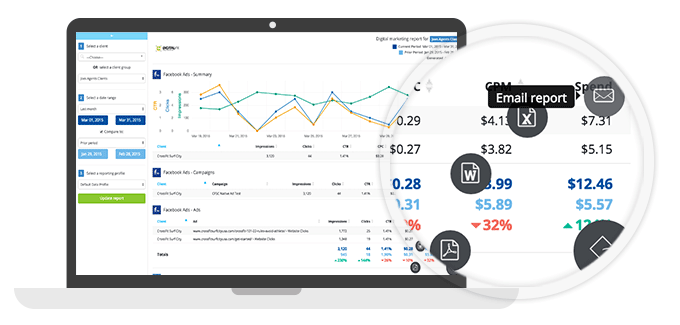
TapClicks is a leading marketing technology company for agencies, media companies, brands, and enterprises. Its integrated Marketing Operations Platform includes workflow and order management, analytics, and automated reporting -- all within a single intuitive user interface available on demand in the cloud. TapClicks has delivered over 1,000,000 dashboards to over 5,000 brands and over 500 media companies and agencies worldwide. The TapClicks platform leverages over 150 native API…
N/A
Pricing
Microsoft Power BI
TapClicks
Editions & Modules
Power BI Pro
$14
per month (billed annually) per user
Power BI Premium
$24
per month (billed annually) per user
No answers on this topic
Offerings
Pricing Offerings
Microsoft Power BI
TapClicks
Free Trial
Yes
Yes
Free/Freemium Version
Yes
No
Premium Consulting/Integration Services
No
Yes
Entry-level Setup Fee
No setup fee
No setup fee
Additional Details
Power BI Desktop is the data exploration and report authoring experience for Power BI, and is available as a free download.
TapClicks offers a subscription on a month-to-month basis. We offer multiple packages catered to your needs. Try us out for free, no credit card required.
Has significantly improved collation of data and visualisation especially with business across Europe. Has given me the ability to see the Site availability at the click of a button to see which Site is in the "money" and seize opportunities based on Market data
A de minimis incentive was given to thank the reviewer for their time. The incentive was not used to bias or drive a particular response, nor was the incentive contingent on a positive endorsement. More Info
For advertising agencies and marketing departments looking to aggregate and consolidate marketing, advertising, and website analytics performance data into one centralized platform, TapClicks is a market-leading solution. TapClicks provides customizable modules, charts, and graphs to make visual sense of your data. TapClicks is designed for organizations that are trying to import reporting data across multiple marketing, advertising, and web analytics platforms. It probably does not makes sense to license TapClicks if you are just getting started with your digital marketing and are only utilizing 1 or 2 third-party platforms that TapClicks has an API connection with, it's probably premature for your organization to invest in TapClicks.
A de minimis incentive was given to thank the reviewer for their time. The incentive was not used to bias or drive a particular response, nor was the incentive contingent on a positive endorsement. More Info
Options for data source connections are immense. Not just which sources, but your options for *how* the data is brought in.
Constant updates (this is both good and bad at times).
User friendliness. I can get the data connections set up and draft some quick visuals, then release to the target audience and let them expand on it how they want to.
A de minimis incentive was given to thank the reviewer for their time. The incentive was not used to bias or drive a particular response, nor was the incentive contingent on a positive endorsement. More Info
Customizable dashboards: these are easy to set-up and manage and tell a powerful story. We appreciate that they can be exported.
Import Wizard: it's very important that we are able to include custom data points in our reports through the Import Wizard. After a short learning curve, we are not importing data on a weekly basis for a comprehensive report that not only shows marketing trends, but the business results too.
Groups and Clusters: The ability to manage client groups and clusters has been vital to how we report out to the client.
A de minimis incentive was given to thank the reviewer for their time. The incentive was not used to bias or drive a particular response, nor was the incentive contingent on a positive endorsement. More Info
A de minimis incentive was given to thank the reviewer for their time. The incentive was not used to bias or drive a particular response, nor was the incentive contingent on a positive endorsement. More Info
The support team sometimes isn't very responsive, and I can go a week without hearing from the TapClicks team on an open issue.
I would love to have the categories feature enhanced so that I could combine several services, and be able to break out reporting by the flights/adgroups/lineitems within those services.
I would love for the custom dashboards that are created to be integrated into reporting so that, for example, I could use the Categories dashboard as the title page of an exported report.
A de minimis incentive was given to thank the reviewer for their time. The incentive was not used to bias or drive a particular response, nor was the incentive contingent on a positive endorsement. More Info
Microsoft Power BI is an excellent and scalable tool. It has a learning curve, but once you get past that, the sky is the limit and you can build from the most simple to the most complex dashboards. I have built everything from simple reports with only a few data points to complex reports with many pages and advanced filtering.
A de minimis incentive was given to thank the reviewer for their time. The incentive was not used to bias or drive a particular response, nor was the incentive contingent on a positive endorsement. More Info
Automating reporting has reduced manual data processing by 50-70%, freeing up analysts for higher-value tasks. A finance team that previously spent 20+ hours per week on Excel-based reports now does it in minutes with Microsoft Power BI's automated Real-time dashboards have shortened decision cycles by 30-40%, enabling leadership to react quickly to sales trends, operational bottlenecks, and customer behavior.
A de minimis incentive was given to thank the reviewer for their time. The incentive was not used to bias or drive a particular response, nor was the incentive contingent on a positive endorsement. More Info
TapClicks provides an array of on-demand training videos coupled with account management support to help your organization get up and running. That being said, TapClicks integrates with hundreds of marketing, advertising, CRM, and website analytics third-party platforms, so depending on how many integrations you want to activate, it can be a steep learning curve. Overall, we like the usability of the product.
A de minimis incentive was given to thank the reviewer for their time. The incentive was not used to bias or drive a particular response, nor was the incentive contingent on a positive endorsement. More Info
It is a fantastic tool, you can do almost everything related with data and reports, it is a perfect substitutive of Power Point and Excel with a high evolution and flexibility, and also it is very friendly and easy to share. I think all companies should have Power BI (or other BI tool) in their software package and if they are in the MS Suite, for sure Power BI should be the one due to all the benefits of the MS ecosystem.
A de minimis incentive was given to thank the reviewer for their time. The incentive was not used to bias or drive a particular response, nor was the incentive contingent on a positive endorsement. TR verified that a representative sample of customers was invited. More Info
Our organization experienced a very thorough onboarding process that helped us get up and running with TapClicks. It's pretty easy to integrate or "connect" with other platforms. We have developed a long-term relationship with our Account Manager at TapClicks and we really value her support. In today's world, most technology companies change your Account Manager seemingly almost every year, but that has not been the case with TapClicks.
A de minimis incentive was given to thank the reviewer for their time. The incentive was not used to bias or drive a particular response, nor was the incentive contingent on a positive endorsement. More Info
A de minimis incentive was given to thank the reviewer for their time. The incentive was not used to bias or drive a particular response, nor was the incentive contingent on a positive endorsement. More Info
Microsoft Power BI is free. If I didn't want to create a custom platform (i.e. my organization insisted on an existing platform that I *had* to use), I'd use Microsoft Power BI. For any start-up or SMB, I'd just use Claude & Grok to build it quickly, also for free. Would not pay for Tableau or Sigma anymore. Not worth it at all.
A de minimis incentive was given to thank the reviewer for their time. The incentive was not used to bias or drive a particular response, nor was the incentive contingent on a positive endorsement. More Info
The companies I interviewed are either limited in the number of APIs built with the data source, especially with DFP. Some of them charge us cloud storage fees. TapClicks came in with enthusiasm and so far they have helped us jump start the building of dashboards for our clients.
A de minimis incentive was given to thank the reviewer for their time. The incentive was not used to bias or drive a particular response, nor was the incentive contingent on a positive endorsement. More Info
A de minimis incentive was given to thank the reviewer for their time. The incentive was not used to bias or drive a particular response, nor was the incentive contingent on a positive endorsement. More Info
A de minimis incentive was given to thank the reviewer for their time. The incentive was not used to bias or drive a particular response, nor was the incentive contingent on a positive endorsement. More Info