TrustRadius: an HG Insights company

Mikogo vs. SolarWinds Network Configuration Manager (NCM)

Save this comparison

Save this comparison

Add Product

Recommended Comparisons

    Overview
    ProductRatingMost Used ByProduct SummaryStarting Price

    Mikogo

    Score1.2 out of 10
    N/AMikogo is a free screen sharing solution with built-in VoIP for online meetings, web presentations, web conferencing and sales demos.

    $156

    Annually

    SolarWinds Network Configuration Manager (NCM)

    Score8.3 out of 10
    N/ASolarWinds Network Configuration Manager is network diagnostics and troubleshooting technology, from Austin-based SolarWinds.N/A
    Pricing
    MikogoSolarWinds Network Configuration Manager (NCM)
    Editions & Modules
    Basic Annual
    $156
    Annually
    Professional Annual
    $228
    Annually
    Professional Lifetime
    $456
    Lifetime License per User
    Team Annual
    $468
    Annually
    Team Lifetime
    $936
    Lifetime License [Unlimited Users]
    No answers on this topic
    Offerings
    Pricing Offerings
    MikogoSolarWinds Network Configuration Manager (NCM)
    Free Trial
    YesYes
    Free/Freemium Version
    YesNo
    Premium Consulting/Integration Services
    NoNo
    Entry-level Setup FeeNo setup feeOptional
    Additional DetailsEnterprise plans are also available for larger organizations, with a custom number of users, meeting participants, and channels. Master Administration and Web API integrations are also available. Contact Mikogo for further information.—
    More Pricing Information
    Community Pulse
    MikogoSolarWinds Network Configuration Manager (NCM)
    Considered Both Products
    BeamYourScreen
    No answer on this topic
    SolarWinds
    No answer on this topic
    Key User Insights
    Would buy again
    No answers on this topic
    92%
    Would buy again
    34 Answers
    Delivers good value for the price
    No answers on this topic
    89%
    Delivers good value for the price
    31 Answers
    Happy with the feature set
    No answers on this topic
    95%
    Happy with the feature set
    35 Answers
    Lived up to sales and marketing promises
    No answers on this topic
    94%
    Lived up to sales and marketing promises
    31 Answers
    Implementation went as expected
    No answers on this topic
    94%
    Implementation went as expected
    32 Answers
    Features
    MikogoSolarWinds Network Configuration Manager (NCM)
    Performance & Compatibility of Online Events Software
    Comparison of Performance & Compatibility of Online Events Software features of Mikogo and SolarWinds Network Configuration Manager (NCM)
    Feature
    Mikogo
    3.1
    4 Ratings
    87% below category average
    SolarWinds Network Configuration Manager (NCM)
    -
    Ratings
    High quality audio4.14 Ratings00 Ratings
    High quality video4.14 Ratings00 Ratings
    Low bandwidth requirements1.14 Ratings00 Ratings
    Mobile support3.22 Ratings00 Ratings
    Screen Sharing
    Comparison of Screen Sharing features of Mikogo and SolarWinds Network Configuration Manager (NCM)
    Feature
    Mikogo
    6.0
    4 Ratings
    28% below category average
    SolarWinds Network Configuration Manager (NCM)
    -
    Ratings
    Desktop sharing2.24 Ratings00 Ratings
    Whiteboards9.82 Ratings00 Ratings
    Online Meetings / Events
    Comparison of Online Meetings / Events features of Mikogo and SolarWinds Network Configuration Manager (NCM)
    Feature
    Mikogo
    3.0
    4 Ratings
    93% below category average
    SolarWinds Network Configuration Manager (NCM)
    -
    Ratings
    Calendar integration1.12 Ratings00 Ratings
    Meeting initiation1.24 Ratings00 Ratings
    Record meetings / events2.14 Ratings00 Ratings
    Slideshows7.63 Ratings00 Ratings
    Online Events Collaboration
    Comparison of Online Events Collaboration features of Mikogo and SolarWinds Network Configuration Manager (NCM)
    Feature
    Mikogo
    2.1
    4 Ratings
    117% below category average
    SolarWinds Network Configuration Manager (NCM)
    -
    Ratings
    Live chat1.24 Ratings00 Ratings
    Audience polling3.13 Ratings00 Ratings
    Q&A2.13 Ratings00 Ratings
    Online Events Security
    Comparison of Online Events Security features of Mikogo and SolarWinds Network Configuration Manager (NCM)
    Feature
    Mikogo
    1.5
    4 Ratings
    137% below category average
    SolarWinds Network Configuration Manager (NCM)
    -
    Ratings
    User authentication1.23 Ratings00 Ratings
    Participant roles & permissions1.13 Ratings00 Ratings
    Confidential attendee list2.13 Ratings00 Ratings
    Best Alternatives
    MikogoSolarWinds Network Configuration Manager (NCM)
    Small Businesses
    ClickMeeting
    Score9.5 out of 10
    No answers on this topic
    Medium-sized Companies
    JioMeet
    Score9.8 out of 10
    No answers on this topic
    Enterprises
    Webex Meetings
    Score8.7 out of 10
    No answers on this topic
    All AlternativesView all alternativesView all alternatives
    User Ratings
    MikogoSolarWinds Network Configuration Manager (NCM)
    Likelihood to Recommend
    1.2
    (4 ratings)
    8.0
    (142 ratings)
    Likelihood to Renew
    -
    (0 ratings)
    8.1
    (6 ratings)
    Usability
    -
    (0 ratings)
    7.0
    (9 ratings)
    Support Rating
    8.0
    (2 ratings)
    7.7
    (9 ratings)
    Online Training
    -
    (0 ratings)
    10.0
    (1 ratings)
    Implementation Rating
    -
    (0 ratings)
    9.1
    (2 ratings)
    User Testimonials
    MikogoSolarWinds Network Configuration Manager (NCM)
    Likelihood to Recommend
    BeamYourScreen
    Pros Mikogo is well-suited and cost-effective for the small business Simple & well-designed; easy to figure out. Works best for one-on-one client support. Cons No live customer support Free version has limited features (e.g. no invite meeting allowed) Trial version only 14 days
    Incentivized
    Read full review
    SolarWinds
    Network Configuration Manager is well suited for backing up configurations of all your devices. It also has a great comparison tool for seeing only the differences in config. Another great feature is it's ability to push a script to any number of devices. This is very handy for pushing changes to one, 10 or multiple devices. There are also some great reports that you can run against the devices in inventory
    Incentivized
    Read full review
    Pros
    BeamYourScreen
    • Inexpensive
    • Simple interface
    • Menus and prompts were clear
    Incentivized
    Read full review
    SolarWinds
    • Integrates with Network Performance Management for Alerting and Reporting.
    • NetPath and detects issues due to Configuration Change.
    • Keeps a record of which user made the change.
    • Which devices are not being backed up, devices where backups are failing, dashboard and alerting available.
    Incentivized
    Read full review
    Cons
    BeamYourScreen
    • I'd like to be able to record a session easier.
    Incentivized
    Read full review
    SolarWinds
    • For our use case, it does everything great and some of the features we underutilize but I would like to be able to set a configuration baseline when initially adding a node instead of after the configuration is pulled but it's not a particularly big deal to let it pull the configuration then set it as the baseline.
    Incentivized
    Read full review
    Likelihood to Renew
    BeamYourScreen
    No answers on this topic
    SolarWinds
    Medium complexity to set up in the beginning if using any non-standard devices or configurations, else fairly easy (e.g. Cisco Nexus or IOS-based devices). Reports are fairly straightforward to set up. Updates to the platform are fairly straightforward and don't take a major effort. Easy to add or remove devices.
    Incentivized
    Read full review
    Usability
    BeamYourScreen
    No answers on this topic
    SolarWinds
    The user interface is lacking. It is difficult to navigate at times and things can be done multiple ways. Quite often I am confused by how their notification structure works. It is not very intuitive. They do offer a free Academy. They also offer a community of other technical folks. I have enjoyed both.
    Incentivized
    Read full review
    Support Rating
    BeamYourScreen
    I do not have any experience with Mikogo's support as I have never experienced any problem with it.
    Incentivized
    Read full review
    SolarWinds
    To be fair, I have not had to involve Support in a number of years, but when I did, I was greeted with enthusiastic engineers who wanted to understand and solve the issue. It was a fairly complex scenario and I have discovered in my most recent implementation that engineering included that option as a standard now.
    Incentivized
    Read full review
    Online Training
    BeamYourScreen
    No answers on this topic
    SolarWinds
    Solarwinds has actually produced new training since I last used it that is available on their site at any time. Their previous training was more than enough to get us started but now there is significantly more content. Since I'm comfortable with the Orion platform and the products we use I haven't checked the new training out yet but we have new staff go through portions of that training and they always come away with an understanding of the platform and ready to use it
    Incentivized
    Read full review
    Implementation Rating
    BeamYourScreen
    No answers on this topic
    SolarWinds
    it was a fairly easy implementation and everything was pretty straightforward. only challenge we had was getting all the snmp communities updated on the networking equipment
    Incentivized
    Read full review
    Alternatives Considered
    BeamYourScreen
    Mikogo has simple features and is easy to use. If you don't need lots of bells and whistles and just want to screen share or video conference on a small scale Mikogo works best. Join.me & TeamViewer are a bit confusing for the novice small business person. My experience with LogMeIn has been that it's sluggish. GoToMeeting works great but is pricey for the small firm that mainly does one-to-one support/training. I couldn't get Zoom to work right.
    Incentivized
    Read full review
    SolarWinds
    At the time SolarWinds was the biggest player in the space and their whole portfolio was very comprehensive. As time progressed and newer technologies came about (i.e. SDWAN) their products couldn't keep up with the consumer demands and changing market. Security became such a big focus that once Solarwinds got hacked we had to remove all their products from our environment
    Incentivized
    Read full review
    Return on Investment
    BeamYourScreen
    • Zero positive impact
    • Spend just a little more with products like AnyDesk and get some real ROI
    • Short term, the product can be used on a trial basis (or at least it was available as a trial)
    Incentivized
    Read full review
    SolarWinds
    • Saves 100s of hours a year in man hours over manual configuration.
    • Saved easily 50k in lost revenue when a switch rebooted with months old unsaved configuration. NCM let us quickly restore a snapshot of the running config from the previous day.
    • Saves us several man hours per week of config auditing by reducing all changes to a summary email.
    Incentivized
    Read full review
    ScreenShots

    Mikogo Screenshots

    Screenshot of Screen sharing between two windows desktop computersScreenshot of Phone conference and participant list options

    SolarWinds Network Configuration Manager (NCM) Screenshots
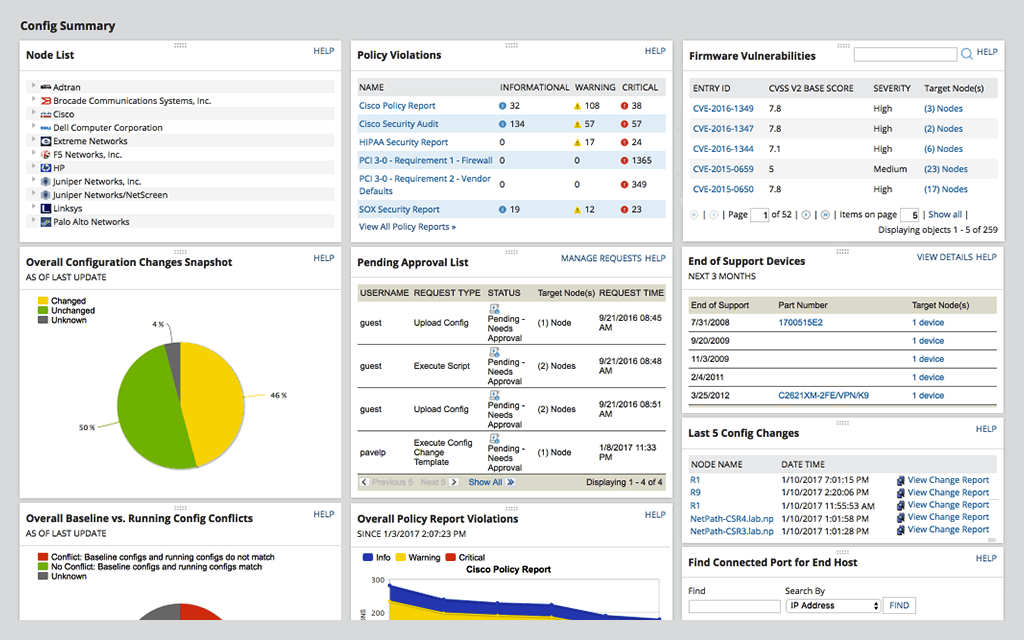
    Screenshot of Network Automation -  manage rapid change across complex and multi-vendor networks, reduce time needed to complete repetitive tasks, and maintain standards and service levels for uninterrupted ITScreenshot of Config Backup - rest easy knowing you can locate the most current configuration and quickly apply it to a replacement spare, or to roll back a blown configuration.Screenshot of Vulnerability Scanning - Take the hassle out of vulnerability scanning using NCM's integration with the National Vulnerability Database and access to the most current CVE’s to identify vulnerabilities in your Cisco devices.Screenshot of Inventory Management - Be able to know what devices are connected to your network, their hardware and software configurations, and when they approach end-of-service and end-of-life, with NCM device configuration management tool.Screenshot of User Management - Use NCM's integrated console to lock down devices from unauthorized access, delegate who can view device details and make configuration changes, and determine when network changes can occur.Screenshot of Baselines and Diffs - IT professionals can get a more comprehensive view by leveraging baselines across multiple nodes. Diff view in NCM’s network configuration management tool is designed to highlight only those lines that changed.
