MVP One vs. UpKeep Maintenance Management

Overview
ProductRatingMost Used ByProduct SummaryStarting Price
MVP One
Score 0.0 out of 10
N/A
MVP One is a computerized maintenance management system (CMMS software), also known as a facilities asset management system (FAMS). Maintenance and facilities managers use the information in a CMMS / FAMS to increase reliability and save time and money.
$45
per month per user
UpKeep Maintenance Management
Score 7.0 out of 10
Small Businesses (1-50 employees)
UpKeep allows users to snap a picture of a broken piece of equipment, create a work order, and schedule it for repair - all from a mobile device. UpKeep is designed for facility, property, restaurant, and manufacturing managers looking to improve communication by enabling real-time status updates for their teams. The vendor says it is a modern, intuitive, and customizable CMMS that is proven to expedite workflow processes. Capabilities include: -Add co-workers and easily assign work…
$40
per technician/per month
Pricing
MVP OneUpKeep Maintenance Management
Editions & Modules
Bronze
$45
per month per user
Silver
$75
per month per user
Gold
$125
per month per user
Starter
$40
per technician/per month
Professional
$75
per technician/per month
Business Plus
$120
per technician/per month
Enterprise
$180
per technician/per month
Offerings
Pricing Offerings
MVP OneUpKeep Maintenance Management
Free Trial
YesYes
Free/Freemium Version
NoYes
Premium Consulting/Integration Services
YesYes
Entry-level Setup FeeRequiredOptional
Additional Details
More Pricing Information
Community Pulse
MVP OneUpKeep Maintenance Management
User Ratings
MVP OneUpKeep Maintenance Management
Likelihood to Recommend
-
(0 ratings)
9.0
(25 ratings)
Likelihood to Renew
-
(0 ratings)
9.1
(1 ratings)
Usability
-
(0 ratings)
8.2
(6 ratings)
Support Rating
-
(0 ratings)
8.8
(23 ratings)
Implementation Rating
-
(0 ratings)
9.1
(1 ratings)
User Testimonials
MVP OneUpKeep Maintenance Management
Likelihood to Recommend
CMMS Data Group
No answers on this topic
UpKeep Maintenance Management
For companies that have larger facilities or multiple properties - this software is superb. You can track every maintenance plan - daily/weekly/monthly/annually - so nothing ever goes undone. I'm talking daily cleaning to refreshing the paint in the parking lot each year - you can easily schedule all of this maintenance within the app. Asset tracking - everything from machinery to tools to doors - you can tag and track all. Break/fix over time is huge - you can use the reporting function to see how many times something has broken over time - so now you can assess if it's more cost effective to replace rather than repair.
Read full review
Pros
CMMS Data Group
No answers on this topic
UpKeep Maintenance Management
  • Tracking service issues - There's really no more excuses for not knowing when the machine was last serviced. Upkeep allows us to track that.
  • Scheduling - Knowing in advance which machines will need maintenance in the future allows us to actively prepare for shut-down periods.
  • General knowledge - Users can add their knowledge to the archives of each machine we have, helping to improve the trouble-shooting process.
  • Easy to update, easy to make - It's almost too easy to create and update files for locations, assets, parts, and issues.
Read full review
Cons
CMMS Data Group
No answers on this topic
UpKeep Maintenance Management
  • Periodic maintenance needs are still a little tricky keeping in the system without flooding the user with too many work orders.
  • It does not immediately update all the time. For example, closing out work orders and the number of total work orders stays the same until it’s rebooted.
  • Search functions need improving.
Read full review
Likelihood to Renew
CMMS Data Group
No answers on this topic
UpKeep Maintenance Management
We love how organized it has made our processes.
Read full review
Usability
CMMS Data Group
No answers on this topic
UpKeep Maintenance Management
I think the platform is user-friendly but there have been some issues that colleagues have been complaining about. For example, the program tends to run slow from time to time. Reporting could be better. We could use more fields for categories under parts and assets.
Read full review
Support Rating
CMMS Data Group
No answers on this topic
UpKeep Maintenance Management
I cannot say enough great things about their customer service. From the start of the purchase, Upkeep was extremely helpful and informative. They have been ongoingly keeping us informed and available to answer any of our questions as they arise. They ongoing learning portal is also helpful when new features and changes happen with the interface.
Read full review
Implementation Rating
CMMS Data Group
No answers on this topic
UpKeep Maintenance Management
Everything went as planned.
Read full review
Alternatives Considered
CMMS Data Group
No answers on this topic
UpKeep Maintenance Management
Previously had MEX, though had not implemented it throughout the business. It was way too difficult for the techs to use on the fly and was just a nightmare to implement. UpKeep, on the other hand, is a walk in the park.
Read full review
Return on Investment
CMMS Data Group
No answers on this topic
UpKeep Maintenance Management
  • Compared to other task managers, the user cost for Upkeep is very high. But to the degree the staff are willing to work with you, it is completely justified.
  • The concern with an organization my size are items slipping through the cracks whether that is internally or by our renter base. Upkeep minimizes this to a great degree.
  • You need to get everyone within your organization to buy into upkeep. It can only be as good to the degree that it is utilized.
Read full review
ScreenShots

MVP One Screenshots

Screenshot of DashboardScreenshot of Work Orders and Available ActionsScreenshot of Financial Information on Assets/EquipmentScreenshot of Mobile CMMS for Android, iOSScreenshot of CMMS on a Tablet

UpKeep Maintenance Management Screenshots
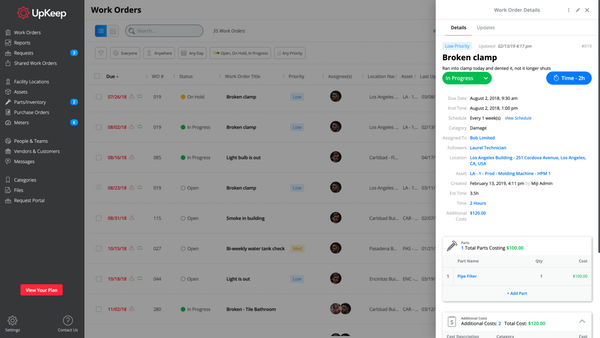
Screenshot of Product Suite