Prometheus is a service monitoring and time series database, which is open source.
N/A
Pulseway
Score 7.0 out of 10
Mid-Size Companies (51-1,000 employees)
Pulseway is an IT monitoring and management solution that enables users to monitor, manage and control all systems and servers from a smartphone, tablet or browser. For system administrators, Pulseway sends a notification, so they can see an issue and sort it in seconds. Pulseway features: Automation: Auto-remediation workflows, so that IT issues are fixed before users even notice them. Mobile Access: Customers can monitor, manage, connect with…
$0.80
per month per installation
Pricing
Observium
Prometheus
Pulseway
Editions & Modules
No answers on this topic
No answers on this topic
Enterprise
$0.80
per month per installation
Offerings
Pricing Offerings
Observium
Prometheus
Pulseway
Free Trial
No
No
Yes
Free/Freemium Version
No
No
Yes
Premium Consulting/Integration Services
No
No
Yes
Entry-level Setup Fee
No setup fee
No setup fee
No setup fee
Additional Details
—
—
No hidden fees or contracts. Term-based discounts.
This program works from the roots of the problem and creates a professional matrix for each of its users. This will give them more skills and resources to carry out tasks and reduce the difficulties of operating each of the processes of my work, as well as being An ally for the manipulation and operability of all your master data; Prometheus is very easy to recommend since it is a program that fulfills its mission.
If you have to manage a large number of computers, especially spread over multiple clients or a large physical area. This is one of the main products that allows us to act as a Managed Service Provider (MSP) and actually manage our clients devices and not just react to issues as clients call them in. Clients really love the proactive approach it allows us to take. Sadly as we became more familiar with options out there we found this area lacking and what was actually holding us back.
It monitors computers and notifies us of any issues with any computer.
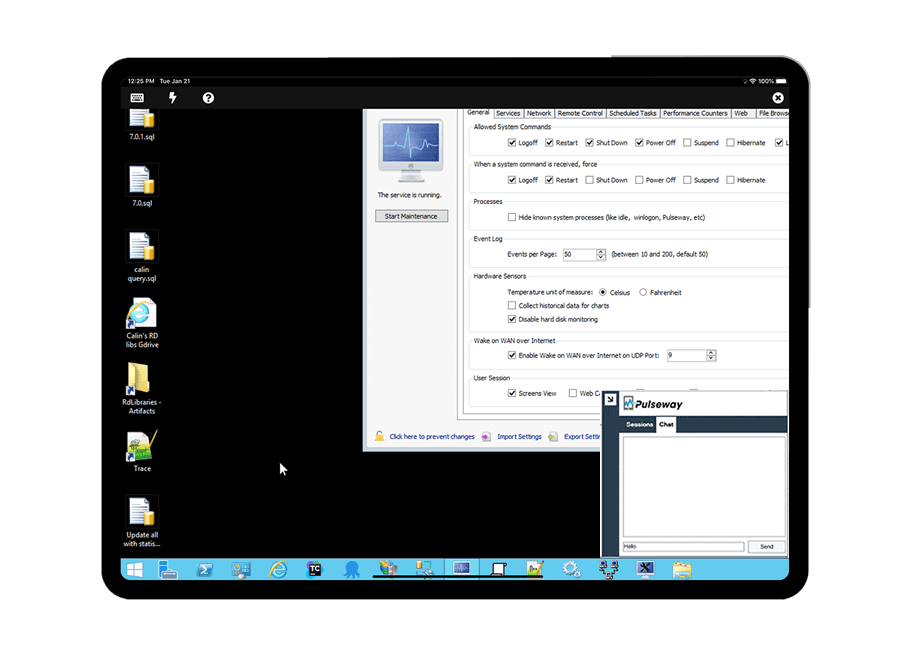
It allows remote control of computers, such as requesting a computer to reboot itself.
It is very highly configurable to monitor exactly what we need to monitor. For example, on server, we can have it notify us any time the server is shutdown or rebooted. On the other hand, for a desktop computer, we don't have to be bothered with notifications when a user decides to reboot his computer.
Customer Service: since this is an open-source tool, customer service is not that great. Generally, you get all answers to your problems in online forums, but in case you got stuck, nobody will assist you in a channelised manner. You will have to find the way out on your own, and it may become frustrating at times.
More metrics for dashboards shall be added per the application being monitored. Standards metrics will work in most cases but may not in specific applications. Therefore, customised metrics shall be created for some of the industry-standard niche applications.
It is usable and one can learn if few people in the team are already using it. It can be difficult to understand at the beginning because of non intuitive UI and syntax of the rules. So, I've gone for 7 points as there is some room for improvement in user interface and rules syntax.
The tool is easy to use however it is can be daunting with the amount of features available in it. Last I checked, their knowledge base was not very expansive and they relied a lot on the changelog for how to do some stuff. This can make it hard to learn how to do some more advanced things like the automation.
I have never had to use the support for Pulseway. However, when initially starting out, we would receive emails every so often asking how we are doing and if there is any support that they can provide. I would imagine that any request would be supplied with the same great support!
I haven't used other products that are similar to Observium. Observium is an open tool, with a robust feature set. There are elements of comparable monitoring across other tools, but nothing I've seen that is a complete parallel in terms of feature set and visualizations. If I were asked, I wouldn't have another tool to recommend over Observium.
Highly customized pricing plans to choose from. Lower pricing for the same features compared to competitors. Easy to reach the support team, which provided detailed documentation and helped set up the Prometheus. Monitoring metrics gets very easy after the integration with Grafana. It also has a sophisticated alert setting mechanism to ensure we don't miss anything critical.
Pulseway has the most features, the best looking app with the best design and better usability than any others we evaluated. We liked the uniformity of the app design across all platforms (Windows, Android, Apple) and the notifications displayed on each platform. The price was a major contributor to our selection of Pulseway compared to the competition.
The ROI mentioned during the purchase has not been achieved, however this could be due to lack of data from our side. 2 years of implementation is too early to calculate and confirm the ROI.
Problems can be dealt with more rapidly because I have access to systems from anywhere. I don't have to carry a computer with me nor do I have to find a location with potentially non-secure wifi to gain access to my systems.
I can handle 99% of my system admin tasks using Pulseway and never have to touch a system or connect to the console.
Pulseway gives so much control over a system that I don't need to spend extra money on other software to perform management tasks.