Planview PPM Pro is a cloud-based project portfolio
management product that gives PMO leaders, project managers, and resource
managers a centralized system to manage project portfolios, resources, work
intake, financials, and reporting in one place.
Portfolio and Project Management
Organizations
manage their full project inventory, including proposals, active projects,
programs, and portfolios, within a single structured system
…
N/A
ZilicusPM
Score7 out of 10
Mid-Size Companies (51-1,000 employees)
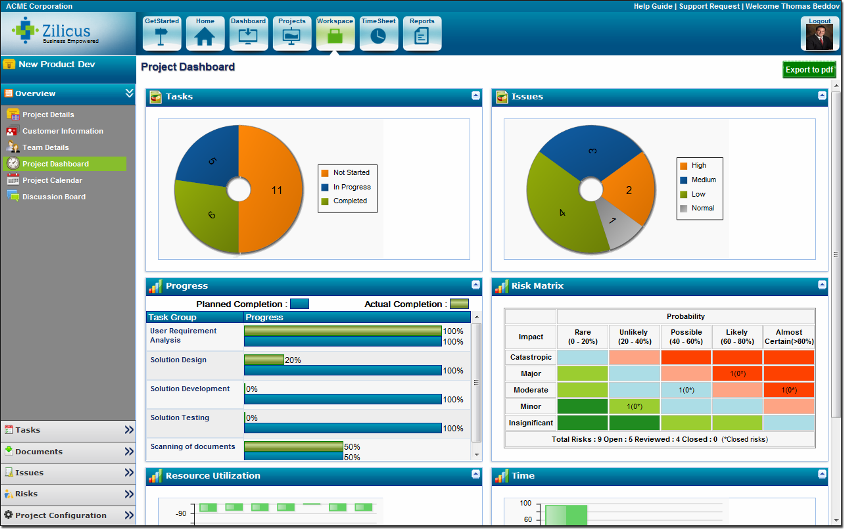
Zilicus is an enterprise-level project management solution with capabilities such as meeting management, risk management, and collaboration.
$15
per user
Pricing
Planview PPM Pro
ZilicusPM
Editions & Modules
No answers on this topic
Yearly Subscription
$15
per user
Monthly Subscription
$20
per user
Offerings
Pricing Offerings
Planview PPM Pro
ZilicusPM
Free Trial
No
Yes
Free/Freemium Version
No
No
Premium Consulting/Integration Services
Yes
Yes
Entry-level Setup Fee
Optional
No setup fee
Additional Details
PPM Pro offers flexible pricing based on user types.
The pricing per subscription reduces as number of subscriptions increases; it is also dependent on the duration of subscription.
PPMPro is well suited for tracking new product introduction projects, as well as process changes. It serves to reliably track ongoing action items, issues, resource allocations for projects. Areas where PPMPro is less appropriate for use: Project to project dependencies, automating action item notifications on multiple platforms, integrations of PPMPro into other platforms PMO typically uses (like MS Projects, Teams, ppt, etc)
ZilicusPM is suited for any business that has difficulty managing and keeping track of office related work as well as project management. Its an efficient way to manage just about anything necessary. It is well-suited for our office, as structural/civil engineers - we are able to keep track of our projects as well as office/human resources related work.
A de minimis incentive was given to thank the reviewer for their time. The incentive was not used to bias or drive a particular response, nor was the incentive contingent on a positive endorsement. More Info
New request workflow/kanban board helps visualize where new requests are in the process of the quote to cash/request to completion
The time tracking tool is tied directly to project tasks for seamless integration of time tracking, estimates, and actuals
The reporting capabilities and ease of use has allowed us visibility to data that we never had before
The tool is easily configurable by Administrators. We can add fields, change reports, add new dashboards within hours vs. days of trying to track things manually
A de minimis incentive was given to thank the reviewer for their time. The incentive was not used to bias or drive a particular response, nor was the incentive contingent on a positive endorsement. More Info
ZilicusPM is great for an office regarding meetings and site visits. It's hard to keep track manually of where everyone is at. By sharing our calendars through ZilicusPM, we are able to access where someone is within a few seconds!! It is very convenient and less of a hassle.
This a great tool to use to manage all documents that enter in and out of our office for certain projects. It is hard to keep track of everything through our office, so this programs helps us manage things very efficiently.
This is great for prioritizing! I know many people in our office have an issue to do so. With the Project Issue Management feature, we are able to do this more effectively without causing any stress to our employees!
A de minimis incentive was given to thank the reviewer for their time. The incentive was not used to bias or drive a particular response, nor was the incentive contingent on a positive endorsement. More Info
The base API is not a REST based interface and is difficult to use for integration with other systems in the enterprise.
The UI for the maintenance of the task schedule for projects can be a bit cumbersome , although the spreadsheet style editor helps somewhat. The Gantt view is not interactive.
The workflow engine is designed only for initial project intake, and does not allow for an integration of the work flow with the project from start to end, so it can't be used for routing artifacts like change requests, ancillary project approvals, etc.
A de minimis incentive was given to thank the reviewer for their time. The incentive was not used to bias or drive a particular response, nor was the incentive contingent on a positive endorsement. More Info
The only thing I would suggest that needs room for improvement is that you should break down Zilicus PM into different sectors. What I mean by this is that you branch off this program into different areas of expertise like accounting, engineering, etc. Every business is managed differently, so other options should be provided to accommodate each field.
Other than that, I am very pleased with this program. It was WELL worth the investment. Saving a lot of time and money spent per worker by using this!
A de minimis incentive was given to thank the reviewer for their time. The incentive was not used to bias or drive a particular response, nor was the incentive contingent on a positive endorsement. More Info
Because I never evaluated other tools, I would be open to considering others. Given our establishment with Innotas and the value it has provided us, separating from it would cause some organizational discomfort. However, if a tool existed with a more intuitive interface for manipulating the data and factors of projects and resources, I would be very interested.
A de minimis incentive was given to thank the reviewer for their time. The incentive was not used to bias or drive a particular response, nor was the incentive contingent on a positive endorsement. More Info
PPM Pro has very effective process capabilities around Project, Demand, and Resource Management as well as Reporting/Dashboards. Very stable platform, never any downtime. We now also have PPM Pro Sandbox which we have leveraged for any new major developments such as Request Management.
A de minimis incentive was given to thank the reviewer for their time. The incentive was not used to bias or drive a particular response, nor was the incentive contingent on a positive endorsement. More Info
No issues with overall response time and performance. There have been some occasions where a Report could take few minutes to render but this is vary rare. No integration issues...
A de minimis incentive was given to thank the reviewer for their time. The incentive was not used to bias or drive a particular response, nor was the incentive contingent on a positive endorsement. More Info
Their ability to assist and answer questions when needed is incredible. They create innovative ways to share information and help customers trouble shoot. I didn't give it a ten because I believe they could do a better job of personally reaching out to customers and providing improvement guidance based on where the customer is at and their needs at the time
A de minimis incentive was given to thank the reviewer for their time. The incentive was not used to bias or drive a particular response, nor was the incentive contingent on a positive endorsement. More Info
Microsoft Project does not integrate the data or provide meaningful dashboards. We needed a tool that could manage a portfolio of projects versus just a single project view. In addition we needed a tool to track financials and internal effort all integrated into one product. Planview PPM Pro addressed all of our needs
We have used Microsoft Project for years. We loved it until we found ZilicusPM. ZilicusPM is more efficient and directive in our field. Microsoft Project does not provide as many features as ZilicusPM does. I am extremely grateful for having found ZilicusPM. It was recommended to us by an architectural firm that swore by this software.
A de minimis incentive was given to thank the reviewer for their time. The incentive was not used to bias or drive a particular response, nor was the incentive contingent on a positive endorsement. More Info
A de minimis incentive was given to thank the reviewer for their time. The incentive was not used to bias or drive a particular response, nor was the incentive contingent on a positive endorsement. More Info
We have always used PPM Pro across multiple Business Units and Business Functions and have never encountered any scalability issues. PPM Pro offers flexibility in how the various Entities are configured across the Enterprise
A de minimis incentive was given to thank the reviewer for their time. The incentive was not used to bias or drive a particular response, nor was the incentive contingent on a positive endorsement. More Info
Very effective and flexible - we obtained a pool of consulting hours that we can use at any time over 12 month period. Consulting topics can vary as we explore new functionalities in PPM Pro. Very easy to schedule ad-hoc time with PPM Pro consultant
A de minimis incentive was given to thank the reviewer for their time. The incentive was not used to bias or drive a particular response, nor was the incentive contingent on a positive endorsement. More Info
A de minimis incentive was given to thank the reviewer for their time. The incentive was not used to bias or drive a particular response, nor was the incentive contingent on a positive endorsement. More Info
A positive impact that ZilicusPM has made is we are able to work more efficiently and prioritize what needs to be sent out, what invoices need to be sent out to clients, where are project engineers at certain time of day, etc.
We also have a higher ROI. I am able to manage what invoices need to be sent out without having to track people down for a summary of the work , which is extremely time consuming. I am able to get more invoices out while returning a higher investment for the company.
A negative impact it has made is we had to hire someone to manage this software entirely. It is very time-consuming for myself to manage and make sure everything is entered in correctly. We hired someone who is familiar with ZilicusPM and is able to certify all work.
A de minimis incentive was given to thank the reviewer for their time. The incentive was not used to bias or drive a particular response, nor was the incentive contingent on a positive endorsement. More Info