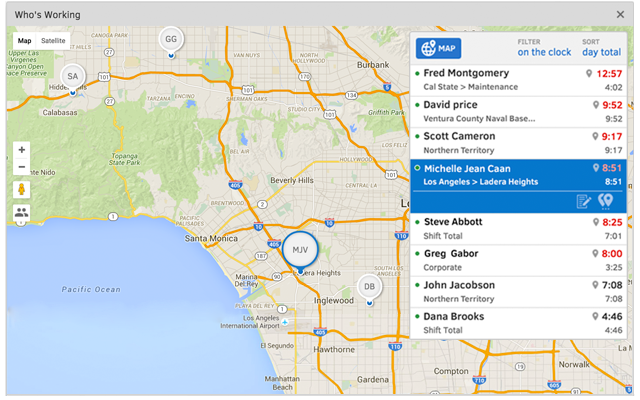
QuickBooks Time (formerly TSheets) is a cloud-based time tracking and scheduling app that allows employees to clock in and out from the job site with the devices they’ve already got in their pockets. The vendor aims to help companies replace paper timesheets with accurate, electronic time data as well as make payroll and invoicing faster and less costly. QuickBooks Time also accurately tracks time and GPS points (even without cell or internet service) then automatically syncs when back…
$0
1 user, unlimited projects
Sage 300
Score6.8 out of 10
N/A
Sage 300 (formerly Sage 300 ERP) is a business management solution that includes strong accounting and financials, as well as multi-currency and multi-language capabilities. Built on accounting best practices, users will be able to track, control, and plan the financial health of their business.
$1,655
Lifetime License per Seat
Pricing
QuickBooks Time
Sage 300
Editions & Modules
Free
$0
1 user, unlimited projects
Premium
$8
per user/month + $20 base fee/month (paid annually)
Elite
$10
per user/month + $40 base fee/month (paid annually)
Sage 300 ERP Standard
$1,655
Lifetime License per Seat
Sage 300 ERP Advanced
$1,665
Lifetime License per Seat
Sage 300 ERP Premium
$1,665
Lifetime License (unlimited seats)
Offerings
Pricing Offerings
QuickBooks Time
Sage 300
Free Trial
Yes
No
Free/Freemium Version
Yes
No
Premium Consulting/Integration Services
No
Yes
Entry-level Setup Fee
No setup fee
No setup fee
Additional Details
—
Our pricing is by module and by license and can range depending on what the customers requirements are. Most of our financial and operational modules are $1655.00 each, plus user license, plus an annual business care of 24%.
It would be very useful for certain remote jobs that require a high level of presence, as in the case of web development, or remote maintenance sessions, so that when reviewing the work data it is possible to ensure that there will be no failures. By being able to include files in the management, from the equipment tab, it is possible to fully control the hours in which each change in these files were made.
A de minimis incentive was given to thank the reviewer for their time. The incentive was not used to bias or drive a particular response, nor was the incentive contingent on a positive endorsement. More Info
Sage 300cloud is a great option when it comes to cloud accounting/tracking software. In comparison to Sage's other products, Sage 300cloud is the only cloud/web based option with modern UI's and more intuitive interfaces. Additionally, Sage 300cloud offers an entire system of customer integrations that become available dependent on subscription level. Sage 300cloud also offers integrations between other Sage products (AP, CRM, etc) that allows for better automation and efficiency
A de minimis incentive was given to thank the reviewer for their time. The incentive was not used to bias or drive a particular response, nor was the incentive contingent on a positive endorsement. More Info
Support (their help desk team is incredibly helpful and always quick to respond).
Ease of access and use (the app is user-friendly an intuitive, and the desktop version is equally as approachable).
Manager functionality (it's useful to be able to clock employees in and out at multiple events on the same day by sorting them into different groups by manager/event).
A de minimis incentive was given to thank the reviewer for their time. The incentive was not used to bias or drive a particular response, nor was the incentive contingent on a positive endorsement. More Info
The desktop version of the TSheets schedule does not have a search feature. This makes it challenging to find things you are looking for without extra work
The app can be a bit buggy. Though it is a great app, there are many reasons that the app will stop syncing and can cause problems with staff scheduling
A de minimis incentive was given to thank the reviewer for their time. The incentive was not used to bias or drive a particular response, nor was the incentive contingent on a positive endorsement. More Info
A de minimis incentive was given to thank the reviewer for their time. The incentive was not used to bias or drive a particular response, nor was the incentive contingent on a positive endorsement. More Info
TSheets tech support people, like Shawn Sommer, from Tsheets. She has been instrumental, after terminating the person in charge of TSheets I was left with a learning curve too high to climb but after 10 mins of her instructions I was able to make payroll in no time. She cleared all errors that nobody had fixed before. TSheets is not a vendor for me, TSheets is my partner in business. Thank you TSheets.
It is a solid stable product with a large user community and large ISV community. Support and Training are easy to access and obtain and there is larger reseller channel to ensure the firm you work with is honest. It is scalable and there are multiple deployment and payment options.
Our employees find TSheets easy to use and spend minimal time at reporting hours using it. As an administrator and user of the TSheets "data and information" I am extremely positive on the functionality and reporting that it has provided me. From its ease of set-up to training to reporting, TSheets has made us so much more efficient from an administration standpoint
A de minimis incentive was given to thank the reviewer for their time. The incentive was not used to bias or drive a particular response, nor was the incentive contingent on a positive endorsement. More Info
Sage 300cloud is intuitive and user friendly after some training. It does require implementation and training but once that's done, this software is easy to use and navigate. Support for Sage 300cloud is spot on and offers assistance over the simplest to [the] most complex of tasks. Finding information or learning new tasks within Sage 300cloud is relatively easy and educational.
A de minimis incentive was given to thank the reviewer for their time. The incentive was not used to bias or drive a particular response, nor was the incentive contingent on a positive endorsement. More Info
I have never failed to have an issue resolved within minutes of contacting Support. Jen D recently assisted my with an export issue and I was back on track in less the 10 minutes. She was knowledgable and thought about the current and future contexts of the issue and assured there would be no recurrence next payroll.
Turnover is high in the Sage Support department so sometimes it is difficult to get a rep who knows the issue well. Reps are good and getting assistance when they need it. Sometimes support is more interested in closing issue than actually solving problem. It can be difficult at times to have issues escalated but overall the support is good.
A de minimis incentive was given to thank the reviewer for their time. The incentive was not used to bias or drive a particular response, nor was the incentive contingent on a positive endorsement. More Info
Besides Intuit Payroll (Sage), the only program I've used is WorkBrain through Menards, and it's more as a scheduling guideline for management, employees don't use it to punch in or out or record hours. However, WorkBrain does show scheduling and it matches with a punch clock to record those hours. Every other place I've used has used either punch clocks or handwritten time cards. I think the TSheets is modern, user-friendly, convenient, accessible, and cost-effective for the owners. It also streamlines payroll for the Accountant instead of manually entering all hours for multiple employees by hand into a software program like Sage.
A de minimis incentive was given to thank the reviewer for their time. The incentive was not used to bias or drive a particular response, nor was the incentive contingent on a positive endorsement. More Info
Sage 300 cloud is much more detailed than the other. About the same in being user friendly A better layout Saves time for doing the schedules for Audits Mobile Access Sage 300cloud can manage all different industries
A de minimis incentive was given to thank the reviewer for their time. The incentive was not used to bias or drive a particular response, nor was the incentive contingent on a positive endorsement. More Info
A de minimis incentive was given to thank the reviewer for their time. The incentive was not used to bias or drive a particular response, nor was the incentive contingent on a positive endorsement. More Info
A de minimis incentive was given to thank the reviewer for their time. The incentive was not used to bias or drive a particular response, nor was the incentive contingent on a positive endorsement. More Info