
QuickBooks Time vs. TMetric
| Product | Rating | Most Used By | Product Summary | Starting Price |
|---|---|---|---|---|
 QuickBooks Time | Score8.8 out of 10 | N/A | QuickBooks Time (formerly TSheets) is a cloud-based time tracking and scheduling app that allows employees to clock in and out from the job site with the devices they’ve already got in their pockets. The vendor aims to help companies replace paper timesheets with accurate, electronic time data as well as make payroll and invoicing faster and less costly. QuickBooks Time also accurately tracks time and GPS points (even without cell or internet service) then automatically syncs when back… | $0 1 user, unlimited projects |
 TMetric | Score10 out of 10 | Small Businesses (1-50 employees) | TMetric is a cloud-based SaaS (Software as a Service) Time Tracking platform designed to capture employee work hours and align service delivery directly with budgeting, financial invoicing, and client billing. Key Capabilities Automated Time Tracking: Captures labor hours across tasks and projects in real time. The platform provides desktop clients, browser extensions, and mobile applications for iOS (iPhone Operating System) and Android (a mobile operating system… | $7 per month per seat |
| QuickBooks Time | TMetric | |||||||||||||||
|---|---|---|---|---|---|---|---|---|---|---|---|---|---|---|---|---|
| Editions & Modules |
|
| ||||||||||||||
| Offerings |
| |||||||||||||||
| Entry-level Setup Fee | No setup fee | No setup fee | ||||||||||||||
| Additional Details | — | Discount of up to 20% for annual billing. | ||||||||||||||
| More Pricing Information | ||||||||||||||||
| QuickBooks Time | TMetric | |
|---|---|---|
| Considered Both Products | No answer on this topic | No answer on this topic |
| Key User Insights | ||
| Would buy again | ||
75% Would buy again 15 Answers | No answers on this topic | |
| Delivers good value for the price | ||
83% Delivers good value for the price 15 Answers | No answers on this topic | |
| Happy with the feature set | ||
80% Happy with the feature set 16 Answers | No answers on this topic | |
| Lived up to sales and marketing promises | ||
69% Lived up to sales and marketing promises 9 Answers | No answers on this topic | |
| Implementation went as expected | ||
69% Implementation went as expected 11 Answers | No answers on this topic | |
| QuickBooks Time | TMetric | |
|---|---|---|
| Small Businesses |  Time Doctor Score8 out of 10 | Time Doctor Score8 out of 10 |
| Medium-sized Companies |  Toggl Track Score9 out of 10 | Toggl Track Score9 out of 10 |
| Enterprises |  TimeCamp Score7.3 out of 10 | TimeCamp Score7.3 out of 10 |
| All Alternatives | View all alternatives | View all alternatives |
| QuickBooks Time | TMetric | |
|---|---|---|
| Likelihood to Recommend | 8.6 | 9.9 |
| Likelihood to Renew | 10.0 | - |
| Usability | 9.5 | 10.0 |
| Support Rating | 2.1 | 8.3 |
| Implementation Rating | 6.0 | - |
| QuickBooks Time | TMetric | |
|---|---|---|
| Likelihood to Recommend |
|
|
| Pros |
|
|
| Cons |
|
|
| Likelihood to Renew |
| No answers on this topic |
| Usability |
|
|
| Support Rating |
|
|
| Implementation Rating |
| No answers on this topic |
| Alternatives Considered |
|
|
| Return on Investment |
|
|
| ScreenShots | QuickBooks Time Screenshots  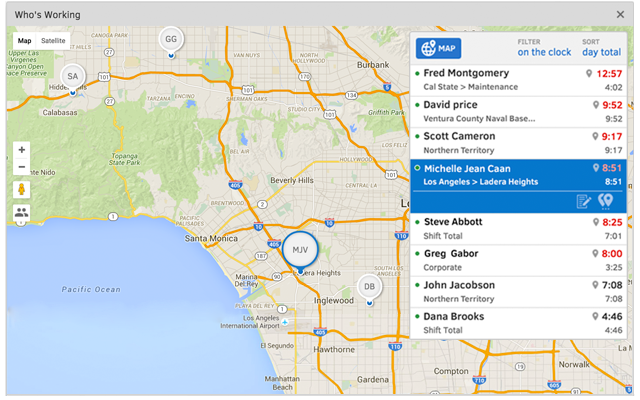    | TMetric Screenshots     |





