Solutions2Share Teams Manager vs. vRealize Orchestrator (discontined)

Overview
ProductRatingMost Used ByProduct SummaryStarting Price
Teams Manager
Score 8.0 out of 10
N/A
IT administrators can keep control of their Microsoft 365 environment with Teams Manager. Teams Manager is used to prevent the uncontrolled creation of Teams and Groups and automate governance processes. Key Features: • Governance Dashboard and Reports – provides an overview of the M365 environment (inactive or ownerless teams, teams with guests etc.) • Provisioning of new teams & SharePoint sites – with channels,…N/A
vRealize Orchestrator (discontined)
Score 5.0 out of 10
N/A
vRealize Orchestrator was a workflow automation platform used to simplify and automate complex data center infrastructure tasks for increased extensibility and agility.N/A
Pricing
Solutions2Share Teams ManagervRealize Orchestrator (discontined)
Editions & Modules
No answers on this topic
Offerings
Pricing Offerings
Teams ManagervRealize Orchestrator (discontined)
Free Trial
YesNo
Free/Freemium Version
NoNo
Premium Consulting/Integration Services
YesNo
Entry-level Setup FeeOptionalNo setup fee
Additional Details
More Pricing Information
Community Pulse
Solutions2Share Teams ManagervRealize Orchestrator (discontined)
Best Alternatives
Solutions2Share Teams ManagervRealize Orchestrator (discontined)
Small Businesses

No answers on this topic

Stackby
Stackby
Score 8.9 out of 10
Medium-sized Companies

No answers on this topic

CMW Platform
CMW Platform
Score 9.3 out of 10
Enterprises
SailPoint Identity Security Cloud
Score 7.4 out of 10
CMW Platform
CMW Platform
Score 9.3 out of 10
All AlternativesView all alternativesView all alternatives
User Ratings
Solutions2Share Teams ManagervRealize Orchestrator (discontined)
Likelihood to Recommend
8.0
(10 ratings)
9.0
(1 ratings)
Usability
8.0
(1 ratings)
-
(0 ratings)
User Testimonials
Solutions2Share Teams ManagervRealize Orchestrator (discontined)
Likelihood to Recommend
Solutions2Share
It's well suited if you or your organization performs tasks incorporating other Microsoft programs such as OneNote or Planner. Teams Manager allows for easy management of that software usage; if you do not use any of those, I'm not sure if there is much advantage in using it to manage workflow.
Read full review
Discontinued Products
Capabilities on vRealize Orchestration are effective from the multiple data security provided for all the project data managed on vRealize Orchestration environment is excellent and easy to monitor multiple Cloud data modeling and also effective data extraction capabilities. The real time capability through data analytics results and reporting results are productive.
Read full review
Pros
Solutions2Share
  • Handles different teams and teams members
  • Giving them permissions as per their job profile and necessity
  • Seeing the projects' progress through one platform
Read full review
Discontinued Products
  • Orchestration capability is excellent.
  • Multiple services Automation is easy.
  • Speed of performance through Cloud is excellent.
Read full review
Cons
Solutions2Share
  • user interface can be enhanced to seperate the color coding for different channels
  • It would be great to receive notifications in Outlook for Shifts and be able to approve/deny requests and schedule changes there while it's synced with the Outlook calendar.
Read full review
Discontinued Products
  • The multiple services Automation functionalities can be more stable.
  • Data migration speed to improve.
  • Not easy learning vRealize Orchestration deep functionalities.
Read full review
Usability
Solutions2Share
It is a well-designed and polished application on Teams. Most of its issues stem from Teams UI and UX, which could be improved further. However, if you can fit the team manager to your needs, it can become a very powerful tool to manage data flow.
Read full review
Discontinued Products
No answers on this topic
Alternatives Considered
Solutions2Share
We still use it for our one-off situations, but mostly stick to Teams as it is much more user-friendly and allows better sharing capabilities through virtual meetings. Skype is not as easily customized, so it's a no-brainer to use Microsoft Teams and Team Manager for all of our instant messaging and virtual meeting needs.
Read full review
Discontinued Products
Unlike the above solutions, vRealize Orchestration provides secure multiple data management environment for easy big data management and easy to transport multiple project data across various Cloud platform very securely and quick saving much time for project and cost management is also a major important thing on vRealize Orchestration, and even creating data analytics is effective.
Read full review
Return on Investment
Solutions2Share
  • Positive in regards to easy access to quick answers through instant messaging
  • Positive in that the Managers have a secure place to go to retrieve sensitive information.
  • Negative in that we do not fully utilize the tool.
Read full review
Discontinued Products
  • vRealize Orchestration enable the development team to easily track multiple Cloud operations easily.
  • The big data analytics production, and easy data and files migration via Cloud services.
  • Easy to manage project contacts and creating effective changes reports and its notification functions keeps the user updated.
Read full review
ScreenShots

Teams Manager Screenshots

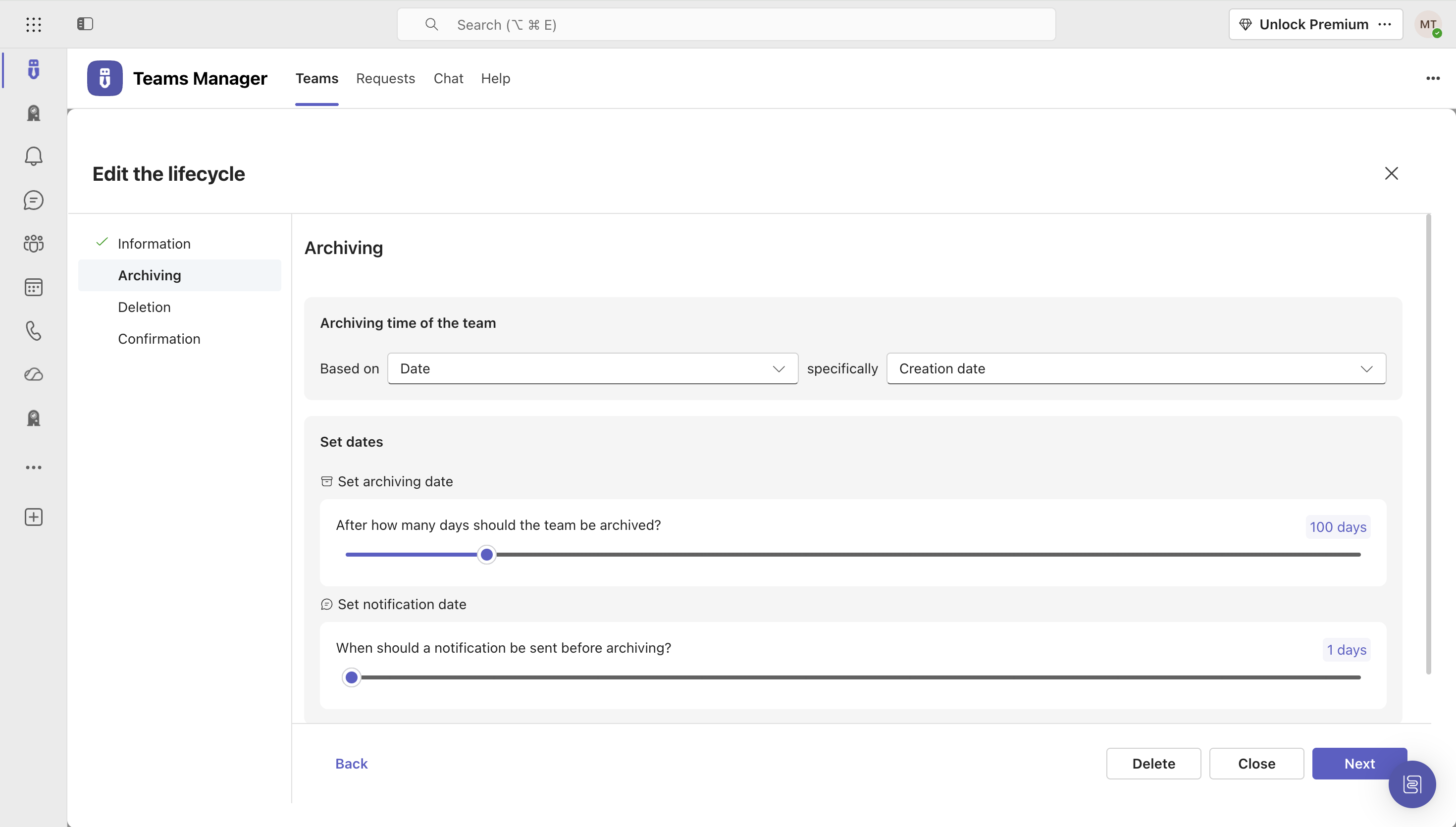
Screenshot of Governance Dashboard and Reports – for an overview of Microsoft 365 environmentsScreenshot of Automated request and approval process for new teams, M365 groups and SharePoint sitesScreenshot of Templates and provisioning for teams and SharePoint Sites (with channels, tabs, apps, folders, Planner with tasks, OneNote with content and more)Screenshot of Lifecycles for teams: inactive or obsolete teams can automatically be archived or even deleted after a specified period of timeScreenshot of Naming conventions for teams, OneNotes and Planners: rules for uniform, relevant names with predefined prefixes and suffixesScreenshot of Mobile view for all functionalities