With thousands of users world-wide, WinEst estimating from Trimble GC is a database-driven construction project management solutions on the market. It looks and feels just like Excel with familiar Windows navigation, including drop-down menus and ribbon bars. Behind the covers is a database with multiple work-breakdown structures (WBS) and filters that can be customized to the user's preferences so that estimating data can be sliced and diced and presented in different ways. WinEst…
N/A
Vista
Score8.2 out of 10
N/A
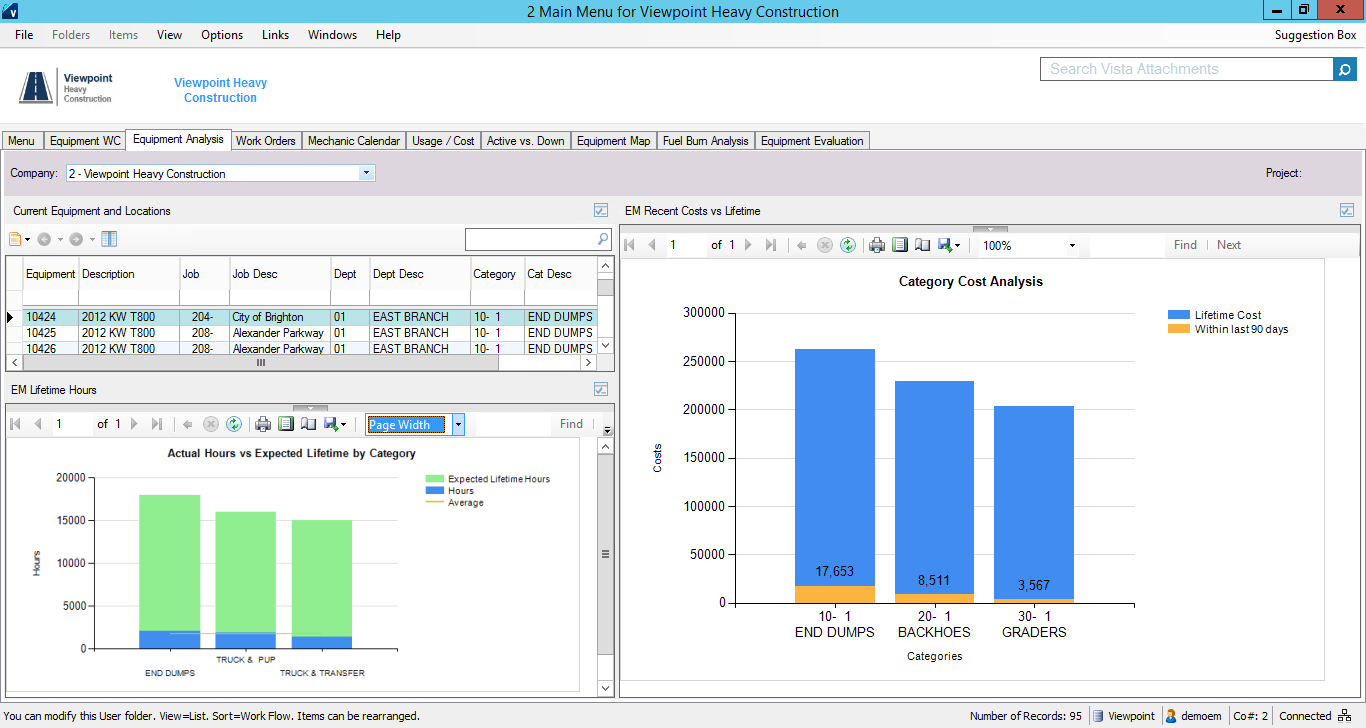
Viewpoint’s Vista is a construction accounting software. Vista’s core accounting features include accounts receivable and payable, general ledger, payroll and time management, and cash management. It also provides tools for document management, including document templates and reporting.
N/A
Pricing
WinEst
Vista
Editions & Modules
No answers on this topic
No answers on this topic
Offerings
Pricing Offerings
WinEst
Vista
Free Trial
No
No
Free/Freemium Version
No
No
Premium Consulting/Integration Services
No
No
Entry-level Setup Fee
No setup fee
No setup fee
Additional Details
—
Prospective buyers may contact Viewpoint directly for a price quote.
Management Information Systems Manager in Information Technology at ASRC Construction Holding Company (Construction, 201-500 employees)
Chose Vista
In all of our reviews through the years, the Vista system has by far been the best fit for any construction related business. The construction centric approach and system design of the Vista system puts it far above other systems we have reviewed. In addition, the constant …
A de minimis incentive was given to thank the reviewer for their time. The incentive was not used to bias or drive a particular response, nor was the incentive contingent on a positive endorsement. More Info
WinEst is truly built for everyone. Their assemblies/database linking is perfect for self perform and subcontractors while their database management and custom reporting is perfect for GCs. While Excel set the bar, WinEst is on another planet. With the immediacy required by today's markets, WinEst allows you to deliver a superior product while being more accurate.
A de minimis incentive was given to thank the reviewer for their time. The incentive was not used to bias or drive a particular response, nor was the incentive contingent on a positive endorsement. More Info
The company has made a commitment to the use of the Vista products and continue to move forward trying to implement more with the Vista HR Management. From timekeeping to onboarding in the near future we strive to look for better ways to utilize the products for our accounting and payroll purposes.
A de minimis incentive was given to thank the reviewer for their time. The incentive was not used to bias or drive a particular response, nor was the incentive contingent on a positive endorsement. TR verified that a representative sample of customers was invited. More Info
It's very flexible when building an estimate and selecting items to include. You can either click your way to the datebase or quickly copy and paste similar items.
The numerous ways to view and estimate whether it's by CSI, Uniformat, Master Format, or any view you'd like to see. One of ours is by program area, i.e. Sitework, Tower, Parking Deck, etc. After that, you can sort by Bid Package, CSI, etc. Quick buttons can be created far all the views you'd need which allows changing between views a breeze.
The visual interface is pleasing and easy to read.
It's easy to create your own database using Excel. Once you tag an item with unit costs, sort codes, etc., Winest will import it. You can also build it manually within the program but Excel was faster.
A de minimis incentive was given to thank the reviewer for their time. The incentive was not used to bias or drive a particular response, nor was the incentive contingent on a positive endorsement. More Info
At times, WinEst controls feel counter intuitive. Also the tools available for actually developing the database can feel clunky. This means that if you do not take the time to create a robust import file, you will spend a serious amount of time fixing your errors.
WinEst is also an object based database which means that it is difficult to do mass dumps of information (mainly takeoff) into the program. While this is great for ensuring that everything is done purposefully, it does lead to extended hours of data entry
It takes hours upon hours of use before you begin to realize the true potential. The sheer number of tools is overwhelming and their help resources are very basic and only explain how to correctly enter the data but not the feature's best use cases.
A de minimis incentive was given to thank the reviewer for their time. The incentive was not used to bias or drive a particular response, nor was the incentive contingent on a positive endorsement. More Info
Their payroll module is terribly slow and very clunky.
Job costing parameters are very strict and limited.
Each module interface has too many forms and screens.
There is too much flexibility regarding where to put information into the system. There isn't one place to do anything, which creates confusion for staff.
A de minimis incentive was given to thank the reviewer for their time. The incentive was not used to bias or drive a particular response, nor was the incentive contingent on a positive endorsement. More Info
It is extremely customizable and tracks so many complicated costs very well, more-so than other construction software programs out there that we've used in the past. It is also not an easy program to use for those even slightly not comfortable with a computer. The help sections/knowledge base could be better organized and updated more. It is a very powerful software program for our business and we rely on it hugely to see how our projects are running in real-time.
A de minimis incentive was given to thank the reviewer for their time. The incentive was not used to bias or drive a particular response, nor was the incentive contingent on a positive endorsement. More Info
I think that Vista's is an easy program to use very user friendly with lots of help features to allow the user to fix an issue without having to put a support call into Vista. The reporting and exporting capability's are strong.
A de minimis incentive was given to thank the reviewer for their time. The incentive was not used to bias or drive a particular response, nor was the incentive contingent on a positive endorsement. TR verified that a representative sample of customers was invited. More Info
Only issue is when there is an upgrade - it takes several times to get back logged in. Otherwise no issues with getting on to the program. We are set up on lap top or on the remote desk top. Works 90% of the time
No issue downloading the reports - I do find sometimes it is easier to export and save than it is to print to a pdf. Options on the different reports not consistent. You can print a couple projects on the JC Contract Status Report - but you have to do each project for the JC Cost by contract item - when neither one is a drill down - not a big deal
Doug Quinn was our trainer and travels all over the country. Whenever I have an issue I shoot him an email and he quickly responds as soon as his training gets a break.
A de minimis incentive was given to thank the reviewer for their time. The incentive was not used to bias or drive a particular response, nor was the incentive contingent on a positive endorsement. More Info
When privately owned, it was very good, then dropped when owned by Bane Capital Investments. Now that it has been bought by Trimble and has a home, support is back up again. Response time is better than most software companies, and the information provided is good. They have Chat support for quick answers, and a good Knowledge Base and video libraries.
Excellent training! They keep you on track to insure your implementation is going as planned. There are ample ways to receive additional training and training can be provided by position type. If you put on the effort, the training is there.
The trainer Viewpoint sent did not understand the processes, he only knew where the modules were located. He had no understanding of the actual process itself.
A de minimis incentive was given to thank the reviewer for their time. The incentive was not used to bias or drive a particular response, nor was the incentive contingent on a positive endorsement. More Info
WinEst simply blows excel and Timberline out of the water. The shear depth of functionality is unparalleled. Not only does WinEst deliver a better product, it also shortens the amount of man hours required for each bid, alternate, pricing exercise, etc. On top of this, it has a number of redundant safeguards for catching errors that the others don't have.
A de minimis incentive was given to thank the reviewer for their time. The incentive was not used to bias or drive a particular response, nor was the incentive contingent on a positive endorsement. More Info
I personally have not used another ERP system other than Viewpoint Vista. I am sure there are others out there, but from listening to my managers experiences before Great Basin Industrial implemented Viewpoint, the other options were less superior to what Viewpoint offers. I think if you are looking for an ERP system in the construction industry, then Viewpoint is the way to go
A de minimis incentive was given to thank the reviewer for their time. The incentive was not used to bias or drive a particular response, nor was the incentive contingent on a positive endorsement. TR verified that a representative sample of customers was invited. More Info
A de minimis incentive was given to thank the reviewer for their time. The incentive was not used to bias or drive a particular response, nor was the incentive contingent on a positive endorsement. More Info
For a small business - this program is well used in the accounting and operations. The two different work plans are set up for success. Alot of the programs we do not use - but like the reports that are generated - one disadvantage if you do not know crystal reports you cannot edit your form to meet your needs so there is a lot of printing different several forms to get all the information you need.
A de minimis incentive was given to thank the reviewer for their time. The incentive was not used to bias or drive a particular response, nor was the incentive contingent on a positive endorsement. More Info
A de minimis incentive was given to thank the reviewer for their time. The incentive was not used to bias or drive a particular response, nor was the incentive contingent on a positive endorsement. More Info
Not sure I can speak to this as the company moved to Viewpoint before I began here. I think it is helpful for the Project Management and Superintendent staff to easily review how specific job items went, which we do in the PM contract drilldown analysis
A de minimis incentive was given to thank the reviewer for their time. The incentive was not used to bias or drive a particular response, nor was the incentive contingent on a positive endorsement. More Info