UKG Workforce Central (formerly Kronos Workforce Central) was a suite of HR Management offerings targeted mainly at enterprise customers with larger-scale and more complex HR and workforce management issues. The product is discontinued.
N/A
WorkflowMax
Score8 out of 10
Small Businesses (1-50 employees)
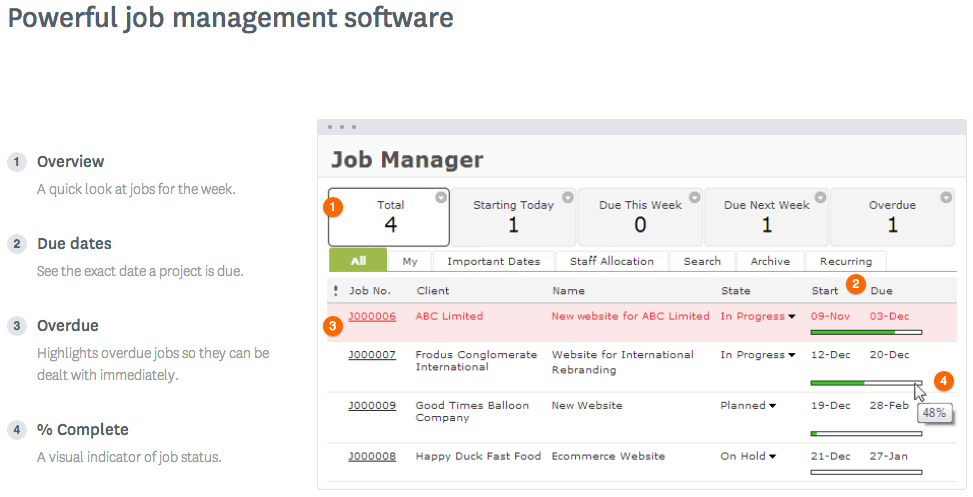
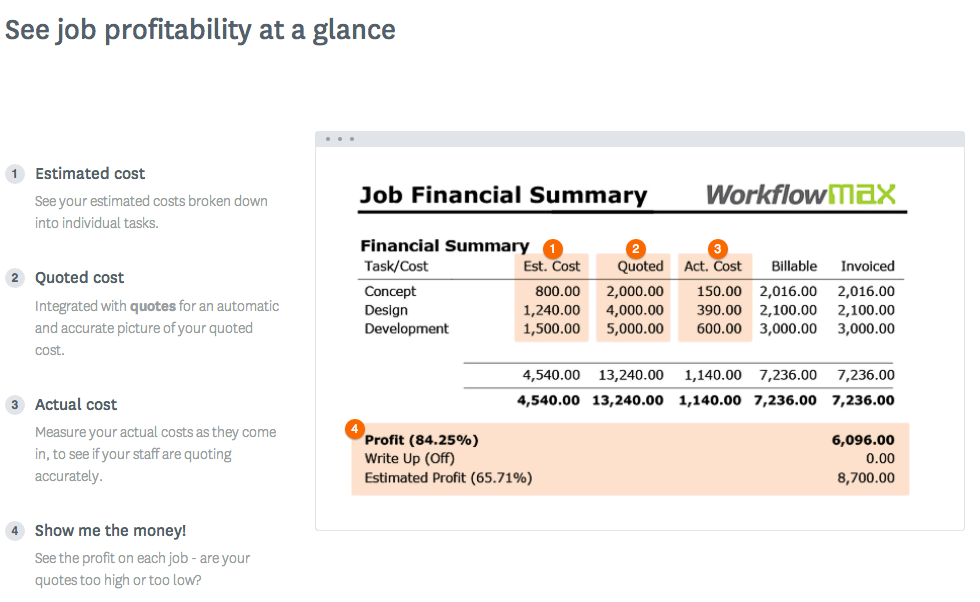
WorkflowMax is a web-based project management solution.The platform offers end-to-end functionality standard to project management software, including time tracking, lead management, collaboration with external stakeholders, invoicing, integrations, and customizable reporting.
This product was marketed to us as a school and several schools in our area use the program. However, the implementation team we were set-up with had limited school experience and we are still working on the best way to do some of the timekeeping issues where I know that could have been handled better. That being said from a payroll and reporting side it has been great to capture so much data (at times almost too much) and have the system do automatic allocations of salaries and general ledger reports. The reporting takes some getting used to, but overall I've been able to run reports to see and track just about anything I want. Our employees also love the self service compared to our previous products where they can make W4, direct deposit and other updates on their own without having to get HR involved.
A de minimis incentive was given to thank the reviewer for their time. The incentive was not used to bias or drive a particular response, nor was the incentive contingent on a positive endorsement. More Info
WorkflowMax is very well suited for a business that wants to track time billed by project, to have an easy way to generate invoices for those projects, and to keep track of overall productivity and invoice status. I imagine it can also be adapted to different types of businesses that deal in goods rather than services and time. I am not sure for which scenarios or businesses the program is not appropriate.
A de minimis incentive was given to thank the reviewer for their time. The incentive was not used to bias or drive a particular response, nor was the incentive contingent on a positive endorsement. More Info
I personally feel like timekeeping is very well thought out and has some powerful tools built in. There is a bit of a learning curve but with strategically placed SMEs we were able to get the use and functionality we needed out of the system.
Workforce planning has been crucial in planning operational support in our retail and customer service centers. It is also editable and modifiable as needed.
A de minimis incentive was given to thank the reviewer for their time. The incentive was not used to bias or drive a particular response, nor was the incentive contingent on a positive endorsement. More Info
You can customize the notifications and this has helped us enormously to schedule dates that we overlooked. Also the templates are customizable which gives the company its own branding on its reports.
It is integrated with the Xero platform which makes it very useful to streamline the processes of billing, accounts payable, accounts receivable, petty cash flow and all the accounting and administrative area.
It also has a very complete mobile version, where we can be present and monitor the progress of projects in real time, no matter where we are.
A de minimis incentive was given to thank the reviewer for their time. The incentive was not used to bias or drive a particular response, nor was the incentive contingent on a positive endorsement. More Info
A de minimis incentive was given to thank the reviewer for their time. The incentive was not used to bias or drive a particular response, nor was the incentive contingent on a positive endorsement. More Info
Currently the timesheet function allows staff to input time for overlapping periods which can cause some headaches when it comes to payroll and invoicing. We understand this is being addressed.
The amount of flexibility in the product can create some challenges when setting up the jobs database at the onset. It is a daunting challenge but worthwhile when completed correctly and rolled out across the firm. Adding new jobs is much easier.
No search function to find a specific job, you have to scroll through all jobs allocated to you.
A de minimis incentive was given to thank the reviewer for their time. The incentive was not used to bias or drive a particular response, nor was the incentive contingent on a positive endorsement. TR verified that a representative sample of customers was invited. More Info
Now that the system is installed and operational, the "pain is gone"...therefore we see no reason to change to a different application. There is no functionality that is missing from the system that would drive us to consider another solution at this time. Maintenance support from Kronos is sufficient and updates occur regularly.
A de minimis incentive was given to thank the reviewer for their time. The incentive was not used to bias or drive a particular response, nor was the incentive contingent on a positive endorsement. TR verified that a representative sample of customers was invited. More Info
A de minimis incentive was given to thank the reviewer for their time. The incentive was not used to bias or drive a particular response, nor was the incentive contingent on a positive endorsement. TR verified that a representative sample of customers was invited. More Info
Having no experience with Kronos prior to using it in March 2016, their customer service team taught me how to use it the right way after my initial training at work. I am well-versed in data analysis using Excel and Access primarily, so once I discovered that Kronos had a reporting feature built in, I've used the feature quite a few times to help our properties evaluate their production costs and make good labor decisions. I give Kronos a 10 because once a person takes the time to learn how to use the software, they'll realize that Kronos is far more effective than most, and gives users more ways to access their information where and when they want to.
A de minimis incentive was given to thank the reviewer for their time. The incentive was not used to bias or drive a particular response, nor was the incentive contingent on a positive endorsement. More Info
A de minimis incentive was given to thank the reviewer for their time. The incentive was not used to bias or drive a particular response, nor was the incentive contingent on a positive endorsement. More Info
Decide how to breakdown your ongoing jobs - are they monthly recurring or annual broken into chunks? What are you going to give clients i.e. how will your proposals and invoices look?
A de minimis incentive was given to thank the reviewer for their time. The incentive was not used to bias or drive a particular response, nor was the incentive contingent on a positive endorsement. More Info
Kronos and Dayforce are the two timekeeping systems I’ve worked with in recent years. Kronos feels a little more comprehensive and is my primary timekeeping tool both for myself as well as my staff. Kronos is a great tool for a wide range of shifts, working locations, and pay codes. In this context, I would pick Kronos over Dayforce. On the opposite side, Dayforce is extremely user-friendly and has a “cleaner” user interface if that is a contributing factor for anyone. Also, for managers who oversee large teams (30-50 team members) then Dayforce is a bit more simple to approve time cards, hours, and leave. Kronos is a bit clunky with all the clicks, and managing large teams of hourly employees would be a huge time suck to go in to review/approve all.
A de minimis incentive was given to thank the reviewer for their time. The incentive was not used to bias or drive a particular response, nor was the incentive contingent on a positive endorsement. More Info
WorkflowMax is much much easier than Streamtime, much more affordable and easier to try out and see if it meets your needs. Streamtime is a great comprehensive product but we lost a year's subscription in investment because we couldn't get answers to the support questions we needed and they had a no refund policy!
A de minimis incentive was given to thank the reviewer for their time. The incentive was not used to bias or drive a particular response, nor was the incentive contingent on a positive endorsement. TR verified that a representative sample of customers was invited. More Info
Kronos is much more expensive than the previous systems we were using, so at this point the ROI is negative. The idea is that it will allow us to scale and grow the company more easily so time will tell if that is the case.
A de minimis incentive was given to thank the reviewer for their time. The incentive was not used to bias or drive a particular response, nor was the incentive contingent on a positive endorsement. More Info
Max enables Loan Assistant to invoice very quickly and easily and integration with Xero for card payments brings our cashflow forward.
Max enables the Loan Assistant team to manage their workflow in an efficient and productive way. The team all work from home. It is the centre of our Loan Assistant universe.
A de minimis incentive was given to thank the reviewer for their time. The incentive was not used to bias or drive a particular response, nor was the incentive contingent on a positive endorsement. More Info