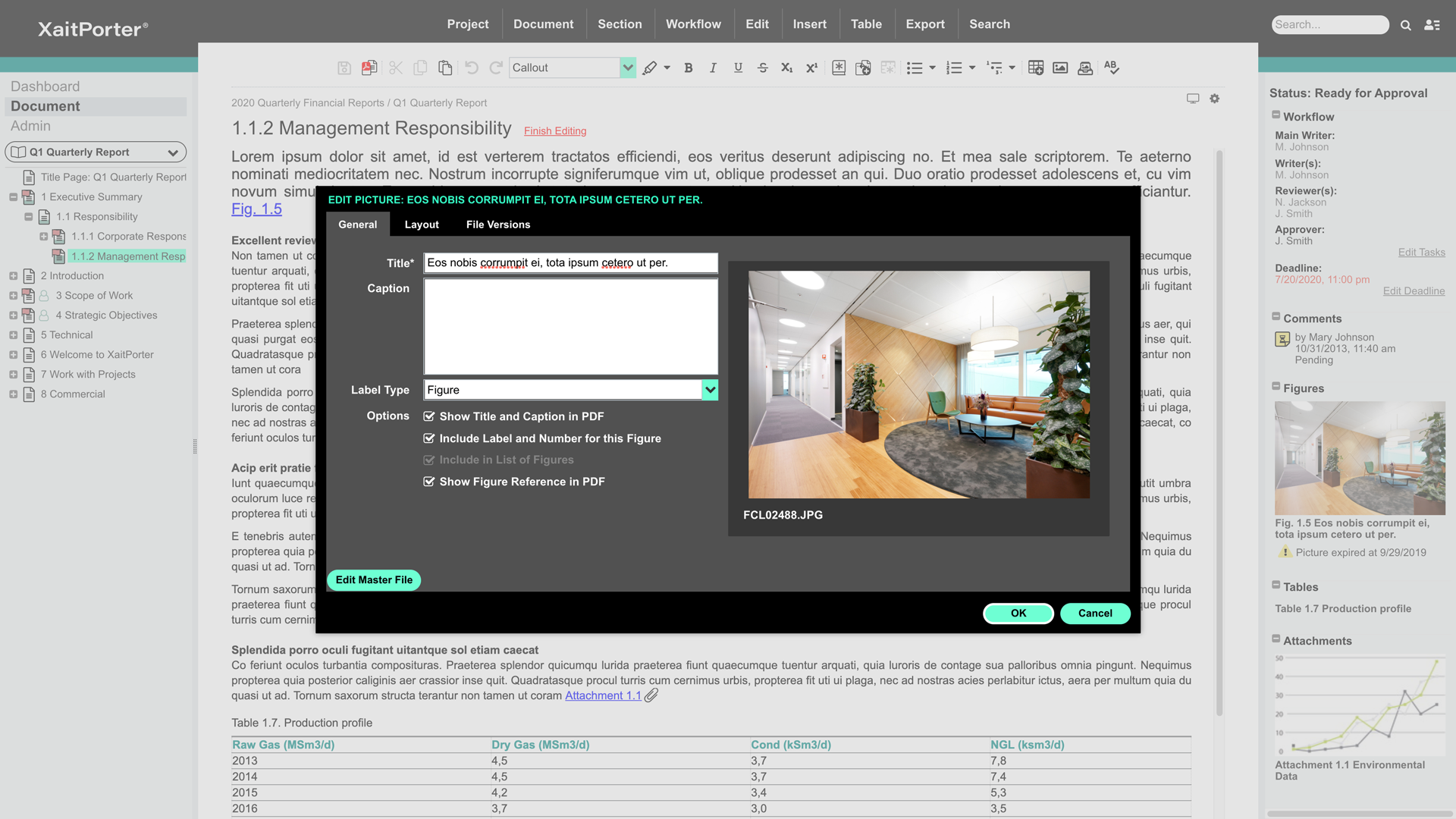
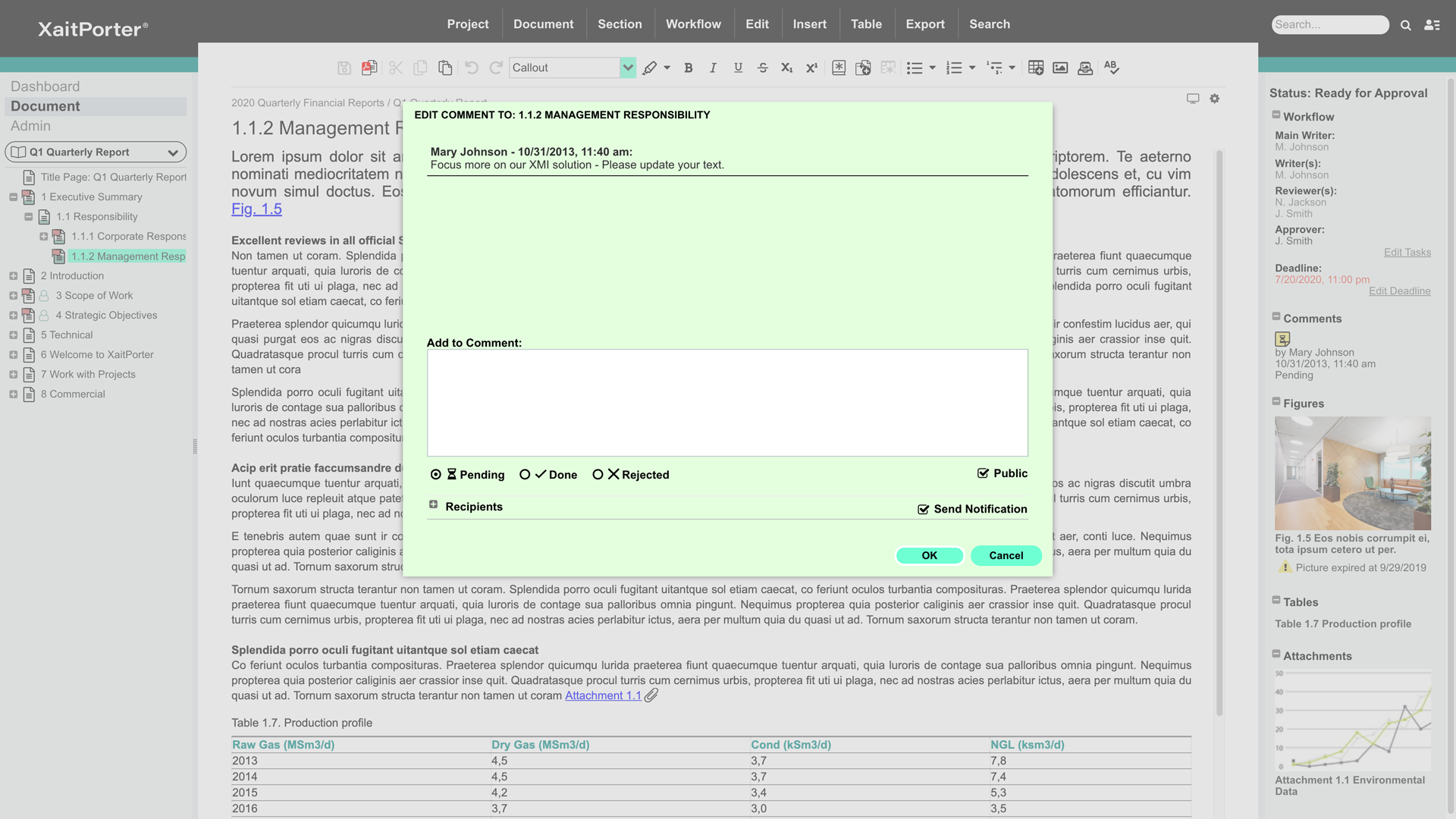
XaitPorter is a co-authoring software solution for teams to collaboratively create, manage and produce documents. With it, users can streamline and optimize document production to maximize revenue from bids and proposals and other business-critical documents. XaitPorter is designed to enable co-authors to focus on creating bid-winning content so that teams can become more efficient while production time and costs are reduced.
N/A
Zoho Projects
Score8 out of 10
N/A
Zoho Project is online project management and planning software that provides project teams with a web-based collaborative environment. Zoho Projects can also include a bug tracking module specifically design to support software development project. It is integrated with other Zoho products including Zoho CRM.
XaitPorter is ideal when a large document, containing many (preferably independent) sections is being created by more than five writers across different office locations and is subject to review by multiple reviewers and requires formal approval. It is particularly suited for external documents which are to be delivered as a non-editable PDF file.
A de minimis incentive was given to thank the reviewer for their time. The incentive was not used to bias or drive a particular response, nor was the incentive contingent on a positive endorsement. TR verified that a representative sample of customers was invited. More Info
My work involves projects of 5-15 people with numerous projects running simultaneously. Prior to Zoho, I did not have a central location from which to view all project statuses at once. Zoho looks to provide this and also looks like it will deliver. I am anxious to see how our organization's use of it develops. At this time, I feel I am likely to recommend Zoho Projects because my organization has made great software decisions in the past so I have a level of trust already that the research has been done that Zoho is the best solution for our line of work.
A de minimis incentive was given to thank the reviewer for their time. The incentive was not used to bias or drive a particular response, nor was the incentive contingent on a positive endorsement. More Info
This tool gives us the opportunity to work together. We always work in the last revision.
We can write comments as we go along and all involved will see it straight away.
We can structure it the way we want/our the way customer wants it and print the whole book in one go. We are sure that pictures/text/tables are where they are supposed to be (they have not moved around the document as it does when using Microsoft Word).
A de minimis incentive was given to thank the reviewer for their time. The incentive was not used to bias or drive a particular response, nor was the incentive contingent on a positive endorsement. TR verified that a representative sample of customers was invited. More Info
We use it to manage our sales orders as there are lots of moving parts which are necessary to get client orders done properly.
I use it anytime I have a new idea I want to put into motion. As I can create a list for brainstorming, feedback, specific actions necessary in order to test and or implement the idea.
Unrelated to business, it's a great way to plan travel in order to make sure you don't forget those important things like passport, flight arrangement, client meeting confirmation, and meeting prep as far as what specific documents or things do you need to bring with you.
And since everyone is on the go and expected to keep up with work, the mobile/tablet app makes it a breeze to keep up, work on, and create new projects.
A de minimis incentive was given to thank the reviewer for their time. The incentive was not used to bias or drive a particular response, nor was the incentive contingent on a positive endorsement. More Info
It would be helpful to improve functions used to organize and reorganize sections. They work fine, but could be retooled for ease of use. Simple drag-drop over the tree-view from the primary navigator (not only in the dedicated dialog for reordering sections) would be very good. It would be good to support simple flagging or tagging of sections to indicate whatever is meaningful to the user (e.g., to flag a section as imported text that needs formatting, or a section that is high priority for review). The icons do change to indicate predefined workflow states (e.g. approved), but there isn't support for a user-defined tag, perhaps with the ability to filter by tag as many newer applications can do. That would be handy. These aren't criticisms so much as product enhancement suggestions.
The editor is ok but could be tuned up a bit. For example, styles in the toolbar dropdown apply only to the whole paragraph. It's hard to indent text. The button tool doesn't consistently remove the button attribute on an existing button; works sometimes, sometimes not. Little stuff. Overall it's adequate for text creation.
The process of defining templates and styles appears to be a black art. While it's something you don't do often, it should be simplified and better exposed to ordinary admins.
The ability to have more than one section open at a time in the editor would be fantastic. Great productivity tool.
Word import/export could be cleaner.
The ability to export to html with user-defined style sheets would open new markets for Xait. If the product had that, we'd use Xait to maintain our online help site too.
The ability to link to externally stored images rather than lock them inside the Xait library would be huge, as we've expressed to the support team. We manage hundreds of images (diagrams, screen shots etc.) that are used throughout the company, not just for Xait documents. We would like to store them on a file system (e.g. Dropbox) and have them update into Xait automatically when the master copy is modified. This is a very important capability, though in fairness we didn't find it in other products either. Explicit support for Dropbox/Google Drive/Box would be one way, but dynamic linking a la Microsoft Word would be fine, maybe even better.
A de minimis incentive was given to thank the reviewer for their time. The incentive was not used to bias or drive a particular response, nor was the incentive contingent on a positive endorsement. TR verified that a representative sample of customers was invited. More Info
I've reviewed about 8 other project management solutions and Zoho Projects is the best I've seen without being overly complicated. Zoho Projects keeps getting better! Recent new enhancements makes it even easier to navigate. There are new keyboard shortcuts that cut my time way down. The tools are very easy to use.
A de minimis incentive was given to thank the reviewer for their time. The incentive was not used to bias or drive a particular response, nor was the incentive contingent on a positive endorsement. TR verified that a representative sample of customers was invited. More Info
Zoho Projects is an easy project management tool to use. It provides all the functionality that we required for handling projects. We can easily create personal forms for projects and tasks, allowing us to add and report on our own desire. Apart from this we can create and edit documents in real time which saves our time. This allows us to share text docs, presentations, tables with the whole team and we can work on them together
A de minimis incentive was given to thank the reviewer for their time. The incentive was not used to bias or drive a particular response, nor was the incentive contingent on a positive endorsement. More Info
A de minimis incentive was given to thank the reviewer for their time. The incentive was not used to bias or drive a particular response, nor was the incentive contingent on a positive endorsement. TR verified that a representative sample of customers was invited. More Info
A de minimis incentive was given to thank the reviewer for their time. The incentive was not used to bias or drive a particular response, nor was the incentive contingent on a positive endorsement. TR verified that a representative sample of customers was invited. More Info
A de minimis incentive was given to thank the reviewer for their time. The incentive was not used to bias or drive a particular response, nor was the incentive contingent on a positive endorsement. TR verified that a representative sample of customers was invited. More Info
Although it might lack intuitiveness, once you get a hang of how Zoho Projects works, you can do a LOT. The impact good project management has on profitability is huge, and it has helped not only improve communication and coordination when working on a project, but more importantly have adequate tracking of time, due dates and potential bottle necks
A de minimis incentive was given to thank the reviewer for their time. The incentive was not used to bias or drive a particular response, nor was the incentive contingent on a positive endorsement. More Info
He was really good. He came from Xait and trained us for several days. He got all involved and answered the questions asked. He was a professional trainee
A de minimis incentive was given to thank the reviewer for their time. The incentive was not used to bias or drive a particular response, nor was the incentive contingent on a positive endorsement. TR verified that a representative sample of customers was invited. More Info
A de minimis incentive was given to thank the reviewer for their time. The incentive was not used to bias or drive a particular response, nor was the incentive contingent on a positive endorsement. TR verified that a representative sample of customers was invited. More Info
A de minimis incentive was given to thank the reviewer for their time. The incentive was not used to bias or drive a particular response, nor was the incentive contingent on a positive endorsement. TR verified that a representative sample of customers was invited. More Info
The standard product for many years has been Microsoft Word. Some have tried to use SharePoint as a collaborative tool, but it is not suited for the purpose and is generally very user un-friendly. It is not intuitive and we have very few persons with any competency in it. Porter is easy to pick up and the new interface is very intuitive, and the way that Porter works removes many of the typical layout and formatting choices that made Microsoft Word so difficult for the average employee. It also greatly simplifies and reduces the amount of corrective work that tender support staff used to have to do. We are not aware of any product in the market that comes close to Porter. It is an ideal product that was purpose built for collaborative writing.
A de minimis incentive was given to thank the reviewer for their time. The incentive was not used to bias or drive a particular response, nor was the incentive contingent on a positive endorsement. TR verified that a representative sample of customers was invited. More Info
Zoho Projects provides a more limited set of functionality and customization options than other task/bug trackers on the market, but what it lacks in functionality it makes up for in ease of use. It probably has 80-90% of the features of its competitors but takes about a third of the time to get up and running and realizing value.
A de minimis incentive was given to thank the reviewer for their time. The incentive was not used to bias or drive a particular response, nor was the incentive contingent on a positive endorsement. More Info
A de minimis incentive was given to thank the reviewer for their time. The incentive was not used to bias or drive a particular response, nor was the incentive contingent on a positive endorsement. TR verified that a representative sample of customers was invited. More Info
Too soon to tell. Right now we're still at the near end of the value chain - it still seems expensive given the outputs to date. But we have a lower proposal volume than some companies, so you need to factor that in.
Also, the named user licensing is restrictive and problematic in a small company where people perform multiple roles and may dip in and out of the proposal development process over a period of weeks or months. A concurrent user model would be much, much better for us, though I understand you'd need to figure out a way to handle email notifications.
A de minimis incentive was given to thank the reviewer for their time. The incentive was not used to bias or drive a particular response, nor was the incentive contingent on a positive endorsement. TR verified that a representative sample of customers was invited. More Info
We needed a system to organize our growing business, so anything was better than what we had, which was nothing.
Recording time spend is a huge reason for using project software. It has made me aware of the tasks that are taking too long and where we are not being profitable as a company.
It has kept our team accountable for what needs to get completed and when projects are not in motion or completed timely. It's helpful to know in order to get billing out faster.
A de minimis incentive was given to thank the reviewer for their time. The incentive was not used to bias or drive a particular response, nor was the incentive contingent on a positive endorsement. More Info