TrustRadius: an HG Insights company

Less Annoying CRM

Score9.7 out of 10

71 Reviews and Ratings

What is Less Annoying CRM?

Less Annoying CRM is a customer relationship management (CRM) solution built specifically for small businesses to help clients manage contacts and track leads.

Media

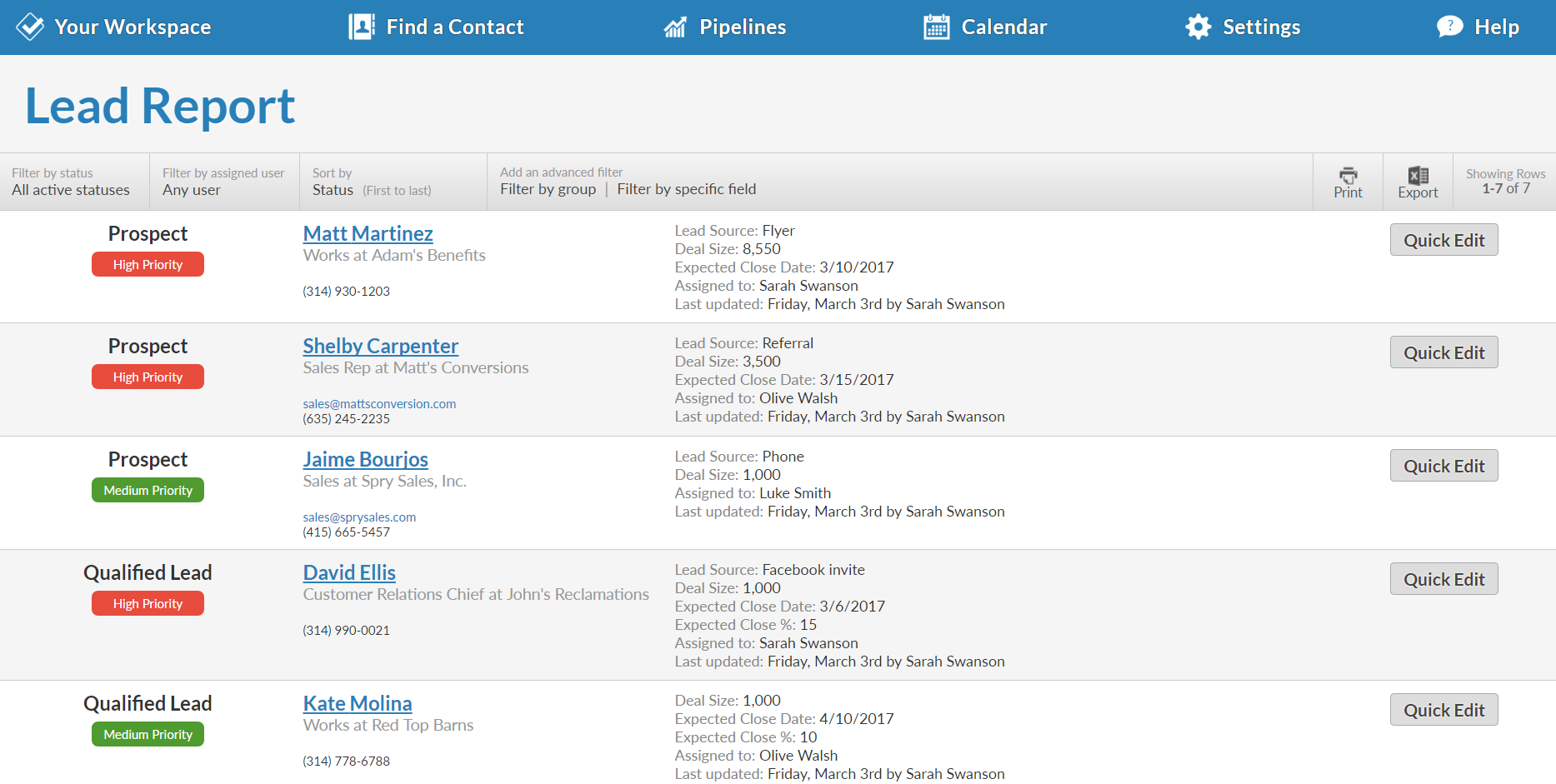
The full-customizable Lead Report keeps you updated on every opportunity in your pipeline.
Every contact and company has a profile that shows your entire history, along with any leads, files, events, to-dos, and more.
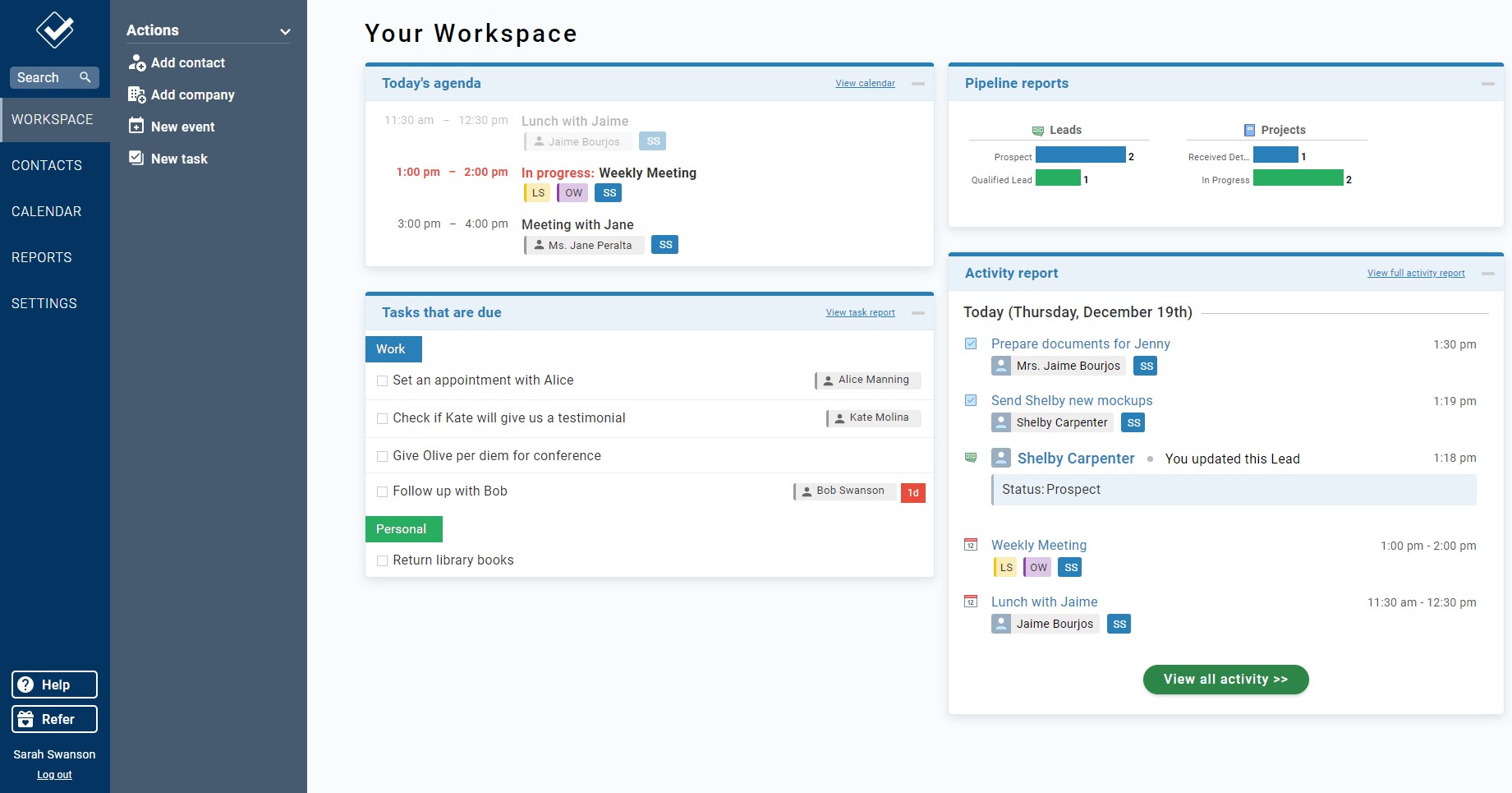
Your Workspace is your homepage for your CRM. It give you a quick overview of everything that's going on.
The full-customizable Lead Report keeps you updated on every opportunity in your pipeline.
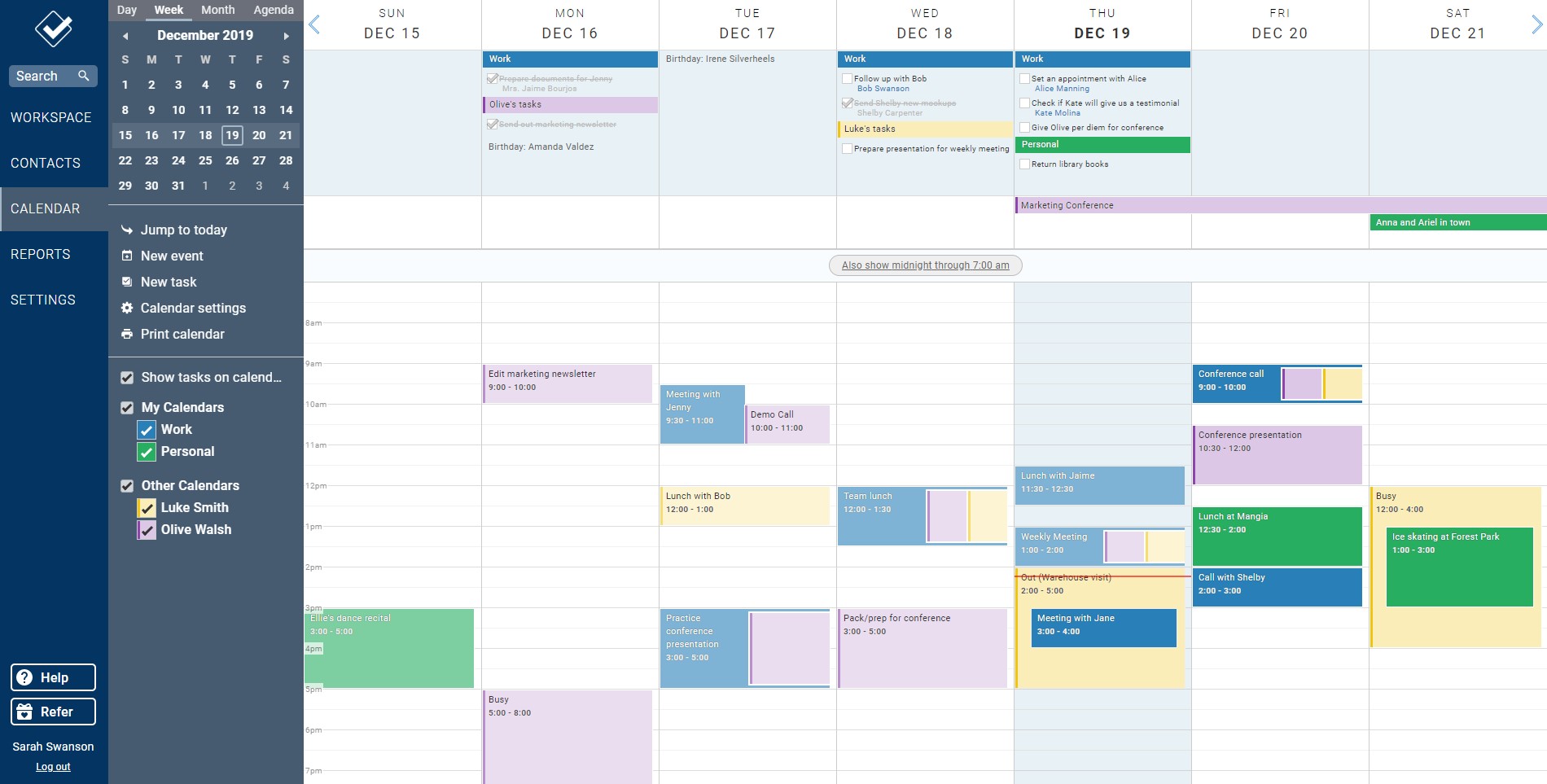
Our powerful web calendar allows you to stay on top of your events and to-dos and those of your co-workers.
Our fully-featured mobile site means you can access your CRM from anywhere you have an internet connection.

1 / 6

Top Performing Features

  • Case management

    This includes incident/ticket creation, routing, escalation, and resolution.

    Category average: 8.3

  • Help desk management

    This includes trouble ticketing, knowledge base, self-service, and service level agreement (SLA) management.

    Category average: 8

  • Role-based user permissions

    Permissions to perform actions or access or modify data are assigned to roles, which are then assigned to users, reducing complexity of administration.

    Category average: 8.6

Areas for Improvement

  • Scripting environment

    Technical users can write, run, and test scripts that automate common tasks or business rules via a standard or vendor custom programming language.

    Category average: 7.5

  • Compensation management

    The software can integrate with compensation management software or sales commission software such as Xactly Incent or IBM’s Varicent.

    Category average: 7.9

  • Quote & order management

    Users can create, process and fulfill price quotations and sales transactions.

    Category average: 8

The perfect CRM for our needs

Use Cases and Deployment Scope

We are a few months into using LACRM and have been uber impressed. The solution itself is exactly what we needed for our small company managing a nominal amount of contacts. That's not to say LACRM couldn't handle a larger operation than ours (which they do), but this felt like the perfect sweet spot for us.

The one thing that stands out to me about this company is its people. EVERYONE I have communicated with at LACRM has been outstanding. I don't know if "high-level customer service" is part of this company's hiring criteria, but they have certainly knocked it out of the park whenever I have a question that needs answering.

Keep up the good work, LACRM.

Pros

  • Support
  • Customer Service
  • Articulation of the solution benefits

Cons

  • I would like to see a search functionality in the Notes section

Return on Investment

  • Moving from an Excel spreadsheet tracking method to LACRM has helped us be much more efficient.

Usability

Less Annoying is all you need

Use Cases and Deployment Scope

I use LACRM to manage my clients and seminar participants. I looked at several CRMs, and LACRM impressed me from the very first minute with its clear layout and structure. On the homepage, I can see my tasks, appointments, and pipelines. I have a progress report for each of my clients and can freely configure individual checkboxes and fields. All emails are automatically logged and assigned to the clients. I can enter notes, so I can see what we've discussed in previous interactions with clients. I can assign appointments to clients, which are synchronized with my Google Calendar. I can also assign tasks, which are displayed on my homepage and can be checked off. The integration with Tidycal (similar to Calendly) also works perfectly. Booked appointments, including the meeting link, are automatically added to my LACRM calendar. As a visual learner, I was pleased that I could customize the color scheme – it makes it more visually appealing. But the most ingenious feature is the forms: I've linked the forms to my landing pages, making it easy to collect and organize my prospects' data. The clear and simple structure makes it easy to navigate. I wouldn't want to live without LACRM anymore – it truly makes my life less annoying! I wholeheartedly recommend it!

Ich benutze LACRM für die Verwaltung meiner Klienten und Seminar-Teilnehmer. Ich hatte mir mehrere CRMs angeschaut und LACRM hat mich von der ersten Minute überzeugt durch seine gute Übersichtlichkeit und Struktur. Auf der Home-Seite sehe ich meine Aufgaben, Termine und Pipelines. Ich habe zu jedem meiner Klienten eine Verlaufsdokumentation zur Verfügung und kann individuelle Check-Boxen und Felder frei zusammenstellen. Alle Emails werden automatisch geloggt und den Klienten zugeordnet. Ich kann Notizen eingeben und so bei jeder Interaktion mit den Klienten sehen, worüber wir die letzten Male gesprochen haben. Ich kann den Klienten Termine zuordnen, die mit meinem Google-Kalender synchronisiert werden. Ebenso kann ich Aufgaben zuordnen, die auf meiner Home-Seite angezeigt und abgehakt werden können. Auch die Verbindung von Tidycal (ähnlich Calendly) funktioniert perfekt. Gebuchte Termine landen inklusive Besprechungslink direkt in meinem LACRM-Kalender. Da ich ein visueller Typ bin, hat es mich gefreut, dass ich die Farbgestaltung selber einstellen kann - so schaue ich es mir auch gerne an. Aber das genialste sind die Formulare: Ich habe die Formulare auf meinen Landingpages verknüpft und kann so mit Leichtigkeit die Daten meiner Interessenten sammeln und organisieren. Durch die Übersichtlichkeit und Einfachheit der Struktur findet man sich leicht zurecht. Ich möchte nicht mehr ohne LACRM leben - es macht mein Leben wirklich "less annoying", also weniger nervtötend! Ich kann es uneingeschränkt weiterempfehlen!

Pros

  • Very clear and easy-to-understand client management
  • Tasks, deadlines and communication protocols perfectly organized.
  • Forms can be linked to landing pages, making the collection and organization of prospect data incredibly easy.
  • Sehr übersichtliche und leicht zu verstehende Klientenverwaltung
  • Aufgaben, Termine und Kommunikationsprotokolle perfekt organisiert.
  • Formulare können auf Landingpages verlinkt werden, so wird das Sammeln und die Organisation von Interessentendaten kinderleicht.

Cons

  • It would be nice to have the option of pop-up windows in the forms (e.g. for privacy notices, which could then be accepted with one click).
  • I work in two time zones. I would like my two preferred time zones to be displayed when scheduling appointments, so I don't have to scroll through them every time. I would like to be able to specify in my calendar when I'm in each time zone, so I can see appointments at the correct time and not only when I'm already there.
  • These are minor things, nothing else comes to mind.
  • Es wäre schön, bei den Formularen die Möglichkeit von Pop-Up-Fenstern zu haben (z.B. für Datenschutzhinweise, die dann mit einem Klick akzeptiert werden könnten)
  • Ich arbeite in zwei Zeitzonen. Ich würde gerne bei der Terminvergabe meine beiden bevorzugten Zeitzonen angezeigt bekommen, damit ich nicht jedesmal lange scrollen muss. Ich würde gerne in meinem Kalender festlegen, von wann bis wann ich in welcher Zeitzone bin, damit ich die Termine gleich zur richtigen Zeit sehen kann und nicht erst, wenn ich dort bin.
  • Das sind Kleinigkeiten, mehr fällt mir nicht ein.

Return on Investment

  • I no longer overlook any requests or tasks.
  • It saves me a lot of time.
  • I can operate it from anywhere, including from my smartphone.
  • Ich übersehe keine Anfragen oder Aufgaben mehr.
  • Es spart mir viel Zeit.
  • Ich kann es von überall bedienen, auch vom Smartphone.

Usability

Alternatives Considered

HubSpot CRM

Other Software Used

TidyCal

It reliably does what I need it to do and it's easy to use.

Use Cases and Deployment Scope

I run a small business. I tried a few big name CRM vendors but found them cumbersome and confusing to use. Fortunately, it turns out, those vendors have consultants on call who would be happy to set things up for the customer for a small fortune. To heck with that. And that is when Less Annoying CRM came to my attention. I've been using them for years with zero headaches and zero consultants. I strongly recommend them. Try it; you may be able to discard the Tylenol bottle.

Pros

  • Customizable data fields.
  • Simple, clear user interface.
  • Marvelously easy to set up.

Cons

  • I'd like to see a support chat option.

Return on Investment

  • Simplicity saves time.

Usability

Other Software Used

Pinnacle Studio, em Client, HeyGen

Excellent experience

Use Cases and Deployment Scope

I am the sales manager for an equine supplements company in NZ. Less Annoying CRM helps me to organize my cold calls, plan call lists, track client engagement and sales through the groups and pipelines, record client interest for future sales calls, track re-order dates for clients on my calendar, track important racing dates and events, consolidates my contacts list with simple and easy Intergrations via Google.

Before joining Less Annoying CRM, i was tracking most of my call information via spreadsheets and it has been an absolute game changer for me and allowed me to save time and effort with tasks. The staff are friendly and super helpful! I have really enjoyed using the program. I think the interface is excellent, simple, easy to navigate and easy to understand. I love the fact that I can customize every aspect of my interface with pipelines, groups, calendars and more. It has meant that my workspace runs efficiently for my specific needs!

As a dedicated member of a small business, I know how important it is to have good feedback, I think you guys are doing an excellent job!

Thanks a bunch,

From the [...] NZ team!

Pros

  • simple interface
  • customizations
  • helpful and friendly team

Cons

  • Being able to create sales records for clients that don't display as a badge but instead just show as a record on their contact profile.

Return on Investment

  • Increased time management for me and my expanding role

Usability

Fantastically simple CRM

Use Cases and Deployment Scope

We use LACRM as a general organizational tool that brings all of the information I need day to day into one place. It's a lightweight CRM compared to most, but I didn't need or want most of the heavier (and costlier) features that other services provide. I use it to track my schedule, contacts, tasks, and large overhead view of the different aspects of my business. It is not a shift scheduler or time clock. It is a slightly modular organizer for your operations information.

Pros

  • Simplicity
  • Organization
  • Value

Cons

  • Brief web app stutters

Return on Investment

  • Information organization is easy and intuitive.

Usability

Alternatives Considered

Salesforce CRM Analytics and WeWork Workplace