
TrustRadius: an HG Insights company

MindManager

Score8 out of 10

513 Reviews and Ratings

Start a Free Trial

Contact about MindManager

Please fill out the form below to get in touch.

Corel Corporation

Connect with Corel Corporation

What are you interested in?

Already have an account?

You hereby consent to have TrustRadius share the information supplied on this form with Corel Corporation so that Corel Corporation and TrustRadius may contact you in regard to the information requested.

What is MindManager?

MindManager is a mind mapping and project management tool that aims to boost users’ productivity. It is designed to facilitate a wide range of project types, and includes cross-platform functionality and 3rd party integrations.

Media

Mindmap
Reverse Brainstorming
MindManager for Microsoft Teams
MindManager Snap
MindManager Go
Mind Maps in MindManager
Organizational Charts in MindManager
Timelines  in MindManager
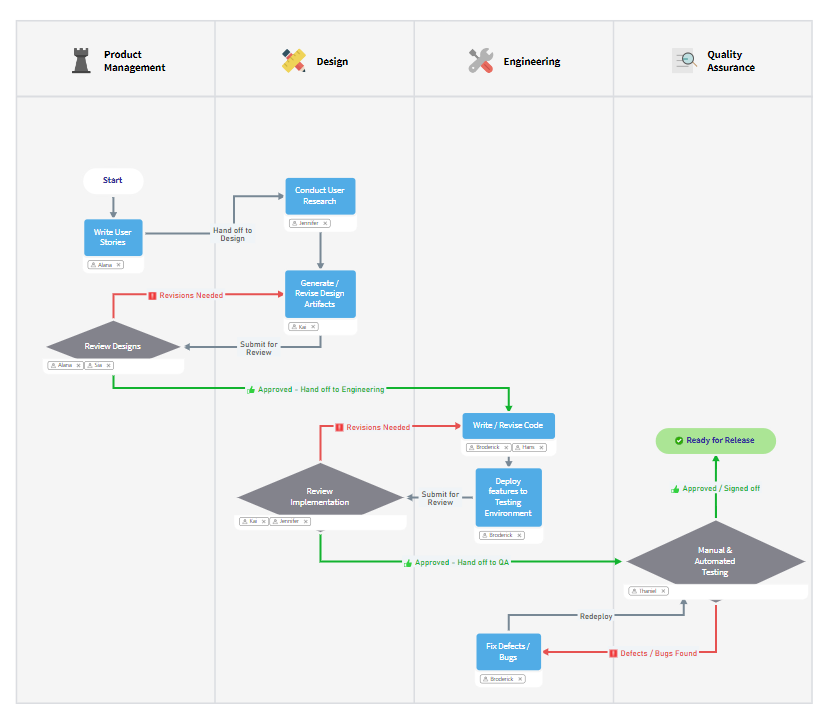
Flowcharts  in MindManager
Venn & Onion Diagrams  in MindManager
Kanban Boards  in MindManager
Funnel Charts  in MindManager
Matrix Diagrams  in MindManager
SWOT
MindManager Jira Integration
Gantt Pro Excel
Sticky Notes
Activity digest
Easy file sharing
Whiteboard

1 / 20

Top Performing Features

  • Drag-and-Drop Capabilities

    Provides an intuitive interface where users can easily drag elements like nodes, branches, and connectors to create and customize their mind maps.

    Category average: 8.9

  • Color and Style Customization

    Offers options to customize the color, font, shape, and style of nodes, branches, and connectors to visually enhance the mind map.

    Category average: 7.7

  • Customizable Templates

    Offers a variety of pre-designed templates for different types of mind maps, such as radial maps, tree maps, flowcharts, and org charts.

    Category average: 7.7

Areas for Improvement

  • Integration with Task Management

    Integrates with task management tools to convert mind map nodes into actionable tasks, set priorities, deadlines, and track progress.

    Category average: 6.9

  • Mind Map Revision History

    Keeps a record of changes made to the mind map, allowing users to track revisions, revert to previous versions, and collaborate effectively.

    Category average: 6.8

  • Real-time Collaboration Tools

    Supports real-time collaboration among multiple users, allowing them to work on the same mind map simultaneously and share ideas.

    Category average: 6.9

This program helps even the artistically challenged organize their thoughts visually

Use Cases and Deployment Scope

My use of MindManager is not in any way problem specific. I find it helpful for working with any complex problem. In my experience, it helps me to clarify and refine my own thinking and organize my thoughts and express them visually so that they are more easily understood by others as well.

Pros

  • The interface makes it very easy to use.
  • The fonts and design elements make the maps easy to read.
  • Exporting the maps to other formats is easy to do.

Cons

  • I would like to be able to click and drag some elements to make it easier to read. Some things can get bunched.
  • Always looking for templates from other users who are smarter than me.

Return on Investment

  • I am more effective at explaining complex scenarios.
  • The program is much faster than me trying to create something in PowerPoint or by hand.

Other Software Used

Zoom Workplace, Microsoft Office 2016 (discontinued)

Usability

Client-facing software.

Use Cases and Deployment Scope

It helps me with client interactions by creating visuals for account needs, asset movements, and different plans. It's extremely useful for clients who learn in a more visual way instead of using lists. It's also used to lay out processes for ease of reference and for internal processes for the team and business. We also use MindManager for prospects to show them our processes when working with new clients and how different services work together holistically.

Pros

  • Calculation consistency.
  • Ease of Use.
  • Visuals
  • Better understanding of system

Cons

  • Interface.
  • Ease of calculation building.
  • Easier to export/import info.
  • Visual imagery

Return on Investment

  • Improved consistency.
  • Improved client understanding.
  • Process efficiencies.

Usability

MindManager the best note organizer

Use Cases and Deployment Scope

MindManager has become an integral part of my workflow. I use it for meeting notes, detailed notes on

books I am reading, sharing mind maps with co-workers, brainstorming, and organizing ideas.

Pros

  • organize notes in an easy to reference way
  • Easily reorganize material
  • Format notes in a usable way

Cons

  • Exporting the structure into word and other documents
  • automatically adding sub directories when adding folder shortcuts
  • easier organization of markers
  • ability to import other documents and use indents and bullets to map to sub areas in the MindManager file

Return on Investment

  • saved time in search notes for relevant information
  • improved accessibility of information in a concise maner
  • clearly outlines material for organized meeting agendas

Other Software Used

Adobe PhotoShop, Office 365 Document Management, Notepad++

Usability

Mindmapping at its best!

Use Cases and Deployment Scope

I've been using MindManager for about 20 years for a variety of purposes:Project management, event organization, brainstorming, preparing decision-making documents, test organization, and much more.The program is a great help in collecting keywords, ideas, and/or tasks and structuring them neatly. I've had the opportunity to try out other mind mapping programs (both freeware and licensed), but none compares to MindManager in terms of functionality and ease of use.I wouldn't want to be without this tool anymore and can highly recommend it to anyone interested! Ich nutze den MindManager bereits seit ca. 20 Jahren und das für die verschiedensten Zwecke: Projektmanagement, Eventorganisation, Brainstorming, Vorbereitung von Entscheidungsvorlagen, Testorgansisation u. v. m. Das Programm hilft mir vorbildlich dabei, z. B. Stichworte, Ideen und/oder Aufgaben zu sammeln und sauber zu strukturieren. Ich hatte bereits Gelegenheit, auch andere Mindmapping-Programme (Freeware, aber auch lizenzpflichtige Programme) auszuprobieren, doch beim Funktionsumfang und der unkomplizierten Nutzbarkeit kommt keines an den MindManager heran. Ich möchte das Tool nicht mehr missen und kann es allen Interessierten nur wärmstens empfehlen!

Pros

  • Brainstorming
  • Project management
  • Organization of events
  • Structuring tasks
  • Projektmanagement
  • Organisation von Events
  • Aufgaben strukturieren

Cons

  • From my point of view there is no need for improvements.

Return on Investment

  • Compliance with deadlines
  • Compliance with quality goals
  • Ease of structuring the recorded points (ideas, tasks, etc.)
  • Einhaltung von Terminzielen
  • Einhaltung von Qualitätszielen
  • Einfachheit der Strukturierung der festgehaltenen Punkte (Ideen, Aufgaben etc.)

Alternatives Considered

Things

Other Software Used

Stackfield, Microsoft Teams, Microsoft Project, OneNote

MindManager has become an indispensable tool over the years

Use Cases and Deployment Scope

We use MindManager very often for brainstorming. It allows thoughts to be captured quickly and put into context.MindManager is also an ideal tool for weighing up decisions with pros and cons.Another key area of application is the documentation of processes and applications. The ability to work with links, images and text is extremely simple.

Pros

  • Brainstorming
  • Documentation
  • Project plans
  • Analysis of pros and cons

Cons

  • Cloud implementation
  • Collaboration with multiple users
  • Rolling up any numerical values

Return on Investment

  • Basis for better discussions
  • Implementation of training courses
  • Decision support for several alternatives

Other Software Used

Microsoft 365 Business Premium, Microsoft Visio, CorelDRAW Graphics Suite
