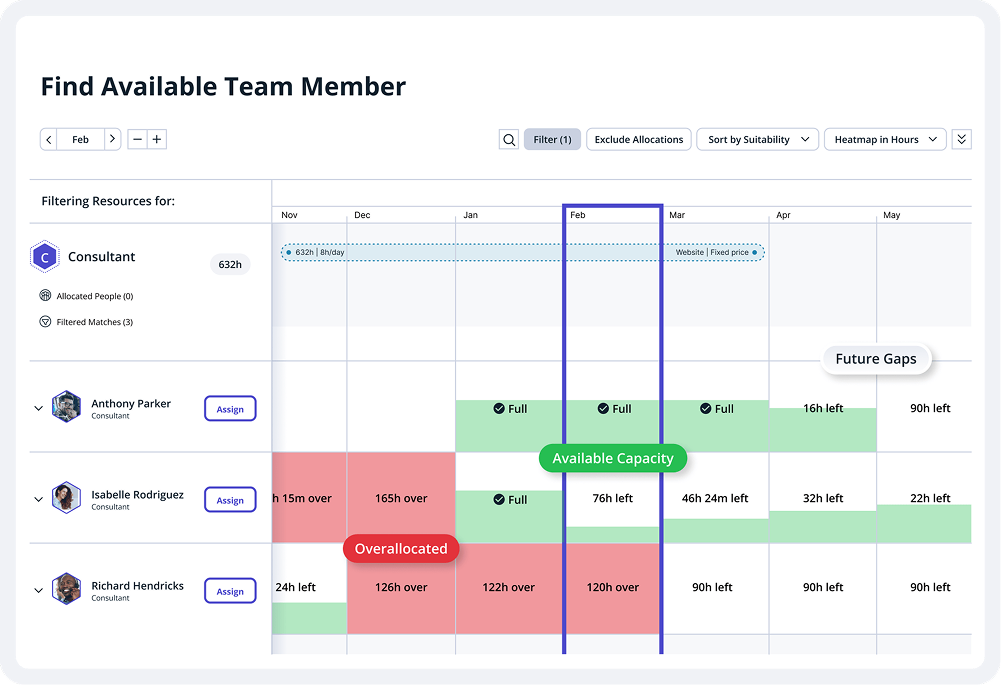
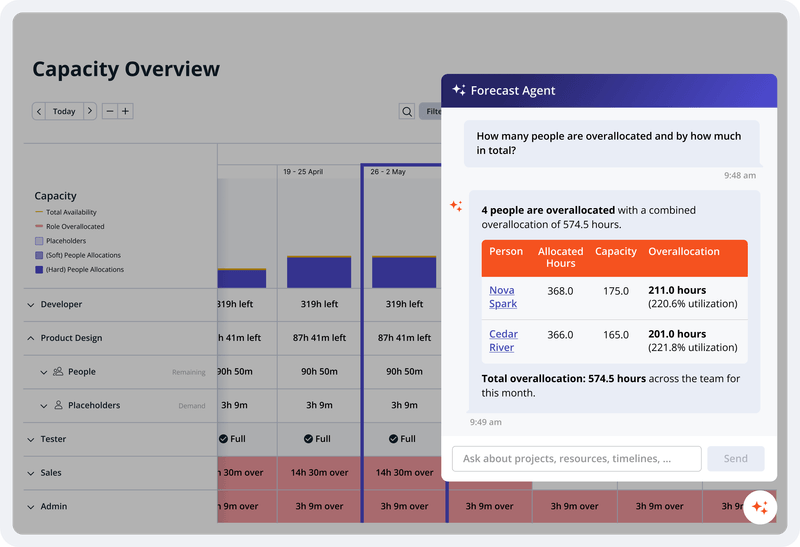
Accelo is a Professional Services Automation (PSA) platform designed to provide visibility into operational risks for service-based organizations. While traditional tools often focus on historical data, Accelo is intended to surface real-time risks such as Project Overruns, Resource Overloading, and Scope Creep. The platform integrates the full client lifecycle, including CRM, Quoting, Project Delivery, Support Ticketing, Time and Expense Tracking, Retainer Management, and…
N/A
Todoist
Score9.3 out of 10
N/A
Doist, a company boasting an entirely globally distributed workforce, offers Todoist, a project management platform emphasizing the needs of a distributed workforce. The application emphasizes tracking events over time with advanced closed task and progress reporting, with custom graphics for sharing or ease of review.
Accelo is a system that can do it all. It's extremely sophisticated. Depending on the sophistication of your organization, or specifically the abilities of the people you put in charge of the implementation, it can almost be too sophisticated. It all just depends on your situation. The more you use it, the more data you give it, the more you'll be able to see and do. It's incredibly powerful. But it's definitely not a tool that would be appropriate for smaller boutique type organizations that have only basic needs.
A de minimis incentive was given to thank the reviewer for their time. The incentive was not used to bias or drive a particular response, nor was the incentive contingent on a positive endorsement. More Info
There have been lots of times when we need to add a new habit into our daily work routines, and having the option to do so in the To-Doist app on the very first screen is incredibly helpful. It's a good reminder, and I believe that professionals who truly appreciate and properly value the implementation of good habits would be very grateful for this feature. It's also a time saver because you don't have to manually type it in every day/week / etc.
A de minimis incentive was given to thank the reviewer for their time. The incentive was not used to bias or drive a particular response, nor was the incentive contingent on a positive endorsement. More Info
A de minimis incentive was given to thank the reviewer for their time. The incentive was not used to bias or drive a particular response, nor was the incentive contingent on a positive endorsement. More Info
A de minimis incentive was given to thank the reviewer for their time. The incentive was not used to bias or drive a particular response, nor was the incentive contingent on a positive endorsement. More Info
A de minimis incentive was given to thank the reviewer for their time. The incentive was not used to bias or drive a particular response, nor was the incentive contingent on a positive endorsement. More Info
The Todoist application now works almost identically across all platforms. There is a minor improvement that I would like to see on iOS and that is the ability to show task count by custom filter.
In Board view, I want to be able to easily add sub-tasks to a parent task.
Besides those two minor improvements, I am extremely happy with the application.
A de minimis incentive was given to thank the reviewer for their time. The incentive was not used to bias or drive a particular response, nor was the incentive contingent on a positive endorsement. More Info
Excellent features and concept, simple implementation, but the software is not very clear in training new users and communicating features. The occasional unexplained crash or freeze is not handled gracefully by the desktop software, requiring either the user or tech support to manually restart.
A de minimis incentive was given to thank the reviewer for their time. The incentive was not used to bias or drive a particular response, nor was the incentive contingent on a positive endorsement. More Info
From the beginning the Accelo team has been very invested in ensuring our success and overall happiness with the platform. The initial implementation specialists and trainers did a fairly good job of learning our company and needs, and tried to tailor the trainings accordingly. However, once we made the formal switch to the platform, meaning we no longer were using our legacy systems, we found that we had a lot of questions....and a lot of ideas and recommendations. The support team is extremely responsive and seemingly happy to receive our continual feedback. And if we encounter an issue that seems to be a system issue, they work diligently to fix it (we've actually had an engineer join a call with us to learn of the issue - and subsequently fix it)
A de minimis incentive was given to thank the reviewer for their time. The incentive was not used to bias or drive a particular response, nor was the incentive contingent on a positive endorsement. More Info
I've used Todoist for about three years now and I haven't needed to contact support, which I'm considering a 10 out of 10. Honestly, their platform is so easy to use that I never had to look up a knowledge base or forum to be able to do what I wanted in Todoist. So I'm not sure what their support system looks like or how it works, but I do know that if I haven't needed support, that's also a good sign!
A de minimis incentive was given to thank the reviewer for their time. The incentive was not used to bias or drive a particular response, nor was the incentive contingent on a positive endorsement. More Info
Accelo doesn't really exceed any competitors in any one area of their product, but in 2015 when we made the move this was the best option that included all the tools we wanted. However, user adoption was low in some areas due to the UI, so we scaled back Accelo and added other tools.
A de minimis incentive was given to thank the reviewer for their time. The incentive was not used to bias or drive a particular response, nor was the incentive contingent on a positive endorsement. More Info
[Todoist: To-Do List & Task Manager] is significantly simpler and cheaper than most of the alternatives and doesn't complicate the management of tasks with a plethora of unnecessary features. While all the alternatives have strong feature sets, what Todoist does better than any of them is manage tasks, in theory the central point of them all.
A de minimis incentive was given to thank the reviewer for their time. The incentive was not used to bias or drive a particular response, nor was the incentive contingent on a positive endorsement. More Info
A de minimis incentive was given to thank the reviewer for their time. The incentive was not used to bias or drive a particular response, nor was the incentive contingent on a positive endorsement. More Info
Location-based reminders ensured that my staff didn't miss things when they went onsite with a customer. This has led to renewals on a regular basis.
Sharing of task visibility for managers with their direct reports has enhanced 1-on-1 meetings and ensured that field coaches kept focused
The cost of Todoist vs. the value it creates is a huge selling point for the software. For the price per user, I've found nothing that even comes close!
A de minimis incentive was given to thank the reviewer for their time. The incentive was not used to bias or drive a particular response, nor was the incentive contingent on a positive endorsement. More Info