Synology Active Backup Suite is software that allows users to consolidate backup tasks for physical servers, file shares, virtual machines, and SaaS applications. It also allows users to replicate and archive data to remote servers or public cloud and can rapidly restore files, entire machines, or VMs. Active Backup Suite is license-free and available on compatible Synology NAS models. Data Backup Integrated backup solution for personal computers, physical…
N/A
Veeam Data Cloud for Microsoft 365
Score8.7 out of 10
Mid-Size Companies (51-1,000 employees)
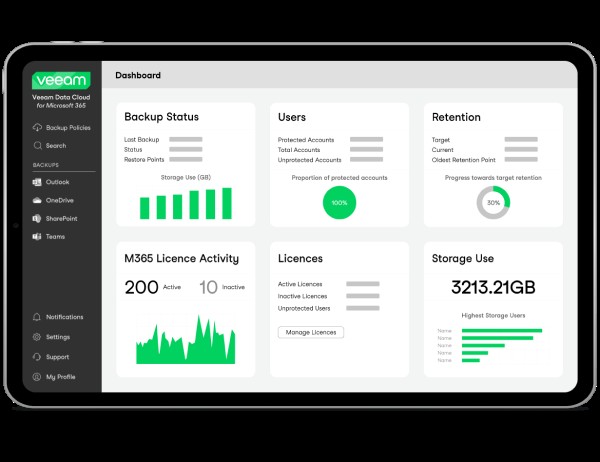
Veeam Data Cloud for Microsoft 365 is a BaaS (Backup as a Service) solution used to back up and restore Microsoft 365 data, including Microsoft Exchange, Microsoft SharePoint, Microsoft OneDrive for Business and Microsoft Teams data.
Veeam Data Cloud for Microsoft 365 is simpler to use then each alternative I've tried. Besides Synology, it's also the most cost effective. I also appreciate Veeam includes pricing on their website so I don't have to fill out a form or call someone. I don't like having to wait …
A de minimis incentive was given to thank the reviewer for their time. The incentive was not used to bias or drive a particular response, nor was the incentive contingent on a positive endorsement. TR verified that a representative sample of customers was invited. More Info
A de minimis incentive was given to thank the reviewer for their time. The incentive was not used to bias or drive a particular response, nor was the incentive contingent on a positive endorsement. More Info
Synology Active Backup Suite is well suited for machines running in the same network due to the setup being easier config as well as the network transmission speed. Through the internet is also possible to make a backup but you would be limited to the internet upload speed of your ISP. I believe it is less appropriate to complex networks with several jumps due to configuration.
A de minimis incentive was given to thank the reviewer for their time. The incentive was not used to bias or drive a particular response, nor was the incentive contingent on a positive endorsement. More Info
Analyzing campaign performance is a great area where the Veeam Data Cloud for Microsoft 365 is well-suited, and it’s working well. In the past, when we analyzed campaign performance, we had to use outside vendors, which was a time-consuming, laborious, and costly process.
A de minimis incentive was given to thank the reviewer for their time. The incentive was not used to bias or drive a particular response, nor was the incentive contingent on a positive endorsement. More Info
A de minimis incentive was given to thank the reviewer for their time. The incentive was not used to bias or drive a particular response, nor was the incentive contingent on a positive endorsement. More Info
A de minimis incentive was given to thank the reviewer for their time. The incentive was not used to bias or drive a particular response, nor was the incentive contingent on a positive endorsement. More Info
I would like the option to remove users from the backup and set them to an alternate storage location/ archive location. Currently, my backups are at 7 TB, and I would like to segment out data with lower data retention requirements.
A de minimis incentive was given to thank the reviewer for their time. The incentive was not used to bias or drive a particular response, nor was the incentive contingent on a positive endorsement. More Info
Veeam Backup for Microsoft 365 just works so well and is so easy to use. I researched multiple options for Office 365 backup and none seemed to be as easy to setup and use as Veeam Backup for Microsoft 365 and the pricing was very comfortable to us. I can't imagine any reason why we would change away from Veeam Backup for Microsoft 365.
A de minimis incentive was given to thank the reviewer for their time. The incentive was not used to bias or drive a particular response, nor was the incentive contingent on a positive endorsement. More Info
A de minimis incentive was given to thank the reviewer for their time. The incentive was not used to bias or drive a particular response, nor was the incentive contingent on a positive endorsement. More Info
The interface is simple, but powerful. It's easy to setup, easy to use. It's able to restore individual files and emails with ease. Would like to see the wording on some features cleared up, as it's caused us some confusing learning the tool.
A de minimis incentive was given to thank the reviewer for their time. The incentive was not used to bias or drive a particular response, nor was the incentive contingent on a positive endorsement. More Info
A de minimis incentive was given to thank the reviewer for their time. The incentive was not used to bias or drive a particular response, nor was the incentive contingent on a positive endorsement. More Info
We have a lot of data, and pulling backups out of the store sometimes takes a bit of time - but this is within acceptable tolerances. I don't expect restores to be instantaneous, and I can't quantify if the speed is software or data repository.
A de minimis incentive was given to thank the reviewer for their time. The incentive was not used to bias or drive a particular response, nor was the incentive contingent on a positive endorsement. More Info
The setup support we received was extremely helpful. They allowed us to learn as they created the policies and managed the handoff between setup and guided setup very well. This resulted in active, usable policies and us having the knowledge to adapt these as our needs change in the future.
A de minimis incentive was given to thank the reviewer for their time. The incentive was not used to bias or drive a particular response, nor was the incentive contingent on a positive endorsement. More Info
A de minimis incentive was given to thank the reviewer for their time. The incentive was not used to bias or drive a particular response, nor was the incentive contingent on a positive endorsement. More Info
Synology Active Backup Suite is more user friendly than TrueNAS and setting up all the environment for a Raspberry Pi system, its plug and play makes all the setup less complicated and the configuration more manageable. While TrueNAS is a great enterprise solution with a great community and Raspberry PI is complete open source and do it yourself, Synology Active Backup Suite offers the best of both worlds with and easy to use and upgrade with enterprise and small business options.
A de minimis incentive was given to thank the reviewer for their time. The incentive was not used to bias or drive a particular response, nor was the incentive contingent on a positive endorsement. More Info
First and foremost, Veeam's reputation stood out. They have been a leader in the backup vendors for a few years. That reputation along with recommendations from colleagues sold us on Veeam Data Cloud for Microsoft 365. The other vendors that we did demo's with were lacluster in setup and performance. Veeam Data Cloud for Microsoft 365 immediately won us over.
A de minimis incentive was given to thank the reviewer for their time. The incentive was not used to bias or drive a particular response, nor was the incentive contingent on a positive endorsement. More Info
A de minimis incentive was given to thank the reviewer for their time. The incentive was not used to bias or drive a particular response, nor was the incentive contingent on a positive endorsement. More Info
The only real impact is from a compliance standpoint. Our company is expected at a regulatory level to be protecting our data and even though the tenant has little traffic there could still be some regulated data in there. We have to be able to tell an auditor that it's being backed up by an enterprise grade solution, and that's what VDC was intended for.
A de minimis incentive was given to thank the reviewer for their time. The incentive was not used to bias or drive a particular response, nor was the incentive contingent on a positive endorsement. More Info