Adobe Marketo Engage vs. Predicte.com

Overview
ProductRatingMost Used ByProduct SummaryStarting Price
Adobe Marketo Engage
Score 8.1 out of 10
N/A
Adobe Marketo Engage (acquired by Adobe in 2018) is a marketing automation platform whose basic features include email marketing, drip nurturing, landing pages, and lead scoring, but other editions offer additional advanced features. Typical customers are B2B firms with complex sales cycles.N/A
Predicte.com
Score 0.0 out of 10
Small Businesses (1-50 employees)
Predicte offers real-time predicive insights from product, sales, and client data. By unifying disparate data sources within its Data Platform (Analytics), Predicte empowers distributors, wholesalers and manufacturers to forecast sales with greater accuracy, detect churn risks before they escalate, and deliver tailored recommendations. The platform’s analytics framework helps teams optimize product usage, enhance sales performance, and continuously improve client outcomes through its…N/A
Pricing
Adobe Marketo EngagePredicte.com
Editions & Modules
Growth
Pricing based on database size.
per month
Select
Pricing based on database size.
per month
Prime
Pricing based on database size.
per month
Ultimate
Pricing based on database size.
per month
No answers on this topic
Offerings
Pricing Offerings
Adobe Marketo EngagePredicte.com
Free Trial
YesNo
Free/Freemium Version
NoNo
Premium Consulting/Integration Services
YesNo
Entry-level Setup FeeOptionalRequired
Additional Details
More Pricing Information
Community Pulse
Adobe Marketo EngagePredicte.com
Features
Adobe Marketo EngagePredicte.com
Email & Online Marketing
Comparison of Email & Online Marketing features of Product A and Product B
Adobe Marketo Engage
7.8
1050 Ratings
2% above category average
Predicte.com
-
Ratings
WYSIWYG email editor8.1952 Ratings00 Ratings
Dynamic content7.6933 Ratings00 Ratings
Ability to test dynamic content7.6906 Ratings00 Ratings
Landing pages7.5973 Ratings00 Ratings
A/B testing7.9957 Ratings00 Ratings
Mobile optimization7.3920 Ratings00 Ratings
Email deliverability reporting7.81016 Ratings00 Ratings
List management8.21011 Ratings00 Ratings
Triggered drip sequences8.4914 Ratings00 Ratings
Lead Management
Comparison of Lead Management features of Product A and Product B
Adobe Marketo Engage
8.2
1016 Ratings
5% above category average
Predicte.com
-
Ratings
Lead nurturing automation8.4988 Ratings00 Ratings
Lead scoring and grading8.3964 Ratings00 Ratings
Data quality management7.4962 Ratings00 Ratings
Automated sales alerts and tasks7.9911 Ratings00 Ratings
Lead segmentation and distribution9.232 Ratings00 Ratings
Campaign Management
Comparison of Campaign Management features of Product A and Product B
Adobe Marketo Engage
7.4
942 Ratings
0% below category average
Predicte.com
-
Ratings
Calendaring7.0765 Ratings00 Ratings
Event/webinar marketing7.8897 Ratings00 Ratings
Social Media Marketing
Comparison of Social Media Marketing features of Product A and Product B
Adobe Marketo Engage
6.9
598 Ratings
7% below category average
Predicte.com
-
Ratings
Social sharing and campaigns6.6589 Ratings00 Ratings
Social profile integration7.2375 Ratings00 Ratings
Reporting & Analytics
Comparison of Reporting & Analytics features of Product A and Product B
Adobe Marketo Engage
6.8
1016 Ratings
8% below category average
Predicte.com
-
Ratings
Dashboards6.6957 Ratings00 Ratings
Standard reports7.0996 Ratings00 Ratings
Custom reports6.7940 Ratings00 Ratings
Platform & Infrastructure
Comparison of Platform & Infrastructure features of Product A and Product B
Adobe Marketo Engage
7.8
1006 Ratings
4% above category average
Predicte.com
-
Ratings
API8.0871 Ratings00 Ratings
Role-based workflow & approvals7.7741 Ratings00 Ratings
Customizability7.5888 Ratings00 Ratings
Integration with Salesforce.com8.5862 Ratings00 Ratings
Integration with Microsoft Dynamics CRM7.5307 Ratings00 Ratings
Integration with SugarCRM6.8202 Ratings00 Ratings
Third-party software integrations8.729 Ratings00 Ratings
Best Alternatives
Adobe Marketo EngagePredicte.com
Small Businesses
Vbout
Vbout
Score 9.9 out of 10
Mediafly
Mediafly
Score 7.7 out of 10
Medium-sized Companies
PFL Direct Mail Platform
Score 9.0 out of 10
Clari
Clari
Score 8.7 out of 10
Enterprises
PFL Direct Mail Platform
Score 9.0 out of 10
Clari
Clari
Score 8.7 out of 10
All AlternativesView all alternativesView all alternatives
User Ratings
Adobe Marketo EngagePredicte.com
Likelihood to Recommend
8.5
(1205 ratings)
-
(0 ratings)
Likelihood to Renew
4.6
(147 ratings)
-
(0 ratings)
Usability
5.0
(99 ratings)
-
(0 ratings)
Availability
9.0
(25 ratings)
-
(0 ratings)
Performance
9.0
(30 ratings)
-
(0 ratings)
Support Rating
8.6
(92 ratings)
-
(0 ratings)
In-Person Training
10.0
(12 ratings)
-
(0 ratings)
Online Training
6.7
(29 ratings)
-
(0 ratings)
Implementation Rating
10.0
(37 ratings)
-
(0 ratings)
Configurability
6.0
(6 ratings)
-
(0 ratings)
Contract Terms and Pricing Model
7.9
(4 ratings)
-
(0 ratings)
Ease of integration
1.1
(9 ratings)
-
(0 ratings)
Product Scalability
7.0
(10 ratings)
-
(0 ratings)
Professional Services
9.4
(3 ratings)
-
(0 ratings)
Vendor post-sale
8.2
(7 ratings)
-
(0 ratings)
Vendor pre-sale
8.2
(6 ratings)
-
(0 ratings)
User Testimonials
Adobe Marketo EngagePredicte.com
Likelihood to Recommend
Adobe
Adobe Marketo Engage is an excellent tool for hosting registration forms and sending out tokenized emails based on a particular person's information within your database. For example, if someone attends an event or webinar and indicates that they'd like to learn more about your product, then Adobe Marketo Engage can easily trigger a specific email template to that person that will be personalized with tokens about them. The pixel tracking that can be applied to any web page is also very helpful. If you want to focus on a more 1:1 type of follow up with a Lead, then the automated emails are not going to be as useful.
Read full review
Predicte.com
No answers on this topic
Pros
Adobe
  • It keeps all of our very important lead data in one place. It's very flexible, allows us to do a lot of different things around list building and segmentation. It deploys our email campaigns for us and it's also where our landing pages are built. So it does a lot of the things that we need to do from a data and deployment perspective.
Read full review
Predicte.com
No answers on this topic
Cons
Adobe
  • Adobe Marketo Engage crashes a lot or freezes. We don't have many users and less than 300k contacts so there's no reason it should ever crash.
  • It's really expensive! It would be nice to pick which features we want a la cart versus being stuck paying more for a feature and not using the others in the package.
  • Because of our integration with Dynamics, we had to use a 3rd party tool called Scribe for field matching. No one at Adobe will help us now that we have a 3rd party tool
Read full review
Predicte.com
No answers on this topic
Likelihood to Renew
Adobe
We're likely to renew for several reasons:
  • Now that it's been implemented, I can't imagine not having marketing automation and the easy interface that Marketo provides to run our campaigns
  • Marketo's community and customer service is fantastic; I know that when I need help, I'll get it
  • Marketo continues to improve the product, so I know that I can expect it to be even more useful in the future
Read full review
Predicte.com
No answers on this topic
Usability
Adobe
In some aspects, the tool can feel quite clunky in parts. But with the rich feature set it has, it's understandable. There is a lot of room for improvement for the user interface. The system itself doesn't have a slick or modern feel, so the usability could feel nicer to use with these areas considered.
Read full review
Predicte.com
No answers on this topic
Reliability and Availability
Adobe
Marketo provides different way and abilities to connect. If you are having product support or unexplained errors you can get someone on Marketo support 24 hours a day. One of Marketo's greatest assets in my opinion however would be the community. Often times our company is just looking for case success stories from someone else. In the community you can search for problems you are currently facing and see others having the same issue and solutions for those issues. If not, you can pose a question to the whole community and champions of the product and others can chime in to provide suggestions to fix your needs. The community is truly a 24/7 place to get your answers quickly.
Read full review
Predicte.com
No answers on this topic
Performance
Adobe
There are times when it is slightly slow for us, where we sit on a screen waiting for it to load. This could be our internet since we have had the same issue occasionally with other systems, but it is enough to make you crazy.
Read full review
Predicte.com
No answers on this topic
Support Rating
Adobe
On multiple occasions we've had Marketo support (technical and license based) issues. Technical issues were minor and resolved within a day. License based issues (even things encouraged by Marketo for partners, like provisioning another license) took WEEKS. They actually took so long to respond that the client we were working with withdrew from the contract because they were no longer convinced Marketo was capable of supporting their business. As an agency trying to sell the software, you can only explain away so much before they just made us look silly.
Read full review
Predicte.com
No answers on this topic
In-Person Training
Adobe
Our account rep stopped out in Lincoln, NE to ensure we were properly set up and running. This was very much appreciated. I was very, very new at this point, so I can't comment very much on the extent of what was taught because I was still brand new to the company and the system
Read full review
Predicte.com
No answers on this topic
Online Training
Adobe
I had never used Marketo prior to taking this job so online training was my starting point. I was able to follow along, it was interesting and quickly and efficiently taught me what I needed to know without a lot of fluff. It was far from boring and really helped me get my hands dirty with Marketo.
Read full review
Predicte.com
No answers on this topic
Implementation Rating
Adobe
1. Have a content marketing plan to run in parallel with the marketing automation installation--you'll need a lot of content to make full use of Marketo's capabilities. 2. Work with sales (and ISRs) to define and document a workflow--build your Marketo installation around how you do business--not figure out how to apply your business to the tools 3. Spend time of data cleaning--both an initial project as well as a strategy for ongoing data management. We found some change manaement issues (no more appending ZZZ to the first name to identify contacts who have left the company, for example, or prohibiting the entry of "info@company.com" email addresses). 4. Find some champions in the sales and ISR teams. You'll have both fans and detractors--work with the fans to build some success stories
Read full review
Predicte.com
No answers on this topic
Alternatives Considered
Adobe
Adobe Marketo Engage is one of the best email sending platforms I have worked with, because there is so much you can do on a lead scoring area and also then connect this to other platforms such as Salesforce. It allows for seamless reporting and working alongside sales colleagues. We chose Adobe Marketo Engage because it allows for more sophisticated audience segmentation and management of ongoing large scale nurture flows across a number of complex criteria.
Read full review
Predicte.com
No answers on this topic
Contract Terms and Pricing Model
Adobe
The total cost is a little bit higher than we expected.
Read full review
Predicte.com
No answers on this topic
Scalability
Adobe
We look at scaleability in a few different ways. First, the speed while using Marketo has remained relatively the same as our database has grown. Though I would say Marketo is slow at times, it has not gotten slower over the last few years. If anything, it has improved, and they are working to improve it. Second, the amount of programs we have developed in Marketo has exponentially grown as well. Marketo has allowed us to drastically increase our output without having to drastically increase our headcount.
Read full review
Predicte.com
No answers on this topic
Return on Investment
Adobe
  • Generated a 35% higher return on investment (ROI) in demand generation in the company.
  • The focus on the accounts that presented a greater sales potential, allowed us to prioritize and reduce costs by 20 Million USD.
  • Being personal and optimized. reduced efforts towards a more personalized customer experience, in working hours by almost 100 h.
Read full review
Predicte.com
No answers on this topic
ScreenShots

Adobe Marketo Engage Screenshots

Screenshot of the Contact Timeline in Adobe Marketo EngageScreenshot of the Audience Feature in Adobe Marketo EngageScreenshot of Progressive Profiling in Adobe Marketo EngageScreenshot of the Insights Dashboard in Adobe Marketo EngageScreenshot of Sources in Adobe Marketo EngageScreenshot of Metrics in Adobe Marketo Engage

Predicte.com Screenshots

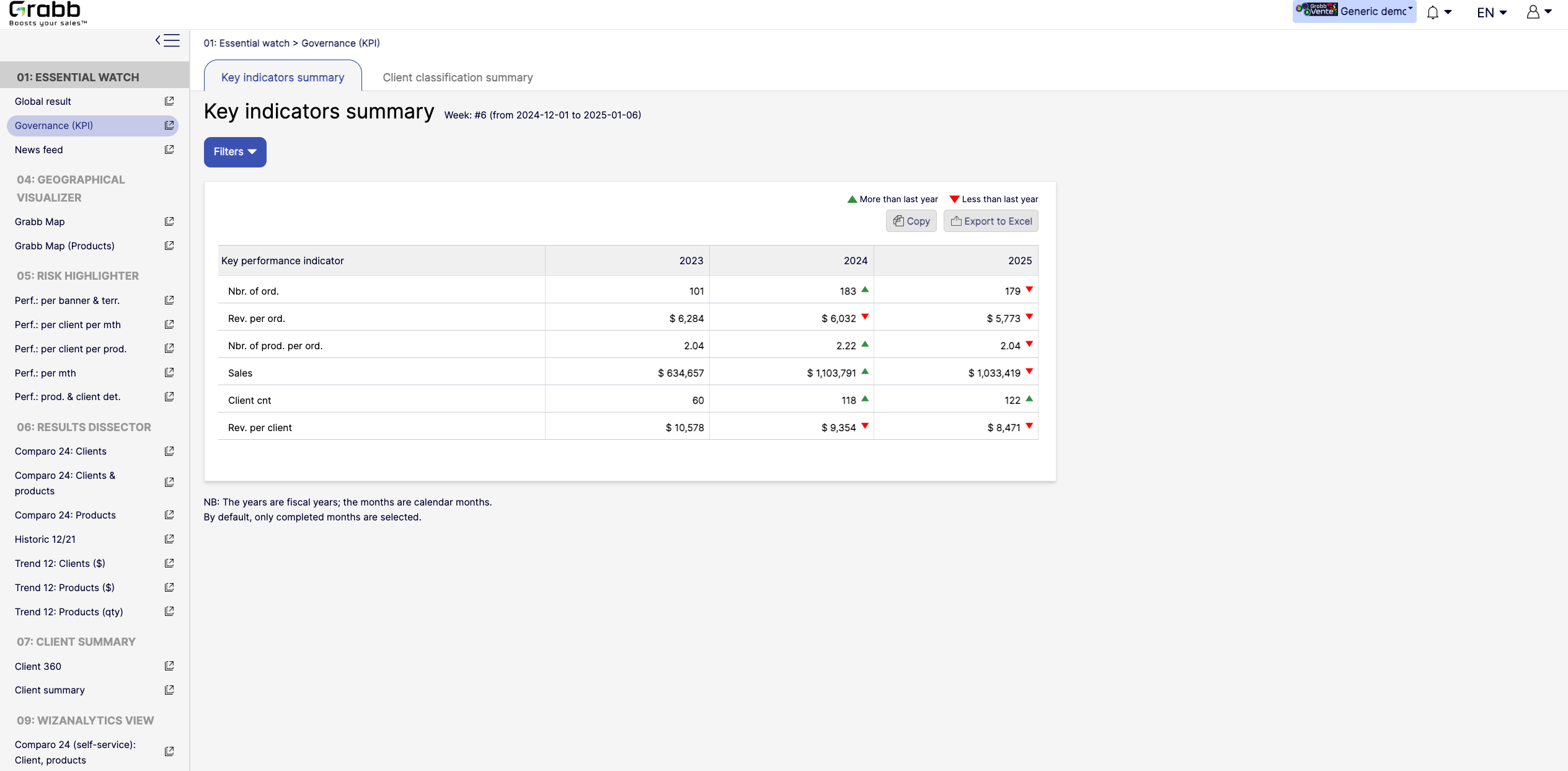
Screenshot of the dashboard for executives and managers, with various performance metrics:

High‐Level KPIs: Summarizes top metrics (e.g., total sales, revenue per client, average products per order) all in one table, making it easier to spot whether the company is trending up or down.
Year‐to‐Year Comparison: Displays data for each fiscal year, with green/red arrows to show improvement or decline since the previous year.
Immediate Visibility of Trends: Simplifies strategic decision‐making by illustrating whether overall performance is improving or if corrective measures are needed.
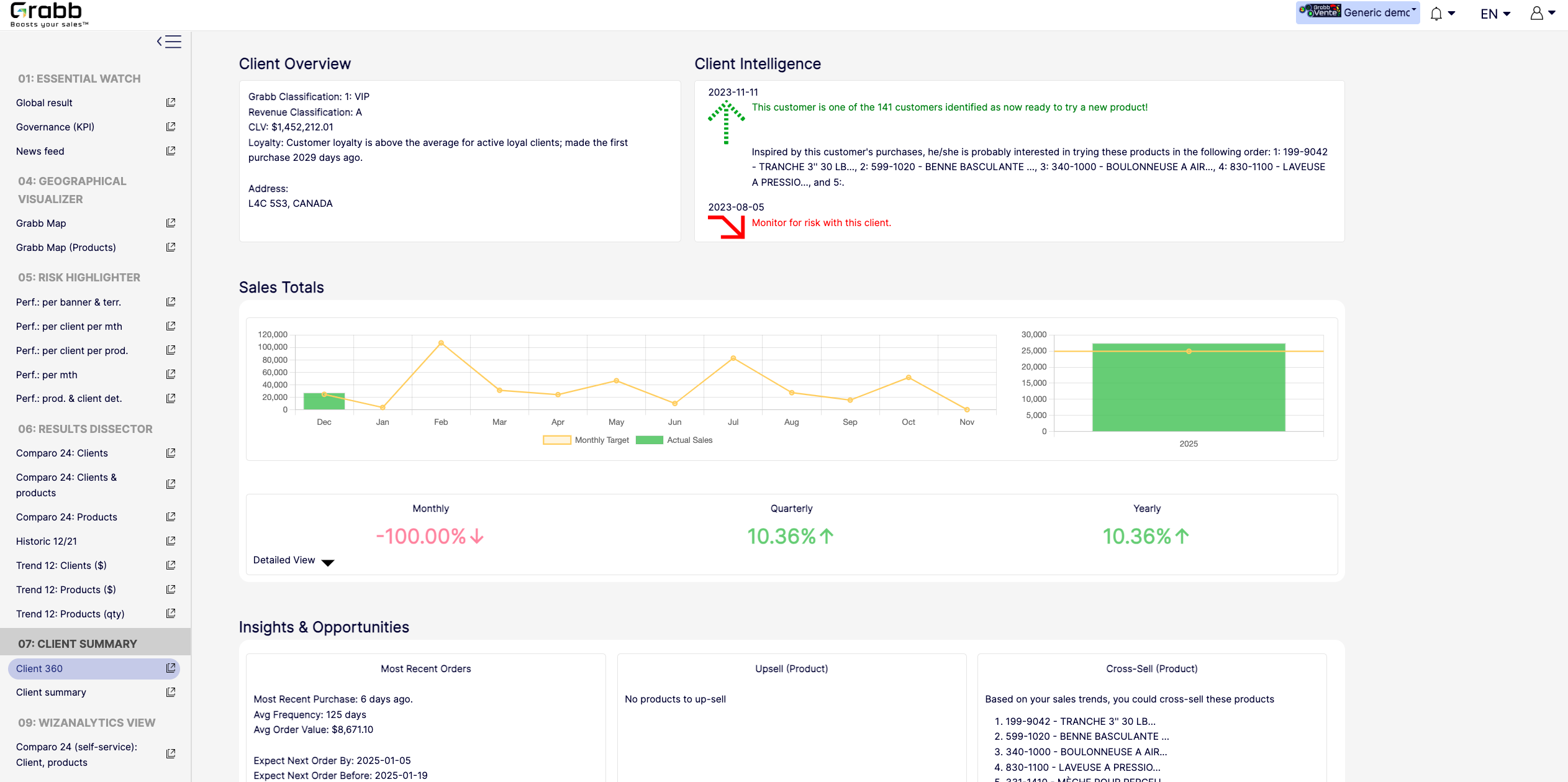
It’s a quick, executive‐friendly scoreboard of the organization’s health, ensuring leaders have the clarity to plan next steps.Screenshot of an at‐a‐glance understanding of a single client’s status, loyalty level, buying behavior, and next best actions that includes data about up‐selling, cross‐selling, and churn risk is often siloed or not immediately visible. This provides:

A Centralized Client Snapshot: Shows the client’s classification (e.g., VIP), revenue category, and CLV, ensuring everyone quickly sees the client’s overall value.
Predictive Intelligence: Highlights whether the client is “ready to try a new product,” or if there’s any “monitor for risk” alert, taking the guesswork out of deciding the next sales move.
Sales Trend & Graphs: Displays monthly, quarterly, and yearly sales to pinpoint performance patterns and quickly identify dips/spikes.
Upsell/Cross‐Sell Suggestions: Automatically suggests which products the client is most likely to buy next, helping reps act on potential revenue opportunities immediately.
Insights & Opportunities: Offers quick reference points such as “Most Recent Purchase,” average order value, frequency, and predicted next order date so you can plan proactive outreach.
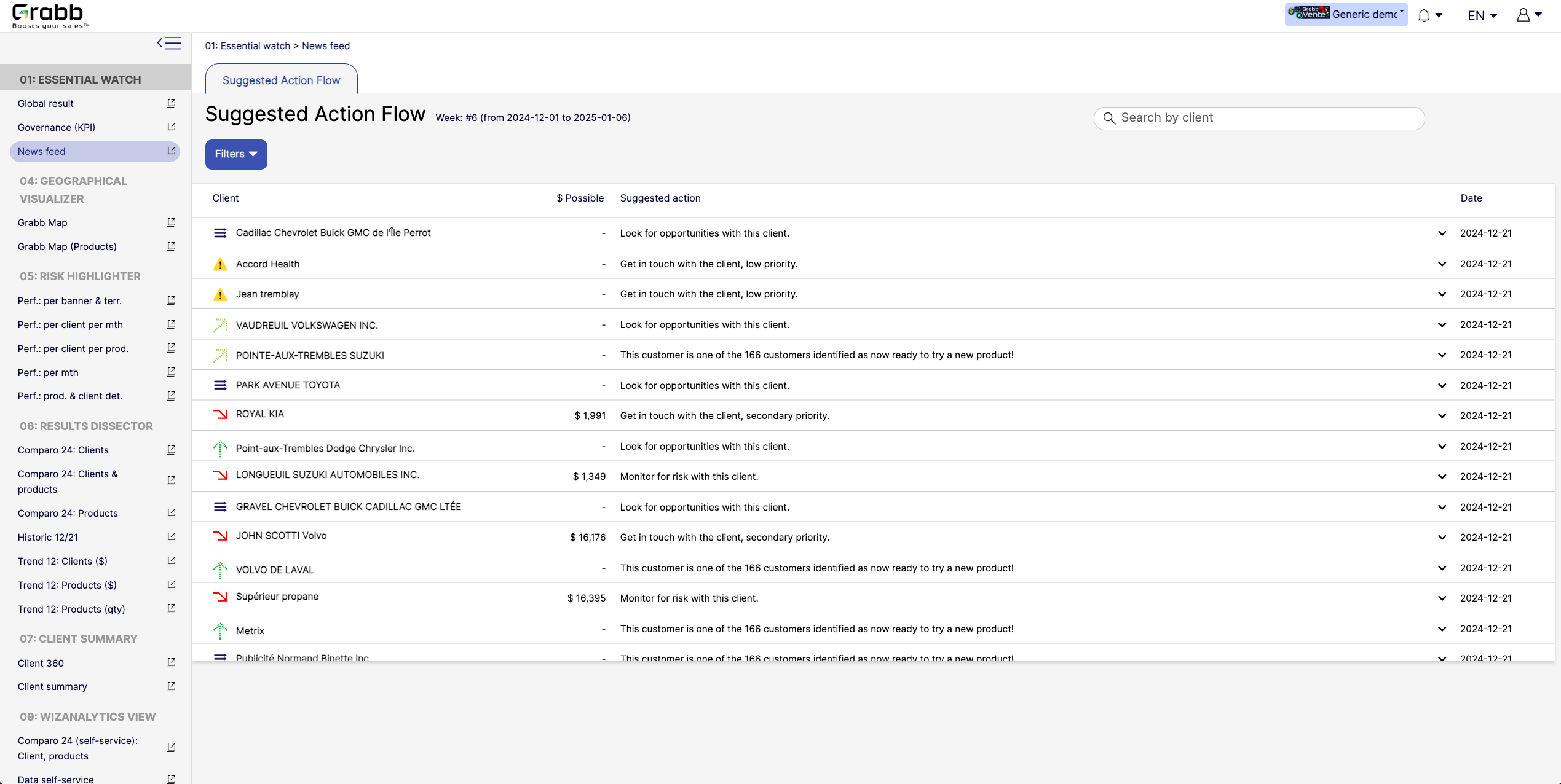
This holistic view enables data‐driven decisions—whether to focus on strengthening loyalty, pitching new products, or preventing churn.Screenshot of A visualization for sales reps and managers, providing:

Prioritized Recommandations: Provides a dynamic feed of next best actions—whether it’s “Look for opportunities with this client” or “Monitor for risk,” ensuring no lead or account slips through the cracks.
Opportunity & Risk Indicators: Quickly flags which clients are “ready to try a new product” versus those at higher risk, so teams can focus their energy where it matters most.
Estimated Upside ($ Possible): In some cases, the screen shows potential revenue if successful, helping reps evaluate the ROI of their outreach efforts.
Search & Filter Capabilities: Salespeople can easily locate a specific client in the list and see suggested actions, which speeds up daily planning and follow‐ups.
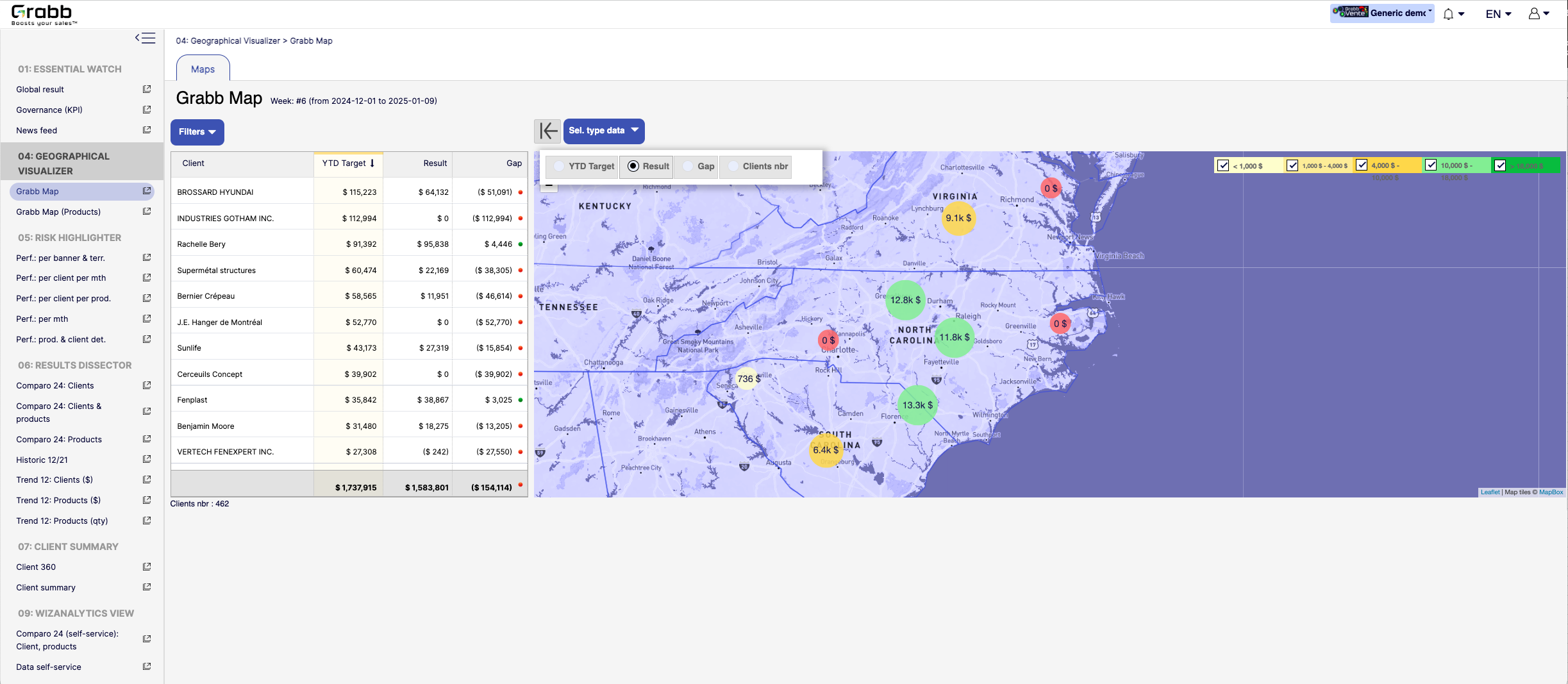
By centralizing these recommended “next steps,” the Suggested Action Flow turns raw data into a practical to‐do list—making each sales call or client interaction more purposeful and timely.Screenshot of a visualization for sales teams that helps them understand how their performance is distributed across different territories or locations. Without geographic context, managers can overlook local trends, regional opportunities, or problem areas.

Solution Provided:

Interactive Territory Overview: Displays each client’s Year‐to‐Date (YTD) target, actual results, and any gap in a color‐coded map, quickly revealing where the biggest mismatches lie.
Client‐Level Details: The list alongside the map allows you to see real‐time data—such as current gap amount or sales performance—sorted by region or client.
Visual Clustering: Bubbles on the map show consolidated sales amounts or gaps for clusters of clients, making it easier to spot hot‐spots or underperforming zones.
Target & Result Comparison: By toggling between metrics (e.g., “YTD Target,” “Result,” “Gap,” “Clients nbr”), managers can instantly pivot the view to see how the team is tracking.
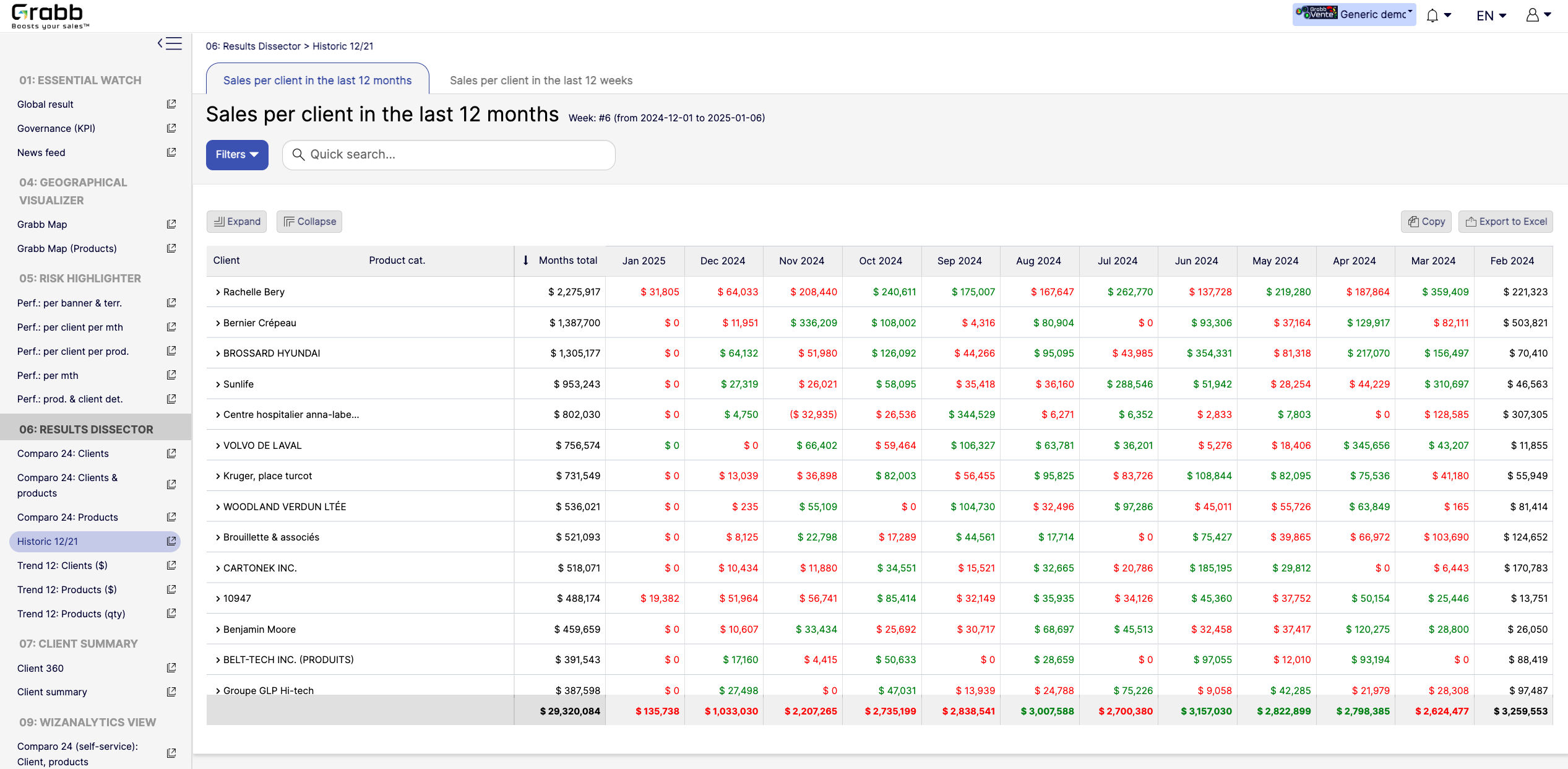
With this map‐based dashboard, leaders can optimize travel routes, allocate resources effectively, and prioritize outreach in areas where the potential impact is greatest.Screenshot of monthly sales trends at the individual‐client level. The visualization provides:

Month‐by‐Month Breakdown: Lists each client with color‐coded monthly sales (green and red), allowing you to see exactly when sales surge or drop off.
Total and Monthly Views: A “Months total” column plus each month’s figure helps you quickly gauge each client’s cumulative performance versus their monthly fluctuations.
Trend Spotting & Seasonality: By laying out 12 consecutive months, it becomes easier to see recurring patterns—helpful for forecasting, inventory planning, and targeted campaigns.
Actionable Insights: Identify which clients need re‐engagement (red cells or big drops) and which clients might be ready for expansion (consistently green or strong increases).
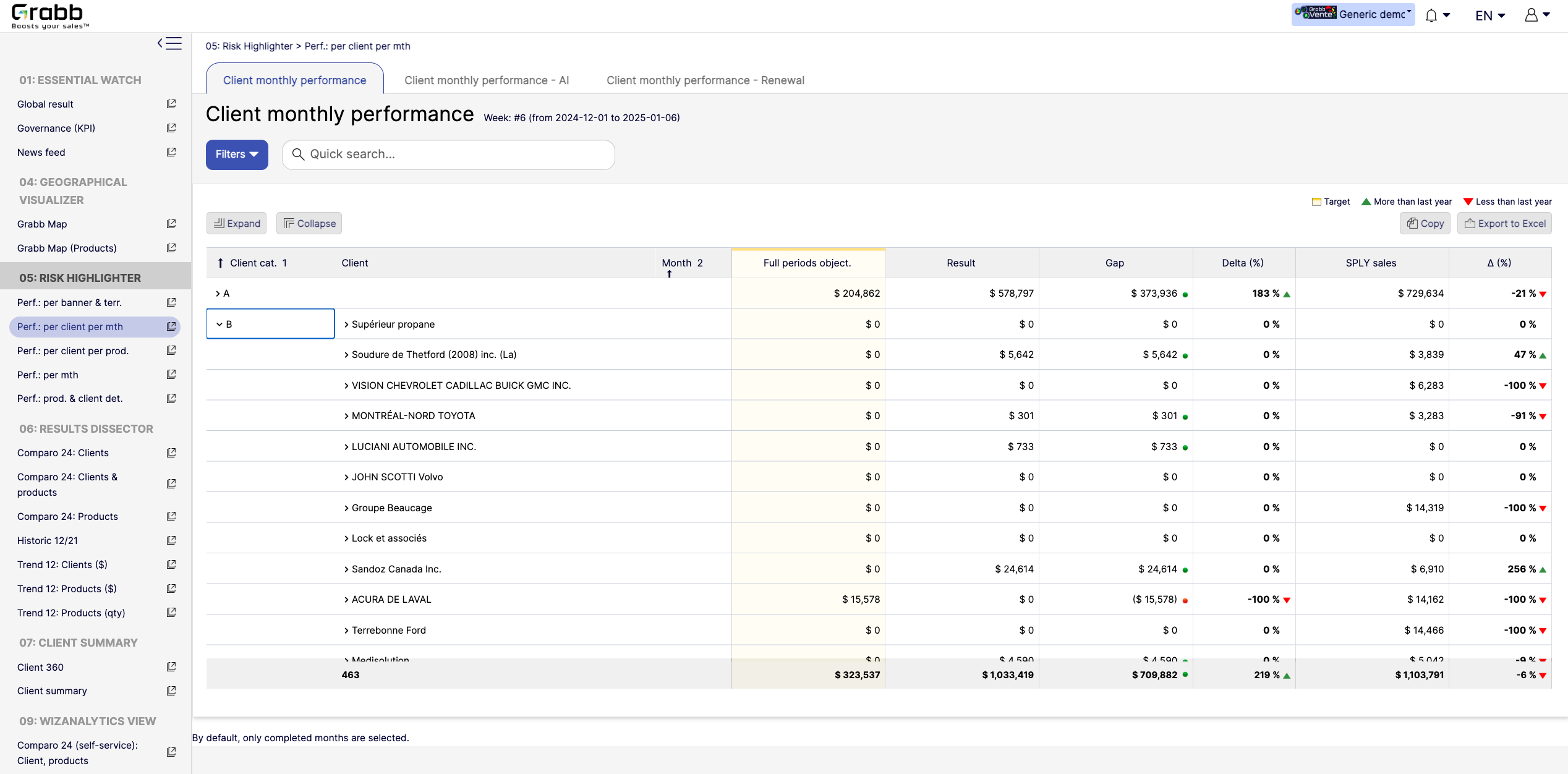
By visualizing an entire year in detail, sales teams can preemptively address potential downturns and capitalize on positive trends.Screenshot of a visualization tracking how each client performs on a month‐to‐month basis, and across accounts. This information provides:

Side‐by‐Side Comparisons: Displays each client’s monthly objectives versus actual results, so sales teams see immediately whether targets are met or missed.
Delta & Gap Analysis: Automatically calculates the variance between the goal and real outcomes—highlighting where shortfalls or over‐performance exist.
Year‐Over‐Year Comparison: “More than last year” or “Less than last year” labels provide quick trend context, guiding strategy for retention or growth.
Easy Filtering & Sorting: Users can filter by client category or name, then expand or collapse details to focus only on accounts that need attention.
With this screen, managers can prioritize which clients need immediate support and which are on track—using precise data rather than guesswork.