The WorkForce Suite, by WorkForce Software, is a mobile-first, cloud-based modern workforce management solution with integrated employee communications and collaboration capabilities. The WorkForce Suite aims to help global enterprise organizations optimize their labor, protect against compliance risks, and maximize productivity while building a highly engaged, resilient, and agile workforce.
N/A
MindManager
Score 8.0 out of 10
N/A
MindManager is a mind mapping and project management tool that aims to boost users’ productivity. It is designed to facilitate a wide range of project types, and includes cross-platform functionality and 3rd party integrations.
$105
per year
RationalPlan
Score 7.7 out of 10
Small Businesses (1-50 employees)
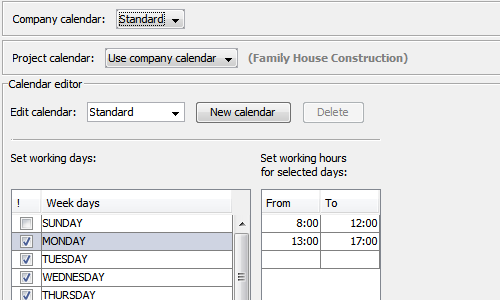
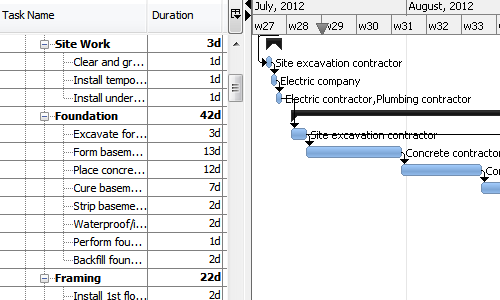
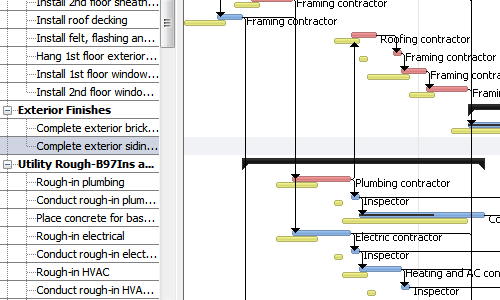
RationalPlan is project management software that has been designed to help project managers keep their projects on time and within budget. The main goal of this software is to make the process of planning projects as short and as straightforward as possible and to guide novice project managers through each step but offer enough tools to those who are more experienced.
EmpCenter is really well suited for companies with minimal variety in time keeping needs. Certainly somewhere that has fairly regular work schedules and operational needs the system would be programmed for and meet those needs quite well. I think they assert themselves as a product specifically for those more complex companies, and I believe it is one of a few products available for companies with many employee types and complex work schedule and pay needs, but because of those complexities each have their own specific customizations I feel it is difficult for the company to then manage the different products that end up existing. Each ends up being unique so applying large scale changes doesn't work well as something we may request and need if applied over EmpCenter in general may cause problems for another company. Therefore everything has to be done on an individual basis and is more time consuming and costly.
It is well suited for a quick prototype of product/development planning to show relationships amongst the APIs used. This helps developers understand the impact of the product changes and identifies the need to update integration components to avoid erroneous deployments. I have not personally experienced a less appropriate scenario at the moment.
Appropriate as a great alternative to MS Project. RationalPlan provides most of the features needed to develop and maintain mid-level complex schedules. Less Appropriate for large complex schedules of long duration. These can be a challenge due to Duration at top-level. It is also a challenge to generate reports for management - reporting feature is limited.
works well with other systems. We were able to collect data from another time system, Avaya phone systems and even a point of sale system with not a lot of difficulty.
They know their product and integration points. They were able to troubleshoot problems with hardware time collection devices quite quickly. We found the devices they sold to be quite durable.
Out of the box they have more reports than I would have anticipated. Creating new reports was sometimes a task if it was complex but there were usually similar reports you could use as a starter template
Portfolio view is great to get a feel for how your programme is running at a glance and which areas possibly might require attention. The fact that you can customise your view by adding your own columns is another plus.
All project information in one tool is a big plus for me considering the amount of projects we run with. This really improves efficiency and saves me time. You have the ability to add documents to tasks, manage risks, email resources tasks due for projects they are assigned to(might need some refinement depending on your requirements), material db with costing etc.
There should be some more functionality in the Notes window, such as a "Paste Special " Icon in the notes area to maintain format control.
Although I create many of my own Web export templates, an add-on for web export design would be great, as I regularly create Interactive Electronic Technical Publications (IETP) in HTML export format.
The ability to sync Map shortcuts between devices would also be welcome. I use MM on three devices, and I have to add or amend the Map list individually. My maps are on OneDrive, so using them should not be that hard if they are cloud-based.
After spending close to 5 years to decide on which payroll product to acquire for our University, I cannot image we would switch now that we have it in use.
I feel the main issues of the old Mindjet seem to be gone with the Corel purchase. With the huge advance of sharing via browser HTML even 1 user can affect many. And, actually, using MM kind of forced my rigid brain to rethink how I categorize and classify information/projects.
The idea of paying $69USD for an annual cost is more than fair and a great model for Corel/Mindjet to keep rolling out improvements!
MindManager is very intuitive. The user interface is not cluttered and the ribbon icons are easy to understand. Several excellent "how-to" videos are available on the MindManager site as well as on YouTube. MindManager starts quickly and the user interface is very responsive. Launching other programs from MindManager such as Excel is very fast and issue free. The browsing feature is lightning fast. The drag-and-drop capability is also very fast and reliable.
The application is quick and responsive. We are able to produce mindmaps and reports with ease. The program is not complicated at all and integrates well with software and programs like Microsoft Outlook and Teams, which we truly appreciate.
I have called technical support a few times. During the COVID Crisis, I called a few times repeatedly due to a rush request. The technical support guy called me back in minutes. He somehow knew that I had called repeatedly and wanted to make sure my issue was resolved immediately
There is a wide range of online training through webinars led by expert users. They are particularly useful for explaining how to use new features and using MindManager 'in the real world' for projects, tasks etc.
EmpCenter is a new software to the company however, I only trained on the old software for a few months before EmpCenter was introduced. I think EmpCenter has a smoother data entry process and can run more in depth reports, but since this is the system I know best I cannot accurately compare it to previous software.
MindManager stands out for its wide range of export options, customization and how they have enriched the format over time. As a constantly evolving tool, and having tried others, I consider it superior for the abovementioned reasons. Its cross-platform nature has been decisive, and although there are many alternatives in the form of web applications or the like, MindManager presents itself as a more complete and robust option.
RationalPlan is cost-effective and allows most users to prepare and manage their schedule. The software lacks comprehensive reporting and duration changes at the top level of a project.
EmpCenter has reduced the amount of time administrators are spending on payroll. Certainly it has made our entry to our pay system more efficient since we can simply load the data from the time keeping system and we are not collecting actual physical signatures and paper timesheets that must be reviewed for accuracy and completeness. The system does this for us and some automatic calculating of certain pay due that we were hand adding. However the feedback I am getting is that the supervisors feel their work has been increased greatly. They are spending more time correcting and approving time. Essentially the work we were doing in our central offices to review and correct time the supervisor must now do as they approve the time. We have now asked them to be more responsible for proper reporting and use which requires they know more about the rules and many different aspects of pay than they had before. We have employees who are union represented and get some benefits from the contract others do not receive, contract employees who have certain pay aspects in their contracts that must be known, as well as temporary employees and students who get very different pay from the other employees. While some things have been programmed for the system to know and handle, some things must be added to the time sheet to pay properly or the way time is reported is different (some clock out for lunch some don't) supervisors must now know these differences while that used to be a role that was more mine as an administrator. Now I just help them and audit and review.
For a single person business presentation it is a plus.
Project difficulty is well assessed using the map.
Giving away a paper version of a map is a positive gesture. People like the map, the look, and what it says, and it may also be a way to promote MindManager to them.
Keep the PDF or JPEG saving capabilities for small customers like me. It's important.