Overview
ProductRatingMost Used ByProduct SummaryStarting Price
Airtable
Score 8.6 out of 10
N/A
Airtable is a project management and collaboration platform designed to enable content pipelines, product management, events planning, user research, and more. It combines spreadsheet,database, calendar, and kanban functionality within one platform.
$24
per month per seat
Grist
Score 9.9 out of 10
N/A
Grist combines the capabilities of spreadsheets, databases and app builders. Using a familiar spreadsheet interface, information can be organized as a relational database, and dashboards built using drag-and-drop. Solving spreadsheet problems Ensures data is well-structured and stored in one place with no duplication, no spreadsheet-wrangling, no merging documents. Collaboration on sensitive data Data is protected…
$8
per month per user
Mode
Score 9.0 out of 10
N/A
Mode, or Mode Analytics, from ThoughtSpot since the June 2023 acquisition, is a business intelligence platform that unifies company analytics by bringing data teams and business teams together, so analysts can provide rapid answers to strategic, ad hoc questions. And, business stakeholder can access relevant data to answer their own questions which can often detract more impactful work.N/A
Pricing
AirtableGristMode Analytics
Editions & Modules
Team
$24
per month per user
Business
$54
per month per user
Enterprise
Custom Pricing
Pro
$8
per month per user
Enterprise
Contact Sales
No answers on this topic
Offerings
Pricing Offerings
AirtableGristMode
Free Trial
YesYesYes
Free/Freemium Version
YesYesYes
Premium Consulting/Integration Services
NoNoNo
Entry-level Setup FeeNo setup feeNo setup feeNo setup fee
Additional Details
More Pricing Information
Community Pulse
AirtableGristMode Analytics
Considered Multiple Products
Airtable

No answer on this topic

Grist
Chose Grist
Grist is easier to use, faster, and loads quicker with heavy data.
Mode

No answer on this topic

Features
AirtableGristMode Analytics
Project Management
Comparison of Project Management features of Product A and Product B
Airtable
7.8
235 Ratings
1% above category average
Grist
-
Ratings
Mode Analytics
-
Ratings
Task Management8.9199 Ratings00 Ratings00 Ratings
Resource Management8.0193 Ratings00 Ratings00 Ratings
Gantt Charts8.489 Ratings00 Ratings00 Ratings
Scheduling7.4165 Ratings00 Ratings00 Ratings
Workflow Automation8.0143 Ratings00 Ratings00 Ratings
Team Collaboration8.0218 Ratings00 Ratings00 Ratings
Support for Agile Methodology8.3108 Ratings00 Ratings00 Ratings
Support for Waterfall Methodology8.580 Ratings00 Ratings00 Ratings
Document Management7.5170 Ratings00 Ratings00 Ratings
Email integration7.1115 Ratings00 Ratings00 Ratings
Mobile Access5.9191 Ratings00 Ratings00 Ratings
Timesheet Tracking7.793 Ratings00 Ratings00 Ratings
Change request and Case Management8.1102 Ratings00 Ratings00 Ratings
Budget and Expense Management7.2127 Ratings00 Ratings00 Ratings
BI Standard Reporting
Comparison of BI Standard Reporting features of Product A and Product B
Airtable
-
Ratings
Grist
-
Ratings
Mode Analytics
8.5
9 Ratings
4% above category average
Pixel Perfect reports00 Ratings00 Ratings9.34 Ratings
Customizable dashboards00 Ratings00 Ratings8.49 Ratings
Report Formatting Templates00 Ratings00 Ratings7.86 Ratings
Ad-hoc Reporting
Comparison of Ad-hoc Reporting features of Product A and Product B
Airtable
-
Ratings
Grist
-
Ratings
Mode Analytics
7.4
9 Ratings
8% below category average
Drill-down analysis00 Ratings00 Ratings7.18 Ratings
Formatting capabilities00 Ratings00 Ratings6.79 Ratings
Integration with R or other statistical packages00 Ratings00 Ratings7.39 Ratings
Report sharing and collaboration00 Ratings00 Ratings8.78 Ratings
Report Output and Scheduling
Comparison of Report Output and Scheduling features of Product A and Product B
Airtable
-
Ratings
Grist
-
Ratings
Mode Analytics
7.9
8 Ratings
4% below category average
Publish to Web00 Ratings00 Ratings8.15 Ratings
Publish to PDF00 Ratings00 Ratings5.88 Ratings
Report Versioning00 Ratings00 Ratings7.74 Ratings
Report Delivery Scheduling00 Ratings00 Ratings9.68 Ratings
Delivery to Remote Servers00 Ratings00 Ratings8.34 Ratings
Data Discovery and Visualization
Comparison of Data Discovery and Visualization features of Product A and Product B
Airtable
-
Ratings
Grist
-
Ratings
Mode Analytics
6.5
9 Ratings
20% below category average
Pre-built visualization formats (heatmaps, scatter plots etc.)00 Ratings00 Ratings7.79 Ratings
Location Analytics / Geographic Visualization00 Ratings00 Ratings5.56 Ratings
Predictive Analytics00 Ratings00 Ratings6.46 Ratings
Access Control and Security
Comparison of Access Control and Security features of Product A and Product B
Airtable
-
Ratings
Grist
-
Ratings
Mode Analytics
9.5
2 Ratings
11% above category average
Multi-User Support (named login)00 Ratings00 Ratings10.02 Ratings
Role-Based Security Model00 Ratings00 Ratings9.02 Ratings
Multiple Access Permission Levels (Create, Read, Delete)00 Ratings00 Ratings9.02 Ratings
Single Sign-On (SSO)00 Ratings00 Ratings9.82 Ratings
Application Program Interfaces (APIs) / Embedding
Comparison of Application Program Interfaces (APIs) / Embedding features of Product A and Product B
Airtable
-
Ratings
Grist
-
Ratings
Mode Analytics
9.0
1 Ratings
15% above category average
REST API00 Ratings00 Ratings9.01 Ratings
Best Alternatives
AirtableGristMode Analytics
Small Businesses
Stackby
Stackby
Score 8.9 out of 10
Stackby
Stackby
Score 8.9 out of 10
Yellowfin
Yellowfin
Score 8.7 out of 10
Medium-sized Companies
InEight
InEight
Score 8.4 out of 10
Microsoft Excel
Microsoft Excel
Score 8.9 out of 10
Reveal
Reveal
Score 10.0 out of 10
Enterprises
InEight
InEight
Score 8.4 out of 10
Microsoft Excel
Microsoft Excel
Score 8.9 out of 10
Kyvos Semantic Layer
Score 9.5 out of 10
All AlternativesView all alternativesView all alternativesView all alternatives
User Ratings
AirtableGristMode Analytics
Likelihood to Recommend
8.7
(237 ratings)
9.9
(2 ratings)
8.1
(9 ratings)
Likelihood to Renew
9.5
(5 ratings)
-
(0 ratings)
-
(0 ratings)
Usability
8.0
(36 ratings)
-
(0 ratings)
8.1
(4 ratings)
Availability
10.0
(2 ratings)
-
(0 ratings)
-
(0 ratings)
Performance
9.0
(1 ratings)
-
(0 ratings)
-
(0 ratings)
Support Rating
9.0
(30 ratings)
-
(0 ratings)
7.4
(5 ratings)
In-Person Training
8.0
(1 ratings)
-
(0 ratings)
-
(0 ratings)
Online Training
9.0
(1 ratings)
-
(0 ratings)
-
(0 ratings)
Implementation Rating
9.0
(2 ratings)
-
(0 ratings)
-
(0 ratings)
Configurability
10.0
(2 ratings)
-
(0 ratings)
-
(0 ratings)
Contract Terms and Pricing Model
5.0
(1 ratings)
-
(0 ratings)
-
(0 ratings)
Ease of integration
8.0
(2 ratings)
-
(0 ratings)
-
(0 ratings)
Product Scalability
9.0
(2 ratings)
-
(0 ratings)
-
(0 ratings)
Vendor post-sale
8.0
(1 ratings)
-
(0 ratings)
-
(0 ratings)
Vendor pre-sale
8.0
(1 ratings)
-
(0 ratings)
-
(0 ratings)
User Testimonials
AirtableGristMode Analytics
Likelihood to Recommend
Airtable
Airtable is an ideal platform for small and growing businesses to keep track of just about EVERYTHING they need to keep things running smoothly. It's a great way to keep tasks organized, and keep everyone on the same page with progress on all things. Our company finds the kanban particularly useful, as products go through a lifecycle from ideation to retirement, it's good to keep a database of what is in production, what's working, and what we've tried before. I can see the platform being challenging with much larger businesses, but for the small to medium businesses I've used the platform with, it is ideal.
Read full review
Grist Labs
This is well suited to someone (or a team) who are technically minded and have a dataset that they need to be able to use in many ways. It's less appropriate for a team who isn't technically minded and/or don't have the data they need to manipulate. It would be useful for things that you could use a database or spreadsheet for such as CRM, Advertising database, Business tracking, Health tracking etc.
Read full review
ThoughtSpot
Mode is a clear category winner for how it easy it is to go from interactive analysis to professional quality reporting. You can easily do all your SQL and quite a bit of R/Python. If you want to quickly go from your database to simple charts, this is your pick. If you need to do heavier data modeling, scheduling jobs, or ML, you'll need something else, like Databricks. In my opinion, the quality of visualizations and some developer/analyst features make Databricks an unacceptable substitute.
Read full review
Pros
Airtable
  • I can create tables, create and customize fields
  • Airtable has capabilities commonly found in spreadsheet applications, but also has some of the features found in databases.
  • The ability to filter fields. I set up a filter on the status field, so when a project is marked, complete, on hold, or canceled, that record is hidden from my current projects table view. If it is marked complete, the record is moved to the completed projects table view. In this way I can easily access a record of past projects
  • Being able to duplicate tables and create alternate views
  • Collapse and expand records. When I collapse the rows, I can easily scan current projects, next steps, project status, and due dates. When I expand the row, or field, I can see more detailed information about that field or record very easily. I can also expand or open the entire record. This is is helpful, when I am entering a lot of information to multiple fields in that record.
Read full review
Grist Labs
  • Provides amazing customer service, help, examples, and explains what they are having you do
  • The layout is easy
Read full review
ThoughtSpot
  • It allows me to undertake data visualization tasks by creating really insightful charts and dashboards
  • It allows for easy sharing and work collaboration on data analysis tasks
  • Mode has an easier to use SQL editor as well
  • I love how it organizes all our SQL data tables into easy-to-view data we can draw insights on
Read full review
Cons
Airtable
  • When records are deleted, there could be more options for what happens to associated records in other tables.
  • Multi-select fields should be sortable.
  • The per-user pricing model can be cumbersome when you need to share bases with third parties but can't use a publicly accessible URL.
Read full review
Grist Labs
  • Making the user permissions more obvious on how to use them - They are highly adaptable, but hard to understand how to use them
  • Small changes such as auto colouring the choices/toggles options and being able to edit them once set.
  • Being able to copy the formatting from one column to the next
Read full review
ThoughtSpot
  • Date ranges aren't always the most intuitive to set, strangely
  • Faster refresh rates would be ideal
  • Would love more dynamic mobile device integration (alerts, etc)
Read full review
Likelihood to Renew
Airtable
We will 10/10 renew the use of Airtable because it has brought great value to our team. Not only is Airtable affordable, but it's also user-friendly and helps our team be efficient. We no longer need to rely on Excel spreadsheets being passed from person to person via email. Furthermore, we aren't dealing with corrupt Excel spreadsheets and the need to salvage data when a file is accidentally altered.
Read full review
Grist Labs
No answers on this topic
ThoughtSpot
No answers on this topic
Usability
Airtable
IMO the usability of this product is its greatest asset. The UI is clean and the menus are intuitive to the point where I'd feel confident having a non-spreadsheety colleague take on building an Airtable for the first time with next to no training. I can't say that about every table-like software product that I've used such as Notion.
Read full review
Grist Labs
No answers on this topic
ThoughtSpot
For the advanced user already familiar with Python. It is just the same tool, already managed and connected to the data.
Read full review
Reliability and Availability
Airtable
I have rarely experience downtime, compared to other tools, and given how much time we spend on the tool. Even if there were to be, their updates on it are very timely, and our support team are able to provide any questions regarding
Read full review
Grist Labs
No answers on this topic
ThoughtSpot
No answers on this topic
Performance
Airtable
I never had any issues with load time, even with the integrations that we use today (google sheets) However, I'm curious if adding additional layers of integrations would slow down performance. We do carry quite a bit of data in Airtable, but, again, no impact on overall performance
Read full review
Grist Labs
No answers on this topic
ThoughtSpot
No answers on this topic
Support Rating
Airtable
Airtable has great support. They have a variety of support features to answer any questions. They have great self teaching instructions for templates and product tours. They also have support for teams and project management. They also have a fantastic customer help line. They are able and willing to answer customer questions and never have customers waiting long
Read full review
Grist Labs
No answers on this topic
ThoughtSpot
Mode has dedicated agents who are online in a chatroom, ready to take on any questions and provide helpful feedback.
Read full review
In-Person Training
Airtable
This training was done in-house, but the Airtable team provided resources and how to guides to ensure that we covered all components of the system
Read full review
Grist Labs
No answers on this topic
ThoughtSpot
No answers on this topic
Online Training
Airtable
Recorded trainings were provided by the Airtable team. Great as an evergreen resources to new team members and for anyone that wants to refresh their Airtable knowledge
Read full review
Grist Labs
No answers on this topic
ThoughtSpot
No answers on this topic
Implementation Rating
Airtable
Training all users was an important part of the implementation, which did take considerable time and effort. At first glance without training, the content calendar can be overwhelming because of the amount of data. The features within Airtable seem to be endless but our team was able to identify the most important to be successful.
Read full review
Grist Labs
No answers on this topic
ThoughtSpot
No answers on this topic
Alternatives Considered
Airtable
Airtable was a really good fit for this specific use case as it provided a huge number of collaboration features in an intuitive and pleasant-to-use interface. The free tier worked initially with our work, and the upgrade pathway was fair and made sense for us.
Read full review
Grist Labs
Grist is easier to use, faster, and loads quicker with heavy data.
Read full review
ThoughtSpot
We used both Qlik and Mode at our organization. The mode was used a quick analysis SQL tool while Qlik was our enterprise BI solution.
Read full review
Contract Terms and Pricing Model
Airtable
I did not help purchase the product, but Airtable's per user pricing structure is inconvenient when some users only need occasional or read-only use.
Read full review
Grist Labs
No answers on this topic
ThoughtSpot
No answers on this topic
Scalability
Airtable
There are TONS of opportunity to scale, but I think it's a matter if you have the time and resources to do so because the initial setup can be fairly time consuming and prioritized dedication
Read full review
Grist Labs
No answers on this topic
ThoughtSpot
No answers on this topic
Return on Investment
Airtable
  • It gives us a real-time experience of working.
  • Through this platform, I always have the idea bout which of my team member is working on which particular part of the project, I can easily track their progress, and also I can easily correct them where it is required by adding sticky notes, by sending the attachments and URLs.
  • Quality services.
Read full review
Grist Labs
  • It's saved a lot of time in both creating an advertising database and managing it week to week effectively. I had previously created in others that haven't worked, and this does, saving me a good 1 hour weekly, and 5 hours or more each time I had problems with the last ones
  • Being able to stay on track with this has meant I'm following up at the right time (advertisers) and keeping a professional manner and not losing business due to missed communication
  • Saving me $ from buying a program like Access (or Airtable monthly) and then the learning curve that that has. This has a much easier learning curve to say the least.
Read full review
ThoughtSpot
  • Extremely positive. It's a key feature in our application.
  • Were it not for the account management bit, Mode would be hands-down our recommendation for anyone looking for cloud BI.
Read full review
ScreenShots

Airtable Screenshots

Screenshot of Screenshot of Screenshot of Screenshot of Screenshot of

Grist Screenshots

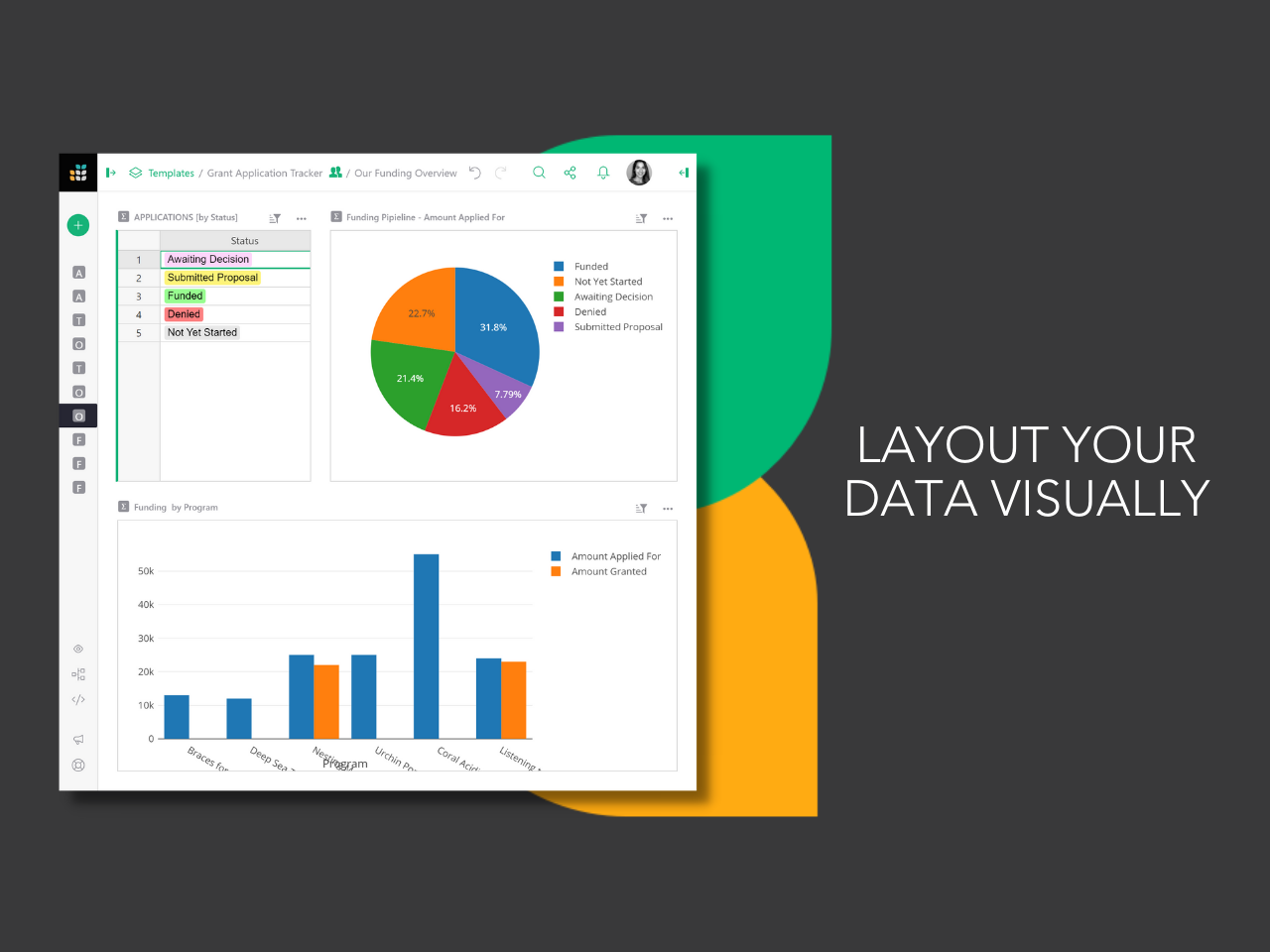
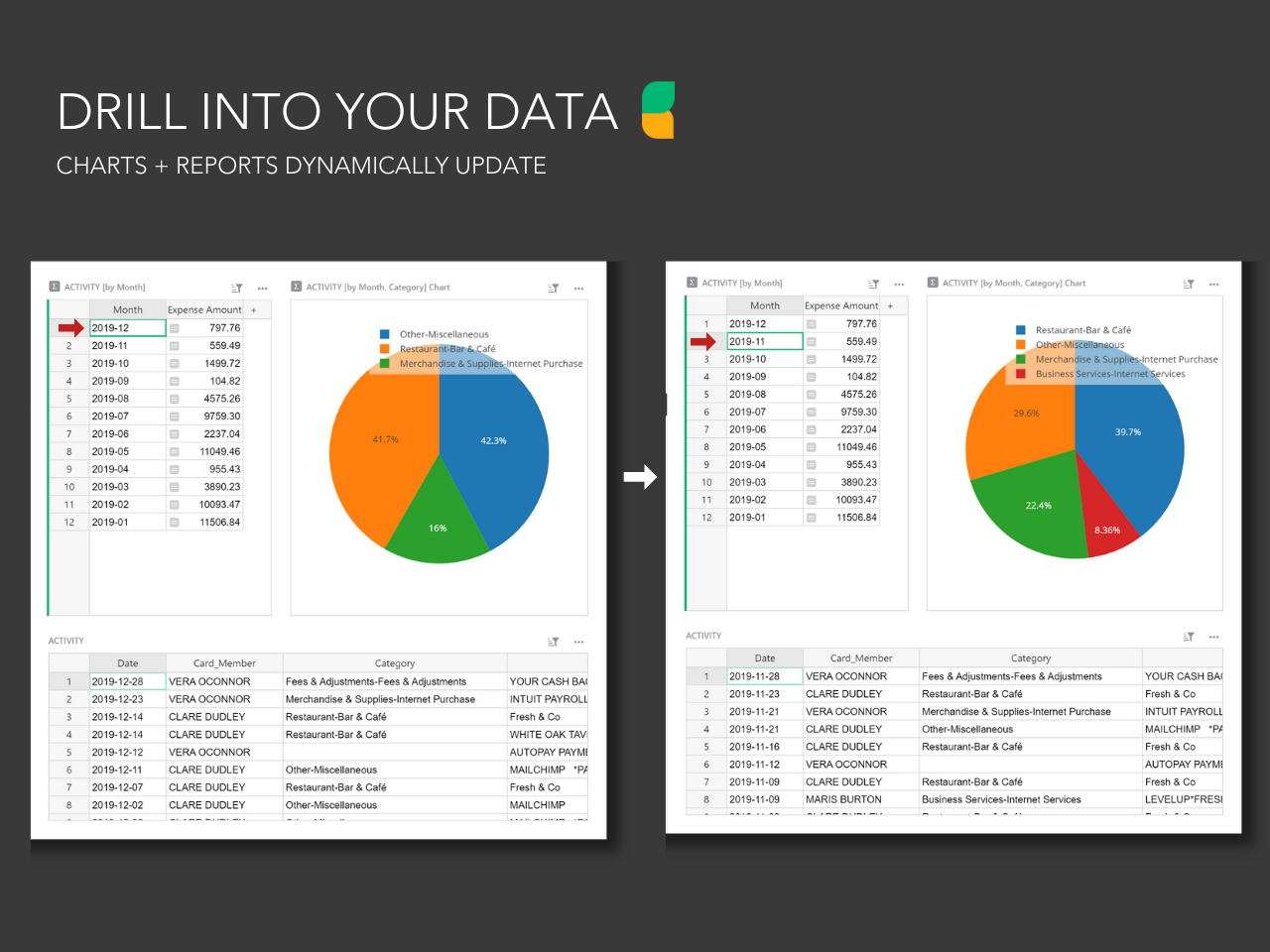
Screenshot of the drag and drop dashboard editor used to build layouts.Screenshot of the custom user permissions that determine who can see what, down to each column and row.Screenshot of dynamic charts and reports that update with the click of a mouse.Screenshot of Grist's formula support for Excel-like functions or Python formulas. Technical users can drill into database structure in code view.