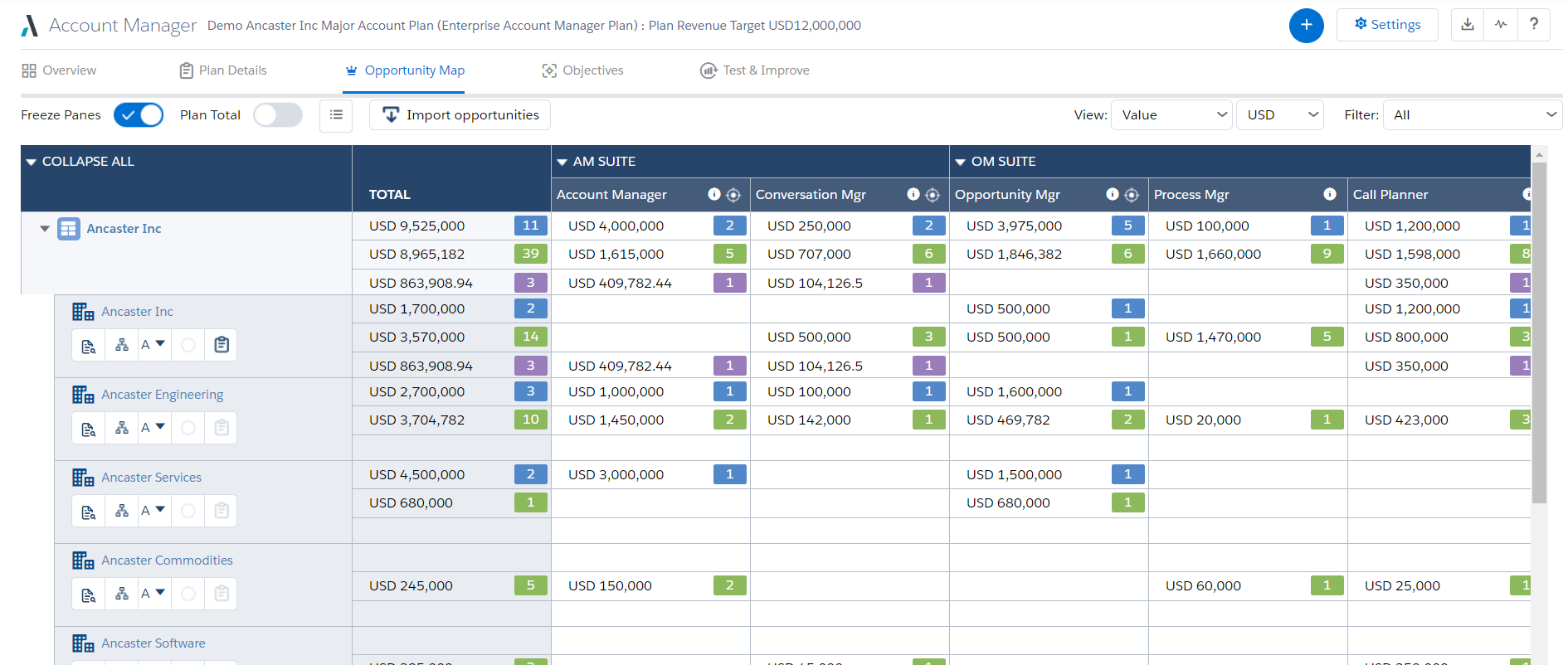
Altify’s suite of Salesforce native solutions guide and coach sellers to identify and map key relationships, uncover business insights, align sales processes to buying processes, qualify, manage and execute deals, and grow wallet share in accounts.
N/A
Slack
Score 9.0 out of 10
N/A
Slack is a group messaging or team collaboration app that aims to simplify communication for businesses. Features include open discussions, private groups, and direct messaging, as well as deep contextual search and message archiving, and file sharing. Slack integrates with a number of other tools, such as MailChimp, Dropbox, and Google Drive. Slack was acquired by Salesforce in December 2020.
The product is free to use, and also has paid plans with more features and greater controls.
The…
$8.75
per month per user
Pricing
Altify
Slack
Editions & Modules
No answers on this topic
Free
$0
Pro
$7.25*
per month per user
Business+
$12.50*
per month per user
Enterprise
Contact Sales
Offerings
Pricing Offerings
Altify
Slack
Free Trial
No
Yes
Free/Freemium Version
No
Yes
Premium Consulting/Integration Services
Yes
No
Entry-level Setup Fee
Optional
No setup fee
Additional Details
—
*Per active user, per month, when paying once a year.
Pro is $8.75 USD per active user when paying month to month. Business+ is $15.00 USD per active user when paying month to month.
More Pricing Information
Community Pulse
Altify
Slack
Features
Altify
Slack
Project Management
Comparison of Project Management features of Product A and Product B
Altify
-
Ratings
Slack
7.9
625 Ratings
2% above category average
Task Management
00 Ratings
7.7428 Ratings
Gantt Charts
00 Ratings
6.961 Ratings
Scheduling
00 Ratings
7.8361 Ratings
Workflow Automation
00 Ratings
8.1394 Ratings
Mobile Access
00 Ratings
9.4598 Ratings
Search
00 Ratings
8.3605 Ratings
Visual planning tools
00 Ratings
7.4273 Ratings
Communication
Comparison of Communication features of Product A and Product B
Altify
-
Ratings
Slack
8.8
633 Ratings
9% above category average
Chat
00 Ratings
9.6632 Ratings
Notifications
00 Ratings
8.8629 Ratings
Discussions
00 Ratings
9.2617 Ratings
Surveys
00 Ratings
8.1410 Ratings
Internal knowledgebase
00 Ratings
7.8409 Ratings
Integrates with GoToMeeting
00 Ratings
8.9110 Ratings
Integrates with Gmail and Google Hangouts
00 Ratings
8.7182 Ratings
Integrates with Outlook
00 Ratings
8.9120 Ratings
File Sharing & Management
Comparison of File Sharing & Management features of Product A and Product B
Altify is very well suited for customer relationship mapping and for use on very large, long term and complex deals. Altify is created and represented as an enterprise-level tool, but even some of its functions are too overbuilt for enterprise level sales activities. Altify is a tool best utilized only for the top level of complex deals within an organization. Features such as customer relationship mapping do have use and benefit for mid to large level deals and is arguably the most valuable tool in the Altify suite. After nearly a year using Altify, my recommendation on its use would be to enable account plans, account management, opportunity management, and sales process manager only to the top strategic account reps in the organization, realizing that they are probably best used purely out of the box as any customizations create other complications. For the rest of the sales teams, the customer relationship mapping feature is the one tool reps would gain the most value out of.
Slack is great for tracking commits to new coding projects. You can take parts of code that still need to be implemented later and easily search through the history of comments if there is something that goes wrong with a code commitment. It can be difficult for people that only like Teams to adjust to a new platform if you are using both to communicate.
Sales Process Manager: The Altify Sales Process manager's biggest drawback is the lack of usability for the end user. Altify has an out of the box sales process or a custom one can be created based on the company sales process. The drawback is that unless the sales process includes very few items, it can be more cumbersome than helpful. The Rep walks through the Sales Process by selection whether they have "Completed" are "In Progress" or have "Not Completed" the sales process activities at each stage of the opportunity. Altify saves after each selection so there is considerable downtime as the user waits for their selection to be recorded before they can answer the next question. Altify has an option to automatically advance the Salesforce opportunity Sales Stage once a certain % or mandatory steps in the sales process are completed, however this is not entirely useful as it does not advance until the set % or mandatory marked processes within a Sales Stage are completed AS WELL as at least one process from the next sales stage. This becomes very confusing and cumbersome for the users. In most cases, the sales process manager becomes more of a micromanagement tool with managers requiring all items to be marked completed and the Users merely marking items to satisfy that requirement without getting the intended benefit of the guided selling experience.
Account Plans: Account Plans can be grouped in both "does well" and "does poorly" for the Altify Suite. I will outline the bad in this portion of the review. Altify Account Plans do have some ability for customization, however the standard out of the box options are incredibly overbuilt. Filling out all of the information within the Account Plan can consume 40+ man hours for a single Account. While some of this information can be useful and important to note, other portions become more cumbersome than useful. The Completeness and Scorecard portions of the use a number of calculations. These calculations are explained at the bottom of the page but from a user perspective are very confusing and not straightforward. Most users that begin using account plans quickly abandon them because of the difficulty in setting them up correctly and the minimal insights that are gleaned out of the work put into them. One place for the greatest opportunity to improve account plans is in the objectives section, there the user can set objectives and activities (tasks) to meet them. The tasks must be manually selected to create an actual task in Salesforce and this cannot be assigned out to other SF Users. This portion of the Account plan would be improved if it could be used as a holistic account management platform to manage tasks across all the opportunities and potential opportunities, with an ability to assign them out to others in Salesforce within the account team.
Altify Max Insights: Altify max insights is intended to provide coaching advice at the opportunity level. This feature is tied into the opportunity manager. The drawback to this feature is that the insight mainly pertains to whether or not a user filled out all the steps in the opportunity manager: the sales process, the opportunity assessment, strategy, and the customer relationship map. The insights are far less action-oriented and more of a reminder to use the tool components. This tool just doesn't hold value, especially as it is an add on product.
Lack of Customization - While Altify does allow customization of some of their products and components, Altify has a ton of limitations. One of the most frustrating aspects is that all of the processes happen from their "black box" which is the dealmaker opportunity objects that Altify creates. This is essentially a shadow copy of the opportunities within Salesforce that then push changes to the actual opportunity. There is no way to tap into this shadow opportunity to either run custom processes or to even surface the Altify insights in a BI tool such as Einstein. This means that a lot of the use and functionality that Altify does do well cannot be leveraged for company insights or user end improvements.
Would love a better integration with GitHub. For example, notifications when your PR is updated, when review is requested, @-mention in comments, etc.
Improved "Later" tab, for example the ability to create to-do lists or making the "Later" tab into a more powerful to-do list (annotate items with notes)
More powerful integrations, e.g. Google Calendar could render a calendar view within Slack, rather than sending the daily schedule
To be more transparent, I give 10 because Slack serves our collaboration needs. It provide us a good platform for team communication relaying important update within the company, it has even mobile app where you can install in your phone to monitor any updates within that team that needs your immediate attention and intervention.
My rating was 7. Its intuitive interface and user-friendly features like channels, threads, and integrations make it excellent for team communication and onboarding. However, its usability is held back by the resource-intensive desktop app and cluttered feeling in large workspaces. The mobile app's performance and unreliable notifications have also been noted as weaknesses.
Yes, the app works 24/7. I don't even recall having any period that we could not use since the implementation. Even the maintenance periods are barely noticeable and our work is not impacted by it when it happens.
Slack is a soft app, we don't have many issues with it. I recall one or two people complaining about something during our usage period, but I didn't have a bad experience. When the app is slow, usually the problem is with my computer or my internet. The app works just fine.
Whenever I've had to troubleshoot an issue with Slack (which, to be honest, has not happened very often), their online documentation has been easy to locate, easy to understand, and effective in resolving my issue. Slack's ever-growing popularity also means that there's a large community of practice out there that can be depended upon.
While Skuid is not a match to what Altify does in terms of capabilities, Skuid did allow us to natively create the functions that we needed within the business in a way that was more useful than the Altify tools out of the box functionality. Altify does not offer anything for a more "light touch" opportunity, which is its greatest drawback. With Skuid we were able to create our own solution for these lighter touch opportunities
I like Slack better than ClickUp, because I would spend 30-60 minutes a day updating my ClickUp tasks. The way ClickUp was used was very micromanaging. I billed by the hour, so I was willing to put in the time to alert the boss what tasks I was working on.
One of my jobs used Hive - I mostly just ran it in the background in case anyone messaged me. I did not use it often.
Slack has been incredibly helpful in connecting various tech apps and ecosystems, creating a more streamlined and responsive process.
Slack has made it significantly easier to communicate with our team members across multiple time zones, creating a more engaging environment for our all-remote team.