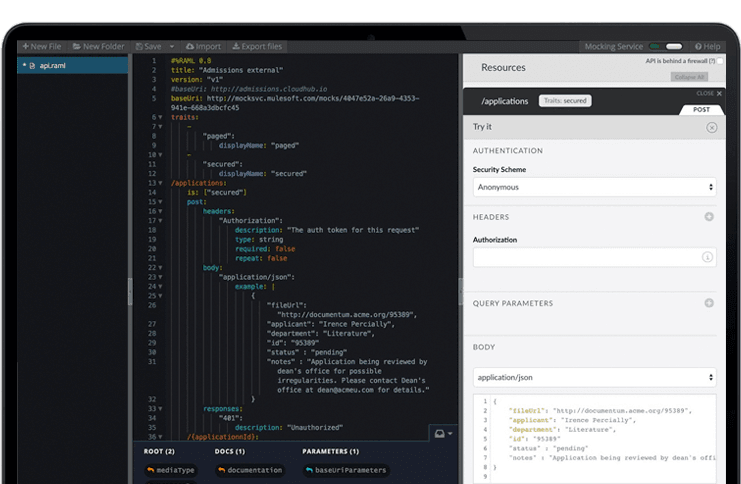
The Anypoint Platform developed by MuleSoft and acquired by Salesforce in early 2018 is designed to
connect apps, data, and devices anywhere, on-premises or in the cloud. This platform was built to
offer out-of-the-box connectors as well as tools that architects and developers can adopt quickly to
design, build and manage the entire lifecycle of their APIs, applications, and products.
N/A
Oracle Data Integrator (ODI)
Score8.9 out of 10
N/A
Oracle Data Integrator is an ELT data integrator designed with interoperability other Oracle programs. The program focuses on a high-performance capacity to support Big Data use within Oracle.
N/A
Zapier
Score8.9 out of 10
N/A
The Zapier Automation Platform designed to integrate data between web apps. It is scaled for small to mid-sized businesses, with a functional but limited free version of the program.
Senior Director, Information Services at MarketScale (Media Production, 51-200 employees)
Chose Zapier
We actually utilize both Integromat and Zapier at our company, for all the reasons detailed in this review. Though Zapier is excellent for simple client integrations, we often run into internal use cases that require complexity that Zapier cannot provide. Specifically working …
A de minimis incentive was given to thank the reviewer for their time. The incentive was not used to bias or drive a particular response, nor was the incentive contingent on a positive endorsement. More Info
MuleSoft Anypoint Platform is best tool in the market for developing APIs with complex structures communicating with various different types of applications including web applications as well as legacy applications. Also applications including database connectivity for fetching and updating data in the DB tables. I cant think of any scenario which MuleSoft Anypoint Platform could not be used for developing the integrations.
A de minimis incentive was given to thank the reviewer for their time. The incentive was not used to bias or drive a particular response, nor was the incentive contingent on a positive endorsement. More Info
Oracle Data Integrator is well suited in all the situations where you need to integrate data from and to different systems/technologies/environments or to schedule some tasks. I've used it on Oracle Database (Data Warehouses or Data Marts), with great loading and transforming performances to accomplish any kind of relational task. This is true for all Oracle applications (like Hyperion Planning, Hyperion Essbase, Hyperion Financial Management, and so on). I've also used it to manage files on different operating systems, to execute procedures in various languages and to read and write data from and to non-Oracle technologies, and I can confirm that its performances have always been very good. It can become less appropriate depending on the expenses that can be afforded by the customer since its license costs are quite high.
A de minimis incentive was given to thank the reviewer for their time. The incentive was not used to bias or drive a particular response, nor was the incentive contingent on a positive endorsement. More Info
If you have processes that are now managed and controlled using a spreadsheet, Zapier will give you a lot more control over what is happening and will help you increase productivity by eliminating simple steps such as sending emails and sharing information with your colleagues. It frees time for very transactional activities.
A de minimis incentive was given to thank the reviewer for their time. The incentive was not used to bias or drive a particular response, nor was the incentive contingent on a positive endorsement. More Info
A de minimis incentive was given to thank the reviewer for their time. The incentive was not used to bias or drive a particular response, nor was the incentive contingent on a positive endorsement. More Info
Oracle Data Integrator nearly addresses every data issue that one can expect. Oracle Data Integrator is tightly integrated to the Oracle Suite of products. This is one of the major strengths of Oracle Data Integrator. Oracle Data Integrator is part of the Oracle Business Intelligence Applications Suite - which is highly used by various industries. This tool replaced Informatica ETL in Oracle Business Intelligence Applications Suite.
Oracle Data Integrator comes with many pre-written data packages. If one has to load data from Excel to Oracle Database, there is a package that is ready available for them - cutting down lot of effort on writing the code. Similarly, there are packages for Oracle to SQL, SQL to Oracle and all other possible combinations. Developers love this feature.
Oracle Data Integrator relies highly on the database for processing. This is actually an ELT tool rather than an ETL tool. It first loads all the data into target instance and then transforms it at the expense of database resources. This light footprint makes this tool very special.
The other major advantage of Oracle Data Integrator, like any other Oracle products, is a readily available developer pool. As all Oracle products are free to download for demo environments, many organizations prefer to play around with a product before purchasing it. Also, Oracle support and community is a big advantage compared to other vendors.
A de minimis incentive was given to thank the reviewer for their time. The incentive was not used to bias or drive a particular response, nor was the incentive contingent on a positive endorsement. More Info
Ease of use - multiple people in the organization can set up and run Zaps per their specific use cases without much training.
Connectivity - Zapier is able to connect to multiple applications we use on a regular basis.
Functionality - Zapier provides embedded functionality within the app itself (email, data conversion), but also appropriate triggers and actions for apps it connects to.
Versatile - Zapier can execute complicated and simple tasks and thus has many use cases.
A de minimis incentive was given to thank the reviewer for their time. The incentive was not used to bias or drive a particular response, nor was the incentive contingent on a positive endorsement. More Info
Has more features than what we really need so we're paying for more than we use. Sort of like paying for an Abrams tank when all we really need is a Toyota Corolla.
Not a value product, tends to be expensive.
Takes a while for developers to learn to use Mulesoft Anypoint.
A de minimis incentive was given to thank the reviewer for their time. The incentive was not used to bias or drive a particular response, nor was the incentive contingent on a positive endorsement. More Info
ODI does not have an intuitive user interface. It is powerful, but difficult to figure out at first. There is a significant learning curve between usability, proficiency, and mastery of the tool.
ODI contains some frustrating bugs. It is Java based and has some caching issues, often requiring you to restart the program before you see your code changes stick.
ODI does not have a strong versioning process. It is not intuitive to keep an up to date repository of versioned code packages. This can create versioning issues between environments if you do not have a strong external code versioning process.
A de minimis incentive was given to thank the reviewer for their time. The incentive was not used to bias or drive a particular response, nor was the incentive contingent on a positive endorsement. More Info
A de minimis incentive was given to thank the reviewer for their time. The incentive was not used to bias or drive a particular response, nor was the incentive contingent on a positive endorsement. More Info
It is maturing and over time will have a good pool of resources. Each new version has addressed the issues of the previous ones. Its getting better and bigger.
A de minimis incentive was given to thank the reviewer for their time. The incentive was not used to bias or drive a particular response, nor was the incentive contingent on a positive endorsement. More Info
We have migrated our existing over 100+ APIs from legacy to MuleSoft Anypoint Platform and the processing has seen over 40% improvement and saved huge amount in overall annual billing. From development perspective, MuleSoft Vibe has made developers life so easy and reduced development time. Extensive logging, and build-in connectors for other integration tools, logging and repo is providing kind of one place solutions. Any point Platform is providing various options like runtime, API manager, Access management, segregation of Business groups and so many other option which is helping us to monitor, configure and manage all our APIs in one place
The interface is very user-friendly, and there are also many tools to help a brand-new user get started. For example, you can put your Zap idea into the AI bot, and it will basically build a shell of your Zap to get started on. The format for each step within a Zap is also very helpful (set up the connection/app, set up the fields/details, then test).
A de minimis incentive was given to thank the reviewer for their time. The incentive was not used to bias or drive a particular response, nor was the incentive contingent on a positive endorsement. More Info
Anypoint Platform support is very responsive. There is also a huge knowledge base and an active online forum where answers to most questions can be found. When needed support engages the engineering group so adequate solutions or workarounds are always provided.
A de minimis incentive was given to thank the reviewer for their time. The incentive was not used to bias or drive a particular response, nor was the incentive contingent on a positive endorsement. More Info
Before we purchased Zapier, I contacted support and asked them if Zapier could support my intended workflow (this is actually a selection on their support form - awesome). Within 2 hours, I was contacted by a support team member who seemed sure it would work, but granted me premium access for 2 weeks to try it out for myself. Sure enough, it did! Ever since then, support has replied rapidly to any problems I have experienced and answered my questions within a few sentences.
A de minimis incentive was given to thank the reviewer for their time. The incentive was not used to bias or drive a particular response, nor was the incentive contingent on a positive endorsement. More Info
I have started with MuleSoft Fundamentals course provided by MuleSoft training at start. This was sufficient to do initial learning and get onboarded. The online documentation with different Runtime versions/deprecated functions and keywords are well documented. The automated solution provided by MuleSoft Anypoint Platform to upgrade 3.0 to 4.0 gave a good head start while learning MuleSoft Anypoint Platform and working altogether with Online training and documentations
Once we have moved all of our system integration APIs to the MuleSoft Anypoint Platform, we will need to communicate with a wide variety of external systems. All of our business and service logic is stored in the aforementioned core systems. Anypoint Platform (and all of our APIs) makes it easy to connect to various other platforms. In order to link to these many other systems, connectors and/or components are utilized, and they are simple to configure and integrate.
A de minimis incentive was given to thank the reviewer for their time. The incentive was not used to bias or drive a particular response, nor was the incentive contingent on a positive endorsement. More Info
I have used Trifacta Google Data Prep quite a bit. We use Google Cloud Platform across our organization. The tools are very comparable in what they offer. I would say Data Prep has a slight edge in usability and a cleaner UI, but both of the tools have comparable toolsets.
A de minimis incentive was given to thank the reviewer for their time. The incentive was not used to bias or drive a particular response, nor was the incentive contingent on a positive endorsement. More Info
We actually utilize both Integromat and Zapier at our company, for all the reasons detailed in this review. Though Zapier is excellent for simple client integrations, we often run into internal use cases that require complexity that Zapier cannot provide. Specifically working with API calls (not just webhooks), complex multi-step integrations with Routing/parsing/etc, and large volume integrations. Integromat is perfect for these use cases, but doesn’t provide the simplicity and account scalability that Zapier offers.
A de minimis incentive was given to thank the reviewer for their time. The incentive was not used to bias or drive a particular response, nor was the incentive contingent on a positive endorsement. More Info
A de minimis incentive was given to thank the reviewer for their time. The incentive was not used to bias or drive a particular response, nor was the incentive contingent on a positive endorsement. More Info
A de minimis incentive was given to thank the reviewer for their time. The incentive was not used to bias or drive a particular response, nor was the incentive contingent on a positive endorsement. More Info
A de minimis incentive was given to thank the reviewer for their time. The incentive was not used to bias or drive a particular response, nor was the incentive contingent on a positive endorsement. More Info